What is pair?
pair gives your AI coding assistant a Knowledge Base, skills and adoption files, so it works your way in every session, from PRD to code review.
Code is the easy part. The hard part is getting an AI assistant to understand your project's architecture, standards and decisions, and to keep that understanding from one session to the next. Without it you re-explain the project every morning and review code that ignores last week's decision.
The three components
pair installs three things into your repository, in a .pair/ folder every assistant reads:
- Knowledge Base: guidelines, how-to guides and templates for the whole development lifecycle. Onboarding documentation for your AI teammate, refreshed by
pair-cli update. Knowledge Base - Skills: slash commands your assistant discovers and runs, following the Agent Skills open standard. One skill per step of the process, from writing the PRD to reviewing the PR. Skills
- Adoption files: your decisions, architecture, tech stack, way of working, recorded once and read before every generation. You do not write them by hand: bootstrap interviews you, or reads an existing codebase. Adoption files
A day with pair
- You open the project and run
/pair-next. It reads the board and says: story #42 is Ready, implement it. /pair-process-implement 42works task by task, tests first, following your adoption files, and opens one pull request./pair-process-review 123reviews the PR against the same files and the risk tier of the story; approved, it merges and closes the story./pair-nextagain. Tomorrow, a different teammate or a different assistant starts from the same files.
That loop is the last phase of a longer flow: PRD, bootstrap, initiatives, epics, stories, refinement, implementation, review. The flow, the two workflows that run on it and the three ways to drive them are the Process Lifecycle.
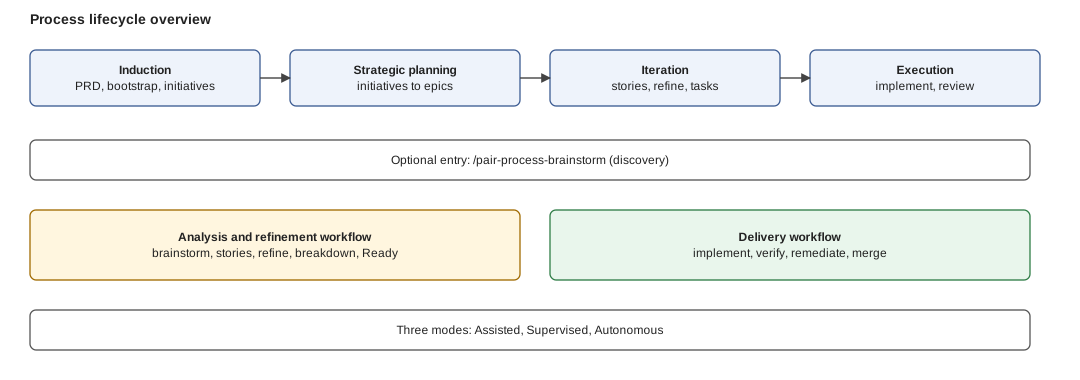
Figure: the ground is four phases; the last two carry the refinement and delivery workflows; the three modes decide how much of it you run by hand.
Install
Five minutes, with pair-cli (default) or the optional Claude Code plugin: Quickstart. Then bootstrap, pick your path (solo, team or organization) and verify the setup.
Next: Quickstart.