Release Process
How pair releases work, changeset per PR, dispatched channels, and artifact publishing.
Releases are dispatched via GitHub Actions and Changesets. This guide covers how to create a release and what happens behind the scenes.
Overview
Releases are dispatched, never merge-triggered. Two runs per release:
- Run 1,
version.yml: the maintainer runspnpm release <channel>; the workflow validates, versions and tags. - Run 2,
release.yml: builds from the tag, publishes and cleans up.
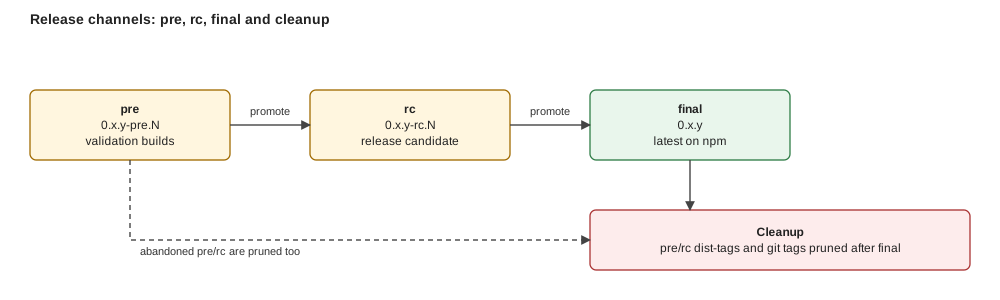
Figure: every channel ends in the same final release; what differs is how many pre-releases get cleaned up on the way there.
Build once, verify, publish. Changesets manages versions, CI builds artifacts from the tag, GitHub Releases distributes them.
Every PR carries a changeset
.changeset/<story-id>.md mirrors the PR description and states the bump. CI fails a PR without one unless it is labelled no-changeset. Below 1.0 a breaking change is a minor bump.
If the change breaks .pair/adoption/ or .pair/knowledge/ structure, add a migration page under Migrations before merging, see Writing Migration Pages.
Creating a release
The command prints the plan (version, tag, cleanup) and dispatches version.yml; CI re-validates with the same state module. Channels are forward-only (pre → rc → final, see the channel diagram) and skippable; the same channel needs new main commits; duplicates are refused.
| Channel | Registry | GitHub Release | Website |
|---|---|---|---|
pre / rc (X.Y.Z-pre.N) | GitHub Packages, tag-only (main untouched) | prerelease | not deployed |
final | npmjs.org, version commit + CHANGELOG on main | latest | deployed |
After a successful publish, the previous same-channel pre/rc is deleted; on final (or a base change) every pre/rc of that base is deleted, release, assets, tag and package version.
To install a prerelease, use a token with read:packages and npm config set @foomakers:registry https://npm.pkg.github.com.
Release checklist: skill marketplace manifest
The marketplace channel is served by two hand-maintained files: .claude-plugin/marketplace.json at the repository root, and .claude-plugin/plugin.json inside the plugin root it points to (packages/knowledge-hub/dataset/plugin). They are deliberately not generated. The plugin ships the bootstrap corpus only, so adding a skill to the distributed catalog no longer touches them:
plugin.jsonskillslists one./skills/<name>entry per directory under the plugin root'sskills/, and nothing stale.- The marketplace entry's
sourcestill points at the plugin root, pointing it at./would ship the whole repository again, and with it pair's own.pair/adoption/inside every user's plugin cache. claude plugin validate .passes. The "no version specified" warning is expected: the manifest pins no version so/plugin updatealways fetches the current catalog. Never run this check with--strict: that flag turns the expected warning into a hard failure, and the missing version pin is a deliberate decision.- Skills only, on all three hand-edited surfaces,
plugin.jsoncarries metadata plusskillsand nothing else; the marketplace entry carries metadata plussource/category/tags/strictand noskills(an entry-levelskillssilently replaces the plugin's whole catalog); andmarketplace.json's own top level carries marketplace metadata plusowner/plugins, neverforceRemoveDeletedPlugins,allowCrossMarketplaceDependenciesOnormetadata.pluginRoot. - At the plugin root, no component directory named after a manifest component key (
agents/,commands/,hooks/,monitors/, …) and no.mcp.json.skills/is the one exception: at that root it is the declared payload, so auto-discovery and the manifest coincide instead of competing. The repository root is not the payload any more.
The catalog guard in packages/knowledge-hub/src/tools/claude-plugin-manifest.test.ts (run by pnpm test) fails when the manifest drifts from the bootstrap corpus (packages/knowledge-hub/dataset/plugin/skills/), naming the exact entry to add or remove, so a forgotten update is caught before release, not after.
The same guard asserts the skills-only rule as an allowlist per surface (so settings, dependencies, monitors, commands and any key a future schema revision adds fail closed too) plus a root-payload check whose path list is derived from the schema's component keys, so the manifest half and the payload half of the rule can never drift apart.
Both checklist lines have an automatic backstop.
Workflows
| Workflow | File | Trigger | Purpose |
|---|---|---|---|
| Version | version.yml | Dispatch (channel, version) | Validate, version, tag, dispatch release |
| Release | release.yml | Dispatch (tag) | Build from tag, publish, cleanup |
| Deploy Website (production) | deploy-website.yml | Dispatch | Publish website changes without a release |
Deploying the website without a release
To publish website changes without cutting a release, run gh workflow run deploy-website.yml (workflow Deploy Website (production)). It deploys only from main, refuses any other ref, and creates no tag, release or package.
Release artifacts
CLI
| Artifact | Description |
|---|---|
pair-cli-manual-{version}.zip | Self-contained CLI bundle (ncc, no node_modules) |
pair-cli-manual-{version}.zip.sha256 | SHA256 checksum |
pair-cli-{version}.tgz | npm package for npmjs.org |
pair-cli-{version}.tgz.sha256 | TGZ checksum |
Knowledge Base
| Artifact | Description |
|---|---|
knowledge-base-{version}.zip | KB dataset with manifest |
knowledge-base-{version}.zip.sha256 | SHA256 checksum |
The CLI auto-downloads the KB on first run from GitHub Releases and caches it at ~/.pair/kb/{version}/.
Manual dispatch
Workflows can be triggered manually:
Post-release validation
After a release is published, run the manual test suite to validate all artifacts:
This executes the test cases in qa/release-validation/ against the live release, website, CLI binaries, KB dataset, and registry packages. The report is written to .tmp/manual-test-reports/.
If no test suite exists yet, create one first:
See the Release testing tutorial for a full walkthrough.
Release validation checkpoints
Pair's own critical paths live in qa/release-validation/; the README has the per-channel ($CHANNEL) rules.
- CP1: website landing page, core navigation, responsive, meta tags.
- CP2: CLI artifacts: ZIP + TGZ download, checksum,
--version,--help. - CP3:
installandupdate, idempotency, persisted keep choice. - CP4: KB dataset ZIP, manifest, verify, info.
- CP5: every docs page returns 200, version consistency, internal links.
- CP6: Orama search, sidebar, prev/next,
llms.txt, privacy. - CP7: npmjs.org visibility and install from the public registry.
- CP8:
pair-cli packagelayouts, metadata, validation. - CP9: timed quickstart onboarding (
$mode: quickunder 10 minutes). - CP10: pair from Claude Code Web (manual, inside the web session).
- CP11: release pipeline: dry-run, duplicate refusal, dispatch-only workflows, cleanup (inspection only).
- CP12: Claude Code marketplace: add, install
pair@pair,/pair-assistant(manual, inside Claude Code).
Rollback
If a release needs to be reverted:
- Delete the GitHub Release and tag from the GitHub UI.
- Revert the final version commit on
main. - Add a changeset with the fix and dispatch a new release.