# pair
> AI-assisted software development — structured Knowledge Base, Agent Skills, and adoption files for AI coding assistants.
## Welcome
Source: https://pair.foomakers.com/docs
Welcome to pair
pair gives your AI coding assistant a Knowledge Base, skills and your project's decisions, so it develops software your way, from PRD to code review, in every session.
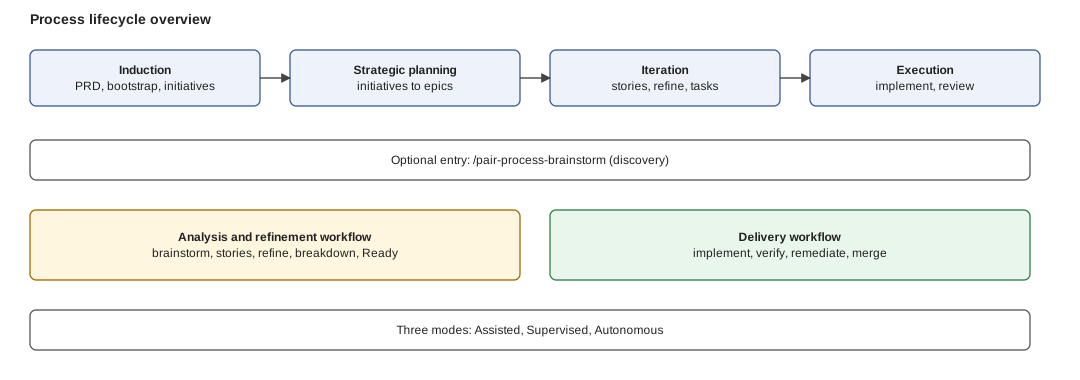
*Figure: pair's whole flow on one picture. Phases along the ground; the refinement and delivery workflows on top; Assisted, Supervised and Autonomous are three ways to run the same thing.*
## Pick your journey
- **[Getting Started](/docs/getting-started)**: what pair is and how to install it, five to ten minutes.
- **[Process Lifecycle](/docs/process-lifecycle)**: the flow for developing with pair: phases, workflows, modes, skills, with links to the configuration and the commands.
- **[Tutorials](/docs/tutorials)**: guided end-to-end walkthroughs, first project, existing project, team, enterprise, automation (20 to 60 minutes).
- **[What's new](/docs/whats-new)**: everything new in v0.5.1, most important first.
## Top tasks
| I want to... | Go to |
| --- | --- |
| Install pair and run my first command | [Quickstart](/docs/getting-started/quickstart) |
| Add pair to a repository that has its own `AGENTS.md` | [Adopt pair in an existing repository](/docs/guides/adopt-existing-repo) |
| Configure card states, gates, autonomy or the Knowledge Base | [Guides](/docs/guides) |
| Understand how pair works | [Concepts](/docs/concepts) |
| Connect my AI coding assistant or my PM tool | [AI coding tools](/docs/integrations), [PM tools](/docs/pm-tools) |
| Look up a command, a skill or a setting | [Reference](/docs/reference) |
| Upgrade `.pair/` after a pair release | [Migrations](/docs/migrations) |
| Fix an install or setup problem, or contribute | [Support](/docs/support), [Contributing](/docs/contributing) |
---
## Concepts
Source: https://pair.foomakers.com/docs/concepts
These pages explain **how pair works**. Read them when you want understanding, not steps; the steps are in [Guides](/docs/guides) and the flow in the [Process Lifecycle](/docs/process-lifecycle). Every page ends with a Next link, so the whole section reads top to bottom.
## Core
Start here if you are new to pair.
1. **[AI-assisted SDLC](/docs/concepts/ai-assisted-sdlc)**: the problem pair solves and how structured context changes AI collaboration end to end.
2. **[Knowledge Base](/docs/concepts/knowledge-base)**: the documents installed into `.pair/` that give your assistant persistent context.
3. **[Skills](/docs/concepts/skills)**: the actions on top, structured instructions your assistant discovers and runs.
4. **[Adoption files](/docs/concepts/adoption-files)**: your project's decisions, recorded so they never drift.
## Work and state
- **[Canonical states](/docs/concepts/canonical-states)**: how skills reason about work-item state across any board vocabulary.
- **[Definition of Ready and Done](/docs/concepts/definition-of-ready-and-done)**: the criteria that make a card Ready and a story Done.
- **[Code host and PM tool](/docs/concepts/code-host)**: why cards and pull requests may live in different tools, and how pair routes between them.
## Quality and review
- **[Tag-driven quality gates](/docs/concepts/tag-driven-gates)**: the risk tier, the tag it projects and the gate matrix it scales.
- **[PR state flow](/docs/concepts/pr-state-flow)**: the three PR states, the required checks and why a label is a view, not the authority.
- **[Review identity](/docs/concepts/review-identity)**: running reviews under a dedicated identity, and light auto-approval.
## Tooling
- **[Package-local adoption](/docs/concepts/package-local-adoption)**: rules next to the code in a monorepo, loaded by scope.
- **[Agent integration](/docs/concepts/agent-integration)**: the bridge pattern that connects any AI coding tool to the single source of truth.
- **[llms.txt](/docs/concepts/llms-txt)**: the standard pair uses to make documentation and project context consumable by assistants.
## Glossary
- **[Glossary](/docs/concepts/glossary)**: card, macrostate, tier, harness, engine, seal, handoff and the rest, defined once.
The mechanics of delivery (stages, realizations, hooks, the merge stage) live with the flow they belong to: [The delivery cycle in depth](/docs/process-lifecycle/delivery-cycle).
---
## Adoption Files
Source: https://pair.foomakers.com/docs/concepts/adoption-files
Adoption files are your project-specific decisions, recorded in `.pair/adoption/`. They tell AI assistants what your team chose, which tech stack, architecture pattern, way of working, and product requirements define your project.
While the [Knowledge Base](/docs/concepts/knowledge-base) provides general guidelines and process guides, adoption files provide the **constraints**. Together, they ensure the AI generates code that follows both industry best practices and your team's specific decisions.
## Structure
```text
.pair/adoption/
product/ # Product decisions
PRD.md # Product Requirements Document
context-map.md # Domain glossary, entities, common rules (optional)
subdomain/ # Domain-Driven Design subdomains
.md # Subdomain catalog entry
.context.md # Lazy per-subdomain context split (optional)
tech/ # Technical decisions
architecture.md # Architecture pattern and style
tech-stack.md # Languages, frameworks, libraries
infrastructure.md # Hosting, CI/CD, deployment
way-of-working.md # Process, methodology, quality gates
ux-ui.md # Design system, component library
automation.md # Unattended-automation policy (optional)
risk-matrix.md # Project delta to the quality model (optional)
adr/ # Architectural Decision Records
```
## What Each File Records
### architecture.md
Documents your chosen architecture pattern, API style, and data storage approach:
```text
- Monolith with REST API
- SQLite for data storage
- All components self-hosted
```
### tech-stack.md
Lists every approved technology with exact versions:
```text
- TypeScript v5.x
- React ^19.0.0
- Vitest v3.x for testing
- pnpm v10 for package management
```
When the AI generates code, it only uses libraries listed here. During code review, unlisted dependencies are flagged.
### way-of-working.md
Defines your development process:
```text
- Kanban workflow
- Feature branches with squash merges
- Quality gate: pnpm quality-gate
- Code review required before merge
```
It also hosts an optional `## State Mapping` section: only needed if your board's column names differ from pair's [canonical states](/docs/concepts/canonical-states). Omitted by default.
#### `## Process Profile`: running a subset of the process
Optional. Not every team runs every step. A `## Process Profile` section declares which **process steps** this project does, and no disabled step is ever proposed.
```text
## Process Profile
- `profile`: `poc`
```
| Profile | What it enables |
| --------- | ---------------------------------------------------------------------------------------------------------------------- |
| `default` | Every step. **This is what an absent section means**: a team running the full process configures nothing. |
| `poc` | No DDD mapping and no strategic planning layer: `specify-prd`, `bootstrap`, `brainstorm`, `plan-stories`, `refine-story`, `plan-tasks`, `implement`, `review`. |
| `custom` | Exactly the steps you name in a `whitelist`. |
```text
## Process Profile
- `profile`: `custom`
- `whitelist`: `brainstorm`, `plan-stories`, `refine-story`, `plan-tasks`, `implement`, `review`
```
**The unit is the step, not the skill.** A step has up to two representations, a how-to guide (the manual path) and an executable skill, and the profile governs the step, so a project with **no skills installed**, working from the how-to guides by hand, gets exactly the same behaviour. The mapping lives in the [step catalogue](https://github.com/foomakers/pair/blob/main/packages/knowledge-hub/dataset/.pair/knowledge/guidelines/technical-standards/ai-development/step-catalogue.md); the schema and the built-in profiles in [process-profiles.md](https://github.com/foomakers/pair/blob/main/packages/knowledge-hub/dataset/.pair/knowledge/guidelines/technical-standards/ai-development/process-profiles.md).
What a disabled step does, in the three places you can meet one:
- `/pair-next` never proposes it.
- Invoked **directly**, the skill warns that the step is disabled and asks for confirmation: a profile is a project convention, not a permission system.
- Reached as a **composition** from an enabled step, it is silently skipped, exactly like a skill that is not installed. It never stops to ask about a step you did not name.
A profile is **validated, not trusted**: a misread profile does not surface as an error anyone sees: it removes a step from every suggestion, which looks exactly like that step not being due yet. Every case below **HALTs** instead of quietly resolving to `default`.
| Case | Outcome |
| ------------------------------------------------------------------------------------- | ----------------------------------------------------------------------------------------------------------------------------------------------------------------------------- |
| Unknown profile name, or an unknown step id in a `whitelist` | **HALT**, listing the valid values, in two deliberately different messages: a typo in a step id is not the same mistake as naming a profile that does not exist. |
| `custom` with **no** `whitelist`, or with an **empty** one | **HALT**, again in two messages, "you wrote none" is not "you wrote an empty one". An empty whitelist is a misconfiguration, never "everything off". |
| A line the schema can't read (`- profile: poc`, value unbackticked) | **HALT** restating the shape. The key is detected loosely and its value accepted strictly: reading the line as "no declaration" resolves to `default` and re-enables the whole process. |
| A **partially** readable whitelist (`` - `whitelist`: `implement`, review ``) | **HALT** on the whole line, never on the readable half, keeping the backticked ids and dropping the bare one would remove a step with nothing reported. |
| The section declared **twice**, at a level other than `##`, or as a **setext** heading | **HALT**. Only the first section is read, and a heading at another level (`### Process Profile`) is not this section at all. |
| The same key on **two lines**, or a key with no bullet or a numbered one (`1.`) | **HALT**. Only the last line would be read; a bullet-less key would be passed over as prose and resolve to `default`. Backticks are optional behind a marker and required without one, so `1. profile: poc` HALTs too: the two errors compose. |
| A value that **spills** past its key's line (wrapped, or ending on a dangling `,`) | **HALT**. Read up to the wrap the line looks complete, so the ids after it vanish from every suggestion with nothing reported. |
| A key **indented** by four spaces or a tab | **HALT**, at that indent it is indistinguishable from a sublist item, and the same key indented by two spaces IS read. |
| A key inside a **blockquote** (`` > - `profile`: `poc` ``) | **HALT**. `>` is not indentation, so the line would be passed over as prose and resolve to `default`. A key inside a documentation **table row** is the deliberate opposite: no declaration, and no HALT either. |
| A key under **no `## Process Profile` section at all**, `## Process Profiles` (plural), `## ProcessProfile`, an unrelated heading, or none | **HALT** naming the line. Every heading rule above closes only the spellings it names; a key outside every section was read by nothing and reported by nothing, which is the same silent `default`. A key-shaped line in a code block, an HTML comment or a table row is not a key. |
| The same step id named **twice** in one whitelist | **HALT** naming it, never deduped in silence: a repeat is as likely an unfinished edit as a harmless one, and unread it doubles that step's warning and every "N steps enabled" count. |
| An **unterminated** fence or HTML comment anywhere in the file | **HALT**. Everything after it reads as non-content, so the real section is never found and nothing else would report that the file went unread. |
| A whitelist that disables a step another enabled step depends on | **Reported** with the minimal fix: the one case that is not fatal, and never silently repaired. |
What the reader accepts without complaint:
- **Heading**: spelled as loosely as the keys (`## Process profile`, `## Process Profile (optional)`, the closed-ATX `## Process Profile ##`, up to three spaces of indent), so decorating it cannot make the declaration evaporate.
- **Key in any case**: `` - `Profile`: `poc` ``, `` - `Whitelist`: … ``. Case is part of the key's spelling, so it is detected like any other decoration. The **value** stays strict: `` `POC` `` is an unknown profile name and HALTs.
- **CRLF files**: normalized before anything is read. Read literally, a Windows checkout would match no key and no heading at all.
- **Code blocks**: all three CommonMark forms (```` ``` ````, `~~~` and four-space indent) are examples, never declarations. A fence closes only on a run of the same character at least as long as the one that opened it.
- **HTML comments**: masked, so neither an illustrative block nor a commented-out section can become the project's profile.
Guidelines are **not** steps: testing, security, code design and the quality gates apply to whatever process you run, so `poc` shortens the process without loosening the bar on the code.
### PRD.md
Your Product Requirements Document: the source of truth for what the project does, who it serves, and what features are prioritized (P0/P1/P2).
### context-map.md
An optional, living domain model: dispatcher + subdomain index + core (glossary, entities, common rules and invariants). Unlike the other adoption files, it isn't scaffolded during bootstrap: it's created and updated inline the first time a brainstorm or refine session sharpens a domain term, per the [Context Map Maintenance](https://github.com/foomakers/pair/blob/main/packages/knowledge-hub/dataset/.pair/knowledge/guidelines/architecture/design-patterns/context-map-maintenance.md) guideline. There's no dedicated skill for it: no ceremony, just an embedded step in the skills that already touch domain scope.
For a worked example, see Pair's own map: the framework dogfoods this artifact to register its canonical terms (macrostate, risk matrix, DDR, checkpoint, working area, marketplace…): [`.pair/adoption/product/context-map.md`](https://github.com/foomakers/pair/blob/main/.pair/adoption/product/context-map.md).
```text
- Subdomain Index: which subdomains have their own context file, classification, Volatility (mirrored from the subdomain catalog)
- Glossary: ubiquitous language, one row per term
- Entities: domain entities and aggregates
- Common Rules and Invariants: domain-wide business rules
```
The unit is the **subdomain**, not a separate "domain" taxonomy. When a subdomain's inline context grows too large, the session proposes moving it to a co-located `subdomain/.context.md` file, lazy, and only after you approve. The map keeps the index entry and the domain-wide rules; everything subdomain-specific (glossary, entities) moves to the sibling file.
If the file doesn't exist, AI assistants skip the domain check entirely: this is the expected state for most projects, not an error.
### automation.md
Optional. `tech/automation.md` declares how much of the delivery flow may run **unattended**. Every section has its own fail-closed default: an absent file or section never widens automation; only a project that writes the section opts in. The sections below are the ones you write by hand; `## Harness` and `## Model Policy` (supported engines, per-tier model class) are written by `/pair-capability-setup-harness` and documented in the [guideline](https://github.com/foomakers/pair/blob/main/packages/knowledge-hub/dataset/.pair/knowledge/guidelines/collaboration/automation/automation-policy.md).
```markdown
## Autonomy
filter: risk:green, risk:yellow
assignee: @me
status: Draft, Ready
until: merged
merge: when; has: cost:red; lacks: risk:green
```
**`## Autonomy`**: one declaration for which cards an unattended run works on, how far it takes them and when a human takes over. Keys: `filter` (any-of labels, matched by plain string equality against the labels classification already put on the card, no AND/OR/NOT grammar), `assignee` (`@me` or a login), `status` (macrostates), `root`, `until` (`ready` | `pr` | `merged`, default `pr`) and two gates, `prepare` and `merge`: `[; has: ][; lacks: ]` (`has`/`lacks` only with `when`). Under `until: merged`, `merge: always` parks the card for a human (the default), `never` and `when` enter the merge stage, and a `when` card carrying a `has` label or lacking a `lacks` label **escalates** instead (status `escalated`, exit 1, `on-halt`, one comment on the card; the PR stays open). The merge stage's own checks (reviewed head, `pair-review`, explicit approval, green gate set) always stay mandatory. No `filter`: every open card is a candidate for a driver given an explicit root; nothing runs unattended until the section exists.
The `prepare` gate says who prepares a Draft card: `always` (default) keeps the human alignment gate; `never` proceeds alone, recording every self-answer under `## Assumptions`; `when` proceeds alone unless a stage boundary (before refinement, after it, after the task breakdown) escalates: the card then stays Draft with a `needs-review` label and one comment, and is not re-picked until a human acts.
Precedence is argument > `## Autonomy` > KB default, and every run prints each effective value with its source. `pair-implement-batch` honours the same keys and, under `until: merged`, merges a card only when the merge gate allows it; `pair-loop` selects, hands the gates to the batch and owns no merge call.
**Legacy sections** (projects written for v0.4): `## Eligibility` (one label) reads as `filter`, `## Auto-Advance` as the `merge` gate (`(none)` is `always`, a tier is `when; lacks: `). Both keep working; a `## Autonomy` section that contradicts them is refused. Write `## Autonomy` only in a new project. See [Tag-driven automation](/docs/process-lifecycle/tag-driven-automation).
```text
## Stop Predicate
tag:risk:red ⇒ Done
max-iterations: 20
```
**`## Stop Predicate`**: when an unattended run stops. ` ⇒ ` (selector: `root` / `tag:` / `type:`; condition: a canonical macrostate and/or `has-tag:`) plus a `max-iterations: ` backstop that always applies. Absent ⇒ `max-iterations: 1`, no predicate: a run advances exactly one iteration and stops.
```text
## Max Parallelism
3
```
**`## Max Parallelism`**: the ceiling `pair-loop` passes to the batch engine as `min(dependency-allowed, max_parallelism)`; an optional per-tier override may follow the global integer. Absent ⇒ `1` (fully sequential).
```text
## Audit Location
automation/loop-audit.md
```
**`## Audit Location`**: the project-relative path (under `working_path`) an unattended run appends its per-iteration record to. Absent ⇒ `automation/loop-audit.md`. See [automation-policy.md](https://github.com/foomakers/pair/blob/main/packages/knowledge-hub/dataset/.pair/knowledge/guidelines/collaboration/automation/automation-policy.md) for the full schema, every fail-safe default, and every HALT trigger.
```text
## Workflows
auto-dev ⇒ pair-loop
auto-plan ⇒ pair-process-plan-tasks
Precedence: auto-dev, auto-plan
```
**`## Workflows`**: the **tag→workflow mapping**, and the declaration that makes automation opt-in *per card*. One entry per line, ` ⇒ `: the tag is a plain label a card may carry (matched by string equality, exactly like the `filter`), and the workflow is the **skill** that runs on it. An optional `Precedence:` line resolves a card carrying two mapped tags, first listed wins.
Five properties are worth knowing before you write one:
- **A card with no mapped tag runs nothing.** There is no default workflow and no fallback: the absence of a route *is* the opt-in boundary.
- **Absent section ⇒ nothing is routable.** A dispatch reports `no mapping declared` and exits cleanly; that is the shipped default, not an error.
- **Ambiguity halts, it never guesses.** A workflow that is not installed, a workflow outside the guideline's catalog, or a card carrying two mapped tags with no `Precedence:` covering them: each stops the run with a message naming the file and the value to fix.
- **The card travels as the workflow's own argument.** `pair-loop` takes it as `--root ` and `pair-process-plan-tasks` as `--story `, and the latter selects the highest-priority story on the board when it gets no story at all, so a workflow the dispatcher cannot scope to the card is refused rather than run on a card nobody tagged. Those two *are* the mappable set: a skill outside it is refused even when installed, because a dispatch takes the card's lock and posts a record on it, and doing that for a skill that only reports leaves a card claiming work nothing did.
- **A workflow that needs a human in the room is not mappable.** A dispatch runs unattended, so `auto-refine ⇒ pair-process-refine-story` is refused even though the dispatcher knows how to scope it: refinement's alignment gate ends only on an explicit human approval, and unattended that means either a stall until the timeout (holding the card's lock, on a card publicly commented as started) or an agent approving its own work past the gate. Refine by hand, or declare the `prepare` gate (`never` / `when`) to take the human out deliberately: the only autonomous route, with every self-answer recorded as an assumption; map the tags for what follows.
The `filter` is applied **before** routing, so a mapped card that carries none of its labels is skipped and logged without ever being routed. A trigger passes the card and its labels to the entry point, [`pair-cli run --card --card-tags `](/docs/reference/cli/commands#run), which is where the routing happens.
**`## Cycle Hooks`**: deterministic shell commands the delivery cycle's coordinator runs around its stages, the same semantics as `## Publish-PR Hooks` generalized to every stage. One bullet per command: ``- `pre-verify`: `pnpm build` ``.
- **Names are a pattern.** `pre-` / `post-` for every stage the cycle has (a stage added later gets its hooks with no schema change), plus `pre-cycle`, `post-cycle` and `on-halt`.
- **`pre-*` blocks, everything else logs.** A non-zero `pre-*` (or `pre-cycle`) stops the cycle before the stage runs (`failed-hook`), printing the command's own output. `post-*`, `post-cycle` and `on-halt` failures are reported and never stop anything.
- **Once per invocation.** `pre-cycle` and `post-cycle` run once per run, not per remediation round; `on-halt` runs on any `failed-*` or `escalate` stop, never on `ready-for-merge`.
- **Absent ⇒ nothing runs**, silently. A misspelled hook name is reported once as a warning and never fires.
- **Where they run.** `pre-` / `post-` run in the story worktree; a verify hook runs in the story worktree at the PR head, not the review worktree. `pre-cycle`, `post-cycle` and `on-halt` run in the main checkout.
- **Per-hook timeout.** ``- `timeout`: `` `` bounds each command; absent means 600 seconds; `0` disables it. A timed-out `pre-*` is `failed-hook`; the others are logged.
- **Who runs them.** `pair-workflow-cycle` and `pair-cli run --card`, through one shared executor. `pair-implement-batch` has no shell and runs none: it says so once per run.
### risk-matrix.md
Optional, and the other half of the optional-adoption-file pattern: `tech/risk-matrix.md` records your project's **delta to the quality model**, which classification tags are projected onto cards (`## Tag Projection`), a criticality table (service/domain → High/Medium/Low), and threshold/reviewer overrides. Fully absent means the KB defaults apply and no tags are emitted: nothing fails.
It matters to `tech/automation.md`: eligibility matches the labels Tag Projection actually emits, so with no projection active no card carries a `risk:*` label and nothing is eligible. See [Quality Model: Project Overrides](/docs/reference/quality-model#project-overrides-techrisk-matrixmd).
## How They Get Created
You don't write adoption files by hand, with one exception, noted at the end of this section. There are two paths:
**New project**: Run `/pair-next` in your AI assistant. It guides you through the full structured process: PRD creation, bootstrap checklist, architecture assessment, tech stack evaluation, and so on. Each step produces the corresponding adoption file automatically.
**Existing project**: Ask your AI assistant to analyze the codebase and generate adoption files from what already exists. For example: *"Analyze this project and write the adoption files, architecture, tech stack, way of working."* The AI inspects your dependencies, folder structure, CI config, and conventions, then produces adoption files that reflect your current reality. From there, skills stay aligned with your actual stack.
**The exception (the two optional files above.** `tech/automation.md` and `tech/risk-matrix.md` are the ones you author yourself: nothing scaffolds them) for `risk-matrix.md`, `classify` and `bootstrap` may *propose* a section and write only what you confirm, while `automation.md` is never proposed and is created entirely by you. Their absence is a valid state that turns the corresponding behaviour off rather than failing.
Either way, once adoption files exist, every subsequent AI session reads them and stays consistent.
## How the AI Uses Them
Every time an AI assistant starts a session, it reads the adoption files to understand your constraints:
1. **Generating code**: uses only approved libraries and follows the architecture pattern
2. **Creating tasks**: references adoption files in each task specification
3. **Code review**: checks that new code conforms to recorded decisions
4. **Making decisions**: when a new choice arises, records it as an ADR, ADL, or DDR; a completed technical analysis is logged separately (analysis-log)
5. **Generating stories**: reads the decision log, the ADRs and the context map *before* drafting, so a new story never re-proposes something already rejected (see below)
If a developer asks the AI to add a feature and the implementation requires a library not in `tech-stack.md`, the AI flags it and creates an Architectural Decision Record (ADR) to document the choice.
### Adoption is read back when stories are generated
Recording a decision is only half the loop. Story generation (`/pair-process-plan-stories`, `/pair-process-brainstorm`'s triage phase, and `/pair-process-refine-story`) reads your recorded decisions and your context map **before** it drafts anything, and that read does exactly three things:
- **Constrains**: a candidate that contradicts a live decision is reshaped to fit it or dropped, and one that re-proposes something a decision already rejected is never generated.
- **Cites**: whatever a decision shaped carries it inline: `(per ADR-013)`, `(per decision-log/2026-07-12-adr-sequential-naming-convention)`, `(per DDR-004)`, `(per context-map: macrostate)`. You see *why* the story is shaped that way without opening the adoption tree.
- **Flags a revisit**: a story that genuinely needs to reopen a decision is allowed, but it says so (`Revisits ADR-013: `) in the proposal you confirm. Silently contradicting a decision is the one thing it won't do.
The read has four properties:
- **Read-only**: generation never writes a decision. That stays with you and `/pair-capability-record-decision`.
- **Bounded**: every record is indexed from its metadata alone (title, date, status, category), in one sweep per directory. Only the records in the story's scope are opened in full, so a large decision log doesn't flood the prompt.
- **Live-aware**: only a record currently in force constrains, `Accepted` for an ADR/DDR and `Active` for an ADL. A `Proposed` draft does not constrain yet, a `Deprecated` one no longer does, and a `Superseded` one is replaced by the record that superseded it. A status that can't be resolved is surfaced to you, never silently read as "not live".
- **Decision-only**: an analysis-log entry sharing the decision-log directory is read as context, never as an authority. It concluded in a recommendation, not a decision, so it never drops a candidate, never gets cited, and is never something to "revisit".
On a fresh project with no decisions yet, generation behaves exactly as it did before: no citations, no warnings, never a failure.
The mechanics are defined once, in the [adoption-informed generation convention](https://github.com/foomakers/pair/blob/main/packages/knowledge-hub/dataset/.pair/knowledge/guidelines/technical-standards/ai-development/skill-conventions/adoption-informed-generation.md), and pointed at from each generating skill.
## Architectural Decision Records
When significant technical decisions are made, they are recorded as ADRs in `.pair/adoption/tech/adr/`:
```text
adr/
adr-001-tty-detection-pattern.md
adr-002-http-range-resume.md
adr-003-checksum-validation.md
```
Each ADR documents:
- **Context**: what problem needed solving
- **Decision**: what was chosen and why
- **Consequences**: tradeoffs and implications
ADRs provide an audit trail of your project's technical evolution.
## Domain Decision Records
Domain decisions (business rules, glossary terms, or behavior) are recorded as DDRs in `.pair/adoption/product/ddr/`, but only when they clear a 3-criteria gate: hard to reverse, surprising without context, and a real trade-off. A candidate that fails the gate is recorded as an ADL or an inline context-map note instead.
```text
ddr/
ddr-001-refund-window-30-days.md
ddr-002-single-active-subscription.md
```
Each DDR documents:
- **Context**: the domain rule affected and evidence for each gate criterion
- **Decision**: the rule now in force
- **Consequences**: tradeoffs and implications
- **Context Map Impact**: which entry in `context-map.md` (or `.context.md`) changed
Unlike ADRs, a DDR always syncs a second artifact (the context map) so the domain's current state never diverges from why it got that way.
## Analysis Log
A completed technical analysis (performance investigation, dependency evaluation, benchmark) isn't itself a decision, so it's recorded differently: an analysis-log entry in `.pair/adoption/decision-log/`: the same directory ADL uses, distinguished only by Category `Analysis`. No new artifact directory is introduced.
```text
decision-log/
2026-06-01-checkout-latency-investigation.md # Category: Analysis
2026-06-15-payment-provider-benchmark.md # Category: Analysis
```
Each analysis-log entry documents:
- **Context**: what prompted the analysis
- **Analysis / Findings**: what was investigated and found
- **Recommendation**: what should happen next, if anything
- **Adoption Impact**: which adoption file's current-state summary now reflects this analysis
Like DDR↔context-map, this follows a history↔state split: the record is history (never edited once written: a repeated analysis always adds a new record), while the pertinent adoption file's summary is current state, always replaced with the latest analysis' findings. If no adoption file is clearly pertinent, the AI asks instead of guessing; if the findings contradict an existing ADR, it flags that instead of silently overwriting the summary.
## Package-Local Override
On large monorepos an opt-in override co-locates rules in `/.pair/` and turns the central file into a router; skills then load only the packages a diff or story touches. See [Package-Local Adoption](/docs/concepts/package-local-adoption).
## Protection
Adoption files are protected by design. When pair updates the Knowledge Base (`pair-cli update`):
- **Knowledge files** update: guidelines, process guides, templates refresh
- **Adoption files stay**: your decisions are never overwritten
This is enforced by the asset registry system: the `adoption` registry uses **add** behavior, meaning it only creates files that don't already exist. Your team's decisions are permanent until you explicitly change them.
**Next:** [Canonical states](/docs/concepts/canonical-states), how skills read your board.
---
## Agent Integration
Source: https://pair.foomakers.com/docs/concepts/agent-integration
pair works with any AI coding assistant that can read project files. It uses a **bridge pattern** to connect different AI tools to a single source of truth: the [Knowledge Base](/docs/concepts/knowledge-base) in `.pair/`.
## The Bridge Pattern
Each AI tool has its own configuration format for project-level instructions. pair installs bridge files for each supported tool:
```text
AGENTS.md # Universal entry point
.github/copilot/ # GitHub Copilot instructions
.cursor/ # Cursor rules
```
All bridge files point to `.pair/`. There is one source of truth: the Knowledge Base and adoption files. The bridge files simply tell each AI tool where to find it.
### AGENTS.md
The universal bridge file. It sits at the repository root and contains:
- Quick start instructions (which how-to file to read for the current task)
- Essential commands (build, test, lint)
- Key references (adoption files, guidelines, templates)
- Quick rules (testing requirements, adoption checks, commit conventions)
Claude Code and other agents that support `AGENTS.md` read this file automatically when they enter a repository.
### Tool-Specific Bridges
Each AI tool has its own discovery mechanism:
- **GitHub Copilot** reads `.github/copilot/` for custom instructions
- **Cursor** reads `.cursor/rules/` for project-specific rules
- **Claude Code** reads `AGENTS.md` and `.claude/` for skills and instructions
The bridge files are maintained by pair's `agents` asset registry and update when you run `pair-cli update`.
## Multi-Agent Support
A team can have developers using different AI tools. The bridge pattern ensures they all follow the same standards:
1. Developer A uses Claude Code → reads `AGENTS.md` → follows `.pair/` guidelines
2. Developer B uses Cursor → reads `.cursor/rules/` → follows `.pair/` guidelines
3. Developer C uses Copilot → reads `.github/copilot/` → follows `.pair/` guidelines
Same Knowledge Base, same adoption files, same standards. The AI tool is an implementation detail.
## Skills Distribution
[Skills](/docs/concepts/skills) are distributed to multiple AI tool directories simultaneously:
```text
.claude/skills/pair-process-implement/SKILL.md # Canonical copy
.github/skills/pair-process-implement/SKILL.md # Symlink
.cursor/skills/pair-process-implement/SKILL.md # Symlink
```
The canonical copy lives in `.claude/skills/`. Secondary targets (`.github/skills/`, `.cursor/skills/`) receive symlinks, ensuring all tools share the exact same skill definitions without duplication.
On Windows, where symlinks require elevated permissions, pair falls back to full copies.
## How Agents Discover Context
When an AI assistant starts a session in a pair-enabled project:
1. **Bridge file**: the AI reads its tool-specific bridge file (or `AGENTS.md`)
2. **Task matching**: the bridge directs it to the relevant how-to guide for the current task
3. **Adoption loading**: the AI reads adoption files to understand project constraints
4. **Guideline loading**: the AI reads relevant guidelines for the task at hand
5. **Execution**: the AI follows the how-to guide, constrained by adoption files and guidelines
This discovery happens automatically at session start. The developer does not need to manually point the AI to documentation.
## Adding New Agent Support
The bridge pattern is extensible. To support a new AI tool:
1. Create a bridge file in the tool's expected location
2. Point it to `.pair/` for the Knowledge Base
3. Add it to the `agents` asset registry for automatic updates
The Knowledge Base and adoption files remain unchanged: only a new bridge file is needed.
**Next:** [llms.txt](/docs/concepts/llms-txt), the same context for assistants that read the web.
---
## AI-Assisted SDLC
Source: https://pair.foomakers.com/docs/concepts/ai-assisted-sdlc
When developers collaborate with AI coding assistants, a fundamental problem emerges: the AI lacks context. It does not know your architecture, your tech stack decisions, your team's standards, or where you are in the development process. Every session starts from zero.
The result is inconsistent code, hallucinated libraries, drifting decisions, and variable quality. The AI is powerful but directionless.
## The pair Approach
pair solves this by providing **structured, persistent context** that AI assistants read at the start of every session. Instead of treating AI as a code autocomplete tool, pair treats it as a **team member that needs onboarding**.
This onboarding takes the form of a [Knowledge Base](/docs/concepts/knowledge-base): a set of documents installed in your project that cover:
- **How to work**: 9 how-to guides defining every step from product requirements to code review
- **What standards to follow**: guidelines for architecture, testing, code design, security
- **What the team decided**: adoption files recording the chosen tech stack, architecture, and way of working
The AI reads these documents and follows them consistently.
## Structured, Not Ad Hoc
Traditional AI-assisted development is ad hoc: you prompt, the AI responds, and you hope the output aligns with your standards. pair replaces this with a structured lifecycle:
1. **Induction**: one-time project setup: create a PRD, complete the bootstrap checklist, prioritize initiatives
2. **Strategic Planning**: break initiatives into epics, define the architecture
3. **Iteration**: break epics into user stories, refine acceptance criteria, create tasks
4. **Execution**: implement tasks with TDD, review code against standards
Each level has specific [process guides](/docs/process-lifecycle) that the AI follows. The guides reference your [adoption files](/docs/concepts/adoption-files), so the AI's output is always aligned with your decisions.
## Why It Matters
| Problem | How pair solves it |
|---------|-------------------|
| Inconsistent code across sessions | The AI always reads the same adoption files |
| Hallucinated libraries and patterns | Tech stack adoption lists approved dependencies; review blocks deviations |
| Decisions not aligned with team | Every task references specific adoption documents |
| Unstructured process | 9 how-to guides define every step from idea to merge |
| Variable quality | Definition of Done checklist and automated quality gates |
| Slow onboarding | New developer (or AI) reads `.pair/` and has full context |
## How It Works in Practice
A developer starts a session and says: *"I need to implement the user login feature."*
The AI reads `.pair/` and knows:
- The architecture is a monolith with REST API (from `architecture.md`)
- The tech stack uses TypeScript, React, and Vitest (from `tech-stack.md`)
- The team uses Kanban with squash merges (from `way-of-working.md`)
- The implementation guide requires TDD (from `how-to/10-how-to-implement-a-task.md`)
It creates a feature branch, writes tests first, implements the minimum code to pass them, runs quality gates, and creates a PR following the team's template. Every step follows the documented process.
The next day, a different developer (or the same developer in a new session) picks up where things left off. The AI reads the same files and maintains the same standards.
When you want that whole loop run for you, implement, independent verification, remediation, optional merge, the [Delivery workflow](/docs/process-lifecycle/delivery-workflow) does it card by card, in the mode you choose ([lifecycle modes](/docs/process-lifecycle/lifecycle-modes)).
**Next:** [Knowledge Base](/docs/concepts/knowledge-base), the documents that carry the context.
---
## Canonical States & State Mapping
Source: https://pair.foomakers.com/docs/concepts/canonical-states
pair skills reason about work-item state using **5 canonical macrostates**, never board-specific labels like "Todo" or "In Review". Every board (GitHub Projects, Jira, Linear, a plain 3-column Kanban) maps its own column names onto these 5 macrostates, so skills work the same way regardless of what your board columns are called.
## The 5 Macrostates
```text
Draft → Ready → In Progress → Review → Done
```
| Macrostate | Meaning |
| --------------- | ---------------------------------------------------------------- |
| **Draft** | Not yet refined, missing acceptance criteria or technical analysis |
| **Ready** | Meets the Definition of Ready, eligible for sprint/WIP |
| **In Progress** | Actively being implemented |
| **Review** | Implementation complete, awaiting code review / PR approval |
| **Done** | Delivered and accepted |
`/refine-story` is the single Draft → Ready transition. `/implement` produces In Progress and Review. `/review` produces Done on merge.
## Zero Configuration by Default
If your board already uses these 5 names, you configure nothing. Skills resolve state by matching the board column name against the canonical names directly.
If your board uses different names, which is common, and true even of pair's own recommended GitHub Projects setup (`Todo`, `Refined`, `In Progress`, `Review`, `Done`), add a `## State Mapping` section to `way-of-working.md`:
```markdown
## State Mapping
| Board State | Macrostate |
| ------------ | ----------- |
| Todo | Draft |
| Refined | Ready |
| In Progress | In Progress |
| Review | Review |
| Done | Done |
```
The mapping is **n-m**: several board states can map to the same macrostate (e.g., both `Icebox` and `Backlog` mapping to `Draft`), but a single board state never maps to more than one macrostate. Board states with no entry are simply ignored, not an error.
## Minimal Boards Work Too
A 3-column board (`Todo`, `In Progress`, `Done`) has no dedicated column for "refined but not started." pair doesn't require one. The readiness fallback triggers when the mapping is **structurally** missing a `Ready` target: no board state anywhere in the map is mapped to `Ready` at all (not when a specific item is merely ambiguous: a board state that IS in the map always resolves deterministically). In that case, skills check the item's content instead of the column name, does it have acceptance criteria? a technical analysis?, and treat it as `Ready` if so.
## Customizing for Your Board
Walking through a real n-m case: a team backlog has both an `Icebox` and a `Backlog` column (both pre-refinement), a single `Ready for Dev` column, and no separate `Review` column (PRs get merged straight from `In Progress`).
```markdown
## State Mapping
| Board State | Macrostate |
| -------------- | ----------- |
| Icebox | Draft |
| Backlog | Draft |
| Ready for Dev | Ready |
| In Progress | In Progress |
| Done | Done |
```
Notes on this example:
- **Icebox and Backlog both map to Draft**: that's the n-m rule in practice: many board states, one macrostate, never the reverse.
- **No board state maps to Review**: that's fine, not every macrostate needs a mapped column. A skill that needs to *write* Review will halt and report the gap (it never guesses); a skill that only *reads* state simply never resolves an item to Review, which matches the team's real workflow of merging straight from `In Progress`.
- **On write, first-listed wins**: if you later added a second column also mapped to `Draft` (say, `Someday`), `/refine-story` moving an item out of Draft would still target whichever of `Icebox`/`Backlog` is listed first in the table.
To write your own mapping: list every board state you have, map each to the one macrostate it represents, and leave states genuinely outside pair's lifecycle (e.g. `Won't Do`, `Duplicate`) out of the table entirely, unmapped states are ignored, not an error.
## How Skills Use It
- **Reading state**: a skill looks up the item's board-state value in the mapping table. Found → use the mapped macrostate. Not found and the section is absent (or has no entry for it) → fall back to matching the canonical name directly. Still unresolved → the item is out of scope for state-based logic, no error.
- **Writing state**: a skill resolves the target macrostate to a board state: the first board state listed under that macrostate in the mapping table. No mapping needed → write the canonical name itself. No board state maps to the target macrostate at all → the skill halts and reports the gap rather than guessing.
This resolution rule is what lets `/write-issue` and `/next` (and, over time, the rest of the skill catalog) stay completely free of hardcoded board-state names.
## Related
- [Adoption Files](/docs/concepts/adoption-files): `way-of-working.md` is where the `State Mapping` section lives
- [GitHub Projects](/docs/pm-tools/github-projects): pair's own board setup and how it maps
- [Migrating to v0.5](/docs/migrations/v0.4-to-v0.5): upgrading an existing project to canonical states
- Full schema, resolution algorithm, and worked examples: `.pair/knowledge/guidelines/collaboration/project-management-tool/canonical-states.md` in your installed Knowledge Base
**Next:** [Definition of Ready and Done](/docs/concepts/definition-of-ready-and-done), what makes a card Ready.
---
## Code Host vs PM Tool
Source: https://pair.foomakers.com/docs/concepts/code-host
pair distinguishes two tools that are usually the same one:
- the **PM tool**: where the backlog lives (initiatives, epics, stories, state)
- the **code host**: where the code lives (repositories, branches, pull requests, reviews)
On GitHub or Azure DevOps these coincide, so you configure nothing. On Linear, Jira or the `filesystem` tracker they cannot: those tools host no code. That is what the optional `code-host` field is for.
## Zero Configuration by Default
Omit `code-host` and **the code host is your PM tool**. Behavior is identical to a single-tool project: there is nothing to migrate and nothing to declare.
Declaring the *same* tool in both places is treated exactly as omitting it: single-tool, no dual-write.
**One exception: a PM tool that hosts no code.** `linear`, `jira` and `filesystem` own no repositories, branches or pull requests, so an omitted `code-host` has nothing to fall back to. On those tools pair asks for `code-host` at setup, and a PR operation without it HALTs with a setup pointer rather than resolving to a tool that cannot host a PR.
| PM tool | Hosts code? | `code-host` |
| ------------------------------------------ | ----------- | ------------------- |
| GitHub Projects, Azure DevOps | Yes | Omit it |
| Linear, Jira, `filesystem` | No | Declare it |
## Declaring a Split Setup
Add a `## Git Workflow` section to `.pair/adoption/tech/way-of-working.md`:
```markdown
## Git Workflow
- `code-host`: `github` - repository `acme/platform`.
- `base-branch`: `main`.
```
| Field | Default | Meaning |
| ------------- | --------------- | -------------------------------------------------------------------- |
| `code-host` | _(the PM tool)_ | The tool hosting repositories, branches and pull requests |
| `base-branch` | `main` | The branch PRs target and feature branches are cut from |
## The Routing Rule
Skills never assume the two tools coincide: they route by field. The rule lives in **one** place (`.pair/knowledge/guidelines/technical-standards/ai-development/skill-conventions/way-of-working-pm-resolution.md`), so no skill re-derives it:
| Operation | Goes to |
| ---------------------------------------------------------------- | ----------- |
| Create/update an issue, read its hierarchy, labels, state (`/pair-capability-classify` reading a card) | PM tool |
| **State transitions** (Ready, In Progress, Review, Done) | PM tool |
| Close an issue, cascade to its parents | PM tool |
| Branches, pushes, pull request create/update/read | Code host |
| PR labels and required checks (the CI gate) | Code host |
| Code review submission and PR merge | Code host |
| Open-PR detection (`/pair-next` row 6) | Code host |
| Classification matrix + chromatic tags | Whichever side the target is, refinement writes the **card** (PM tool), review writes the **PR** (code host) |
Two invariants follow:
- **State transitions always happen on the PM tool.** PR states (draft/ready/approved/merged) live on the code host and are never mirrored onto the board: no state is duplicated.
- **The pair review check registers on the code host only**, because that is where it gates the merge. The board sees the outcome through the linked PR.
## Cross-Linking (No Native Integration Required)
The two tools are linked by **text convention** in both directions. Native integrations (e.g. Linear's own GitHub app) may be enabled, but no skill depends on one:
1. **PR → issue**: the PR body carries `Refs: ` with the PM tool's own identifier, `Refs: ENG-412` on Linear, `Refs: #412` on GitHub, `Refs: PROJ-412` on Jira. `/pair-process-review` reads this to find the story from a PR.
2. **Issue → PR**: `/pair-capability-publish-pr` posts the PR URL back onto the issue as soon as the PR exists, as a **comment** (or the tool's link field), never as a body edit, so your story's acceptance criteria and task breakdown are untouched.
If the issue id can't be resolved when writing the back-link, the PR is still created: you get a warning with a manual-link instruction, never a failed publish.
## Reference Case: Linear + GitHub
```markdown
- Linear is adopted for project management.
Team: `ENG`. Access: Linear MCP Server.
## Git Workflow
- `code-host`: `github` - repository `acme/platform`.
- `base-branch`: `main`.
```
The cycle then runs across both tools:
```text
/pair-process-refine-story → story refined on Linear (ENG-412 → Todo)
/pair-process-implement → ENG-412 → In Progress on Linear; branch on GitHub
/pair-capability-publish-pr → PR on GitHub with "Refs: ENG-412";
PR URL commented on ENG-412; ENG-412 → In Review
/pair-process-review → review + merge on GitHub; ENG-412 → Done on Linear
```
## Failure Modes
| Situation | Behavior |
| ------------------------------------------------ | ---------------------------------------------------------------------------------------- |
| `code-host` declared but unreachable/unauthenticated | Publish HALTs with a setup pointer. PM-side work already done is **not** rolled back |
| `code-host` omitted on a PM tool that hosts no code (Linear, Jira, `filesystem`) | HALT before any PR operation, with a pointer to `## Git Workflow`. Item/state work keeps working |
| **Existing** Linear/Jira/`filesystem` project upgrading pair | One-time step: declare `code-host` once (or re-run `/pair-capability-setup-pm`, which backfills it). Until then PR operations HALT as above; repository-hosting trackers are unaffected |
| Issue id not found when linking back | PR is still created; warning with a manual-link instruction |
| Back-link re-run (a fix round, or recovery from a HALT) | The existing comment is detected and **not** re-posted, exactly one `PR: ` comment per item |
| Same tool in both fields | Treated exactly as omitted: no dual-write, no cross-link comment. Sameness is per product: `github` ≡ `github-projects`, `azure-devops` ≡ `azure-repos` |
## Related
- [Adoption files](/docs/concepts/adoption-files): where `way-of-working.md` lives
- [Canonical states](/docs/concepts/canonical-states): the state vocabulary the PM tool side writes
- [Linear](/docs/pm-tools/linear): the split setup end to end
- [PM Tools overview](/docs/pm-tools): choosing a PM tool
**Next:** [Tag-driven quality gates](/docs/concepts/tag-driven-gates), the tier that scales gates and review.
---
## Definition of Ready & Done
Source: https://pair.foomakers.com/docs/concepts/definition-of-ready-and-done
Companion to [Canonical States](/docs/concepts/canonical-states): that concept defines the 5 macrostates (Draft → Ready → In Progress → Review → Done); this one defines the **criteria** behind two of them: when an item earns `Ready` (Definition of Ready) and when work on it counts as `Done` (Definition of Done).
**Mapped board state is always the primary signal.** These criteria are the **fallback**, used only when no board state resolves to `Ready`, or when a skill checks readiness directly from an item's body (e.g. a story predating this template).
## Definition of Ready: 6 criteria
Each criterion maps to one section of the [refined user-story template](/docs/reference/guidelines-catalog#collaboration):
| # | Criterion | Verifiable via |
| - | --- | --- |
| 1 | Clear title | Issue title, not a placeholder |
| 2 | Problem/goal | Story Statement (As a / I want / So that) |
| 3 | Verifiable AC | At least one Given-When-Then scenario |
| 4 | Estimate | Final Story Points has a value |
| 5 | Dependencies | Story Dependencies present (may state "None") |
| 6 | Design flag | `Design:` line (`not required` or `required) reference: //`, where a cycle keeps its handoffs and log. Never loaded as context unless a skill asks for it.
## Tools
### Harness
An AI coding tool configured to execute pair's process: skill paths, auth, model provider, headless mode. Claude Code, Codex, pi and opencode are harnesses. See [Harnesses and engines](/docs/integrations/adding-a-harness).
### Engine
A process `pair-cli run` can drive one iteration at a time without a human: `claude -p`, `codex`, `pi`, `opencode`. A harness is usually also an engine; the roles are independent.
### Bridge file
The file a tool reads to discover `.pair/`: `AGENTS.md`, `CLAUDE.md`, `.cursor/rules/`, `.github/agents/`. All of them point at the same Knowledge Base. See [Agent integration](/docs/concepts/agent-integration).
### Registry
One named set of files `pair-cli install` and `update` manage, with a source, a target path and a behaviour (`mirror`, `add`, `overwrite`): `knowledge`, `adoption`, `skills`, `agents`, `github`, `workflows`, `agent-definitions`. See [Configuration](/docs/reference/configuration).
## Knowledge
### Knowledge Base
The guidelines, how-tos and templates installed into `.pair/knowledge/`, refreshed by `pair-cli update`. Yours to read, never to edit in place. See [Knowledge Base](/docs/concepts/knowledge-base).
### Adoption file
A file under `.pair/adoption/` recording one of your project's decisions: `architecture.md`, `tech-stack.md`, `way-of-working.md`, `automation.md`, `risk-matrix.md`. Adoption wins over the Knowledge Base and is never overwritten. See [Adoption files](/docs/concepts/adoption-files).
### ADR, ADL, DDR
The three kinds of recorded decision. An **ADR** (Architecture Decision Record, `tech/adr/`) records an architectural choice with context and consequences. An **ADL** entry (decision log, `decision-log/`) records a non-architectural project decision. A **DDR** (Domain Decision Record) records a domain-model decision. All three are written by `/pair-capability-record-decision`.
**Next:** [AI-assisted SDLC](/docs/concepts/ai-assisted-sdlc), where the concepts start.
---
## Knowledge Base
Source: https://pair.foomakers.com/docs/concepts/knowledge-base
The Knowledge Base (KB) is the core of pair. It is a structured set of documents that gets installed into your project's `.pair/` folder, providing persistent context to AI coding assistants.
Think of it as onboarding documentation for your AI teammate: instead of explaining your standards from scratch every session, you give it a comprehensive manual that it reads and follows.
## Structure
When you run `pair-cli install`, the CLI creates a `.pair/` folder with two main sections:
```text
.pair/
knowledge/ # Reference material (the "how to")
way-of-working.md # Development process definition
getting-started.md # Onboarding guide
how-to/ # 9 step-by-step process guides
guidelines/ # Technical standards
architecture/ # Architecture patterns
code-design/ # Code design principles
testing/ # Testing strategy
security/ # Security rules
assets/ # Templates (PRD, checklist, PR, commit)
adoption/ # Your decisions (the "what we chose")
product/ # PRD, subdomain definitions
tech/ # Architecture, tech stack, infrastructure
architecture.md
tech-stack.md
infrastructure.md
way-of-working.md
```
### Knowledge vs. Adoption
This two-part structure is intentional:
**Knowledge** (`knowledge/`) contains reference material that applies broadly, process guides, technical standards, templates. This content is maintained centrally and updates when you upgrade pair. It tells the AI *how* to work.
**Adoption** (`adoption/`) contains your project-specific decisions, which tech stack you chose, what architecture pattern you follow, what your way of working is. This content is yours. pair never overwrites it. It tells the AI *what you decided*.
When the AI generates code, it reads both: the guidelines tell it the standards, and the adoption files tell it your specific choices within those standards.
### A Third Area: Working (Operational, Not Knowledge)
`.pair/working/` holds state produced *during* execution (checkpoints and reports) not knowledge or decisions. It is excluded from both registries above by design: `pair-cli install` never creates it and `pair-cli update` never touches it. Skills create `checkpoints/` and `reports//` on demand the first time they need them. See the [KB Structure Reference](/docs/reference/kb-structure) for details.
## How It Provides Context
AI coding assistants (Claude, Copilot, Cursor) discover the Knowledge Base through **bridge files**:
```text
AGENTS.md # Points the AI to .pair/
.github/copilot/ # GitHub Copilot configuration
.cursor/ # Cursor rules
```
When a developer starts a session, the AI reads the bridge file for its tool, which directs it to `.pair/`. From there, it loads the relevant guidelines and adoption files for the current task.
This means the AI has full context about:
- Your development process (how-to guides)
- Your coding standards (guidelines)
- Your technical decisions (adoption files)
- Your templates and conventions (assets)
## KB Lifecycle
The Knowledge Base follows a managed lifecycle:
1. **Install**: `pair-cli install` downloads the KB and installs it into your project
2. **Customize**: you fill in adoption files with your project decisions
3. **Update**: `pair-cli update` refreshes the KB when a new version is available
4. **Package**: `pair-cli package` creates a distributable ZIP for organization-wide distribution
5. **Scaffold**: `pair-cli scaffold-kb` creates the KB as its **own repository**, versioned and released independently, so steps 1 and 3 pull from it instead of from pair's default KB. See [External KB Repository](/docs/guides/external-kb).
### What Updates and What Stays
When you run `pair-cli update`:
- **Knowledge files update**: process guides, guidelines, and templates refresh to the latest version
- **Adoption files are preserved**: your decisions are never overwritten
This is enforced by the asset registry system: the `knowledge` registry uses **mirror** behavior (sync everything), while the `adoption` registry uses **add** behavior (only add files that don't exist yet).
## Why a File-Based Approach
pair uses plain Markdown files rather than a database or API because:
- **Version controlled**: your KB is committed to Git alongside your code
- **Transparent**: every guideline and decision is readable by humans and AI alike
- **Portable**: works with any AI tool that can read project files
- **Diffable**: changes to standards or decisions show up in code review
- **Offline**: no external service required
**Next:** [Skills](/docs/concepts/skills), the actions that run on top of it.
---
## llms.txt
Source: https://pair.foomakers.com/docs/concepts/llms-txt
pair generates [llms.txt](https://llmstxt.org) files: a standard format that lets AI assistants quickly understand what a site or project offers, without parsing full HTML pages or navigating file trees.
Instead of forcing an AI to crawl documentation or read every file in `.pair/`, an llms.txt file provides a curated index: what's available, where to find it, and optionally the full content.
## The Standard
The [llmstxt.org](https://llmstxt.org) specification defines a Markdown-based format served at `/llms.txt`. The structure is:
```markdown
# Project Name
> Brief description of the project.
## Section Name
- [Page title](https://example.com/page): Optional description
- [Another page](https://example.com/other)
## Optional
- [Less critical page](https://example.com/extra): Can be skipped for shorter context
```
Key rules:
- Starts with an `# H1` heading (project name)
- A blockquote summary follows
- `## H2` sections group links by topic
- Links use `- [title](url)` format
- A `## Optional` section marks content that can be skipped when context is limited
## Three Levels in pair
pair produces llms.txt at three levels, each serving a different use case:
### 1. Site Index: `/llms.txt`
Available at the pair documentation website. Lists all published doc pages with titles and URLs. An AI assistant can fetch this to understand what documentation exists and link to specific pages.
```text
# pair
> AI-assisted software development - structured Knowledge Base, Agent Skills, and adoption files for AI coding assistants.
## Getting Started
- [Quickstart](https://pair.foomakers.com/docs/getting-started/quickstart)
- [Solo, team or organization](https://pair.foomakers.com/docs/getting-started/choose-your-path)
## Concepts
- [AI-Assisted SDLC](https://pair.foomakers.com/docs/concepts/ai-assisted-sdlc)
- [Knowledge Base](https://pair.foomakers.com/docs/concepts/knowledge-base)
...
```
### 2. Site Full: `/llms-full.txt`
Also on the documentation website. Contains the full text content of every published doc page, concatenated with heading separators. Designed to be loaded into an AI's context window so it can answer questions about pair without fetching individual pages.
### 3. Project-Local: `.pair/llms.txt`
Generated locally when you run `pair-cli install` or `pair-cli update`. Summarizes the installed Knowledge Base: adoption files, guidelines, how-to guides, and skills. This gives an AI assistant a map of your project's pair setup without scanning the entire `.pair/` directory.
```text
# pair
> AI-assisted development knowledge base for this project.
## Adoption - Product
- [PRD](.pair/adoption/product/PRD.md)
## Adoption - Tech
- [Architecture](.pair/adoption/tech/architecture.md)
- [Tech Stack](.pair/adoption/tech/tech-stack.md)
## How-To Guides
- [Create PRD](.pair/knowledge/how-to/01-how-to-create-PRD.md)
- [Implement a Task](.pair/knowledge/how-to/10-how-to-implement-a-task.md)
...
```
## How AI Assistants Use It
An AI assistant consumes llms.txt in two main ways:
**Discovery**: the AI fetches `/llms.txt` from the site to learn what documentation is available, then fetches specific pages as needed. This is efficient: one small request gives a complete map.
**Full context**: the AI loads `/llms-full.txt` or `.pair/llms.txt` into its context window. This works well for questions that span multiple topics or when the AI needs broad understanding of the project.
The project-local `.pair/llms.txt` is referenced from `AGENTS.md`, so AI coding assistants discover it automatically at session start.
## When It Regenerates
| Event | What regenerates |
|-------|-----------------|
| Site build (CI/CD) | `/llms.txt` and `/llms-full.txt`, extracted from MDX content at build time |
| `pair-cli install` | `.pair/llms.txt`, generated from installed KB content |
| `pair-cli update` | `.pair/llms.txt`, regenerated to reflect updated KB |
Site routes are statically generated at build time: no runtime processing required, compatible with Vercel's free tier.
**Next:** [Glossary](/docs/concepts/glossary), every term defined once.
---
## Package-local adoption
Source: https://pair.foomakers.com/docs/concepts/package-local-adoption
On a large monorepo one central adoption file grows noisy and every skill loads all of it. The **package-local adoption override** keeps rules next to their code and lets skills load only the packages they touch. It is opt-in: without it every rule loads from `.pair/adoption/`, and nothing is created until a human approves activation. The recipe is [Package-local rules in a monorepo](/docs/guides/monorepo-rules); this page explains the model.
## Layout
```text
.pair/adoption/tech/architecture.md # global rules + router section
apps/web/.pair/architecture.md # rules for apps/web only
apps/web/.pair/testing.md
packages/ui/.pair/code-design.md
```
Local files follow `/.pair//.pair/` of the touched packages |
| `assess-*` | the diff | the same |
| `refine-story` | the packages the story references | globals + `/.pair/` of the referenced packages |
Edge cases: a touched package without a local `.pair/` loads globals only, with no warning; a story that references no package loads the central files only; a router row whose directory is missing is reported as dangling, and globals still load.
## Activation is proposed, never automatic
When `review`, `assess-*` or `refine-story` detect complexity they **propose** the override as a scaffold plan (which packages, which rules move, the router that would be added) and wait for approval. The thresholds live in the Knowledge Base guideline, not in the skills.
| Signal | Default threshold |
| --- | --- |
| packages touched with recurring package-specific rules in the central file | 3 or more |
| central adoption file size | more than 400 lines |
## Registry exclusion
Local `.pair/` directories are project content. `pair-cli install` and `update` never touch them, and `pair-cli validate-config` rejects any registry `target` at or inside a `/.pair` directory, the same protection the [working area](/docs/reference/configuration#working-area-override) has.
## Reference
- KB guideline: [package-local adoption](https://github.com/foomakers/pair/blob/main/packages/knowledge-hub/dataset/.pair/knowledge/guidelines/technical-standards/ai-development/skill-conventions/package-local-adoption.md)
- Skills convention: [scoped context resolution](https://github.com/foomakers/pair/blob/main/packages/knowledge-hub/dataset/.pair/knowledge/guidelines/technical-standards/ai-development/skill-conventions/scoped-context-resolution.md)
**Next:** [Agent integration](/docs/concepts/agent-integration), how every AI tool finds the same `.pair/`.
---
## PR State Flow (gate ≠ review)
Source: https://pair.foomakers.com/docs/concepts/pr-state-flow
import { Callout } from 'fumadocs-ui/components/callout'
A pull request in pair has exactly **three** states, and nobody types them in. The state is the **synthesis** of signals that already exist on the pull request: the CI gate result, the review verdict, the `risk:*` tier, and whether a human approved explicitly.
```text
to-be-reviewed → ready-to-merge
↘ not-approved
```
| PR state | Meaning | Mergeable |
| --- | --- | --- |
| **to-be-reviewed** | Gates not green, review not submitted (or crashed), or a 🔴 PR still waiting for explicit human approval | No |
| **ready-to-merge** | Gates green, review approved, and (at 🔴) a human approval on the current head | Yes: a human performs the merge, unless the project's `merge` gate (`## Autonomy`, under `until: merged`) lets the merge stage execute it unattended on freshly re-verified signals (same synthesis, no looser rule) |
| **not-approved** | The review asked for changes; the findings go back to the author | No |
## Two enforcers that never blur
| Enforcer | Nature | Judgment |
| --- | --- | --- |
| **Gate**: CI checks | deterministic pass/fail | **zero judgment** |
| **Review**: the `review` process skill | a verdict on the change | **zero mechanical checks**: it reads gate results, never re-runs them |
**The gate goes first.** While any mechanical check is red the review may still report findings, but it cannot produce a merge-enabling outcome: a red gate never yields `ready-to-merge`, whatever the verdict says. The gate answers "does it build and pass"; the review answers "should it exist".
## The review is a required check, not a convention
At PR creation `publish-pr` registers a **`pair-review`** check as pending, on GitHub a *commit status*, which an ordinary agent token can write (the Checks API is GitHub-App only) and which branch protection accepts as a required context all the same, and dispatches the review to a clean-context subagent: a reviewing context that inherits nothing from the authoring session. Because `pair-review` is a **required status check** on the protected branch, the merge is blocked from the first second:
- review approved ⇒ check `success`
- changes requested ⇒ check `failure`
- review never ran, crashed, or timed out ⇒ check stays **pending**, which blocks the merge exactly like a failure
So the review cannot be skipped, and a crashed review can never leave a PR quietly mergeable.
A second required check, **`pair-explicit-approval`**, enforces the 🔴 tier's extra requirement: a **human, non-author** approval on the current head commit (the AI review does not count, and a bot cannot substitute). It auto-passes at 🟢 and 🟡, so lower-risk PRs are never slowed down by it.
Because it is an *authorization* check, two implementation properties are non-negotiable: the host guide's job template has both:
- **it runs from the target branch's code**, never the pull request's own, otherwise a PR could rewrite the check that authorizes it and self-grant the 🔴 approval;
- **its verdict is pinned to the PR head commit** on every re-evaluation, including the one the approval itself triggers: a verdict recorded anywhere else would leave a 🔴 PR blocked *after* the human approved;
- **its producer is pinned and it publishes "pending" first**: a status context is writable by anyone with push access, so the protected branch pins *who* may satisfy it (`checks[].app_id`), and the job marks the context pending before it evaluates, so a cancelled run can't leave a stale `success` from a lower tier.
The review is dispatched to that clean-context subagent with a bounded instruction: produce the verdict and the checks, **never merge**. Merging stays a human act at every tier.
## Labels are a view; checks are the authority
The flow keeps exactly one `pr-state:*` label on the PR so humans and automation can filter at a glance. That label never permits a merge, branch protection evaluates the required checks and ignores labels entirely. Editing or forging a label changes nothing about mergeability; if label and checks disagree, the checks win and the next evaluation re-labels.
## Tiers, fail-safe, and no criteria in the flow
Reviewer count, SLA, checklist depth, and the 🔴 explicit-approval rule come from the [Quality Model](/docs/reference/quality-model), one place, overridable in adoption. The flow reads the PR's `risk:*` label and nothing else: **no classification criteria live in it** (it never inspects the diff, paths, or change size). An untagged, unknown, or malformed tier is treated as 🔴, so a missing classification always demands *more*: the widest gate matrix **and** an explicit human approval.
## Things that change mid-flight
- **Tier raised during review** (🟡 → 🔴): requirements are re-evaluated on the new tier and the merge **re-blocks** until a human approves. Tiers are raise-only, so re-evaluation never loosens anything.
- **Force-push after approval**: checks and reviews are per head commit, so the new head has no review check: the merge blocks. The re-run is **triggered, not automatic**: re-invoke the review (or add a `synchronize` job that re-registers the pending check): the fail-safe direction is "blocked", so nothing slips through in the meantime. Stale human approvals are dismissed too.
- **Review subagent crashes**: the pending check keeps the merge blocked, and the PR gets a comment with the re-run command.
- **Host without a required-check API**: documented **degraded mode**: the state is still computed and labeled, but enforcement is advisory until the branch protection is applied manually. `setup-gates` reports the gap instead of pretending the flow is enforced.
## Related
- [The risk-driven thread](/docs/process-lifecycle#the-risk-driven-thread): what the PR states mean for the developer, phase by phase
- [Dedicated Review Identity](/docs/concepts/review-identity): who executes the flow's code-host writes, and the adoption-gated light auto-approval row
- [Tag-Driven Quality Gates](/docs/concepts/tag-driven-gates): the gate side of the flow (the first filter)
- [Canonical States](/docs/concepts/canonical-states): the work-item macrostates a PR lives under (`Review`)
- [Quality Model](/docs/reference/quality-model): the per-tier requirements this flow reads
- [Quality Gates & Configuration](/docs/reference/quality-gates-configuration): what is always on, and what is opt-in
**Next:** [Review identity](/docs/concepts/review-identity), who signs the review.
---
## Dedicated Review Identity
Source: https://pair.foomakers.com/docs/concepts/review-identity
import { Callout } from 'fumadocs-ui/components/callout'
The [PR state flow](/docs/concepts/pr-state-flow) decides **what** a pull request's state is. This page is about **who acts**: which credential writes the review verdict, the `pair-review` check, and the audit comment to the code host.
By default nobody special does. The flow writes with the **session token** (whoever is running it) and the check is a commit status. The verdict is the host's native action (approve / request changes) when the session account is reviewing someone else's pull request; only when the account running the flow authored the pull request does the host reject the action, and the verdict is then recorded as a comment-form review led by its verdict token. That works, it is the default, and nothing below is required to use pair.
A project that wants more can provision a **dedicated review identity**: a code-host App installation, or a machine account. The flow then executes its host writes as that identity instead.
## Three modes, and no fourth
| Mode | When | What happens |
| --- | --- | --- |
| `session` | nothing configured, **the default** | Today's behavior, unchanged: session token, `pair-review` as a commit status, native verdict, except on a self-authored pull request, where the host rejects it and the verdict is a comment-form review. Not an error and not reported as a degradation. |
| `identity` | configured and usable | Host writes execute as the identity. A blocking verdict becomes a **native REQUEST_CHANGES**: the reviewer is no longer the author, so the host accepts the real event. An **approving** verdict becomes a native APPROVE only where the light row below authorizes it, and a comment-form review otherwise. An App identity publishes `pair-review` as a **check run** instead of a commit status. Every action is attributable to the identity in the host's own records. |
| `halt` | configured but unusable, invalid credential, missing permission, unknown health | The flow **stops**, with a pointer to the host setup guide. |
**Usable is checked on every run, not remembered from setup.** Health is two questions with two homes: the cheap, artifact-free probes (does the credential authenticate, is it scoped to this repository, are the required grants observable without writing) run before *every* review and publish; the probes that must write something to prove a write grant run **once, at setup**, because they leave artifacts on a real pull request that cannot be removed. Anything a read cannot prove at run time is covered by one rule: a permission error met *mid-write* halts, reported against the artifact that failed, never retried under the session token, and never a published check implying a review that did not land.
**The identity must not be an account that opens pull requests.** Hosts reject a review action on your own pull request, so an identity that is also the author cannot deliver the verdict as a native review at all: it degrades to the comment form, and the light row's approval is unobtainable there. This bites the obvious setup: an unattended pipeline that already runs under one credential and then names that same principal as its review identity. It applies to **both** forms (an app opens pull requests under its own bot login, exactly as a machine user does) so the per-run health check compares the identity against the pull request's author and halts before any write. Provision a separate one.
**Turning it on with pull requests already open: drain them first.** The `pair-review` required check has two forms (an app identity publishes it as a check run, every other mode as a commit status) and the form is resolved twice on a pull request's life, once when it is published and once when it is reviewed. Change the setting in between and one required context ends up with two independent records, only one of which the flow will ever update again; a host that honours the stale one blocks the merge with nothing in the flow to clear it. Merge or close what is open before switching, or follow the host guide's supersede step. One producer per required context.
The resolution is one shipped, host-agnostic projection (`review-identity.sh`), so the publishing skill and the reviewing skill cannot disagree about who is acting on the same pull request. Which identity form to use, which permissions to grant, and where the credential lives are host concerns and live in the code host's implementation guide.
## What it does not change
An identity approval **still does not satisfy the 🔴 explicit human approval**. `pair-explicit-approval` counts approvals from accounts where `user.type == "User"`, and it excludes the review identity, but by two different clauses, because the two forms are two different account kinds:
| Identity form | Account type on the reviews API | What excludes it |
| --- | --- | --- |
| App installation | `"Bot"` | the account-type clause. Automatic, nothing to configure. |
| Machine **user** account | `"User"`: an ordinary user | its **login**. You must provision it as a **repository variable** (`REVIEW_IDENTITY_LOGIN`): the gate job reads it from there, so exporting it in your shell or CI environment does not arm the clause; until the variable is set, that account's approval satisfies the 🔴 gate exactly like a human's. |
That the identity cannot grant the human gate is deliberate rather than an oversight: it buys a native verdict and per-identity auditability, not the right to sign for a person. A `risk:red` pull request still needs a **second human account**, exactly as before. The two mechanisms stay side by side: the identity signs the ordinary review, a human signs the 🔴 one.
## Light auto-approval (off unless you declare it)
One optional row builds on the identity. When **all four** of these hold, the identity submits the approving review, so the pull request is mergeable with no human action:
1. the project's adoption declares the `light` family in `## Tag Projection`,
2. the pull request carries the `light` tag,
3. its tier is **below 🔴**, and
4. the state is already `ready-to-merge` (green gates, approving verdict).
Four properties are worth stating plainly:
- **Zero criteria.** Nothing here computes "lightness". The row reads a tag produced upstream by classification, a declaration made in adoption, the tier, and the state: it never inspects the change.
- **It is a sibling, not a rewrite.** The state synthesis table is untouched; this row consumes its output. A green or yellow pull request still reaches `ready-to-merge` the same way, and a human still presses merge unless this row supplied the host's required approval.
- **It is the only thing that authorizes the identity's approving review.** Outside the row an approving verdict by the identity is published as a comment-form review, so the identity never satisfies a host's required-approvals rule on your project's behalf. Without that, the four conditions would gate nothing, any approving review satisfies the host rule on its own.
- **Most restrictive wins.** `light` on a 🔴 (or on an untagged pull request, which is fail-safe 🔴) is inert.
Every identity review writes an audit comment naming the tag, the declaration, the tier and the state (the authorized approval, the approving verdict it did *not* authorize, and the block) so the reason is reconstructable from the pull request alone.
## Related
- [PR State Flow](/docs/concepts/pr-state-flow): the states, the required checks, and the 🔴 rule this page extends
- [Tag-Driven Quality Gates](/docs/concepts/tag-driven-gates): where the `risk:*` tag the flow reads comes from
- [Quality Model](/docs/reference/quality-model): the per-tier requirements, including the 🔴 explicit approval
**Next:** [Package-local adoption](/docs/concepts/package-local-adoption), rules next to the code in a monorepo.
---
## Skills
Source: https://pair.foomakers.com/docs/concepts/skills
Skills are structured instructions that AI assistants discover and execute. They follow the [Agent Skills](https://agentskills.io) open standard, supported by Claude Code, Cursor, VS Code Copilot, and OpenAI Codex.
Where the [Knowledge Base](/docs/concepts/knowledge-base) provides context, skills provide **actions**. A skill tells the AI exactly how to perform a specific task, from creating a PRD to reviewing a pull request.
## How Skills Work
Each skill is a `SKILL.md` file that defines:
- **What the skill does**: purpose and scope
- **When to use it**: trigger conditions
- **How to execute it**: step-by-step instructions the AI follows
- **What it composes**: other skills it calls during execution
When a developer invokes a skill (for example `/pair-process-implement`), the AI reads the `SKILL.md` file and follows its instructions precisely. The skill references adoption files, guidelines, and templates from the Knowledge Base, ensuring consistent execution.
## Skill Categories
pair organizes skills into families: [process](#process-skills) and [capability](#capability-skills) skills, [workflow](#workflow-skills) skills, [loop and batch entry points](#loop-and-batch-entry-points), and one [plugin skill](#plugin-skill).
### Process Skills
Process skills guide the AI through lifecycle phases. They follow a defined sequence and often compose capability skills:
| Skill | Purpose |
|-------|---------|
| `/brainstorm` | Discovery: structured discovery into a Draft backlog tree |
| `/specify-prd` | Create or update a Product Requirements Document |
| `/bootstrap` | Orchestrate full project setup |
| `/plan-initiatives` | Create prioritized strategic initiatives |
| `/plan-epics` | Break initiatives into epics |
| `/plan-stories` | Break epics into user stories |
| `/refine-story` | Add acceptance criteria and technical analysis |
| `/plan-tasks` | Create implementation tasks |
| `/implement` | Implement a story task-by-task |
| `/review` | Perform structured code review |
### Capability Skills
Capability skills perform specific, reusable operations. They are invoked independently or composed by process skills:
| Skill | Purpose |
|-------|---------|
| `/verify-quality` | Run quality gates against the codebase |
| `/record-decision` | Record architectural, non-architectural, or domain decisions, or log a completed technical analysis |
| `/assess-stack` | Evaluate and register new dependencies |
| `/verify-adoption` | Check code against adoption file compliance |
| `/verify-done` | Check Definition of Done criteria |
| `/write-issue` | Create or update issues in the PM tool |
| `/estimate` | Estimate story size |
### Workflow Skills
Workflow skills are the **stages of the [delivery workflow](/docs/process-lifecycle/delivery-workflow)**. A stage skill does one stage of one card (one role, one handoff) and is dispatched by the coordinator or the batch engine, never suggested by `/pair-next`. You normally invoke only the coordinator.
| Skill | Role |
|-------|------|
| `/pair-workflow-cycle` | coordinator: drives one card through the stages |
| `/pair-workflow-contract-phase` | stage: fresh acceptance contract |
| `/pair-workflow-implement-phase` | stage: implement and open the PR |
| `/pair-workflow-red-spec` | stage: write the failing test of a finding |
| `/pair-workflow-red-verify` | stage: validate and seal that test |
| `/pair-workflow-green-fix` | stage: fix above the seal |
| `/pair-workflow-review-phase` | stage: independent verification of the PR head |
Detail: [Delivery cycle](/docs/process-lifecycle/delivery-cycle#2-the-stages-one-by-one), [Skills Catalog](/docs/reference/skills-catalog#workflow-skills). How the layers stack: [Skill layers](/docs/process-lifecycle/skill-layers).
### Loop and Batch Entry Points
`/pair-loop` selects eligible cards and repeats under the [autonomy gates](/docs/tutorials/automated-development#autonomy-until-gates-escalation). It composes the batch workflows `pair-implement-batch` and `pair-refine-batch` (installed in `.claude/workflows/`), which dispatch five subagents installed in `.claude/agents/`:
| Subagent | Role |
|----------|------|
| `pair-implementer` | implements and publishes |
| `pair-fix-test-author` | writes a finding's failing test |
| `pair-contract-generator` | prepares the acceptance contract |
| `pair-red-contract-verifier` | validates and seals it |
| `pair-reviewer` | verifies the PR head |
See [Batch engine](/docs/contributing/batch-engine-internals).
### Plugin Skill
`/pair-assistant` is the single bootstrap skill the optional Claude Code plugin ships. The CLI never installs it into your project; it installs pair and configures it. See [Claude Code plugin & /pair-assistant](/docs/reference/pair-assistant).

*Figure: process skills compose capability skills, never the other way round; the workflow row on top only orchestrates.*
## Composition
Skills compose other skills to build complex workflows. For example, `/implement` composes:
- `/verify-quality`: after each task, to check quality gates
- `/record-decision`: when a new architectural decision is made
- `/assess-stack`: when a new dependency is introduced
- `/verify-adoption`: before committing, to check compliance
And `/review` composes:
- `/verify-quality`: to check quality gates on the PR
- `/verify-done`: to check Definition of Done criteria
- `/analyze-debt`: to analyze and report technical debt
- `/record-decision`: if a decision needs recording
Across families: process skills compose capability skills; `/pair-workflow-cycle` composes the stage skills (which in turn compose `/pair-process-implement`, `/pair-process-review` and the capability skills); `/pair-loop` composes the batch workflows; `/pair-assistant` delegates to the project's own skills.
This composition means complex processes are built from simple, tested parts. Each capability skill works the same whether invoked directly or composed by a process skill.
## The `/next` Entry Point
At the start of any session, running `/next` reads the project's adoption files and PM tool state to recommend the most relevant action. It tells you which skill to invoke based on where your project is in the lifecycle.
## Distribution
Skills are stored in `.skills/` within the KB and distributed to AI tool directories:
```text
.claude/skills/pair-process-implement/SKILL.md # Claude Code (canonical)
.github/skills/pair-process-implement/SKILL.md # GitHub Copilot (symlink)
.cursor/skills/pair-process-implement/SKILL.md # Cursor (symlink)
```
The canonical copy goes to `.claude/skills/`. Secondary targets receive symlinks, so all AI tools share the same skill definitions. The directory structure uses a flatten/prefix naming convention: `process/implement` becomes `pair-process-implement`.
**What ships where.** `pair-cli install` and `update` write the process, capability, workflow and loop skills into `.claude/skills/`, the batch workflows into `.claude/workflows/` and the subagents into `.claude/agents/`. The [marketplace plugin](/docs/reference/pair-assistant#what-the-plugin-installs) ships only `/pair-assistant`.
**Next:** [Adoption files](/docs/concepts/adoption-files), the decisions every skill reads first.
---
## Tag-Driven Quality Gates
Source: https://pair.foomakers.com/docs/concepts/tag-driven-gates
By default, pair's pre-merge quality gate runs the **full check suite on every PR**, base, unit, integration/E2E, and coverage, plus an unconditional secret scan. That is the safe default: every change earns the same, complete verification.
**Tag-driven (tier-aware) gating is an opt-in optimization on top of that.** When enabled, the gate runs more checks on riskier changes and fewer on safe ones, *reducing* the checks on low-risk PRs to trade some verification for speed. Because it narrows coverage, it is off unless a project turns it on by setting `Pre-merge tiering: enabled` in its `way-of-working.md`. Without that flag, `setup-gates` generates the full-suite pipeline and none of the matrix below applies.
When tiering **is** enabled, the gate does **not** decide the risk itself: it reads the `risk:*` tag already on the pull request and applies a fixed matrix. Classification happens once, upstream; CI just consumes the result.
## The matrix (when tiering is enabled)
| Tier | What the gate runs |
| --- | --- |
| 🟢 `risk:green` | install + lint + type + build |
| 🟡 `risk:yellow` | + unit tests |
| 🔴 `risk:red` | + integration + E2E |
Two things run at **every** tier regardless of the matrix:
- **install + lint + type + build**: the base always runs.
- **Deterministic secret scanning** (gitleaks by default): a secret is a secret no matter how small the change. It is never tier-scoped and never skipped.
## Where the tier comes from
The tier is set by classification during refinement and confirmed (or raised) at review, then written onto the PR as a `risk:green|yellow|red` label. The pipeline reads that label and nothing else: it never inspects the diff, file paths, or change size. This keeps CI simple and auditable: you can grep the generated pipeline config and find zero classification logic in it.
See [Canonical States](/docs/concepts/canonical-states) for how work-item state is resolved, and [Definition of Ready & Done](/docs/concepts/definition-of-ready-and-done) for where classification fits in the flow.
## Fail-safe: no tag means red
If a PR has **no** `risk:*` tag (or the tag is unknown or malformed) the gate treats it as 🔴 and runs the full matrix. Missing classification never means "skip the checks"; it means "run everything," with a warning on the PR. Tags are re-read at the start of every run, so re-classifying a PR (for example, review raising the tier) only ever **widens** the matrix: it never narrows it against a previous run.
## Missing a required suite fails loudly
If a tier requires a suite the repository does not have (for example, a 🔴 PR with no E2E suite), the gate **fails with an explicit "suite missing" error**. It never silently passes a tier whose checks could not run.
## Checking locally before you push (local = CI)
The `verify-quality` capability runs the **same check set the gate would run for this item's tier**, on your machine, before you push. It resolves the `risk:*` tag (from the pull request, or pre-publish from the story card) and applies the exact same matrix through the same shipped resolver the CI gate uses. So a 🟢 green change runs only lint + type + build locally (no over-checking), and a 🔴 red change runs the full set locally (no surprise red at the gate).
It never classifies: like the pipeline, it reads the tag and the matrix only. The three parity guarantees carry over unchanged:
- **Fail-safe red**: no resolvable `risk:*` tag ⇒ the full set runs locally too, stated explicitly in the report.
- **Missing suite is loud**: a suite the tier requires but the repo lacks is reported as `suite missing: CI will fail`, never a silent local pass.
- **Opt-in preserved**: with tiering off (the default), `verify-quality` runs the full suite, exactly as CI does.
## Coverage guardrail (opt-in, off by default)
Coverage can be protected by a **baseline regression guardrail**: a job inside the same pipeline, not a separate CI mechanism. It is **opt-in and off by default** (the twin of tiering): a project turns it on by setting `Coverage guardrail: enabled` in its `way-of-working.md`, and `setup-gates` offers it as a guided-setup question (default **No**). Absent the flag, no coverage job is generated. When enabled, a PR that drops coverage **below a committed baseline** fails the gate; a PR that maintains or improves it passes. It is a guardrail against regression, not a wall demanding a fixed percentage on every PR, so a legacy codebase is never failed at 0 on day one.
- **Baseline and per-type targets live in adoption** (`tech/coverage-baseline.md`, created when the guardrail is enabled), with sensible defaults, different goals for backend, frontend, and shared libraries. No specific coverage tool is required: the gate reads whatever percentage the adopted test tooling emits.
- **The baseline is human-committed.** The guardrail is live only once a `baseline.` line is committed to the config. With none committed (or a missing/corrupt one) the gate runs in **bootstrap-only mode**: it prints a suggested baseline to the CI log and passes, without persisting it: a CI checkout is ephemeral, so it never writes the value itself. A human copies the suggested line into the committed config to activate the guardrail. (Automated commit-back is tracked separately.)
- **The `exclude` config is applied by the adopter** to their own coverage tool: the gate does not read it; it only documents the exclusion intent for genuinely untestable surface.
- **No coverage measured** fails safe: it blocks at 🔴 red and warns at lower tiers, never a silent pass.
## Post-merge is build + deploy only
Once a PR merges to the main branch, the gate does not run again: it already passed. The post-merge staging pipeline performs **build + deploy only**. The gate is the deterministic first filter before merge; review starts only once the gate is green, see [PR State Flow](/docs/concepts/pr-state-flow) for what happens after that (the review as a required check, and the synthesis that decides whether the PR is mergeable).
## Setting it up (opt-in)
Tier-aware gating is **off by default**. To turn it on, set `Pre-merge tiering: enabled` in your project's `way-of-working.md`, `setup-gates` also offers this as a guided-setup question (default **No**). With the flag enabled, `pair`'s `setup-gates` capability generates the tier-aware pipeline for your stack and wires the required status checks so a red gate blocks merge; you do not hand-write the tier logic: it is generated from the quality model's matrix, with the tag-reading step and the unconditional secret-scan job included. Leave the flag off (the default) and `setup-gates` generates the full-suite pipeline where every PR runs every suite.
## Related
- [The risk-driven thread](/docs/process-lifecycle#the-risk-driven-thread): where classification, gates and review show up in the day-to-day process
- [Quality Gates & Configuration](/docs/reference/quality-gates-configuration): the unifying catalog that indexes tiering and the coverage guardrail alongside every other opt-in knob, and lists what is always-on (secret scanning)
- [Quality Model](/docs/reference/quality-model): how classification produces the `risk:*` tier this gate reads
**Next:** [PR state flow](/docs/concepts/pr-state-flow), what the gate and the review do to a pull request.
---
## How to Contribute
Source: https://pair.foomakers.com/docs/contributing
Thank you for your interest in contributing to pair! This guide covers everything you need to get started as a contributor.
## Ways to contribute
There are several ways you can help improve pair:
- **Code**: Fix bugs, add features, or improve existing functionality across the monorepo.
- **Documentation**: Improve docs, fix typos, add examples, or write guides.
- **Skills**: Create new Agent Skills that extend the AI-assisted development workflow.
- **Knowledge Base**: Add or improve guidelines, templates, and how-to files.
- **Bug reports**: Open an [issue](https://github.com/foomakers/pair/issues) with reproduction steps.
- **Feature requests**: Propose ideas via [GitHub Discussions](https://github.com/foomakers/pair/discussions).
## Getting started
Adding a tracker or code host is a contributor task too: [Custom PM tool](/docs/pm-tools/custom) explains the one adapter file to write.
## Pull request process
1. **Fork and branch**: Create a feature branch from `main` (e.g., `feature/#123-description`).
2. **Make changes**: Follow the [development setup](/docs/contributing/development-setup) guide.
3. **Run quality gate**: Execute `pnpm quality-gate` before pushing.
4. **Open a PR**: Reference the related issue. Fill in the PR template.
5. **Review**: A maintainer will review your PR. Address any feedback.
6. **Merge**: Once approved, the PR is squash-merged into `main`.
## Expectations
- **Response time**: We aim to review PRs within a few business days. Larger PRs may take longer.
- **Code quality**: All contributions must pass the quality gate (linting, tests, type checking, formatting).
- **Be respectful**: Treat all contributors with kindness and professionalism.
- **Small PRs**: Prefer focused, small PRs over large ones. They are easier to review and merge.
---
## Architecture
Source: https://pair.foomakers.com/docs/contributing/architecture
An overview of how the pair codebase is organized, how the packages relate to each other, and how data flows from the Knowledge Base to your AI assistant.
## Monorepo layout
pair is a **pnpm workspace monorepo** using **Turborepo** for task orchestration and build caching.
```text
pair/
├── apps/
│ ├── pair-cli/ # CLI tool (@pair/pair-cli)
│ └── website/ # Docs site (@pair/website)
├── packages/
│ ├── knowledge-hub/ # KB dataset (@pair/knowledge-hub)
│ ├── content-ops/ # File ops + link processing (@pair/content-ops)
│ └── brand/ # Brand assets + components (@pair/brand)
├── tools/
│ ├── eslint-config/ # Shared ESLint config
│ ├── prettier-config/ # Shared Prettier config
│ ├── markdownlint-config/ # Shared markdownlint config
│ └── ts-config/ # Shared TypeScript config
├── .pair/ # AI-specific files (adoption + knowledge)
├── .claude/skills/ # Agent Skills (agentskills.io standard)
├── turbo.json # Turbo pipeline config
└── pnpm-workspace.yaml # pnpm workspace config
```
## Key packages
| Package | Scope | Description |
|---------|-------|-------------|
| `@pair/pair-cli` | `apps/pair-cli` | CLI tool for KB installation, update, packaging, and validation. Entry point for developers using pair. |
| `@pair/website` | `apps/website` | Documentation site built with Fumadocs (Next.js 15) + Orama search. Hosted on Vercel. |
| `@pair/knowledge-hub` | `packages/knowledge-hub` | The Knowledge Base dataset, guidelines, how-tos, templates, and skills. Distributed as a GitHub release artifact. |
| `@pair/content-ops` | `packages/content-ops` | File operations and markdown link processing library. Used by the CLI for KB manipulation. |
| `@pair/brand` | `packages/brand` | Brand identity, design tokens, React components, and Tailwind preset. |
### Shared tooling
The `tools/` directory contains workspace-internal configuration packages:
- **eslint-config**: Shared ESLint rules for all packages.
- **prettier-config**: Shared Prettier formatting.
- **markdownlint-config**: Shared markdown linting for KB content.
- **ts-config**: Shared TypeScript presets (base, library, app).
## Data flow
```text
Contributor CI / Release Developer
│ │ │
│ writes KB content │ │
│ in knowledge-hub/ │ │
│──────────────────────────▶│ │
│ │ builds + packages KB │
│ │ as GitHub Release │
│ │──────────────────────────▶│
│ │ │ pair-cli install
│ │ │ downloads KB
│ │ │ creates .pair/
│ │ │
│ │ │ AI agent reads
│ │ │ .pair/ + .claude/skills/
│ │ │ follows guidelines
```
1. **Contributors** add or update KB content in `packages/knowledge-hub/dataset/`.
2. **CI** packages the KB into a versioned ZIP and publishes it as a GitHub Release artifact.
3. **Developers** run `pair-cli install`: the CLI downloads the KB and creates the `.pair/` directory.
4. **AI agents** read `.pair/` for guidelines, adoption files, and how-tos. Skills are distributed to `.claude/skills/` (and other tool directories).
## The .pair/ directory
The `.pair/` directory is the interface between pair and AI assistants. It contains two top-level areas:
- **`adoption/`**: Project-specific decisions (architecture, tech stack, way of working). These are generated through the pair workflow and reflect your team's choices.
- **`knowledge/`**: Universal content (guidelines, how-tos, templates, skills guide). This comes from the Knowledge Base and is shared across all projects.
For the full `.pair/` structure and file descriptions, see the [KB Structure Reference](/docs/reference/kb-structure).
## Build system
**Turborepo** manages the build pipeline:
- Tasks are defined in `turbo.json` with dependency relationships.
- Build results are cached, unchanged packages skip rebuilding.
- `pnpm quality-gate` runs the full validation pipeline (type check → test → lint → format → markdown lint).
Key Turbo tasks: `build`, `test`, `lint`, `ts:check`, `dev`.
```bash
# Run a task across all packages
pnpm build
# Run a task for a specific package
pnpm --filter @pair/pair-cli build
```
For build commands and development workflow, see the [Development Setup](/docs/contributing/development-setup) guide.
---
## Batch engine internals
Source: https://pair.foomakers.com/docs/contributing/batch-engine-internals
`pair-cli install` writes two directories that carry the batch engine:
| Installed to | What it is |
| -------------------- | ------------------------------------------------- |
| `.claude/workflows/` | the orchestration workflows |
| `.claude/agents/` | the agent definitions those workflows dispatch to |
They install **unconditionally**, on every project, whatever tool you use.
Three workflows ship:
| Workflow | What it drives |
| ---------------------- | --------------------------------------------------------------------------------------------------------------------------------------- |
| `pair-implement-batch` | a batch of cards, each to a review-approved PR through four judgment stages (preparation, independent contract validation + seal, implementation, independent final verification) resuming a cycle from its first incomplete step |
| `pair-refine-batch` | a batch of backlog cards, classify, refine, or read-only triage; under the default `always` gate the refine prompt is unchanged and writes Ready as before; under a declared `never`/`when` gate Ready is written only by `complete` after a task breakdown, so a refine-only run leaves cards `held`. By its dispatched prompts it writes to the PM tool only and touches no file in the repo: that is process, not permission: see the note below the agent table |
| `pair-loop` | the unattended delivery loop, selects eligible cards via `/pair-next`, runs a dependency + mutex analysis, composes `pair-implement-batch` for the actual batch, hands the autonomy policy (until / prepare / merge) to the batch, which merges a review-approved card only when the merge gate allows it, and evaluates the stop predicate. Realization for the `/pair-loop` skill in Claude Code (ADR-017 §4); elsewhere the skill takes a degraded one-card + continue-token path and this workflow never runs |
`pair-refine-batch` takes an optional `prepare` argument (`always` | `never` | `when[; has: ][; lacks: ]`) for `refine` items. The effective gate is resolved with the precedence argument > `## Autonomy` in `automation.md` > default `always`. Under `always` the human path is unchanged. Under `never` the card is refined unattended (`$approval: auto`), assumptions are recorded, and Ready is written only after a task breakdown. `when` does the same unless a listed condition fires at a stage boundary, then the card stays Draft with `needs-review` and one escalation comment. The result gains a `held` bucket: cards refined or escalated but not Ready.
`pair-refine-batch` deliberately carries neither of the two knobs `pair-implement-batch` has. It has **no parallelism cap** because each card costs one API round trip and holds no worktree, no branch and no CPU: the cap exists on the implement engine because a card there occupies a working tree.
And it has **no `args.pipeline`** because it drives pair's own refinement lifecycle by name (`/pair-capability-classify`, `/pair-process-refine-story`, …) rather than a configurable one; generalizing it is a separate change, and the file says so at the top.
## Workflows are Claude-Code-specific
The engine is a workflow script driven by Claude Code's orchestration primitives: it spawns
subagents by type and runs their steps in parallel. No other tool executes it today.
**Under any other tool the files are inert.** They are never read, never executed, and cost
about **150 KB** on disk, mostly the implement engine itself, which carries its rationale
inline. The workflows' own dry-run test suites are development artifacts and are **excluded from
the install**, so they are not part of that figure. Nothing errors.
## What the agent layer can do
Under Claude Code they are not inert, and it is worth knowing exactly what arrives.
`.claude/agents/` declares five subagents, each with real tool access:
| Agent | Tools it declares | What that lets it do |
| ------------------------- | ------------------------------------------ | --------------------------------------------------------------------------- |
| `pair-implementer` | `Read, Edit, Write, Bash, Grep, Glob, Skill` | write files, run commands, create worktrees, commit, push, open or update pull requests, always above a sealed acceptance contract (`/pair-workflow-implement-phase`, `/pair-workflow-green-fix`) |
| `pair-reviewer` | `Read, Grep, Glob, Bash, Skill` | the independent final verifier (`/pair-workflow-review-phase`): read the code, run commands (`git`, `gh`), run the custody script, publish the marker-keyed review comments; by its own instructions it does not edit, commit or merge |
| `pair-fix-test-author` | `Read, Edit, Write, Bash, Grep, Glob, Skill` | the preparation owner (`/pair-workflow-red-spec`): inventory, grouping, tests and fixtures only; it cannot commit, push, post or edit production artifacts by instruction |
| `pair-red-contract-verifier` | `Read, Grep, Glob, Bash, Skill` | the independent validator and sealer (`/pair-workflow-red-verify`): reproduce the contract, reject with every gap or run `red-snapshot.mjs seal`; read-only apart from the seal commit the script makes |
| `pair-contract-generator` | `Read, Write, Bash` | read a KB template and write the derived `*.contract.json` cache beside it |
**One more agent type arrives with no definition of ours: `general-purpose`.** `pair-refine-batch`
spawns it at both of its stages. It is a host built-in of Claude Code, not a file `pair-cli install`
writes, so it is not in the table above, and that is precisely why it is worth naming here: it
carries your tool configuration's **unrestricted** set, `Bash` included, which is wider than any
of the shipped definitions above. What keeps that engine to PM-tool writes is the read-only clause
in every prompt it dispatches, not a tool grant.
**Read the third column as process, not as permission.** `Bash` is unrestricted wherever it is
declared, so writing files, committing, pushing and `gh pr merge` are all technically inside the
authority you install. What keeps `pair-reviewer` and `pair-red-contract-verifier` read-only,
`pair-fix-test-author` test-only, and keeps merge out of every run that did not declare one is instruction (the engine's
dispatched prompts and each agent's own definition) not the tool grant.
So after an `install` or `update`, your project contains definitions that (when you invoke a
batch) can create worktrees, write files, commit, push branches and open pull requests under
your credentials. The `Tools it declares` column is checked against each agent's frontmatter by
the docs staleness gate, so it cannot understate what arrives; the column beside it is prose the
gate does not check.
They do nothing on their own. Nothing runs until you start a batch.
**No prompt this engine dispatches to a judgment agent instructs a merge, and by default nothing merges.** With nothing declared every run stops at PR-review-approved and reports `ready-for-merge`, leaving the merge decision to you. Only when you declare `until: merged` (an argument, `## Autonomy` in `tech/automation.md`, or a legacy `## Auto-Advance `) does the batch run the merge stage (`cycle-merge.mjs`, through an agent, pinned to the head the verifier reviewed, after re-reading the tier, `pair-review` and `pair-explicit-approval`) and only when your merge gate (`merge: never | when …`) allows it; `merge: always` (the default) parks the card `awaiting-human`, and a gate condition that fires parks it `escalated`. Both are asserted by dry-run tests that inspect every dispatched prompt and every returned status.
Every shipped name carries a `pair-` prefix, file names, agent names, and the workflows'
registry names (`meta.name`) alike, so neither an existing `.claude/agents/reviewer.md` nor
your own `implement-batch` workflow is overwritten or shadowed by one of ours.
They install anyway rather than being gated on the tool detected at install time, because that
detection is a snapshot: a user who adopts Claude Code later would need a full re-install rather
than an `update` to acquire files that were always harmless to have.
## The degraded path
Without a workflow runtime you drive the same lifecycle by hand, one card at a time. The
per-step skills are the same ones the engine composes, and they work standalone under any tool:
1. `/pair-process-implement`: implement the card, test-first, on its own branch
2. `/pair-capability-publish-pr`: open or update the PR, run the tier-resolved gate
3. `/pair-process-review`: review it independently, from the acceptance criteria and the diff
4. `/pair-process-implement` again: apply the findings, then re-review
What you lose is the orchestration, not the process: parallelism across cards, the isolated
worktree per card, the executable acceptance contract sealed before the implementation, the
durable cycle state that survives a context reset, and the convergence rule that decides when a
card is done.
## Merge is the human gate unless your merge gate says otherwise
By default no configuration merges: the engine stops at a review-approved PR and reports it, and the decision to merge is yours, on every path, convergence, escalation, or failure. A batch is the delivery cycle on N cards, so it takes the cycle's own `until` / `prepare` / `merge` arguments; under `until: merged` it merges a card only when the merge gate allows it, and the rule is `autonomy-policy.mjs`'s, never the sandbox's. Where there is no Workflow tool, run `/pair-workflow-cycle` one card at a time with the same arguments.
## Configuring it
The engine ships with pair's own values as defaults, so it runs in a pair-shaped project with no
configuration. A project whose skills, worktree root or base branch differ passes
`args.pipeline` to override them per key; anything left unmentioned keeps its default.
An unknown key, an empty override, a retired key or a `maxParallelism` below 1 is rejected loudly
rather than ignored: a discarded setting would run the batch on values you did not choose while
reporting success.
### Four judgment stages, one transition authority
A story's cycle is four judgment dispatches ([ADR-024](https://github.com/foomakers/pair/blob/main/.pair/adoption/tech/adr/adr-024-delivery-phases-are-skills.md)),
each a skill invoked by name with typed arguments; the workflow file carries no phase policy of
its own and dispatches nothing mechanical:
| Stage | Skill | Who | What it owns |
| ----- | ----- | --- | ------------ |
| 1 preparation | `/pair-workflow-red-spec` | `pair-fix-test-author` | the authoritative inventory (AC or finding → producer → inputs, representations, consumers → equivalence classes and interactions → executable evidence), the grouping of a remediation round, the executable acceptance contract (red witnesses, positive controls that may pass, stable row ids) as tests and fixtures only, before any production edit; `initial`, `remediation`, `repair` and `revision` modes |
| 2 validation + seal | `/pair-workflow-red-verify` | `pair-red-contract-verifier` | reproduces every row and artifact at the base, re-derives the inventory from the producer, returns every gap in one typed rejection (one repair, then `failed-contract`), and on approval runs `red-snapshot.mjs seal` in the same execution |
| 3 implementation | `/pair-workflow-implement-phase` · `/pair-workflow-green-fix` | `pair-implementer` | GREEN above the seal, inside `fixScope`, never touching a sealed test byte; the initial stage publishes the story's one PR through the configured publish-pr skill, the remediation stage updates it; an approved test that still fails returns here once on the same seal |
| 4 final verification | `/pair-workflow-review-phase` | `pair-reviewer` | `red-snapshot.mjs verify-chain` first (a breach is terminal), then the fixers' evidence re-run, the witnesses and controls, every prior finding with an explicit transition, the delta and its consumers, cross-group interactions, the adopted risk-tier passes (general via `/pair-process-review`; security and boundary on `risk:yellow`; architecture and an adversarial second pass on `risk:red`); one verdict, the head reviewed, readiness only when the remote head equals it; as the last non-partial reviewer it concludes the required `pair-review` commit status and the ONE `pr-state:*` label (`pr-state.mjs conclude`, the KB mapping), merge stays a human's |
**A fresh card has no up-front contract** (ADR-024, amendment of 2026-09-23). Its first stage is
implementation (stage 3): tests and code are written together, test-first, above the base, and an informal self-review is fixed but never recorded. Its first final verification (stage 4) names, per acceptance criterion, the test that proves it. A weak or missing test is an ordinary finding, and every finding carries a reproducer or a concrete failure scenario.
Stages 1 and 2 run for **review findings**, where the failing test is still written by someone other than the fixer. A run directory that already holds `a0` contract handoffs finishes on the old path. Cold path: 2 dispatches (implement, verify); one fix round adds 4.
Once per run and cache-by-hash, the review template's vocabulary contract is resolved by the **first review dispatch** (`$contractSpec` → the reviewer invokes `/pair-workflow-contract-phase`, whose `ensure-contract.mjs check` reads a fresh cache without generating anything, and returns `templateContract`): no generator-only dispatch (AC-06, S7).
That first review runs on the loose skeleton and is validated against the vocabulary it brought back; every later review is enum-locked. It is the **template** contract; the **acceptance** contract a story is judged against is the one stage 1 prepares and stage 2 seals.
**Transport constraint (recorded as tech debt, ADL 2026-09-13):** every card and PR write the engine
performs goes through the GitHub CLI (`gh issue view|edit|create`, `gh api …/comments|statuses|labels`),
so the workflow supports GitHub as code host **and** PM tool, driven from Claude Code; an adopter
elsewhere gets a typed `gh … failed` refusal, never a silent skip. The exit path is one `cardTransport`
seam selected by adoption.
Every stage begins and ends with `cycle-state.mjs` (a script shipped inside each skill) which reads the phase handoffs under `.pair/working/runs///` in the main checkout (never a worktree), publishes the stage's own handoff atomically (sequenced, predecessor-checked, a stale writer is refused, a held lock is never broken) and derives the **first incomplete step**.
A stage dispatched when another step is due returns `{ status: "redirect", next }` without spending judgment; the coordinator follows `next`, validates every typed result and enforces the budgets: it never derives a transition of its own. Handoffs stay the storage authority: there is no register, no projector.
### Resume, recovery, findings
- **Same inputs, unchanged head** ⇒ the cycle continues from its first incomplete step; a
completed cycle is a cheap identity check (remote head equals the verified head) and no new
judgment. A different invocation id for the same PR finds the existing run directory
(`other-run`) instead of opening a second cycle; several candidate run directories are
`incompatible` until the caller names one.
- **Moved head or changed relevant inputs** ⇒ the prior findings plus the delta and its
affected boundaries are re-validated (`re-review`), never a fresh full pass; an unrelated card
edit invalidates nothing.
- **An approved witness fails on production** ⇒ back to `green-fix` on the same seal, once; a
second failure is `failed-fix`. **A genuine contract gap** ⇒ `red-spec` revises only the affected group (`r-g-rev`), stable row ids kept, the changed rows re-validated and sealed as a successor snapshot; `verify-chain` treats the earlier seal as history.
A revision or repair inherits the predecessor's `fixScope` and may only add paths: the sealer refuses a narrowed one (`fixScope-narrowed`, engine 3.0.8). **A custody breach** ⇒ `failed-custody`, the trusted snapshot preserved, nothing reset.
- **Findings** carry an id assigned once by the verifier that first saw them
(`r[-]-`), a `kind` (`defect`, `regression`, `approved-test-failing`, `contract-gap`, `question`), a `transition` on every later review (`open`, `resolved`, `superseded`, `human`) and `blocking`, computed from the severity floor and re-checked by the coordinator; a severity change needs `severityEvidence`; a dropped, duplicated or invented id fails the verification closed.
An `external` finding (the card, the PR body) is a location, never acceptance: it stays blocking until a human disposition or a read-back-verified correction, and the story escalates rather than converging around it.
- **Publication is idempotent**: the first review, the synthesis and an escalation are one
comment each PER RUN, keyed by a hidden marker that carries the run id (``, from `4.0.1`) and edited in place through `pr-comment.mjs upsert`, which reads the PR back before writing: a restart under another invocation never posts twice, and a later cycle on the same PR posts its own comments instead of overwriting the previous cycle's.
The scope-decision packet stays PR-scoped: its `sc-` ids and the maintainer's answer outlive cycles.
- **Statuses** a caller may see: `ready-for-merge` (only with a 40-hex `reviewedHead` and a
`verdict`), `merged`, `awaiting-human`, `escalated` (an autonomy gate condition fired, distinct from the review's `escalate`), `target-ready`, `escalate`, `failed-preparation`, `failed-contract`, `failed-seal`, `failed-implement`, `failed-fix`, `failed-verify`, `failed-custody`, `failed-resume`, `incompatible`, and four added in `4.0.0`: `awaiting-scope-decision` (quality converged, one or more scope proposals still pending a human decision), `failed-publication` (the final summary could not be confirmed, retry publication only, quality evidence stays intact), `interrupted` and `abandoned` (an explicit developer abandonment).
`pair-loop` halts on every one but the first.
### PM tool and code host: one adapter layer
The cycle's scripts do not spawn `gh` or `az` themselves. Every write to a card or a pull request goes through the adapter in `scripts/host/`, which ships inside each workflow skill. That covers the card hash, PR comments, the `pair-review` check, the `pr-state:*` label, scope decisions, merge and close. Two adapters are implemented: **GitHub** (`gh`, the default) and **Azure DevOps** (`az boards`, `az repos`, `az devops invoke`).
- **Which one.** It is read from `way-of-working.md`, using the existing `pm-tool` / `code-host` split. Card operations go to the PM tool and PR operations go to the code host. A project that declares nothing stays on GitHub.
- **Resolved once.** The coordinator runs `cycle-state.mjs bind-hosts --dir ` at its start. Every later call against that run reuses the binding, even if `way-of-working.md` changes mid-cycle.
- **An unknown host stops the run.** A declared tool without an adapter HALTs with `host-unsupported`, naming the declared value and the adapters that exist. It never falls back to GitHub.
- **Azure DevOps.** The adapter supports `squash` and `merge` only, with no `rebase`. New cards are created as `User Story`. The `pair-review` check is a PR status bound to the reviewed head's iteration.
- **Adding a host.** Write one new `scripts/host/.mjs` file and add one `way-of-working.md` line. The steps are in the KB's `host-adapter-extension-guide.md`: the eight methods, how an adapter registers, and a worked filesystem stub.
### Scope proposals are never defects
A finding that violates an accepted obligation (an AC, an adoption rule, a supported boundary) is a defect and is fixed or absorbed into the story like before.
Something demonstrably **absent** from the baseline (a genuinely new requirement, not a violation) is instead recorded as a `scopeChanges[]` entry (`sc-`, stable across rounds): it never carries a severity, is never `blocking`, never enters a remediation plan and is never counted as a defect.
Once quality converges (zero blocking findings) with one or more proposals still `pending`, the cycle halts at `awaiting-scope-decision` (never `ready-for-merge`) and the reviewer posts the consolidated packet (``): each proposal's evidence that it is new scope, the affected AC, and the three permitted choices.
The maintainer's decision is applied mechanically, never generated by an agent.
`cycle-state.mjs apply-scope-decisions --dir --decision-ref --repo --pr ` reads the ACTUAL comment through `gh`, verifies its author is a `User` equal to the adopted maintainer, `code-host-assignee`, else `default-assignee`, read from `way-of-working.md` (never a login literal in shipped code, never a bot; `--maintainer` is the explicit override and an unresolvable principal is the typed refusal `maintainer-unresolved:*`), parses one fenced JSON object (`{schemaVersion: 1, scopeBaselineHash, decisions: [{id, action, rationale?, targetIssueUrl?, approvedDelta?}]}`, `action` one of `ignore | new-card | extend-current-card`), and rejects a stale baseline, a duplicate id, an unknown action or an unauthenticated comment outright.
From `4.0.1` the `scopeBaselineHash` covers the pending proposals' **ids and types**, never their wording (a new cycle's reviewer re-authors the text in a fresh run directory, which used to stale the maintainer's standing decision), and the same command with `--decision-ref` omitted
**discovers** the decision on the PR: the reviewer runs it before declaring
`awaiting-scope-decision`, so a decision already posted is applied instead of asked again. `ignore` and `new-card`
disposition the proposal without touching source or severity; `extend-current-card` names the
exact new/changed AC, bumps `scopeEpoch` exactly once, and opens a targeted remediation round for
that delta through the ordinary pipeline: no parallel path. The whole exchange is idempotent: a
replayed `decisionRef` is a no-op, never a duplicate epoch.
`extend-current-card` resolves each approved AC against the card's ACTUAL body, in the adopted formats only: the colon convention (`AC-1: text`, `- **AC-1**: text`), the checkbox convention (`- [ ] **AC-01: Title.** Description.`, and the title-less shape the script emits itself) and the delivery template's numbered `**Given** / **When** / **Then**` blocks.
An id matched exactly is rewritten in place, its bullet, checkbox state and title preserved, the rest of the card byte-identical; an id defined twice, whether inside one format or across two, is `ambiguous-ac-id` and refused.
A parser miss is never taken as proof the AC is new: an id a recognized card cannot match is `ac-id-unresolvable`, and a card speaking **none** of these formats is refused outright as `unsupported-card-format` (no edit, no `extended`, no `scopeEpoch` bump) whether or not the id appears in its text. Restate the AC section in an adopted format, or use `new-card`.
### Metrics, host runtime and the final PR summary
Two scripts, shipped beside `cycle-state.mjs` in `review-phase`'s (and, where
imported, other phases') scripts folder:
- **`cycle-metrics.mjs`**: a pure, schema-1 reducer over the durable handoffs plus optional
normalized runtime observations: cycle/review/defect/scope counts, token and time aggregation
(known/partial coverage, never a fabricated zero), a cohort aggregator (completion rate, mean/
median/p90 completed cycles), and the render/publish functions for the final summary.
- **`cycle-runtime.mjs`**: a narrow HOST process (never the Workflow sandbox, which still has no
clock, filesystem or usage API): `entry` prepares a cache-hint capsule, `observe` tails ONLY the journal/usage sources it is given on a 5-second default interval and updates `metrics.json`/ `metrics.md` at every observed boundary, stopping on a durable terminal result once reconciled or after a 30-second grace period leaves it partial; `finalize` combines the last verdict with the accumulated metrics and posts the ONE synthesis comment.
From `4.0.1` (canary v9), when no host runtime is present (no `.runtime-checkpoint.json` / `.run-terminal.json` in the run directory, the case whenever the Workflow sandbox alone drives the cycle) the final reviewer runs `finalize` itself after its converging publish: same script, same marker, metrics reduced from the handoffs alone (completeness `partial`, never fabricated).
The engine result's `metricsRef` names `metrics.json` only on that evidence (or a present host runtime) and is `absent` otherwise; a reviewer that owned the synthesis and could not confirm it by read-back ends the story `failed-publication`, not `ready-for-merge`.
The final summary (one comment at ``, upserted, never a second one per run/step/scope-decision/metrics-correction) carries, in order: workflow identity/ versions/models/reviewed head; quality vs. delivery status; effective cycles and review executions (retries, redirects, contract revisions kept separate); tokens and time with explicit coverage; late defects by origin (`preexisting-missed`, `introduced-by-remediation`, `unknown`) and a separate scope-proposal table; a compact schema-1 JSON tail (`sourceDigest`, `asOf`, `metricsRevision`, `completeness`).
Readiness is reported only after that candidate summary is read back and confirmed, until then delivery is `failed-publication` even when quality already converged. A confirmation-only republish is not a new semantic revision; human text written after the comment's owned section survives every republish.
**Residual limit at `4.0.0`:** `execution.redirects` / `engineRecoveries` / `administrativeDispatches` /
`nestedDispatches` are derived from an optional `--dispatchStats` JSON input the host's own launch recipe supplies to `cycle-runtime.mjs`'s `observe`/`reconcile`/`finalize` (no journal/usage line encodes this: only the host that actually dispatched knows it); real counts when supplied, explicit `null` (never a claimed zero) when absent.
It persists in the runtime checkpoint, so a later tick or a `finalize` run after the observer stopped still reports the last host-supplied values, never silently reverting to null. `usage.sharedOverhead` works the same way via `--sharedCost`.
`usage.byRole` is real once usage observations carry a `role`; `dispatches`/`startedWithoutResult` are derived from observed executions themselves and need no external input. Every quantity's known/partial coverage is exact; none of these are placeholders presented as measurements.
Timing/completeness account for an execution observed on only one side (started with no result, or a result with no observed start) as genuine missing coverage (`time.incomplete` and `snapshot.completeness: 'partial'`) never a silent `complete` from an unresolved execution.
Delta-usage dedup (`(executionId, eventId)`) survives a checkpoint/restart round trip: the applied-event ledger is itself persisted and reseeded on resume, so a replayed delta stays a no-op across a real process restart, not only within one reducer call.
A supplied `entryCapsules` map (per story id) is accepted and schema-validated (workflow major, schema version, story, PR, the 40-hex reviewed head), but it is a cache hint, NEVER approval: the sandbox has no filesystem/network access to confirm a capsule's claim itself, so it can never skip a dispatch.
Readiness always comes from the dispatched phase's own `cycle-state.mjs` `resolve()` call against the real durable state; a mismatched OR a fully matching capsule changes nothing about what gets dispatched (a cache hint is never a readiness proof).
`model` remains a legacy global override. For a measured trial use `models`, for example `{ models: { green: "fable" } }`: that changes only GREEN, leaving the independent verifier, the preparation author and the validator on their declared models. Roles: `implementation`, `reviewer`, `red`, `redVerifier`, `green`.
The retired roles (`planner`, `seal`, `preflight`, `pr`) and the retired skill keys (`pipeline.skills.remediationPlan`, `redSeal`, `p3Verify`, `cycleComments`, `prPhase`) are rejected with a message naming what absorbed them, never mapped silently.
Every result carries `workflowVersion` and `metrics` (dispatches, retries, redirects; wall time and token counters are not exposed to a workflow script (the sandbox has no clock and no usage API) and are reported as `unknown`, never as zero: read both from the harness run summary), and every stage receives `$workflowVersion`, `$policy` and the effective-inputs digest so each handoff records which coordinator, policy and inputs produced it.
An incompatible workflow major or schema found in a run directory is `incompatible`; prior approval is never reused or overwritten silently.
`runId` (optional, one safe path segment) names the run directory `.pair/working/runs//`;
absent, each card uses `story-`. The six phase skills are pipeline configuration like the
others (`pipeline.skills.contractPhase`, `redSpec`, `redVerify`, `implementPhase`, `greenFix`,
`reviewPhase`) and `pipeline.reviewers` (default 1, the KB tier default) is the number of
independent final verifiers the tier requires.
### Carrying verified evidence
A card may pass `requiredFindings`: a compact verified observation with `observedHead`, finding
fields, oracle, probe and observed result. The final verifier re-proves it on the same reviewed
SHA (`kind: regression` if the defect is still present). A different SHA is `failed-verify`; old
evidence never silently becomes a new specification.
### History rewrites and rebases
If a review finding can only be fixed by rewriting existing Git history, the verifier types it
`humanDecisionKind: "history-rewrite"` and the engine escalates to a human before any RED, seal
or GREEN. Nothing in the engine can accept or waive such a finding; the human decides out of band
and re-runs.
A rebase is never repaired. An in-flight attempt whose base moved fails closed where it is
measured (the sealer refuses a `HEAD` that is not its base, the custody check refuses a snapshot
that is not an ancestor) and the trusted snapshot is preserved, never reset. There is no
card-level reset, no `supersedes` field and no SHA-scoped waiver to carry across runs; unknown
dirty state in a worktree is reported (`dirty`), never cleaned.
## Regression-risk rewind
A defect the independent review proves was **introduced by a remediation** does more than reopen: it
invalidates that remediation and sends the cycle back to the same batch's preparation.
"Rewind" is a **workflow-state transition**, not a Git operation. The branch stays on its current
head, every commit and seal stays where it is, and the fix goes **forward**. The last clean reviewed
head is only the behavioural baseline the guard is compared against: nothing is reverted, reset,
rebased or force-pushed, and no seal or evidence is deleted.
The claim is only admissible with all of: the approved obligation it violates, an executable
reproducer, the head where that reproducer passes, the head where it fails, the remediation batch
that produced the failing head, closure assertions and affected boundary references. Anything less is
an ordinary finding of `unknown` origin; a new or changed requirement stays a scope proposal.
The risk then lives on the existing finding entry with a script-derived `riskId` (story/PR + stable
finding id + introducing batch), so replay, restart and a second observation reuse it. The **active
matrix is derived** from the ledger, never stored, never supplied by a caller. The ordinary path runs
unchanged (preparation → red verification → green fix → independent delta review), with every active
guard inside the one complete contract.
Only an independent review bound to the **exact** new head discharges a risk: it executes the closure
assertions, shows the obligation passing, confirms the batch's original findings closed and re-tests
the affected boundaries. A discharged risk leaves the active matrix and stays in the append-only
history; a reintroduction reopens the same finding rather than counting as a new discovery.
`quality-converged`, scope escalation and `ready-for-merge` are impossible while any risk is active,
and a scope decision can neither waive nor discharge one. Four derived counters (`invalidatedRemediations`, `regressionRepairs`, `activeRegressionRisks`, `dischargedRegressionRisks`) reach the step metrics and the one PR summary, with active and historical views separated. An
invalidated remediation is an *attempted* batch; its round becomes a completed cycle only once a
review closes the original findings and leaves no active risk. `maxFixRounds` is reused as it stands.
## Illegal transitions are contracted, not discovered late
A change to a persisted state, a ledger transition, a terminal gate or an evidence identity is contracted with its **whole finite matrix** before any production edit: the positive path plus every applicable negative family.
- a direct jump to a terminal state without its predecessor
- a missing predecessor or matching repair
- mutation of immutable evidence
- a payload that disagrees with persisted history
- an event bound to another head, finding, batch or run
- replay and restart
- a stale writer
- an authority omitted from one participant
- a mandatory human decision combined with an otherwise automatic transition
- a multi-group batch whose producing group differs
- convergence with something still active
- the interaction between a finding, its remediation and a regression that remediation introduced
The preparation owns the matrix; the independent verifier receives the same authoritative state and
guard set the resolver holds and rejects an incomplete or inconsistent matrix before the seal
(`contract-incomplete::`); implementation refuses to start without the complete
seal and may not reduce a sealed row; the final review samples the sealed rows and the changed
interactions. One green end-to-end chain is necessary and never sufficient.
For the regression-risk ledger specifically, one authority validates every transition against the persisted ledger: a discharge needs its active predecessor, a matching repair whose fix produced the exact reviewed head, byte-equal immutable evidence and the batch's own obligations closed in that same review, and the risk state, finding transition and blocking flag must describe one transition.
The repaired group is derived from the group that produced the failing head (never assumed to be `-g1`) and ambiguous provenance is a typed refusal.
## Related
- [The delivery cycle in depth](/docs/process-lifecycle/delivery-cycle): the state machine these workflows drive, and the two other realizations
- [Lifecycle modes, by assistant](/docs/process-lifecycle/lifecycle-modes#modes-by-assistant): where the batch workflows run and where they are inert
- [Architecture](/docs/contributing/architecture): where the workflows and agent definitions live in the monorepo
- [Adoption settings](/docs/reference/adoption-settings#techautomationmd): the `## Autonomy` keys the batch honours
---
## Development Setup
Source: https://pair.foomakers.com/docs/contributing/development-setup
Step-by-step instructions to get the pair monorepo running locally.
## Prerequisites
| Tool | Version | Install |
|------|---------|---------|
| **Node.js** | 18+ (LTS recommended) | [nodejs.org](https://nodejs.org) |
| **pnpm** | 10.15.0+ | `npm install -g pnpm@10.15.0` |
| **Git** | 2.x+ | [git-scm.com](https://git-scm.com) |
## Clone and install
```bash
git clone https://github.com/foomakers/pair.git
cd pair
pnpm install
```
`pnpm install` also sets up Husky git hooks automatically.
## Running the dev server
Use `pnpm --filter` to run commands in a specific package:
```bash
# Documentation site
pnpm --filter @pair/website dev
# CLI tool
pnpm --filter @pair/pair-cli dev
```
## Running tests
Tests use **Vitest**, orchestrated by **Turborepo**:
```bash
# All tests across the monorepo
pnpm test
# Single package
pnpm --filter @pair/pair-cli test
pnpm --filter @pair/content-ops test
# Single test by name
pnpm vitest run -t "test name"
# With coverage
pnpm test:coverage
# Playwright E2E tests (builds + starts Next.js)
pnpm --filter @pair/website e2e
# CLI smoke tests (e2e release process)
pnpm smoke-tests
```
### Testing conventions
- **In-memory test doubles** over mocks (e.g., `InMemoryFileSystemService` instead of mocking `fs`).
- **1:1 mapping** between source modules and test files.
- **TDD discipline**: RED (failing test) → GREEN (minimal implementation) → REFACTOR.
## Quality gate
Before committing, always run:
```bash
pnpm quality-gate
```
This runs (in order): `ts:check`, `test`, `lint`, `format:check` (prettier + markdownlint, **check mode**), `gate:composition`, `hygiene:check`, `docs:staleness`, `skills:conformance`, `dup:check`.
The gate never formats. It is the pre-push hook, where the commits already exist: a write-mode formatter would rewrite the working tree without touching what is being pushed, so it only pollutes the next diff. On a `format:check` failure, run `pnpm format` and commit the result.
Exit **2** instead of 1 means a formatter wrapper itself failed (a broken install, not drift), read its output rather than running `pnpm format`.
**Two-step remedy:** if `pnpm format` touched `packages/knowledge-hub/dataset/**`, re-sync the generated `.claude/skills/**` and `.pair/knowledge/**` copies (`pnpm mirrors:regenerate`) in the same commit, or a mirror guard fails later in the same gate, the dataset copy is inside format scope, its generated twin is not (`.claude/` and root `.pair/` are not workspace members), and the mirror guards assert each twin equals the OUTPUT of the real `pair-cli update` transform, never the dataset source itself, which the corpus is transformed away from.
`gate:composition` guards the gate against a write-mode step (formatter or eslint autofix) creeping back in. `pnpm mirrors:regenerate` regenerates from the working tree's own dataset, offline; `pair-cli update` installs the latest PUBLISHED knowledge base and is not the remedy for local drift.
See ADL [the pre-push gate is check-only](https://github.com/foomakers/pair/blob/main/.pair/adoption/decision-log/2026-07-31-pre-push-gate-is-check-only.md).
### Gate registry
| Order | Gate | Command | Required |
|-------|------|---------|----------|
| 1 | Quality Gate | `pnpm quality-gate` | Yes |
| 2 | Smoke Tests | `pnpm smoke-tests` | Yes |
| 3 | E2E Tests | `pnpm --filter @pair/website e2e` | Yes |
## Git hooks (Husky)
Husky is configured to run checks automatically:
- **Pre-commit**: Type checking (`pnpm ts:check`).
- **Pre-push**: The full quality gate (`pnpm quality-gate`), formatting included in **check** mode.
### Troubleshooting hooks
| Problem | Solution |
|---------|----------|
| Hooks not running | Run `pnpm install` after cloning. Verify `.husky/` exists. |
| Permission errors | `chmod +x .husky/*` |
| Pre-commit fails | Run the hook command manually (`pnpm ts:check`) to debug. |
| Pre-push fails on formatting | Run `pnpm format`, commit the result, push again: the gate never formats for you. |
| Pre-push fails on a mirror guard | Run `pnpm mirrors:regenerate` and commit the regenerated files, never hand-edit a mirror. |
## Common commands
```bash
pnpm install # Install all dependencies
pnpm quality-gate # Full quality check (never writes - formatting is checked only)
pnpm format # Apply formatting (prettier + markdownlint, write mode)
pnpm format:check # Check formatting only - what the gate runs
pnpm mirrors:regenerate # Realign the generated mirrors with the LOCAL dataset (offline)
pnpm build # Build all packages
pnpm test # Run all tests
pnpm lint # Lint all packages
pnpm lint:fix # Auto-fix linting issues
pnpm ts:check # Type-check all TypeScript
pnpm prettier:check # Check formatting (prettier only)
pnpm prettier:fix # Auto-format code (prettier only)
pnpm mdlint:check # Check markdown only (markdownlint)
pnpm clean # Clean build artifacts and caches
```
## Dependency management
Shared dependency versions are managed via the **pnpm catalog** in `pnpm-workspace.yaml`:
```bash
pnpm sync-deps # Update all dependencies recursively
pnpm deps:outdated # Show outdated packages
pnpm catalog:update # Update pnpm catalog
pnpm catalog:check # Show catalog contents
```
When adding a new shared dependency, add it to the catalog first.
## Changesets
We use `@changesets/cli` for version management. Every PR carries a changeset (or the `no-changeset` label):
```bash
pnpm exec changeset add
```
Select the affected package(s) and bump type (patch/minor/major). Name it `.changeset/.md` and mirror the PR description. Releases are cut with `pnpm release `.
See the [Release Process](/docs/contributing/release-process) for the full workflow.
## Platform notes
- **macOS / Linux**: Fully supported. All commands work as documented.
- **Windows**: Use WSL2 or Git Bash. Native Windows may have issues with symlinks (skills distribution falls back to copy mode).
---
## Release Process
Source: https://pair.foomakers.com/docs/contributing/release-process
Releases are dispatched via GitHub Actions and [Changesets](https://github.com/changesets/changesets). This guide covers how to create a release and what happens behind the scenes.
## Overview
Releases are **dispatched, never merge-triggered**. Two runs per release:
1. **Run 1, `version.yml`**: the maintainer runs `pnpm release `; the workflow validates, versions and tags.
2. **Run 2, `release.yml`**: builds from the tag, publishes and cleans up.
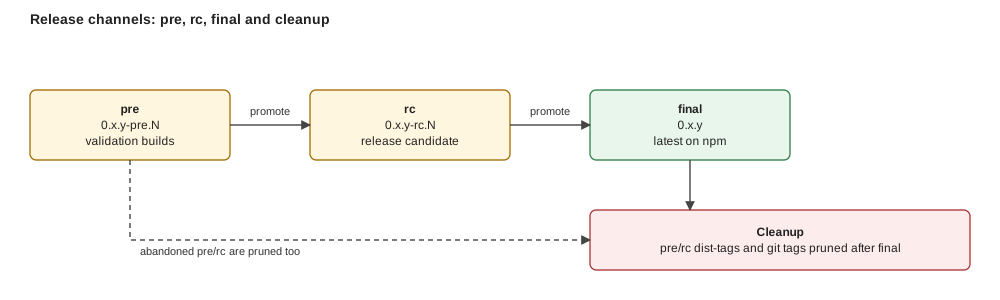
*Figure: every channel ends in the same final release; what differs is how many pre-releases get cleaned up on the way there.*
**Build once, verify, publish.** Changesets manages versions, CI builds artifacts from the tag, GitHub Releases distributes them.
## Every PR carries a changeset
`.changeset/.md` mirrors the PR description and states the bump. CI fails a PR without one unless it is labelled `no-changeset`. Below 1.0 a breaking change is a `minor` bump.
If the change breaks `.pair/adoption/` or `.pair/knowledge/` structure, add a migration page under [Migrations](/docs/migrations) before merging, see [Writing Migration Pages](/docs/contributing/writing-migration-pages).
## Creating a release
```bash
pnpm release [--version X.Y.Z] [--dry-run]
```
The command prints the plan (version, tag, cleanup) and dispatches `version.yml`; CI re-validates with the same state module. Channels are forward-only (`pre` → `rc` → `final`, see the [channel diagram](#overview)) and skippable; the same channel needs new `main` commits; duplicates are refused.
| Channel | Registry | GitHub Release | Website |
|---------|----------|----------------|---------|
| `pre` / `rc` (`X.Y.Z-pre.N`) | GitHub Packages, tag-only (`main` untouched) | prerelease | not deployed |
| `final` | npmjs.org, version commit + CHANGELOG on `main` | latest | deployed |
After a successful publish, the previous same-channel pre/rc is deleted; on `final` (or a base change) every pre/rc of that base is deleted, release, assets, tag and package version.
To install a prerelease, use a token with `read:packages` and `npm config set @foomakers:registry https://npm.pkg.github.com`.
## Release checklist: skill marketplace manifest
The [marketplace channel](/docs/integrations/claude-code#install-channels) is served by two hand-maintained files: `.claude-plugin/marketplace.json` at the repository root, and `.claude-plugin/plugin.json` inside the plugin root it points to (`packages/knowledge-hub/dataset/plugin`). They are deliberately **not generated**. The plugin ships the bootstrap corpus only, so adding a skill to the distributed catalog no longer touches them:
- `plugin.json` `skills` lists one `./skills/` entry per directory under the plugin root's `skills/`, and nothing stale.
- The marketplace entry's `source` still points at the plugin root, pointing it at `./` would ship the whole repository again, and with it pair's own `.pair/adoption/` inside every user's plugin cache.
- `claude plugin validate .` passes. The "no version specified" warning is expected: the manifest pins no version so `/plugin update` always fetches the current catalog. Never run this check with `--strict`: that flag turns the expected warning into a hard failure, and the missing version pin is a deliberate decision.
- Skills only, on all three hand-edited surfaces, `plugin.json` carries metadata plus `skills` and nothing else; the marketplace entry carries metadata plus `source`/`category`/`tags`/`strict` and **no `skills`** (an entry-level `skills` silently replaces the plugin's whole catalog); and `marketplace.json`'s own top level carries marketplace metadata plus `owner`/`plugins`, never `forceRemoveDeletedPlugins`, `allowCrossMarketplaceDependenciesOn` or `metadata.pluginRoot`.
- At the **plugin root**, no component directory named after a manifest component key (`agents/`, `commands/`, `hooks/`, `monitors/`, …) and no `.mcp.json`. `skills/` is the one exception: at that root it is the declared payload, so auto-discovery and the manifest coincide instead of competing. The repository root is not the payload any more.
The catalog guard in `packages/knowledge-hub/src/tools/claude-plugin-manifest.test.ts` (run by `pnpm test`) fails when the manifest drifts from the bootstrap corpus (`packages/knowledge-hub/dataset/plugin/skills/`), naming the exact entry to add or remove, so a forgotten update is caught before release, not after.
The same guard asserts the skills-only rule as an **allowlist** per surface (so `settings`, `dependencies`, `monitors`, `commands` and any key a future schema revision adds fail closed too) plus a root-payload check whose path list is *derived* from the schema's component keys, so the manifest half and the payload half of the rule can never drift apart.
Both checklist lines have an automatic backstop.
## Workflows
| Workflow | File | Trigger | Purpose |
|----------|------|---------|---------|
| Version | `version.yml` | Dispatch (`channel`, `version`) | Validate, version, tag, dispatch release |
| Release | `release.yml` | Dispatch (tag) | Build from tag, publish, cleanup |
| Deploy Website (production) | `deploy-website.yml` | Dispatch | Publish website changes without a release |
### Deploying the website without a release
To publish website changes without cutting a release, run `gh workflow run deploy-website.yml` (workflow `Deploy Website (production)`). It deploys only from `main`, refuses any other ref, and creates no tag, release or package.
## Release artifacts
### CLI
| Artifact | Description |
|----------|-------------|
| `pair-cli-manual-{version}.zip` | Self-contained CLI bundle (ncc, no node_modules) |
| `pair-cli-manual-{version}.zip.sha256` | SHA256 checksum |
| `pair-cli-{version}.tgz` | npm package for npmjs.org |
| `pair-cli-{version}.tgz.sha256` | TGZ checksum |
### Knowledge Base
| Artifact | Description |
|----------|-------------|
| `knowledge-base-{version}.zip` | KB dataset with manifest |
| `knowledge-base-{version}.zip.sha256` | SHA256 checksum |
The CLI auto-downloads the KB on first run from GitHub Releases and caches it at `~/.pair/kb/{version}/`.
## Manual dispatch
Workflows can be triggered manually:
```bash
gh workflow run version.yml --ref main -f channel=final
```
## Post-release validation
After a release is published, run the manual test suite to validate all artifacts:
```text
/pair-capability-execute-manual-tests
```
This executes the test cases in `qa/release-validation/` against the live release, website, CLI binaries, KB dataset, and registry packages. The report is written to `.tmp/manual-test-reports/`.
If no test suite exists yet, create one first:
```text
/pair-capability-design-manual-tests
```
See the [Release testing tutorial](/docs/tutorials/release-testing) for a full walkthrough.
## Release validation checkpoints
Pair's own critical paths live in [`qa/release-validation/`](https://github.com/foomakers/pair/blob/main/qa/release-validation/README.md); the README has the per-channel (`$CHANNEL`) rules.
- **CP1**: website landing page, core navigation, responsive, meta tags.
- **CP2**: CLI artifacts: ZIP + TGZ download, checksum, `--version`, `--help`.
- **CP3**: `install` and `update`, idempotency, persisted keep choice.
- **CP4**: KB dataset ZIP, manifest, verify, info.
- **CP5**: every docs page returns 200, version consistency, internal links.
- **CP6**: Orama search, sidebar, prev/next, `llms.txt`, privacy.
- **CP7**: npmjs.org visibility and install from the public registry.
- **CP8**: `pair-cli package` layouts, metadata, validation.
- **CP9**: timed quickstart onboarding (`$mode: quick` under 10 minutes).
- **CP10**: pair from Claude Code Web (manual, inside the web session).
- **CP11**: release pipeline: dry-run, duplicate refusal, dispatch-only workflows, cleanup (inspection only).
- **CP12**: Claude Code marketplace: add, install `pair@pair`, `/pair-assistant` (manual, inside Claude Code).
## Rollback
If a release needs to be reverted:
1. Delete the GitHub Release and tag from the GitHub UI.
2. Revert the final version commit on `main`.
3. Add a changeset with the fix and dispatch a new release.
---
## Writing Guidelines
Source: https://pair.foomakers.com/docs/contributing/writing-guidelines
The pair Knowledge Base is a curated set of guidelines, templates, how-tos, and assets that AI assistants use to understand your project. This guide explains how to contribute new KB content.
## KB structure overview
The KB dataset lives in `packages/knowledge-hub/dataset/.pair/` and has two top-level areas:
```text
.pair/
├── adoption/ # Project-specific decisions
│ ├── product/ # PRD, subdomains, bounded contexts
│ └── tech/ # Architecture, tech stack, way of working
│ └── adr/ # Architecture Decision Records
│
└── knowledge/ # Universal content (from KB)
├── guidelines/ # Category-organized guidelines
├── how-to/ # Step-by-step task guides
├── assets/ # Templates, checklists
├── skills-guide.md # Full skills catalog
└── way-of-working.md # Default way of working template
```
**Adoption** files contain decisions specific to a project (generated through the pair workflow). **Knowledge** files contain universal content shared across all projects.
When contributing to the KB, you work in the **knowledge** area.
## Guideline categories
Guidelines are organized by domain in `knowledge/guidelines/`:
```text
knowledge/guidelines/
├── README.md # Guidelines overview
├── architecture/ # Architecture patterns
├── code-design/ # Code design principles
├── collaboration/ # Process, templates, PM
│ └── templates/ # Commit, PR, story templates
├── infrastructure/ # CI/CD, deployment
├── observability/ # Monitoring, logging
├── quality-assurance/ # Quality gates, metrics
├── technical-standards/ # Coding standards
├── testing/ # Testing strategy
└── user-experience/ # UX guidelines
```
## Adding a new guideline file
### 1. Choose the category
Pick the most appropriate category directory. If no existing category fits, consider whether a new category is warranted (prefer extending existing ones).
### 2. Create the file
```bash
# Example: adding a new guideline to code-design
touch packages/knowledge-hub/dataset/.pair/knowledge/guidelines/code-design/new-guideline.md
```
### 3. Write the content
Follow this structure:
```markdown
# Guideline Title
Brief description of what this guideline covers and why it matters.
## Principles
- Key principle 1
- Key principle 2
## Guidelines
### Specific Topic
Detailed guidance with examples...
## References
- Links to related guidelines or external resources
```
Key conventions:
- **Heading level**: Start with `# H1` for the guideline title.
- **Actionable**: Write guidelines as actionable instructions, not abstract principles.
- **Examples**: Include code examples where applicable.
- **Cross-references**: Use relative paths to link to related files within `.pair/`.
### 4. Update the category README
If the category has a `README.md`, add your guideline to the file list.
## Working with templates
Templates live in `knowledge/guidelines/collaboration/templates/`:
| Template | Purpose |
|----------|---------|
| `commit-template.md` | Commit message format |
| `pr-template.md` | Pull request description structure |
| `user-story-template.md` | User story format |
| `epic-template.md` | Epic format |
| `initiative-template.md` | Initiative format |
| `task-template.md` | Task format |
| `adr-template.md` | Architecture Decision Record |
| `adl-template.md` | Architecture Decision Log entry |
| `ddr-template.md` | Domain Decision Record |
| `analysis-log-template.md` | Analysis-Log entry (category `Analysis`, shares `decision-log/` with ADL) |
| `code-review-template.md` | Code review checklist |
When adding a new template, place it in the `templates/` directory and document its purpose and usage.
## Cross-referencing conventions
Within `.pair/` files, use **relative paths**:
```markdown
See [architecture guidelines](../architecture/README.md).
See [commit template](collaboration/templates/commit-template.md).
See [architecture guidelines](/packages/knowledge-hub/dataset/.pair/...).
```
Cross-references help AI agents navigate between related guidelines without duplicating content.
## How-to guides
How-to files live in `knowledge/how-to/` and are numbered for ordering:
```text
knowledge/how-to/
├── 01-how-to-create-PRD.md
├── 02-how-to-complete-bootstrap-checklist.md
├── 03-how-to-create-and-prioritize-initiatives.md
├── ...
└── 11-how-to-code-review.md
```
Each how-to corresponds to a development lifecycle phase and references one or more skills.
## Validation
Before submitting KB changes, run the quality gate:
```bash
pnpm quality-gate
```
This includes **markdownlint** which checks markdown formatting, heading structure, and link syntax.
For targeted validation:
```bash
# Markdown lint only
pnpm mdlint:fix
# Build the website to verify content renders
pnpm --filter @pair/website build
```
## Best practices
- **No duplication**: If content exists elsewhere, link to it rather than copying.
- **Adoption vs Knowledge**: Never put project-specific decisions in the knowledge area. Those belong in `adoption/`.
- **Diataxis framework**: Guidelines follow the "explanation" type; how-tos follow the "how-to" type.
- **Keep it concise**: AI agents have context limits. Prefer dense, actionable content over verbose explanations.
- **Test with an AI**: After adding content, ask your AI assistant to use it. Does it find the right file? Does it follow the guidance correctly?
## Resources
- [KB Structure Reference](/docs/reference/kb-structure): Full `.pair/` directory documentation.
- [Guidelines Catalog](/docs/reference/guidelines-catalog): Browse all existing guidelines.
---
## Writing Migration Pages
Source: https://pair.foomakers.com/docs/contributing/writing-migration-pages
Every pair release that changes the `.pair/adoption/` or `.pair/knowledge/` structure ships a migration page under [Migrations](/docs/migrations). This is the *only* place migration logic lives: no pair skill ever contains it (grep-verifiable: searching `packages/knowledge-hub/dataset/.skills` for migration logic should turn up nothing).
## When to write one
- **Breaking structure change** → page required. Treat it as a release-checklist item: no breaking adoption/KB structure change ships without a page.
- **No structure change** → no page. The [Migrations index](/docs/migrations) simply won't list that version, absence of a page means "nothing to migrate."
## Page structure: Changed / Prompt / Verify
Every migration page has exactly three sections, in this order:
| Section | Purpose |
| --- | --- |
| **Changed** | What structurally changed, in plain terms, new files/directories, renamed sections, new optional adoption fields. No prompt text here. |
| **Prompt** | One copy-paste block any AI coding agent can run unmodified. Agent-agnostic, idempotent, scoped only to `.pair/adoption/` and `.pair/working/` in the *consumer* project. |
| **Verify** | A checklist the reader (or the same agent) ticks off after running the prompt, including an idempotency check, re-running should make no further changes. |
### Prompt requirements
- **Copy-paste.** A single fenced block, no placeholders the reader has to fill in blind. If a value is project-specific, tell the agent how to discover it, don't ask the human to edit the prompt first.
- **Agent-agnostic.** No pair-specific slash command or skill invocation, plain instructions any coding agent can follow by reading and writing files.
- **Idempotent.** Every step checks "is this already done?" before acting, and the prompt says so explicitly. Re-running must be safe.
- **Scoped.** Touches only adoption/KB files in the consumer project (`.pair/adoption/`, `.pair/working/`). Never edits `.pair/knowledge/` (upstream, overwritten by `pair-cli update` anyway), skill files, or application code.
- **Resumable, not duplicating.** If a previous run was interrupted or only partially applied, the prompt detects the partial state and finishes it rather than starting over or double-writing.
## Template
Copy this skeleton for a new page:
````mdx
---
title: "vX.Y → vA.B: "
description: Migration prompt for .
---
Structural background: [.mdx`.
2. Add its filename to the `pages` array in `apps/website/content/docs/migrations/meta.json`, in version order.
3. Update the "Published migration pages" section in `apps/website/content/docs/migrations/index.mdx`: if this is the first page ever published, replace the "no pages published yet" note with a `Version jump | What changed` table and add your row; if a table already exists, add your row to it.
4. Run the prompt end-to-end against a fixture project on the previous structure (twice, to confirm idempotency) before publishing.
5. Grep-check that no migration logic leaked into a skill: search `packages/knowledge-hub/dataset/.skills` for migration-specific logic; it should turn up nothing.
## Related
- [Migrations index](/docs/migrations)
- [KB Structure Reference](/docs/reference/kb-structure)
- [Writing Skills](/docs/contributing/writing-skills): the equivalent authoring guide for skills
---
## Writing Skills
Source: https://pair.foomakers.com/docs/contributing/writing-skills
Agent Skills are structured instructions that AI coding assistants discover and execute. They follow the [Agent Skills](https://agentskills.io) open standard, supported by Claude Code, Cursor, VS Code Copilot, and OpenAI Codex.
This guide has two parts: the **mechanics** of a pair skill (structure, anatomy, composition), and the **effectiveness standard**, what makes a skill trigger reliably and execute predictably. The goal isn't identical output: it's an agent that runs through identical steps on every invocation; everything in the standard below is aimed at protecting that repeatability.
## Skill types
| Type | Count | Purpose |
|------|-------|---------|
| **Process** | 9 | Lifecycle phases, orchestrate capability skills (e.g., `/implement`, `/review`) |
| **Capability** | 24 | Atomic units, perform a single focused operation (e.g., `/verify-quality`, `/record-decision`) |
Process skills **compose** capability skills. Capability skills are independently invocable.
## Directory structure
Skills live in the Knowledge Base dataset and get distributed to AI tool directories on install:
```text
packages/knowledge-hub/dataset/.pair/knowledge/
├── skills-guide.md # Full skill catalog
# After pair-cli install, skills are distributed to:
.claude/skills/
├── pair-process-implement/
│ └── SKILL.md
├── pair-capability-verify-quality/
│ └── SKILL.md
└── ...
```
Each skill lives in its own directory named `-` (e.g., `pair-process-implement`, `pair-capability-record-decision`).
## SKILL.md anatomy
Every skill is a single `SKILL.md` file with YAML frontmatter and markdown content:
```markdown
---
name: pair-capability-example
description: "Brief description of what this skill does."
---
# /pair-capability-example - Descriptive Title
One-line summary of the skill's purpose.
## Composed Skills
| Skill | Type | Required |
|-------|------|----------|
| `/pair-capability-other` | Capability | Yes - when invoked |
## Arguments
| Argument | Required | Description |
|----------|----------|-------------|
| `$scope` | Yes | The scope to operate on |
## Algorithm
### Step 1: First Step
1. **Check**: Is the precondition met?
2. **Skip**: If yes, move to Step 2.
3. **Act**: Perform the action.
4. **Verify**: Confirm the result.
### Step 2: Second Step
...
## Output Format
Description of what the skill outputs.
## HALT Conditions
When the skill stops and why.
## Idempotent Re-invocation
How re-running the skill behaves safely.
## Graceful Degradation
What happens when dependencies are missing.
```
### Frontmatter fields
| Field | Required | Description |
|-------|----------|-------------|
| `name` | Yes | Skill identifier, matches directory name |
| `description` | Yes | Trigger-oriented description (used by AI tools for discovery, see [Description = trigger](#1-description-trigger)) |
Frontmatter is bound by hard [constraints](#8-constraints): size limits and portability rules.
## Composition model
Process skills orchestrate capability skills through a **compose** relationship:
```text
/pair-process-implement
├── composes /pair-capability-verify-quality (required)
├── composes /pair-capability-record-decision (required)
├── composes /pair-capability-assess-stack (optional)
└── composes /pair-capability-verify-adoption (optional)
```
Key composition rules:
- **Required compositions**: The skill halts if the composed skill is not installed.
- **Optional compositions**: The skill warns and continues if the composed skill is not installed (graceful degradation).
- **Arguments**: Composed skills receive arguments (e.g., `$scope`, `$type`) from the parent skill.
## Algorithm conventions
Skills use a consistent step pattern:
1. **Check**: Evaluate a precondition.
2. **Skip**: If the condition is already met, skip to the next step.
3. **Act**: Perform the action.
4. **Verify**: Confirm the result before proceeding.
This pattern ensures **idempotency**: re-running a skill skips already-completed steps.
### HALT conditions
Skills define explicit HALT conditions, situations where the skill stops and waits for developer input rather than proceeding with incomplete information.
## Setup skills: guided vs quick
A skill or CLI command that collects inputs to produce or configure something (package metadata, an adoption decision, a scaffolded project) exposes the same two-mode duality, **guided** (asks one input at a time, each pre-filled with a sensible default) and **quick** (accepts KB-sensible defaults in one shot, for CI, scripting, and experienced users).
Neither mode is universally the default: each adopter declares its own (a human-facing setup skill leans guided, a scripting-first CLI command leans quick), and an explicit signal selects the non-default mode. Guided always needs a TTY: a non-interactive environment can never run it, so the command fails clearly or falls back to quick, never hangs.
The two shipped precedents declare opposite defaults: `pair-cli package` defaults to quick with `--interactive` as the guided opt-in, while the `assess-*` family defaults to guided (Path C) with a `$choice` override as the quick opt-in.
Both modes read the **same resolved defaults** through one precedence cascade (`explicit argument/flag > project state > saved/inferred preferences > hardcoded`) the mode only decides whether each value is confirmed or taken as-is. This is the `pair-cli package` command's `--interactive` flag + `resolveDefaults()` cascade (both the quick and guided paths resolve it), and the `assess-*` family's resolution cascade (Path A override = quick, Path C = guided).
Adopt the convention directly rather than re-designing the duality: the full mechanics, precedents, and edge cases live in the KB reference `.pair/knowledge/guidelines/technical-standards/ai-development/skill-conventions/guided-quick-setup.md`.
## The effectiveness standard
Conformance to the anatomy above makes a skill *valid*; it does not make it *effective*. This standard is the authoring bar for every new skill and the review checklist for every edit (recorded as ADR-010). Each principle ends with a **How to check** test you can run against the skill text alone.
### 1. Description = trigger
The frontmatter `description` carries a dual burden: it identifies the skill's purpose, and it enumerates the **trigger branches**: the distinct situations that should cause an agent to load it. Rules:
- **A branch earns exactly one trigger.** Two clauses naming the same situation in different words still describe one branch, "evaluates the tech stack … use when choosing technologies" is a single trigger stated twice, not two. Merge such pairs down to the one branch they actually cover.
- **Reach clause for composed capabilities.** A capability that fires mostly through composition by other skills carries a lean reach clause ("Composed by `/refine-story` and `/plan-tasks`; invoke directly when …") instead of a prompt-trigger list.
- **Body identity stays in the body.** Algorithm detail, step structure, and output format belong below the frontmatter. Since every session reloads the description on every turn, its token cost compounds, which is exactly why it deserves the most aggressive trimming of anything in the file.
**How to check:** map every description clause to a distinct trigger branch; two clauses on one branch collapse into one. Any clause that only matters *after* the skill is loaded moves to the body.
### 2. Information hierarchy
Content in a skill sits at different depths, ranked by how soon after invocation it actually gets used:
1. **Steps**: the sequence of actions written directly into `SKILL.md`; this is the top tier, read first and acted on immediately.
2. **In-file reference**: definitions, rules, and tables that stay in `SKILL.md` but are only looked up when a step actually calls for them.
3. **Disclosed reference**: a same-directory `.md` file, folded in through a **context pointer**. How it's phrased is what decides whether it actually gets pulled in: the destination it names has no bearing on that.
**Progressive disclosure** (pushing reference material down into a sibling file) keeps the top of that stack readable: when reference piles up around the steps, whether the executor actually reads and follows them each time stops being a sure thing. Deciding what to disclose comes down to **branching**, how many paths actually reach the material. Material every run touches belongs inline; once only a fraction of runs ever reach it, that fraction marks the cut point for a pointer. Rewrite the pointer's wording first when it fails to surface must-have material: that's the cheap, local fix; only fold the content back into the main file if repeated rewording still doesn't make it stick.
**How to check:** for each block ask "does every run need this before acting?", yes: keep it with the steps; on demand: in-file reference; only some branches: sibling file behind a sharply worded pointer.
### 3. Completion criteria
Every step's **Verify** beat needs two properties. First, it must be *checkable*: given the current state of things, either the step obviously happened or it obviously didn't, with no judgment call needed in between.
Second, where thoroughness actually matters, it must be *exhaustive*, say "every AC has a mapped task" rather than something as loose as "coverage looks reasonable."
A criterion like "internally consistent" or "guidelines loaded" passes almost automatically, which opens the door to **premature completion**: the step gets marked finished because finishing became the goal, not because the underlying work actually got done.
Where a human, not the executor, is the real judge, say so explicitly with an approval gate instead of dressing up a soft self-assessment as a check.
**How to check:** for each Verify beat, ask "could two executors disagree on whether this is satisfied?" If yes, rewrite it as an observable condition or an explicit approval gate.
### 4. Pruning discipline
Four tests keep a skill lean, run on every edit, pruning by discipline, not by periodic slimming passes:
- **One home per meaning**: pick a single authoritative spot for each meaning and have everything else point back to it, so changing the behavior means editing exactly one place. A convention shared across many skills belongs in one KB reference, with each skill holding only its own delta. Two up-to-date copies are still a bug: the next edit desynchronizes them.
- **Relevance**, per line: if you deleted this line, would the skill actually lose something it depends on?
- **No-op**, per sentence: pull the sentence out and ask whether the model's behavior would change at all; if it wouldn't, the sentence wasn't doing any work. When a sentence fails that test, remove it in full, reworking a no-op only leaves behind a shorter no-op.
- **Sediment**: a skill only ever grows by default, because appending a new rule feels low-risk while deleting an old one feels like it might break something for someone. Nobody schedules a pass to remove what's no longer true, so it doesn't happen on its own. Make removal part of the edit you're already making, not a separate pass you'll get to later.
**How to check:** run relevance + no-op on every section you touch, and search the corpus for the meaning you're about to add: if it already lives somewhere, point to it instead of restating it.
### 5. Leading words
Certain words already carry a fully-formed behavior from what the model saw during pretraining (*idempotent*, *scope*, *gate*, *halt*, *delta*) call these **leading words**: naming one does the work a full explanation would otherwise need, because the model brings its own sense of what *halt* means without the sentence spelling it out. Where you place one changes what it stabilizes: inside a step it keeps the executor's action the same on every run; inside the description it keeps invocation itself consistent, especially when that same word also turns up in the user's prompts and the project's docs.
**How to check:** scan the file for every sentence circling the same single quality; either they collapse into one recurring leading word, or there's a reason no pretrained word already covers it. Take an example like "be thorough": it doesn't out-pull what the model does by default, so it earns nothing and should be swapped for a sharper word rather than padded with extra prose.
### 6. Positive phrasing
State the target behavior. Naming the behavior you don't want puts exactly that behavior on the page, and the page is what the executor reads from next, "never skip the verify step" leaves *skip the verify step* as the most recent phrase in view, competing with the instruction meant to prevent it. Reach for a prohibition only when there is no positive behavior that closes the same gap (a true hard guardrail) and even then, write the positive target next to it so the executor has somewhere else to look.
**How to check:** for every "never"/"don't", attempt the positive rewrite (e.g. swap "never merge without a green quality gate" for "merge only once the quality gate reports green"). Keep the negation only where the rewrite loses the guardrail, and confirm the positive target sits beside it.
### 7. Co-location
Group a concept's definition, its rules, and its exceptions under the one heading that governs the step they apply to, rather than letting them settle wherever they were written. A load-bearing rule buried in a Notes section hundreds of lines from the step it constrains makes whether the executor notices it a toss-up between runs, not a certainty. Co-location is not the same failure as duplication (duplication says the same thing twice in two places; poor co-location says one thing once, but scattered as fragments throughout the document) no single pass through it gives the whole picture.
**How to check:** for each load-bearing concept, search the skill: if its rules appear under more than one heading (other than a context pointer), regroup them under the concept's own heading.
### 8. Constraints
Hard mechanics on top of the principles:
- **Size limits**: the spec caps `name` at 64 chars and `description` at 1024 chars separately; Pair adopts a stricter combined ≤1024 bound for both together.
- **Portability**: the [agentskills.io](https://agentskills.io) spec's top-level frontmatter fields are `name` and `description` (required) plus `license`, `compatibility`, `metadata`, and `allowed-tools` (optional); the spec's own example `version`/`author` keys live *under* `metadata:`, not top-level. Pair skills carry `version`/`author` at top level instead: a tolerated **Pair extension** beyond the spec's optional fields, kept there for provenance tracking (who authored/last bumped a skill) until a future skill-corpus pass considers moving them under `metadata:`. Assistant-specific fields (e.g., `disable-model-invocation`) stay out of the dataset regardless: a skill must install identically on Claude Code, Cursor, VS Code Copilot, and Codex.
- **Mirror sync**: the dataset copy (`packages/knowledge-hub/dataset/.skills/`) and the installed mirror (`.claude/skills/`) change in the same commit, always.
- **`version` bumps track observable behaviour, not edits**: minor (`0.5.0 → 0.6.0`) when a skill gains or changes something a caller can observe: a new argument, a new mode/execution depth, a new or removed phase, a changed HALT condition. Patch (`0.6.0 → 0.6.1`) for a behaviour-preserving correction to the algorithm's wording. **No bump** for prose, formatting, link, or documentation-only edits, which is why a clarity pass across many skills leaves their versions alone. Same value in both copies: the mirror transform rewrites `name`/`description`, never `version`.
**How to check:** character-count `name` and `description` against the combined bound; diff the frontmatter's fields against the spec's top-level list plus the tolerated `version`/`author` extension, anything else is a portability violation; confirm the commit touches both copies; if the diff adds an argument, a mode, or a phase, confirm `version` moved.
### 9. Evaluation
A description rewrite is a hypothesis; the eval is the experiment. Maintain a **should-trigger / should-not-trigger** prompt set per skill family: prompts that must load the skill, and near-miss prompts that must not. Run it in fresh sessions, triggering is a cold-start behavior, so conversation history invalidates the result. When rewriting a description, run the set against both the old and the new description and record the before/after results; a regression reverts the rewrite, and you iterate on the description, not on the eval.
**How to check:** before/after results are recorded for every rewritten description; each skill family has prompts on both sides of the trigger boundary.
## Review checklist
One line per principle: use it when authoring or reviewing any skill change:
- [ ] Every description clause maps to a distinct trigger branch (or a lean reach clause for composed capabilities); no body identity in the description
- [ ] Steps lead; in-file reference only where most runs need it; branch-specific material disclosed behind a sharply worded pointer
- [ ] Every Verify beat leaves no room for a judgment call, and is exhaustive where thoroughness matters
- [ ] No meaning duplicated (in-skill or cross-skill); every touched line passes relevance, every sentence clears the no-op check
- [ ] Recurring concepts anchored by leading words, not restated prose
- [ ] Prohibitions only as hard guardrails, each paired with its positive target
- [ ] Each concept's rules co-located under one heading, adjacent to the step they govern
- [ ] `name` ≤ 64 / `description` ≤ 1024 chars separately (spec), and both together ≤ 1024 (Pair's stricter bound); frontmatter limited to spec fields + the tolerated `version`/`author` extension (no assistant-specific fields); dataset + mirror in the same commit
- [ ] `version` bumped iff observable behaviour changed (new argument/mode/phase → minor; wording-only → no bump), identical in both copies
- [ ] Description rewrites carry before/after trigger-eval evidence
## Writing a new skill
### 1. Choose the skill type
- **Process** if it orchestrates multiple steps across the development lifecycle.
- **Capability** if it performs a single, focused operation.
### 2. Create the directory
```bash
# In the KB dataset
mkdir -p packages/knowledge-hub/dataset/.pair/knowledge/skills//
```
### 3. Write the SKILL.md
Follow the anatomy above and hold the draft to the [effectiveness standard](#the-effectiveness-standard). Key principles:
- **Be explicit**: AI agents follow instructions literally. Ambiguity leads to incorrect behavior.
- **Use the Check/Skip/Act/Verify pattern**: Ensures idempotency.
- **Define HALT conditions**: Better to stop and ask than to proceed incorrectly.
- **Document composition**: List all composed skills with required/optional status.
- **Include graceful degradation**: What happens when optional dependencies are missing.
- **Pass the review checklist**: Every box above, before opening the PR.
### 4. Update the skills guide
Add your skill to `packages/knowledge-hub/dataset/.pair/knowledge/skills-guide.md` in the appropriate section (Process or Capability).
### 5. Test the skill
1. Install the KB locally: run `pair-cli install` or copy the SKILL.md to `.claude/skills//`.
2. Run the trigger eval: should-trigger and should-not-trigger prompts in fresh sessions (see [Evaluation](#9-evaluation)).
3. Invoke the skill via the slash command (e.g., `/pair-capability-example`).
4. Verify the skill follows its algorithm correctly.
5. Test idempotency: re-invoke and confirm it skips completed steps.
6. Test graceful degradation: remove optional composed skills and verify the warning behavior.
## Naming conventions
| Convention | Example |
|-----------|---------|
| Process skills | `pair-process-` (e.g., `pair-process-implement`) |
| Capability skills | `pair-capability-` (e.g., `pair-capability-verify-quality`) |
| Verification skills | `pair-capability-verify-`, conformance pass/fail (e.g., `pair-capability-verify-quality`) |
| Assessment skills | `pair-capability-assess-`, evaluate options + propose an adoption choice (e.g., `pair-capability-assess-stack`) |
| Analysis skills | `pair-capability-analyze-`, analyze + report only, never blocks (e.g., `pair-capability-analyze-debt`) |
Three distinct verbs, kept separate, don't overload one across branches: **`verify-*`** = conformance pass/fail; **`assess-*`** = evaluate options and PROPOSE an adoption decision; **`analyze-*`** = analyze and REPORT only (no decision, never blocks). Recorded as ADL `2026-07-13-skill-naming-verb-taxonomy.md`.
## Resources
- [Agent Skills specification](https://agentskills.io): The open standard, including frontmatter fields and size limits.
- [`writing-great-skills`](https://github.com/mattpocock/skills): The reference model behind the effectiveness standard (predictability, information hierarchy, leading words, pruning).
- [Skills Catalog](/docs/reference/skills-catalog): Full list of all 51 pair skills.
- [Skills concept](/docs/concepts/skills): How skills fit into the pair ecosystem.
---
## What is pair?
Source: https://pair.foomakers.com/docs/getting-started
**Code is the easy part.** The hard part is getting an AI assistant to understand your project's architecture, standards and decisions, and to keep that understanding from one session to the next. Without it you re-explain the project every morning and review code that ignores last week's decision.
## The three components
pair installs three things into your repository, in a `.pair/` folder every assistant reads:
- **Knowledge Base**: guidelines, how-to guides and templates for the whole development lifecycle. Onboarding documentation for your AI teammate, refreshed by `pair-cli update`. [Knowledge Base](/docs/concepts/knowledge-base)
- **Skills**: slash commands your assistant discovers and runs, following the [Agent Skills](https://agentskills.io) open standard. One skill per step of the process, from writing the PRD to reviewing the PR. [Skills](/docs/concepts/skills)
- **Adoption files**: your decisions, architecture, tech stack, way of working, recorded once and read before every generation. You do not write them by hand: bootstrap interviews you, or reads an existing codebase. [Adoption files](/docs/concepts/adoption-files)
## A day with pair
1. You open the project and run `/pair-next`. It reads the board and says: story #42 is Ready, implement it.
2. `/pair-process-implement 42` works task by task, tests first, following your adoption files, and opens one pull request.
3. `/pair-process-review 123` reviews the PR against the same files and the risk tier of the story; approved, it merges and closes the story.
4. `/pair-next` again. Tomorrow, a different teammate or a different assistant starts from the same files.
That loop is the last phase of a longer flow: PRD, bootstrap, initiatives, epics, stories, refinement, implementation, review. The flow, the two workflows that run on it and the three ways to drive them are the [Process Lifecycle](/docs/process-lifecycle).

*Figure: the ground is four phases; the last two carry the refinement and delivery workflows; the three modes decide how much of it you run by hand.*
## Install
Five minutes, with pair-cli (default) or the optional Claude Code plugin: [Quickstart](/docs/getting-started/quickstart). Then [bootstrap](/docs/getting-started/bootstrap-quick-mode), pick your path ([solo, team or organization](/docs/getting-started/choose-your-path)) and [verify the setup](/docs/getting-started/verify).
**Next:** [Quickstart](/docs/getting-started/quickstart).
---
## "Bootstrap: guided or quick"
Source: https://pair.foomakers.com/docs/getting-started/bootstrap-quick-mode
Bootstrap has two resolution depths and one entry point. **Guided** (the default) interviews you decision by decision. **Quick** takes the same defaults without asking, so an empty project reaches a first workable story in minutes.
This page is about the `/pair-process-bootstrap` skill. For installing the CLI and the Knowledge Base first, see the [Quickstart](/docs/getting-started/quickstart).
## Which depth do you want?
| | Guided (default) | Quick |
|---|---|---|
| **You get asked** | every decision, one at a time | only what has no safe default |
| **Best for** | a first setup, or a project whose direction is still open | an experienced user, a spike, a CI/scripted setup |
| **Time** | as long as the conversation takes | minutes |
| **Files written** | adoption files | the same adoption files |
Quick mode is **additive**. It is a second depth of the same skill, not a separate skill and not a replacement: if you omit the argument, the interview you already know runs exactly as before.
## Run it
```text
/pair-process-bootstrap $mode: quick
```
**In your assistant:** the command above. **With `/pair-assistant` (optional, Claude Code):** ask it to adopt the project; it runs the install, then hands off to `/pair-process-bootstrap` ([how to ask](/docs/reference/pair-assistant#how-to-ask)).
**One precondition**: a populated `.pair/adoption/product/PRD.md`. Phase 0 of bootstrap is blocking in both depths, with no PRD it composes `/pair-process-specify-prd`, a full interactive authoring session that is neither defaulted nor counted below. Write the PRD first, then run quick mode.
With the PRD in place, expect at most two questions:
- **Which PM tool?**: the choice is organisational, not technical, so there is no safe default to guess. Skipped if your `way-of-working.md` already names one.
- **Which tech stack?**: normally read straight from `package.json`, lockfiles and config. Only asked on a genuinely empty repository, where there is nothing to read.
One rarer third case can ask: `/pair-capability-map-contexts`, composed in Phase 3.5, stops on a relationship that is both unbalanced and volatile when neither a mitigation nor an explicit acceptance is on offer. Quick mode deliberately keeps that gate, recording a coupling risk nobody judged would be worse than one more question.
Everything else (project categorization, the per-section architecture/infrastructure/way-of-working decisions, the testing and AI sections that follow from your stack, the adoption documents, the standard quality-gate pipeline) is resolved from defaults and reported, not asked.
The `assess-*` skills bootstrap composes do not add confirmations of their own either: in quick mode their resolved values are accepted as-is and listed in the final summary, instead of being confirmed one skill at a time (there are eight of them).
When it finishes, the summary names the depth that ran and how many questions it asked:
```text
BOOTSTRAP COMPLETE:
├── Mode: quick - 1 question asked
├── PRD: verified
├── Categorization: Type B - .pair/adoption/decision-log/...
...
```
## Nothing about the output is "quick mode"
Every file quick mode writes is a normal adoption file, in the normal location and format: `.pair/adoption/tech/*.md`, the gate registry in `way-of-working.md`, ADRs and ADLs in the decision log. There is no quick-mode-only file, marker, or format.
So a default you disagree with is not a lock-in, edit the file by hand, or re-run the relevant phase, and the change sticks like any other adopted decision. Accepting a default costs you nothing you cannot change later.
An already-configured project is **confirmed, not overwritten**: each phase checks its own output first, in both depths.
## Where the defaults come from
Quick mode does not invent its own resolution order. It follows the shared Guided / Quick Setup Convention that `pair-cli package` and the `assess-*` skills already use, highest wins:
1. **Explicit argument**: anything you named in the invocation
2. **Project state**: what is already on disk, except the decision log: `.pair/adoption/tech/**`, `.pair/adoption/product/**`, the PRD, `package.json`, lockfiles, CI workflows, `git config`
3. **Saved preferences**: decisions a previous run recorded in `.pair/adoption/decision-log/`
4. **Fallback**: the _Quick-Mode Per-Project-Type Defaults_ table in the KB bootstrap checklist (never its worked examples)
Bootstrap only declares which of its own decisions each tier fills. That mapping, decision by decision, lives next to the skill in `quick-mode-defaults.md` (`.claude/skills/pair-process-bootstrap/quick-mode-defaults.md` once the KB is installed).
## In CI or a non-interactive session
Guided needs a terminal. With no TTY, bootstrap warns and runs quick instead rather than hanging on input that can never arrive. If a still-asked decision cannot be resolved either, the run halts and tells you which input to pass explicitly: it does not guess.
**Next:** [Solo, team or organization](/docs/getting-started/choose-your-path), then [verify the setup](/docs/getting-started/verify) quick mode just produced.
---
## Solo, team or organization
Source: https://pair.foomakers.com/docs/getting-started/choose-your-path
The [Quickstart](/docs/getting-started/quickstart) is the same for everyone. What differs is who records the decisions and where the Knowledge Base comes from.
## Solo
You are the only reader of `.pair/adoption/`, so the process stays light: start every session with `/pair-next`, skip the ceremonies (no sprint planning, no standups), and run the skills directly, `/pair-process-implement` to start a story, `/pair-process-review` to self-review your PR. Change a decision whenever you like by editing the adoption file. Continue with the [Your first project](/docs/tutorials/first-project) tutorial (30 minutes), or [Adopting pair on an existing project](/docs/tutorials/existing-project) if the code exists already.
## Team
One repository, several assistants, one set of decisions. Bootstrap records them ([guided or quick](/docs/getting-started/bootstrap-quick-mode)) and you commit `.pair/adoption/`: every teammate who pulls gets the same architecture, stack and way of working, whatever tool they use, because every bridge file (`AGENTS.md`, `CLAUDE.md`, `.cursor/rules/`) points at the same `.pair/`. Team-level behaviour (card states, quality gates, review enforcement, autonomy) is a set of recipes: [Customize the Knowledge Base for your team](/docs/guides/customize-for-your-team). Continue with the [Team setup](/docs/tutorials/team-setup) tutorial (45 minutes); new teammates read [Join a project that already uses pair](/docs/guides/join-a-pair-project).
## Organization
Several teams should start from the same standards. Own a Knowledge Base: scaffold a repository with `pair-cli scaffold-kb`, author the guidelines and skills there, cut versions with the generated release script, and have every project install it with `pair-cli install --source #`. Teams customize through their own adoption files; your standards reach them through releases. The whole path is one guide, [Own and publish a Knowledge Base](/docs/guides/external-kb); the walkthrough with governance and the first team onboarded is [Enterprise adoption](/docs/tutorials/enterprise-adoption) (60 minutes).
Whatever the path, the flow you follow afterwards is the same: the [Process Lifecycle](/docs/process-lifecycle).
**Next:** [Verify your setup](/docs/getting-started/verify).
---
## Quickstart
Source: https://pair.foomakers.com/docs/getting-started/quickstart
By the end of this page your project has a `.pair/` folder your AI assistant reads, and you have run `/pair-next` once. Everything else is a link.
## Prerequisites
- Node.js 18 or higher, with npm or pnpm
- A terminal on macOS, Linux, or Windows through WSL2 or Git Bash
- An AI coding assistant that reads Agent Skills ([supported tools](/docs/integrations))
## Install pair-cli
```bash
npm install -g @foomakers/pair-cli
# or
pnpm add -g @foomakers/pair-cli
```
```bash
pair-cli --version
```
Expected output: `pair-cli vX.Y.Z`. Air-gapped? Download `pair-cli-manual-vX.Y.Z.zip` from [GitHub Releases](https://github.com/foomakers/pair/releases), extract it and run `./pair-cli` from the folder.
## Install the Knowledge Base
From your project root:
```bash
pair-cli install
```
This writes `.pair/knowledge/` (guidelines, how-to guides, templates), `.pair/adoption/` (empty files for your decisions), the skills under `.claude/skills/` and the bridge files (`AGENTS.md`, `CLAUDE.md`) that point every assistant at `.pair/`.
Does the repository already have an `AGENTS.md` or `CLAUDE.md`? Install refuses rather than overwrite them. Keep yours with `pair-cli install --skip-registries agents`, or follow [Adopt pair in an existing repository](/docs/guides/adopt-existing-repo).
## Run your first skill
Open the project in your assistant and run:
```text
/pair-next
```
It sees the empty adoption files and walks you through the PRD and the bootstrap, asking which PM tool you use on the way (`filesystem` needs no account). From then on, `/pair-next` suggests the next step every session. Bootstrap in a hurry: [guided or quick](/docs/getting-started/bootstrap-quick-mode).
## With the Claude Code plugin (optional)
Claude Code users can let a skill run the three steps above:
```text
/plugin marketplace add foomakers/pair
/plugin install pair@pair
/pair-assistant
```
`/pair-assistant` installs `pair-cli`, runs the install, asks keep-or-overwrite for existing files, then hands over to `/pair-next`. pair-cli stays the default path; the plugin is a convenience. Details: [Claude Code plugin and /pair-assistant](/docs/reference/pair-assistant).
## Keep it current
`pair-cli update` refreshes the Knowledge Base and skills and never touches `.pair/adoption/`. Which of the three update commands you need, and when: [Update the Knowledge Base](/docs/guides/update-kb).
**Next:** [Bootstrap: guided or quick](/docs/getting-started/bootstrap-quick-mode), then [Solo, team or organization](/docs/getting-started/choose-your-path). The flow you will follow from here is the [Process Lifecycle](/docs/process-lifecycle).
---
## Verify your setup
Source: https://pair.foomakers.com/docs/getting-started/verify
Run through this once after the [Quickstart](/docs/getting-started/quickstart) and [bootstrap](/docs/getting-started/bootstrap-quick-mode). Ten minutes.
## The CLI
- [ ] `node --version` prints 18 or higher
- [ ] `pair-cli --version` prints a version (manual download: `./pair-cli --version` from the extracted folder; on Windows use WSL2 or Git Bash)
- [ ] `pair-cli --help` lists `install`, `update`, `run`, `package`
- [ ] `pair-cli install --list-targets` prints the `Asset Registries` block ([expected output](/docs/reference/cli/examples#1-first-time-setup))
## The project
- [ ] `.pair/knowledge/guidelines/` and `.pair/knowledge/how-to/` exist and are not empty
- [ ] `.pair/adoption/tech/` holds `architecture.md`, `tech-stack.md`, `way-of-working.md` with your decisions, not the templates
- [ ] `AGENTS.md` exists and points at `.pair/` (your own file with a pointer counts, if you kept it with `--skip-registries agents`)
- [ ] `.claude/skills/` holds the `pair-*` skill directories
- [ ] `pair-cli kb-validate` passes
- [ ] `pair-cli update-link --dry-run` reports no broken links
## Your assistant
- [ ] A new session in your assistant describes the project from `.pair/adoption/` when asked
- [ ] `/pair-next` answers with a next step, not with "no project found"
- [ ] `/pair-process-bootstrap` reports an already-configured project as confirmed, not re-asked
## Your tools
- [ ] The PM tool in `way-of-working.md` is the one you use, and a card moved on the board changes what `/pair-next` reports
- [ ] `git status` shows `.pair/adoption/` committed and `.pair/knowledge/` either committed or ignored, deliberately
Anything unchecked: [Troubleshooting](/docs/support/troubleshooting) covers install and permission problems; [Adopt pair in an existing repository](/docs/guides/adopt-existing-repo) covers a repository that already had agent files.
**Next:** the [Process Lifecycle](/docs/process-lifecycle), how a day with pair runs.
---
## Guides
Source: https://pair.foomakers.com/docs/guides
Each guide is one task: goal, prerequisites, numbered steps, how to verify, where to read more. For the flow these tasks belong to, read the [Process Lifecycle](/docs/process-lifecycle) first.
## The three paths
Every step names the path that applies, with the same three labels everywhere in the docs:
- **In your assistant**: a skill you invoke as a slash command in Claude Code, Codex, Cursor, pi, opencode or any tool that reads Agent Skills. This is the default path for everything after install: bootstrap, planning, refinement, implementation, review.
- **With pair-cli**: a real `pair-cli` command in a shell: `install`, `update`, `run`, `package`, `scaffold-kb`, `kb-*`. Install, update and unattended runs live here; there is no CLI command for a skill.
- **With `/pair-assistant` (optional, Claude Code)**: the one skill the Claude Code marketplace plugin ships. It runs the CLI for you and writes adoption files after showing the diff. Only listed where asking it is the thing to do; the other two paths never depend on it.
## Set up
- [Install via the Claude Code marketplace](/docs/guides/install-via-marketplace)
- [Adopt pair in an existing repository](/docs/guides/adopt-existing-repo)
- [Join a project that already uses pair](/docs/guides/join-a-pair-project)
- [Update the Knowledge Base](/docs/guides/update-kb)
- [Configure another harness](/docs/guides/configure-harness)
## Knowledge Base
- [Customize the Knowledge Base for your team](/docs/guides/customize-for-your-team)
- [Customize templates](/docs/guides/customize-templates)
- [Package-local rules in a monorepo](/docs/guides/monorepo-rules)
- [Own and publish a Knowledge Base](/docs/guides/external-kb)
## Configure
- [Card states, DoR/DoD and the process profile](/docs/guides/card-states)
- [Classify stories and use risk tags](/docs/guides/classify-risk)
- [Quality gates and the coverage ratchet](/docs/guides/quality-gates)
- [Review identity and light auto-approval](/docs/guides/review-identity)
- [Assess security, cost and coupling](/docs/guides/assess-security-cost-coupling)
## Deliver
- [Deliver a card](/docs/guides/deliver-a-card)
- [Autonomy and per-stage engine and model](/docs/guides/autonomy-and-profiles)
- [Cycle Hooks and Blocking Severities](/docs/guides/hooks-and-severities)
- [Deliver multiple cards](/docs/guides/deliver-many-cards)
- [Automate work via tags](/docs/guides/tag-automation)
- [Measure delivery](/docs/guides/delivery-metrics)
Longer, learning-oriented walkthroughs are in [Tutorials](/docs/tutorials); every setting is in [Adoption settings](/docs/reference/adoption-settings).
---
## Adopt pair in an existing repository
Source: https://pair.foomakers.com/docs/guides/adopt-existing-repo
**Goal**: add pair to a repository that already has code and agent instruction files.
## Prerequisites
- A clean git working tree
- Node.js 18+ and `pair-cli` installed ([Quickstart](/docs/getting-started/quickstart))
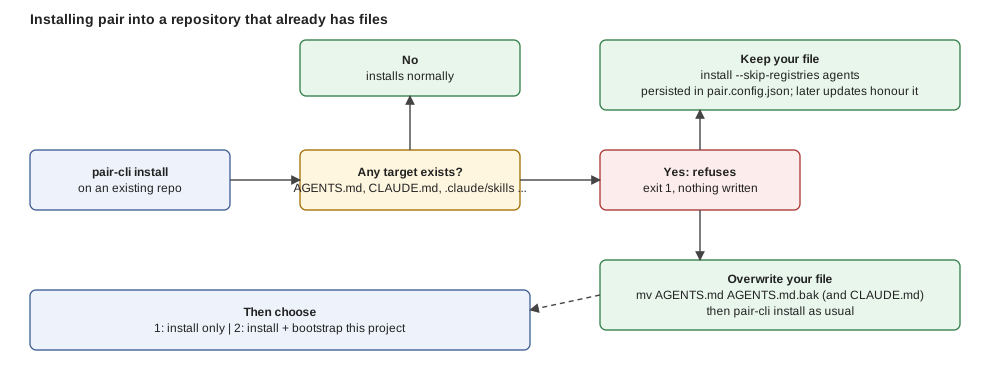
*Figure: install never overwrites silently. The only two ways past the refusal are moving your file aside or telling install to skip that registry.*
## Steps
1. **Decide what happens to your agent files**
- `pair-cli install` is all-or-nothing per registry target: if `AGENTS.md`, `CLAUDE.md`, `.claude/skills` or `.pair/knowledge` already exists it exits 1 with `Target '' already exists` and writes nothing. For your own `AGENTS.md` and `CLAUDE.md` (one registry, decided together): **keep** them, or **overwrite** them.
2. **Install**
- With pair-cli, keep: `pair-cli install --skip-registries agents`. The choice is saved in `pair.config.json` as `"skipRegistries": ["agents"]` and every later `pair-cli update` honours it. Other targets you own are kept the same way: `--skip-registries skills,github`.
- With pair-cli, overwrite: `mv AGENTS.md AGENTS.md.bak` (and `CLAUDE.md`), then `pair-cli install`. Use `mv`, not `cp`: a leftover original makes install refuse again.
- With `/pair-assistant` (optional, Claude Code): "install pair, keep my files". It checks every target, asks keep or overwrite per file, and runs the `mv` or the `--skip-registries` after you agree.
3. **Wire your kept file to pair**
- In your assistant: add one line to your `AGENTS.md` pointing at `.pair/knowledge/` and `.pair/adoption/`. pair never edits a kept file, so without the pointer your assistant will not find it.
- With `/pair-assistant` (optional, Claude Code): ask it to draft the line and show the diff.
4. **Describe the project**
- In your assistant: `/pair-process-bootstrap` reads the codebase, config and git history and proposes the adoption files; `$mode: quick` takes the defaults. The full reverse-engineering walkthrough is the [Existing project tutorial](/docs/tutorials/existing-project).
- With `/pair-assistant` (optional, Claude Code): ask for "a full adoption pass"; it hands off to `/pair-process-bootstrap`.
## Verify
- `pair-cli kb-validate` passes.
- `git diff AGENTS.md CLAUDE.md` is empty when you chose keep.
- A new session in your assistant describes the project from `.pair/adoption/`.
## Related
- [Existing project tutorial](/docs/tutorials/existing-project)
- [Bootstrap: guided or quick](/docs/getting-started/bootstrap-quick-mode)
- [Update the Knowledge Base](/docs/guides/update-kb): how to opt a kept registry back in later
---
## Assess security, cost and coupling
Source: https://pair.foomakers.com/docs/guides/assess-security-cost-coupling
**Goal**: get a security, cost or coupling verdict without changing any file.
## Prerequisites
- pair skills installed
## Steps
1. **Security**
- In your assistant: `/pair-capability-assess-security $mode: review` on a PR, or `$mode: audit` for a one-shot OWASP scan.
2. **Cost**
- In your assistant: `/pair-capability-assess-cost` gives a chromatic cost class for a change.
3. **Coupling**
- In your assistant: `/pair-capability-assess-coupling $scope: diff` for a PR, or `$scope: full` for an audit.
4. **Act on the findings**
- Promote tolerable ones to tech debt; fix critical ones before merge. The review runs the same three assessments and shows each as a one-line verdict.
## Verify
- Reports for audits land in `.pair/working/reports/`.
## Related
- [Skills catalog](/docs/reference/skills-catalog)
- [Coupling model](/docs/reference/coupling-model)
---
## Configure autonomy and per-stage engine and model
Source: https://pair.foomakers.com/docs/guides/autonomy-and-profiles
**Goal**: set `until` and the gates in `## Autonomy`, then give every stage of the cycle its own engine, model and effort with a workflow profile.
## Prerequisites
- `tech/automation.md` ([every key](/docs/reference/adoption-settings#techautomationmd))
- The cycle scripts installed in `.claude/skills/pair-workflow-cycle/scripts/`
- For a profile: the engines it names installed, and `pair.config.json` at the project root
## Steps
### How far a run goes
1. **Set `## Autonomy`**
- In your assistant: edit `until`, `prepare`, `merge` and `filter` in `tech/automation.md`.
```markdown
## Autonomy
filter: risk:green
until: pr
prepare: always
merge: always
```
- With `/pair-assistant` (optional, Claude Code): "let green cards go up to merge" shows the diff first, then writes it through record-decision.
2. **Check the effective values**
- With pair-cli: `node .claude/skills/pair-workflow-cycle/scripts/autonomy-policy.mjs resolve` prints each value with its source (argument, adoption, KB default).
- With `/pair-assistant` (optional, Claude Code): it echoes the effective gates.
3. **Override per run when needed**
- With pair-cli: `--until`, `--prepare`, `--merge` on `pair-cli run --card` (forwarded to every child card under `--parallel`).
### Engine, model and effort per stage
1. **Write the profile** in `pair.config.json`, inline or as a file under a glob.
- In your assistant:
```json title="pair.config.json"
{
"workflowProfiles": {
"default": "mixed",
"inline": {
"mixed": {
"defaults": { "model": "balanced", "effort": "medium" },
"modelClasses": { "cheap": "claude-haiku-5-5", "balanced": "claude-sonnet-5-5", "frontier": "claude-opus-5-5" },
"stages": {
"prepare": { "model": "cheap", "context": "reuse" },
"green": { "model": "cheap", "context": "reuse" },
"validate": { "model": "frontier", "effort": "high" },
"verify": { "model": "frontier", "effort": "high" }
}
}
}
}
}
```
Per stage, `engine` (`default`, `pi`, `opencode`, `claude`, `codex`), `model` (`default`, an id, `cheap` / `balanced` / `frontier`, `by-tier`), `effort` (`default`, `low`, `medium`, `high`, `xhigh`, `max`) and `context` (`fresh`, `reuse`; `reuse` only into `prepare` and `green`). A stage declares only what differs from `defaults`. With pair-cli, `effort` reaches `claude` and `codex`; for other engines the run warns and marks it `ignored` in the table.
- With `/pair-assistant` (optional, Claude Code): "use profile mixed for the review" shows the edit, then records it as an ADL.
2. **Let the model follow the risk tier (optional)**: set `"model": "by-tier"` and add to `tech/automation.md`:
```markdown
## Model Policy
risk:green: cheap
risk:yellow: balanced
risk:red: frontier
```
An untagged card or a tier the policy omits runs on the engine's default model, never a halt.
3. **Print the resolved table**
- With pair-cli: `node .claude/skills/pair-workflow-cycle/scripts/workflow-profile.mjs resolve --root . --profile mixed --tier risk:green`. The JSON's `table` has one line per stage with engine, model, effort and context, each with the level that decided it. A run prints the same table before its first dispatch.
4. **Pick the profile per run**
- With pair-cli: `pair-cli run --card 217 --profile mixed`, or `--workflow-config ./file.json` for an external file used verbatim. Both also work with `--root`, `--parallel` and `--watch`: every child card gets the same flag.
- In your assistant: `/pair-workflow-cycle` takes the same as `$profile` and `$workflowConfig`.
Cascade, highest first: `--workflow-config` > `--profile` > `workflowProfiles.default` > KB default (the run's engine, its default model, default effort, fresh context). An unknown name or a bad value halts (`profile-unresolved`, `profile-invalid`, `profile-name-collision`), never a silent fallback.
## Verify
- `autonomy-policy.mjs resolve` prints each gate with its source; defaults are `until: pr`, `prepare: always`, `merge: always`: nothing merges and no Draft card is prepared unattended until you change them.
- `workflow-profile.mjs resolve` prints `Profile: mixed`, its source and hash, then a line per stage; with no profile it prints `Profile: KB default`.
- A stage asking `context: reuse` into `validate` or `verify` is refused at load, so the independent checks always run fresh.
## Related
- [Lifecycle modes](/docs/process-lifecycle/lifecycle-modes)
- [Automated development](/docs/tutorials/automated-development#per-stage-engine-model-and-effort-workflow-profiles)
- [Configuration](/docs/reference/configuration#workflow-profiles-workflowprofiles)
- [The delivery cycle in depth](/docs/process-lifecycle/delivery-cycle#4-profiles-engine-model-effort-context-per-stage)
---
## Configure card states, DoR/DoD and the process profile
Source: https://pair.foomakers.com/docs/guides/card-states
**Goal**: make pair read your board correctly and run only the process steps you want.
## Prerequisites
- A PM tool set up ([PM tools](/docs/pm-tools))
- Access to `.pair/adoption/tech/way-of-working.md`
## Steps
1. **Map your board states**
- In your assistant: `/pair-capability-setup-pm` writes the `## State Mapping` table (`Board State | Macrostate`) into `way-of-working.md`; or add it by hand.
- With `/pair-assistant` (optional, Claude Code): "map not-planned to Done".
2. **Review Definition of Ready and Done**
- In your assistant: read the criteria in the Knowledge Base and add project tier requirements to the Review Tier Matrix in `way-of-working.md`.
- With `/pair-assistant` (optional, Claude Code): ask to show the current DoR/DoD and propose a diff.
3. **Pick a process profile**
- In your assistant: set `## Process Profile` in `way-of-working.md` to `profile: default`, `poc` or `custom` plus a `whitelist` of step ids.
- With `/pair-assistant` (optional, Claude Code): "use the poc profile".
4. **Start light**
- In your assistant: `/pair-process-bootstrap $mode: quick`.
- With `/pair-assistant` (optional, Claude Code): ask for a quick bootstrap.
## Verify
- `/pair-next` suggests steps consistent with your profile.
- A card moved on the board changes the state `/pair-next` reports.
## Related
- [Canonical states](/docs/concepts/canonical-states)
- [Definition of Ready and Done](/docs/concepts/definition-of-ready-and-done)
- [Adoption settings](/docs/reference/adoption-settings)
- [Bootstrap: guided or quick](/docs/getting-started/bootstrap-quick-mode)
---
## Classify stories and use risk tags
Source: https://pair.foomakers.com/docs/guides/classify-risk
**Goal**: get a risk tier on every story and PR, and know what it changes.
## Prerequisites
- Refinement done for the story
- Tag projection declared (optional)
## Steps
1. **Declare the tag family**
- In your assistant: add `risk` under `## Tag Projection` in `tech/risk-matrix.md`. `/pair-capability-classify` offers to write it the first time it runs.
- With `/pair-assistant` (optional, Claude Code): "enable risk tags".
2. **Classify during refinement**
- In your assistant: `/pair-process-refine-story`; it calls `/pair-capability-classify` and writes the matrix onto the card.
3. **Tune the matrix (optional)**
- In your assistant: add a Criticality Table or Overrides in `risk-matrix.md`.
- With `/pair-assistant` (optional, Claude Code): shows the diff, then writes.
4. **Let the tier flow**
- `publish-pr` copies the tag to the PR; the gate runs the checks for that tier; the review may raise the tier, never lower it.
## Verify
- The story and its PR carry a `risk:*` tag.
- An untagged PR is treated as the strictest tier.
## Related
- [Quality model](/docs/reference/quality-model)
- [Tag-driven gates](/docs/concepts/tag-driven-gates)
- [Execution](/docs/process-lifecycle/phases/execution)
---
## Configure another harness
Source: https://pair.foomakers.com/docs/guides/configure-harness
**Goal**: make another AI harness (Codex, pi, opencode) read pair, interactively and as an engine for unattended runs.
## Prerequisites
- A pair-enabled project
- The harness installed and authenticated
## Steps
1. **Pick the harness**: read its page, [Codex](/docs/integrations/codex), [pi](/docs/integrations/pi) or [opencode](/docs/integrations/opencode). Which modes each one supports: [Modes by assistant](/docs/process-lifecycle/lifecycle-modes#modes-by-assistant).
2. **Install the targets it reads**
- With pair-cli: `pair-cli install --list-targets` shows the registries; `pair-cli install` writes the bridge files and skill directories every supported harness discovers.
3. **Declare it**
- In your assistant: `/pair-capability-setup-harness` writes `## Harness` (and optionally `## Model Policy`) in `tech/automation.md`.
- With `/pair-assistant` (optional, Claude Code): "switch the harness to pi".
4. **Try it headless (optional)**
- With pair-cli: `pair-cli run --card --engine --dry-run`.
## Verify
- The harness lists the pair skills and reads `AGENTS.md`.
- `pair-cli run --dry-run` names the engine you declared.
## Related
- [Harnesses and engines](/docs/integrations/adding-a-harness)
- [Share AI artifacts with your team](/docs/tutorials/share-ai-artifacts): distribute skills and `AGENTS.md` through a Git repository
- [Adoption settings](/docs/reference/adoption-settings#techautomationmd)
---
## Customize the Knowledge Base for your team
Source: https://pair.foomakers.com/docs/guides/customize-for-your-team
**Goal**: adjust pair to your team's stack, process and gates without losing the ability to pull upstream updates.
## Prerequisites
- A pair-enabled project ([Quickstart](/docs/getting-started/quickstart))
- Bootstrap done, so `.pair/adoption/tech/` holds your first decisions
## How it works
`.pair/` has two layers. `.pair/knowledge/` is the Knowledge Base, replaced by `pair-cli update`; never edit it. `.pair/adoption/` is yours, never overwritten. **Adoption always wins**: when both have an opinion, the AI reads the adoption file first, so every default is overridable by recording a decision.
| You want to change | Edit |
| --- | --- |
| testing framework, language, library | `tech/tech-stack.md` |
| architecture pattern | `tech/architecture.md` |
| methodology, quality gates, review enforcement, PM tool | `tech/way-of-working.md` |
| classification tiers, tag projection | `tech/risk-matrix.md` |
| autonomy, hooks, blocking severities | `tech/automation.md` |
| a guideline the KB does not have | a new file under `.pair/adoption/tech/` |
| a decision that needs a rationale | an ADR in `tech/adr/` |
## Steps
1. **Find the default you want to change**
- In your assistant: `ls .pair/knowledge/guidelines/` and read the file; or ask the assistant which guideline governs the thing.
2. **Record the decision in the adoption file**
- In your assistant: write it as an adopted decision, for example in `tech/tech-stack.md`: `- jest is adopted as the testing framework (jest v29.x).` The next session uses Jest; the KB default is ignored.
- With `/pair-assistant` (optional, Claude Code): name the setting ("make the review a required check", "switch to the poc profile"); it shows the diff, validates and writes through `/pair-capability-record-decision`.
3. **Adjust the gates**
- In your assistant: in `tech/way-of-working.md` set the quality gate command and, if you want more, a `### Custom Gate Registry` table (`Order | Gate | Command | Required`). Tiered gates and the coverage ratchet are their own recipe: [Quality gates](/docs/guides/quality-gates).
4. **Decide whether the review may block**
- In your assistant: `- **Review enforcement**: enabled` in `way-of-working.md` makes `pair-review` and `pair-explicit-approval` required checks; then apply branch protection by hand (admin rights). It ships `disabled`: the review posts its verdict and state label, and nothing stops a merge. On a one-person repository a red PR needs a non-author approval, so enable it only with a second account or with the explicit-approval check left optional. Details: [PR state flow](/docs/concepts/pr-state-flow).
5. **Record significant decisions**
- In your assistant: `/pair-capability-record-decision` writes an ADR (architectural) or an ADL entry (everything else). Future teammates and assistants read why, not only what.
6. **Commit and share**
- `git add .pair/adoption && git commit`. Every teammate who pulls gets the decision; every assistant adapts on its next session.
## Verify
- `pair-cli kb-validate` passes and `pair-cli update-link --dry-run` reports no broken links.
- After `pair-cli update`, `git diff .pair/adoption/` is empty and the new guidelines appear under `.pair/knowledge/`.
- A new session follows the decision (ask the assistant which testing framework the project uses).
## Related
- [Adoption settings](/docs/reference/adoption-settings): every section and key you can set, with defaults
- [Adoption files](/docs/concepts/adoption-files): what each file records
- [Classify stories and use risk tags](/docs/guides/classify-risk), [Card states, DoR/DoD and the process profile](/docs/guides/card-states), [Customize templates](/docs/guides/customize-templates)
- [Own and publish a Knowledge Base](/docs/guides/external-kb): when the customizations should become an organization KB
---
## Customize templates
Source: https://pair.foomakers.com/docs/guides/customize-templates
**Goal**: change what pair writes for commits, PRs, stories and other artifacts without forking the KB.
## Prerequisites
- A pair-enabled project
## How it works
Every skill that uses a template resolves it **override-first** by a plain file-existence check: if `.pair/adoption/tech/templates/-template.md` exists, the skill uses your copy whole; otherwise it uses the KB copy in `.pair/knowledge/guidelines/collaboration/templates/`. No partial merge, no registration: the file being there is the whole mechanism, and `pair-cli update` never touches `.pair/adoption/`. The 19 shipped templates and which skill reads each: [Templates catalog](/docs/reference/templates-catalog).
## Steps
1. **Copy the template**
- In your assistant: `mkdir -p .pair/adoption/tech/templates && cp .pair/knowledge/guidelines/collaboration/templates/commit-template.md .pair/adoption/tech/templates/`.
- With `/pair-assistant` (optional, Claude Code): "override the PR template".
2. **Edit your copy**
- In your assistant: change the format, for example `[JIRA-XXX] type(scope): description` for commits. The next skill run picks it up; no restart, no config.
- With `/pair-assistant` (optional, Claude Code): it shows the diff before writing.
3. **Record it for your team (optional)**
- In your assistant: list the overrides under a `## Templates` heading in `way-of-working.md`, or add an ADL. This is an audit trail only; it never activates or deactivates an override.
- With `/pair-assistant` (optional, Claude Code): done through `/pair-capability-record-decision`.
## Verify
- Create a commit or a PR with the relevant skill and check the new shape is used.
- `ls .pair/adoption/tech/templates/` lists exactly the templates you changed.
## Related
- [Templates catalog](/docs/reference/templates-catalog)
- [Quality gates configuration](/docs/reference/quality-gates-configuration): the catalog of opt-in knobs, template overrides included
- [Adoption settings](/docs/reference/adoption-settings#package-local-adoption-and-templates)
---
## Deliver a card with the delivery workflow
Source: https://pair.foomakers.com/docs/guides/deliver-a-card
**Goal**: run the delivery cycle on a single card and get one review-approved pull request.
## Prerequisites
- A Ready card with a task breakdown ([Refinement](/docs/tutorials/refinement))
- pair skills installed; for the shell path, an engine on the PATH (`claude`, `codex`, `pi` or `opencode`)
## Steps
1. **Start the cycle**
- In your assistant: `/pair-workflow-cycle ` (Claude Code, Codex, or pi with subagents).
- With pair-cli: `pair-cli run --card ` on any engine, from a shell, cron or CI.
- With `/pair-assistant` (optional, Claude Code): not involved; it configures the gates, it never drives a card.
2. **Let the stages run**
- A fresh card runs `implement → verify → merge`: tests and code are written together, an independent reviewer verifies the exact PR head, and `merge` only runs when your merge gate allows it. Blocking review findings add a remediation round, `prepare → validate → green → verify`, where the failing test is written and sealed before the fix.
3. **Pick up the result**
- It stops at a review-approved PR (the default `until: pr`), or at an escalation with one comment on the card naming the reason. You merge; or declare `until: merged` with a `merge` gate to let the cycle do it ([Autonomy](/docs/guides/autonomy-and-profiles)).
## Verify
- One PR exists for the card and the `pair-review` check is green on its head.
- The card is in review on your board; the run directory under `.pair/working/runs/` holds one handoff per stage.
## Related
- [Delivery workflow](/docs/process-lifecycle/delivery-workflow)
- [The delivery cycle in depth](/docs/process-lifecycle/delivery-cycle)
- [Lifecycle modes, by assistant](/docs/process-lifecycle/lifecycle-modes#modes-by-assistant)
---
## Deliver multiple cards automatically
Source: https://pair.foomakers.com/docs/guides/deliver-many-cards
**Goal**: deliver several cards in parallel, safely.
## Prerequisites
- A policy in `tech/automation.md` ([Autonomy and profiles](/docs/guides/autonomy-and-profiles))
- An engine configured for headless runs ([Harnesses and engines](/docs/integrations/adding-a-harness))
## Steps
1. **Dry run**
- With pair-cli: `pair-cli run --root --dry-run` lists the cards the filter and the dependency analysis would allow.
2. **Run one pass while you watch**
- With pair-cli: `pair-cli run --root --parallel 3`.
- In your assistant (Claude Code): `/pair-loop`, or `/pair-implement-batch` for an explicit set of cards.
3. **Keep it going (optional)**
- With pair-cli: add `--watch`, or schedule the command ([daemon options](/docs/tutorials/automated-development#step-4-turn-it-into-a-daemon)).
## Verify
- The audit trail records each iteration.
- No card merges unless the merge gate allows it.
## Related
- [Automated development](/docs/tutorials/automated-development)
- [Lifecycle modes, by assistant](/docs/process-lifecycle/lifecycle-modes#modes-by-assistant)
- [Batch engine internals](/docs/contributing/batch-engine-internals)
---
## Measure delivery
Source: https://pair.foomakers.com/docs/guides/delivery-metrics
**Goal**: see bug resolution time, PR lead time and process adoption.
## Prerequisites
- A PM tool and code host configured
## Steps
1. **Run the skill**
- In your assistant: `/pair-capability-analyze-delivery-metrics` for the period you want.
2. **Read the panel**
- It is written under `.pair/working/reports/`.
3. **Use it in the retro**
- Pick one metric to improve; re-run next period and compare.
## Verify
- A dated panel exists under `reports/`.
## Related
- [Skills catalog](/docs/reference/skills-catalog)
---
## Own and publish a Knowledge Base
Source: https://pair.foomakers.com/docs/guides/external-kb
**Goal**: one Knowledge Base your organization owns, released as versions, installed by every team with one command. Teams keep customizing through their own adoption files; your standards reach them through releases, never through hand edits on their side.
## Prerequisites
- `pair-cli` installed; a git host for the KB repository
- A decision on scope: the full SDLC, or one concern (security standards, API design)
## Steps
1. **Scaffold the repository**
- With pair-cli: `pair-cli scaffold-kb ../acme-kb --name "Acme KB"` creates a repository whose only job is to hold knowledge and skills, package them and publish them: `.pair/knowledge/`, `.skills/`, `pair.config.json` (the registries this KB ships), `scripts/release.sh`, a `release.yml` workflow for the `github` host, `README.md`, `.gitignore`. There is deliberately no `.pair/adoption/`: adoption describes a configured project; a KB is knowledge. Options (`--host`, `--force`): [CLI reference](/docs/reference/cli/commands#scaffold-kb).
- With `/pair-assistant` (optional, Claude Code): ask for "their own knowledge base repository".
2. **Author the content**
- Guidelines and how-tos under `.pair/knowledge/`, one topic per file, written as adopted decisions: `vitest is adopted as the testing framework (vitest v3.x).` tells an assistant this is a rule, not a suggestion. Forking pair's own KB (`pair-cli install`, then edit) is a valid starting point.
- Skills as `.skills//SKILL.md` with `name` and `description` frontmatter. The `prefix` in `pair.config.json` (`acme-kb`) namespaces them on install, so two KBs never collide.
- Nothing else to wire: the scaffolded registries already cover both paths.
3. **Validate**
- With pair-cli: `pair-cli kb-validate --layout source`, then `pair-cli kb-info`.
- With `/pair-assistant` (optional, Claude Code): ask for "the KB checked for structural soundness".
4. **Cut a release** (the default channel)
- With pair-cli: `bash scripts/release.sh 1.0.0`. The script wraps `pair-cli package`, writes `dist/acme-kb-1.0.0.zip` and, on the `github` host, tags `v1.0.0` and attaches the ZIP to a GitHub release; pushing a `v*` tag runs the same script in CI. It pins the pair-cli version that scaffolded the repo, so a release cut in six months packages identically (`PAIR_CLI="npx --yes @foomakers/pair-cli@latest" bash scripts/release.sh 1.0.0` moves deliberately). With no `gh`, outside the repository root or with `--host generic`, it stops after packaging and tells you where the ZIP is.
5. **Install it in a project**
- With pair-cli: `pair-cli install --source https://github.com/acme/acme-kb.git#v1.0.0` (or a local clone with `--offline`, or the release ZIP). The CLI reads the KB's own `pair.config.json`; nothing is copied into the consuming project. Registries the KB does not ship (`adoption`, `github`) are skipped and named, not failed. Later: `pair-cli update --source `.
- With `/pair-assistant` (optional, Claude Code): "install the KB from this URL".
6. **Version it**
- Semantic versions: patch for clarifications, minor for new guidelines or skills, major for a changed layout or removed files. Keep a changelog in the repository; teams decide when to update, and `pair-cli update` replaces `.pair/knowledge/` while leaving their `.pair/adoption/` untouched.
## Alternative channels
| Channel | When | Consumers install with |
| --- | --- | --- |
| **Generated release script** (default) | you host the KB on GitHub, or any git host with the ZIP attached to a release | `pair-cli install --source #` |
| **npm package** | your teams already pull from a private npm registry and want `npm`-style version ranges | `pair-cli package --layout source`, `npm publish`, then `pair-cli install --source npm --url @acme/pair-kb` |
| **GitHub Release ZIP or internal mirror** | air-gapped or mirror-only environments | `pair-cli install --source https://mirror.acme.com/acme-kb-1.0.0.zip`, or `--offline` from a copied ZIP |
Every `--source` form and the offline constraints: [Install sources](/docs/reference/cli/install-sources). Organizational metadata for a package (`--org`, `--compliance`, `--distribution`): [`pair-cli package`](/docs/reference/cli/commands#package).
## Verify
- `pair-cli kb-info` in a consuming project shows your KB name and version.
- `pair-cli install --source ` in a scratch project reports the knowledge and skills registries installed and the others skipped.
- A consuming project's `.pair/adoption/` is unchanged after `pair-cli update`.
## Known limitation
Changing `prefix` on the `skills` registry leaves the old directories installed: `overwrite` registries are not cleaned like `mirror` ones. After a prefix change, delete `-*` under `.claude/skills/` by hand in each consuming project.
## Related
- [Enterprise adoption](/docs/tutorials/enterprise-adoption): the walkthrough, with governance and the first team onboarded
- [Customize the Knowledge Base for your team](/docs/guides/customize-for-your-team): what consuming teams do on their side
- [KB structure](/docs/reference/kb-structure): the directory layout in full
---
## Cycle Hooks and Blocking Severities
Source: https://pair.foomakers.com/docs/guides/hooks-and-severities
**Goal**: add deterministic hooks and set the blocking floor.
## Prerequisites
- `tech/automation.md`
## Steps
1. **Add hooks**
- In your assistant: under `## Cycle Hooks` add `pre-`, `post-`, `pre-cycle`, `post-cycle` or `on-halt` bullets.
- With `/pair-assistant` (optional, Claude Code): "add a pre-verify hook that runs the tests".
2. **Check them**
- With pair-cli: `node .claude/skills/pair-workflow-cycle/scripts/cycle-hooks.mjs load `.
3. **Set the floor**
- In your assistant: `## Blocking Severities`: `Critical`, `Major` or `Minor` (default `Minor`), optional `max-dispatches`.
4. **Validate**
- With pair-cli: `node .claude/skills/pair-workflow-cycle/scripts/blocking-severities.mjs read `.
## Verify
- Both scripts exit 0 and print the parsed values.
## Related
- [The delivery cycle in depth](/docs/process-lifecycle/delivery-cycle#5-cycle-hooks)
- [Adoption settings](/docs/reference/adoption-settings#techautomationmd)
---
## Install via the Claude Code marketplace
Source: https://pair.foomakers.com/docs/guides/install-via-marketplace
**Goal**: install pair from the Claude Code marketplace instead of typing CLI commands. pair-cli stays the default path.
## Prerequisites
- Claude Code with plugin support
- Node.js 18+ (the skill runs `pair-cli` for you)
## Steps
1. **Register the marketplace and install the plugin**
- With `/pair-assistant` (optional, Claude Code): `/plugin marketplace add foomakers/pair`, then `/plugin install pair@pair`.
- With pair-cli: not needed; the CLI path is the [Quickstart](/docs/getting-started/quickstart).
2. **Ask for the install**
- With `/pair-assistant` (optional, Claude Code): "install pair here". It shows the command, asks, runs it and reports the result; in a repo with its own `AGENTS.md` it asks keep or overwrite per file.
- With pair-cli: `pair-cli install` (add `--skip-registries agents` to keep your own `AGENTS.md`/`CLAUDE.md`).
3. **Fill in the adoption files**
- In your assistant: `/pair-next` and follow the suggestion.
- With `/pair-assistant` (optional, Claude Code): ask for "a full adoption pass"; it hands off to `/pair-process-bootstrap`.
## Verify
- `.pair/` and `.claude/skills/` exist in the repository.
- `/plugin` lists `pair@pair` as installed.
## Related
- [Quickstart](/docs/getting-started/quickstart)
- [`/pair-assistant` reference](/docs/reference/pair-assistant)
- [Claude Code integration](/docs/integrations/claude-code)
---
## Join a project that already uses pair
Source: https://pair.foomakers.com/docs/guides/join-a-pair-project
**Goal**: be productive in a pair-enabled repository without installing or configuring anything that is already there.
## Prerequisites
- Node.js 18+
- An AI coding assistant that reads Agent Skills ([supported tools](/docs/integrations))
## Steps
1. **Pull the repository**
- `.pair/adoption/`, the bridge files (`AGENTS.md`, `CLAUDE.md`, `.cursor/rules/`) and usually `.pair/knowledge/` and `.claude/skills/` are committed. Nothing to install into the project.
2. **Install the CLI, if the project's skills call it**
- With pair-cli: `npm install -g @foomakers/pair-cli` (or `pnpm add -g`), then `pair-cli --version`. Match the version your team pinned, if `package.json` lists `@foomakers/pair-cli` use that one with `npx pair-cli`.
3. **Start your assistant in the repository**
- It reads the bridge file for your tool, which points at `.pair/`. Ask it to describe the project's architecture and way of working: the answer should come from `.pair/adoption/`.
4. **Ask what to do**
- In your assistant: `/pair-next`. It reads the board and suggests the next step; `/pair-process-implement ` picks up a Ready story.
## Verify
- A new session knows the tech stack and the quality gate command without being told.
- `/pair-next` proposes a step that matches the board.
## Related
- [Verify your setup](/docs/getting-started/verify): the full checklist
- [Process Lifecycle](/docs/process-lifecycle): the flow your team follows
- [Update the Knowledge Base](/docs/guides/update-kb): when the team moves to a new pair release
---
## Package-local rules in a monorepo
Source: https://pair.foomakers.com/docs/guides/monorepo-rules
**Goal**: let each package carry its own architecture, testing or code-design rules, and let skills load only the packages a diff or story touches.
## Prerequisites
- A monorepo with pair installed
- The central adoption files in `.pair/adoption/tech/`
## Steps
1. **Wait for, or request, the proposal**
- In your assistant: skills never activate the override on their own. When `review`, `assess-*` or `refine-story` see three or more packages with recurring package-specific rules, or a central file past 400 lines, they propose a scaffold plan (which packages, which rules move, the router to add) and wait for your approval. You can also ask for the plan directly.
- With `/pair-assistant` (optional, Claude Code): "add package-local rules for apps/web".
2. **Declare the router**
- In your assistant: add a `## Package-Local Adoption` table to the central `tech//.pair/ ⇒ ` lines under `## Workflows` (for example `auto-dev ⇒ pair-loop`).
2. **Restrict selection**
- In your assistant: set `filter` in `## Autonomy` to the labels unattended runs may pick.
3. **Tag a card and run**
- With pair-cli: `pair-cli run --root ` picks up tagged cards only; a host trigger can call `pair-cli run --card --card-tags ` when a label changes.
## Verify
- Untagged cards are never dispatched.
## Related
- [Tag-driven automation](/docs/process-lifecycle/tag-driven-automation)
- [Tag-driven gates](/docs/concepts/tag-driven-gates)
---
## Update the Knowledge Base
Source: https://pair.foomakers.com/docs/guides/update-kb
**Goal**: bring `.pair/` and the skills to the current release; your adoption files stay as they are.
## Prerequisites
- A pair-enabled project with a clean git tree
- `pair-cli` at the target version (`pair-cli --version`)
## Which update?
| You want to update | Run |
| --- | --- |
| the CLI itself | `npm update -g @foomakers/pair-cli` (or `pnpm update -g`) |
| the Knowledge Base and skills in a project | `pair-cli update` |
| the Claude Code plugin (optional path only) | `/plugin update pair@pair` in Claude Code |
A new pair release usually needs the first two, in that order. The plugin only ships `/pair-assistant`; updating it never touches `.pair/`.
## Steps
1. **Update the CLI**
- With pair-cli: `npm update -g @foomakers/pair-cli`, then `pair-cli --version`.
2. **Update the project**
- With pair-cli: `pair-cli update`. Add `--skip-registries agents` to keep your own `AGENTS.md`/`CLAUDE.md`; a choice saved in `pair.config.json` is honoured without the flag.
- With `/pair-assistant` (optional, Claude Code): "update pair".
3. **Follow the migration page, if the release has one**
- In your assistant: open [Migrations](/docs/migrations) and run the prompts for your version jump step by step.
4. **Repair links**
- With pair-cli: `pair-cli update-link --dry-run`, then without the flag ([reference](/docs/reference/cli/update-link)).
## Verify
- `pair-cli kb-validate` passes.
- `pair-cli update-link --dry-run` reports no broken links.
- `git diff .pair/adoption/` is empty: nothing of yours changed.
## Related
- [CLI commands: update](/docs/reference/cli/commands#update)
- [update-link reference](/docs/reference/cli/update-link)
- [Migrations](/docs/migrations)
---
## AI Coding Tools
Source: https://pair.foomakers.com/docs/integrations
pair works with any AI coding assistant that can read project files. Each tool has its own configuration format, but they all connect to the same source of truth: your `.pair/` directory.
## The Bridge Pattern
pair installs **bridge files** that let each AI tool discover your Knowledge Base and adoption files in its native way:
```text
AGENTS.md → Claude Code, Codex, and any AGENTS.md-compatible tool
CLAUDE.md → Claude Code
.github/agents/ → GitHub Copilot
.cursor/rules/ → Cursor
.windsurf/rules/ → Windsurf
.agents/skills/ → Codex
.agent/skills/ → generic Agent Skills discovery path
```
All bridge files point to `.pair/`. One source of truth, multiple entry points. When you update your adoption files or install new skills, every AI tool picks up the changes automatically.
## Agent Skills Open Standard
pair skills follow the [Agent Skills](https://agentskills.io) open standard, not a proprietary format. Any AI tool that supports Agent Skills can discover and invoke pair's process and capability skills. This means you're not locked into a single assistant: your team can use different tools while following the same standards.
### Coexistence with Other Skills
pair skills coexist with custom skills or skills from other tools. The `prefix` in `config.json` (default: `"pair"`) namespaces all installed skills, e.g., `pair-process-implement`, `pair-capability-verify-quality`. Your own skills or skills from other sources use different prefixes (or no prefix), so there are no naming clashes:
```text
.claude/skills/
├── pair-process-implement/ ← pair skill (prefix: "pair")
├── pair-capability-verify-quality/
├── acme-deploy-staging/ ← another tool (prefix: "acme")
└── my-custom-skill/ ← your own skill (no prefix)
```
## Supported Tools
| Tool | Bridge File | Skill Invocation |
|------|------------|-----------------|
| [Claude Code](/docs/integrations/claude-code) | `AGENTS.md` + `CLAUDE.md` | `/skill-name` slash commands |
| [Codex](/docs/integrations/codex) | `AGENTS.md` + `.agents/skills/` | `/skill-name` slash commands |
| [Cursor](/docs/integrations/cursor) | `.cursor/rules/` | Skill file discovery |
| [GitHub Copilot](/docs/integrations/github-copilot) | `.github/agents/` | Agent mode |
| [opencode](/docs/integrations/opencode) | `AGENTS.md` + `.claude/skills/` | Skill discovery, `opencode run` |
| [pi](/docs/integrations/pi) | `AGENTS.md` + `.agents/skills/` | Skill discovery, `pi -p` |
| [Windsurf](/docs/integrations/windsurf) | `.windsurf/rules/` | Skill file discovery |
Pick your tool and follow the setup guide. The process takes a few minutes.
Running from a cloud coding environment rather than a local terminal? See [Web and Cloud Environments](/docs/integrations/web-cloud-environments), what holds there, and the one thing that does not.
### Bridges vs. Harnesses
The table above is about **skill-bridge discovery**, which file a tool reads to find your `.pair/` directory.
There is a second, separate layer: a **harness** is a tool configured to *execute* pair's process (config locations, authentication, model provider, headless mode), and an **engine** is a process [`pair-cli run`](/docs/reference/cli/commands#run) can drive one iteration at a time for unattended delivery.
If you are setting up automation rather than an editor, start at [Adding a Harness](/docs/integrations/adding-a-harness): it explains the three realizations of fan-out and what supporting a new engine involves.
### Other AGENTS.md-Compatible Tools
`AGENTS.md` is a convention adopted by a growing number of AI tools. Any tool that reads `AGENTS.md` at the repository root works with pair out of the box: no dedicated bridge needed. pair also distributes skills to `.agent/skills/` as a generic discovery path. If your tool supports the [Agent Skills](https://agentskills.io) standard and reads from this location, it will find pair's skills automatically.
## Skill Distribution & config.json
pair distributes skills to **all AI tools simultaneously** from a single source. The distribution is controlled by `config.json` in the KB:
### How It Works
```text
KB source (.skills/)
↓ flatten + prefix transforms
.claude/skills/ (canonical - physical copies)
↓ symlinks
.github/skills/ → .claude/skills/
.cursor/skills/ → .claude/skills/
.windsurf/skills/ → .claude/skills/
.agent/skills/ → .claude/skills/
.agents/skills/ → .claude/skills/
```
1. **Canonical target** (`.claude/skills/`) receives physical copies of all skills
2. **Secondary targets** receive relative symlinks pointing to the canonical copy
3. On Windows, symlinks fall back to full copies automatically
### Distribution Modes
| Mode | Behavior | Used For |
|------|----------|----------|
| `canonical` | Physical copy, source of truth | `.claude/skills/` |
| `symlink` | Relative symlink to canonical | `.github/skills/`, `.cursor/skills/`, etc. |
| `copy` | Independent copy with optional transforms | `CLAUDE.md` (transformed from `AGENTS.md`) |
### Transform Pipeline
Skills in the KB use a category structure. pair transforms them during installation:
```text
Source: .skills/process/implement/SKILL.md
Flatten: process/implement → process-implement
Prefix: process-implement → pair-process-implement
Installed: .claude/skills/pair-process-implement/SKILL.md
Symlinked: .github/skills/pair-process-implement/ → .claude/...
```
The transform also rewrites internal references, skill-to-skill links and slash command names are updated to match the flattened/prefixed names.
### Customizing Distribution
The `config.json` `skills` registry controls everything:
```json
"skills": {
"source": ".skills",
"flatten": true,
"prefix": "pair",
"targets": [
{ "path": ".claude/skills/", "mode": "canonical" },
{ "path": ".github/skills/", "mode": "symlink" },
{ "path": ".cursor/skills/", "mode": "symlink" },
{ "path": ".windsurf/skills/", "mode": "symlink" }
]
}
```
By default, pair distributes skills to all major AI tools (Claude Code, Cursor, GitHub Copilot, Windsurf, Codex). To support only specific tools in your project, add or remove targets from the `skills.targets` array. The same applies to the `agents` registry for bridge files. This keeps your repository clean: only the tool directories your team actually uses.
## Related
- [Agent Integration concept](/docs/concepts/agent-integration): how the bridge pattern works in depth
- [Skills concept](/docs/concepts/skills): what skills are and how they work
- [Web and Cloud Environments](/docs/integrations/web-cloud-environments): running pair from Claude Code Web and similar cloud sessions
- [PM Tools](/docs/pm-tools): project management tool integrations
---
## Adding a Harness
Source: https://pair.foomakers.com/docs/integrations/adding-a-harness
Most pages in this section are about **skill-bridge discovery**: which file a tool reads
(`AGENTS.md`, `.cursor/rules/`) so it can find your Knowledge Base. This page is about the layer
above it, **harness execution**: configuration, authentication, model provider, headless mode, and
who re-invokes the loop.
## Bridge, Harness, Engine
Three words that are easy to conflate and mean different things:
| Term | What it is | Example |
| ---- | ---------- | ------- |
| **Bridge** | The file that lets a tool discover `.pair/` | `AGENTS.md`, `.cursor/rules/` |
| **Harness** | An environment configured to execute pair's process, config locations, skill paths, auth, model provider | Claude Code, [pi](/docs/integrations/pi), [opencode](/docs/integrations/opencode) |
| **Engine** | A process [`pair-cli run`](/docs/reference/cli/commands#run) can drive headlessly, one iteration at a time | `pi`, `opencode`, `claude -p` |
A harness is usually also an engine, but the roles are independent: you may work interactively in
one harness and drive unattended runs through another.
## Fan-Out Has Three Realizations
Unattended delivery needs a way to run many cards without one context accumulating all of them.
That capability has three realizations, in preference order
([ADR-021](https://github.com/foomakers/pair/blob/main/.pair/adoption/tech/adr/adr-021-fan-out-three-realizations.md)):
1. **In-harness**: the harness's own fan-out primitive (Claude Code's `Workflow`, Codex subagents).
Cheapest where it exists: no second executable, no stream contract.
2. **External driver**: `pair-cli run`: a fresh process per iteration on a chosen engine, re-invoked on
the continue-token the skill prints. The **portable baseline**, and a legitimate choice even
where subagents exist: a separate process shares no context, no tool state and no crash with
its predecessor, which is stricter isolation than a subagent gives you.
3. **Degraded**: one card per invocation, re-triggered by a human, CI job or cron. Only for a
caller with neither of the above.
Whichever tier runs, the process logic lives in the skills and the policy lives in
`.pair/adoption/tech/automation.md`. The driver decides *how* to invoke, never *what* to work on.
## Supporting a New Harness
Two levels, and they are separable: a harness is useful after level 1 alone.
### Level 1: Make it a harness (no pair code changes)
1. **Check skill discovery.** If the tool reads `AGENTS.md` / `.agents/skills/` /
`.claude/skills/`, `pair-cli install` already put pair's skills where it looks. Most tools need
nothing here.
2. **Write down what pair needs to know about it**: config file locations and which are
committable, skill-path declaration, context-file precedence, authentication (and whether it is
CI-viable), access paths (MCP or not), model-provider configuration, headless execution, and what
the tool explicitly does *not* support. That is exactly the shape of the per-harness guides in
[the agent-harness framework](https://github.com/foomakers/pair/blob/main/.pair/knowledge/guidelines/technical-standards/ai-development/agent-harness/README.md);
add a sibling file there.
3. **Declare it, if your project restricts harnesses.** `tech/automation.md`'s `## Harness` section
lists the harnesses a project supports (and, optionally, `Requires: mcp`). Absent that section
every harness is presumed supported.
4. **Provision it** with `/pair-capability-setup-harness`, which verifies fitness against those
declarations *before* writing any configuration.
### Level 2: Make it an engine (a small, contained code change)
`pair-cli run` holds every engine as **data**: one entry per engine with its executable, headless and
stream flags, how a skill invocation and a prompt are handed over, the autonomy and project-trust
postures, and which stream event is **terminal**. Adding an engine is an entry in that map: there
are no engine-specific conditionals anywhere else in the driver.
What you must be able to answer, with evidence rather than assumption:
- **What is the one-shot headless invocation**, and which flag makes it emit machine-readable JSONL?
- **Which event ends a run**, and how is a failure distinguishable from a success? `pair-cli run` reads
an explicit terminal event and **never** the exit code: an unrecognised stream is a failed
iteration, and the loop stops. Verify this against the real tool, not its docs alone.
- **How are confirmations expressed**: a flag, or not at all? A tool with no confirmation mechanism
is not treated as "safely confirming": the driver requires an explicit `--autonomous` for it.
- **Is there a project-trust decision**, and where does it live? The driver reads such a store and
never writes it.
## Related
- [`pair-cli run` reference](/docs/reference/cli/commands#run)
- [pi](/docs/integrations/pi) · [opencode](/docs/integrations/opencode) · [Claude Code](/docs/integrations/claude-code) · [Codex](/docs/integrations/codex)
- [Configuration reference](/docs/reference/configuration#execution-engine-engine): the optional `engine` key
- [Batch engine](/docs/contributing/batch-engine-internals): the in-harness fan-out realization
---
## Claude Code
Source: https://pair.foomakers.com/docs/integrations/claude-code
## Prerequisites
- [Claude Code](https://docs.anthropic.com/en/docs/claude-code) installed and authenticated
- A pair-enabled project (`pair-cli install` completed, `.pair/` directory exists), required for the CLI channel, optional for the [marketplace channel](#install-channels)
- Node.js 18+
## Install Channels
pair reaches your project through **one** mechanism: the CLI writes the knowledge base and the skill catalog into your repo. The Claude Code marketplace is the **zero-setup entry point to it**: it ships a single bootstrap skill that installs the CLI and runs it for you.
| Step | Command | What it does |
|------|---------|--------------|
| **Marketplace** (Claude Code native) | `/plugin marketplace add foomakers/pair` → `/plugin install pair@pair` | Installs one skill: `/pair-assistant` |
| **Assistant** | [`/pair-assistant`](/docs/reference/pair-assistant) | **Sets pair up when it is missing**, installs `pair-cli` (locally when your project has a `package.json`, otherwise via `npx`), creates the git repository if there is none, runs the install. **Then stays useful**: it turns a request into the right CLI command, and answers questions about your project from your own `.pair/llms.txt` |
| **CLI** (tool-agnostic) | `pair-cli install` / `pair-cli update` | Writes `.pair/` (knowledge base + adoption files), `.claude/skills/`, and `.claude/workflows/` + `.claude/agents/` ([the batch engine](/docs/contributing/batch-engine-internals), whose agents can run `git`/`gh`). Those last two install **unconditionally, on every project** (there is no install-time tool gate; they are simply inert files when the project is not driven by Claude Code) also what you run directly if you skip the marketplace, or if you use Cursor, Windsurf or Copilot |
You are not choosing between two copies of the catalog: the marketplace never ships it. That is what makes the two safe to have installed at once, see below.
### Marketplace Install
```bash
/plugin marketplace add foomakers/pair
/plugin install pair@pair
/pair-assistant
```
The plugin is optional and Claude Code only. What it installs, how to update and remove it, what `/pair-assistant` can do and how it writes are on [Claude Code plugin & /pair-assistant](/docs/reference/pair-assistant).
You are not choosing between two copies of the catalog: the plugin ships one skill and the CLI never installs that one, so both can stay installed. Keep the plugin for the next project, or remove it with `/plugin uninstall pair@pair`.
## Configure Agent File
Claude Code reads two files at the repository root plus the `.claude/` directory:
### Project Structure
```text
your-project/
├── AGENTS.md ← universal bridge file (all AI tools read this)
├── CLAUDE.md ← Claude Code-specific (generated from AGENTS.md)
├── .claude/
│ ├── settings.local.json ← permissions and allowed tools
│ └── skills/ ← canonical skill directory
│ ├── pair-next/
│ ├── pair-process-implement/
│ ├── pair-capability-verify-quality/
│ └── ... ← 51 skills
├── .pair/
│ ├── knowledge/ ← upstream guidelines (don't edit)
│ └── adoption/ ← your project decisions
└── ...
```
### AGENTS.md
The universal bridge file. pair generates it during `pair-cli install`. It contains:
- Task selection algorithm (which how-to guide to follow)
- Essential commands (`pnpm install`, `pnpm test`, `pnpm lint`)
- Key references to adoption files and guidelines
- Quick rules (testing, commits, adoption checks)
Claude Code reads `AGENTS.md` automatically when entering a repository. No manual configuration needed.
### CLAUDE.md: Generated from AGENTS.md
`CLAUDE.md` is **not written manually**, pair generates it automatically from `AGENTS.md` using the transform pipeline defined in `config.json`. The `agents` registry controls this:
```json
"agents": {
"source": "AGENTS.md",
"behavior": "mirror",
"targets": [
{ "path": "AGENTS.md", "mode": "canonical" },
{ "path": "CLAUDE.md", "mode": "copy", "transform": { "prefix": "claude" } }
]
}
```
The `transform: { "prefix": "claude" }` applies **marker-based rewrites**: the KB source `AGENTS.md` can include or exclude sections for specific targets using markers:
```markdown
### Claude Code Tips
Use `/pair-next` at session start. Skills are slash commands.
### Generic section
This content appears in AGENTS.md but not in CLAUDE.md.
```
After transformation, all markers are stripped from the output. This lets a **single source file** produce tool-specific variants without duplication.
### The .claude/ Directory
The `.claude/` directory is Claude Code's native configuration location:
- **`.claude/skills/`**: the **canonical** copy of all pair skills. Other AI tool directories (`.github/skills/`, `.cursor/skills/`, etc.) are symlinks pointing here.
- **`.claude/settings.local.json`**: Claude Code permissions (allowed Bash commands, MCP tools, additional directories).
### The Bridge Pattern
All files point to `.pair/`: the single source of truth:
```text
AGENTS.md ──→ .pair/knowledge/ (guidelines, how-to guides)
CLAUDE.md ──→ .pair/adoption/ (your decisions)
.claude/skills/ ──→ .pair/ (skills reference adoption + knowledge)
```
When you update adoption files or install new skills, Claude Code picks up the changes at the next session start.
## Use Skills
Skills are invoked as slash commands in Claude Code:
```bash
/pair-next # what should I work on?
/pair-process-implement #42 # implement story #42
/pair-process-review # review current PR
```
### Common Skills
| Skill | Purpose |
|-------|---------|
| `/pair-next` | Determine next action based on project state |
| `/pair-process-specify-prd` | Create or update Product Requirements Document |
| `/pair-process-plan-initiatives` | Plan strategic initiatives from PRD |
| `/pair-process-plan-epics` | Break initiatives into epics |
| `/pair-process-plan-stories` | Break epics into user stories |
| `/pair-process-refine-story` | Refine a story with acceptance criteria |
| `/pair-process-plan-tasks` | Break a story into implementation tasks |
| `/pair-process-implement` | Implement a story task by task |
| `/pair-process-review` | Structured code review |
For the full catalog, see [Skills Catalog](/docs/reference/skills-catalog).
### Skill Discovery
Claude Code discovers skills in `.claude/skills/`. pair installs skills there during `pair-cli install` or `pair-cli update`. Each skill is a `SKILL.md` file that Claude Code reads when you invoke the corresponding slash command.
Skills are installed through the **transform pipeline**: the KB source uses a category structure (`.skills/process/implement/`) which gets flattened and prefixed:
```text
KB source: .skills/process/implement/SKILL.md
Flatten: process/implement → process-implement
Prefix: process-implement → pair-process-implement
Installed: .claude/skills/pair-process-implement/SKILL.md
```
This happens automatically during `pair-cli install` and `pair-cli update`.
## Workflow Tips
### Start Every Session with `/pair-next`
This reads your adoption files and PM tool state, then recommends the most relevant action. It keeps sessions focused and prevents context loss between conversations.
### Commit Strategy
pair supports two strategies configured in your `way-of-working.md`:
- **Commit per task**: one commit per task, with checkpoints between tasks
- **Commit per story**: continuous flow, single commit at story end
Both strategies produce a single PR per story. The choice affects how granular your Git history is during development.
### Session Context
Claude Code maintains context within a session but starts fresh in new sessions. `AGENTS.md` and `CLAUDE.md` ensure it recovers project context automatically. For long-running work, the `/pair-process-implement` skill tracks progress in the PM tool so you can resume across sessions.
## Verify It Works
Open Claude Code in your pair-enabled project and run:
```bash
/pair-next
```
**Expected output**: Claude Code reads your adoption files and suggests the next action (e.g., "Story #42 is refined and ready, run `/pair-process-implement #42`"). If it can't find `.pair/`, check that `pair-cli install` completed successfully.
## Related
- [Agent Integration concept](/docs/concepts/agent-integration)
- [Claude Code plugin & /pair-assistant](/docs/reference/pair-assistant)
- [Skills Catalog](/docs/reference/skills-catalog)
- [CLI Reference](/docs/reference/cli/commands)
- [Configuration Reference](/docs/reference/configuration): full `config.json` documentation
- [Skill Management](/docs/reference/skill-management): transform pipeline details
---
## Codex
Source: https://pair.foomakers.com/docs/integrations/codex
## Prerequisites
- [OpenAI Codex CLI](https://github.com/openai/codex) installed and authenticated
- A pair-enabled project (`pair-cli install` completed, `.pair/` directory exists)
- Node.js 18+
## Configure Agent File
Codex reads `AGENTS.md` at the repository root: the same universal bridge file used by Claude Code. pair generates it during `pair-cli install`.
### AGENTS.md
Codex automatically discovers and reads `AGENTS.md` when entering a repository. The file contains:
- Task selection algorithm (which how-to guide to follow)
- Essential commands (`pnpm install`, `pnpm test`, `pnpm lint`)
- Key references to adoption files and guidelines
- Quick rules (testing, commits, adoption checks)
```text
your-project/
├── AGENTS.md ← Codex reads this automatically
├── .agents/
│ └── skills/ ← skill symlinks (→ .claude/skills/)
├── .pair/
│ ├── knowledge/ ← upstream guidelines (don't edit)
│ └── adoption/ ← your project decisions
└── ...
```
No additional configuration needed: Codex and Claude Code share the same entry point. Skills are distributed to `.agents/skills/` as symlinks pointing to the canonical `.claude/skills/` directory.
### The Bridge Pattern
`AGENTS.md` points to `.pair/`: the single source of truth:
```text
AGENTS.md ──→ .pair/knowledge/ (guidelines)
──→ .pair/adoption/ (your decisions)
```
## Use Skills
Skills are invoked as slash commands in Codex, the same way as in Claude Code:
```bash
/pair-next # what should I work on?
/pair-process-implement #42 # implement story #42
/pair-process-review # review current PR
```
Codex discovers skills in `.agents/skills/` (symlinked to the canonical `.claude/skills/`). Since Codex supports the [Agent Skills](https://agentskills.io) open standard, it can read and execute pair's SKILL.md files directly.
### Common Skills
| Skill | Purpose |
|-------|---------|
| `/pair-next` | Determine next action based on project state |
| `/pair-process-implement` | Implement a story task by task |
| `/pair-process-review` | Structured code review |
| `/pair-process-refine-story` | Refine a story with acceptance criteria |
For the full catalog, see [Skills Catalog](/docs/reference/skills-catalog).
## Workflow Tips
### Sandboxed Execution
Codex runs in a sandboxed environment by default. pair's skills work within these constraints: they read files, make code changes, and create commits through standard Git operations. No special permissions needed beyond filesystem and Git access.
### Shared Entry Point with Claude Code
Since both Codex and Claude Code read `AGENTS.md`, teams can switch between tools without any configuration changes. The project context, adoption files, and skills remain identical.
### Multi-Agent Teams
Codex reads `AGENTS.md` while Cursor reads `.cursor/rules/` and Copilot reads `.github/agents/`: all pointing to the same `.pair/` directory. The AI tool is an implementation detail; the standards are consistent.
## Verify It Works
Open Codex in your pair-enabled project and run:
```bash
/pair-next
```
**Expected output**: Codex reads `AGENTS.md`, follows the references to your adoption files, and suggests the next action. If it can't find `AGENTS.md`, check that `pair-cli install` completed successfully.
## Related
- [Agent Integration concept](/docs/concepts/agent-integration)
- [Skills Catalog](/docs/reference/skills-catalog)
- [CLI Reference](/docs/reference/cli/commands)
---
## Cursor
Source: https://pair.foomakers.com/docs/integrations/cursor
## Prerequisites
- [Cursor](https://cursor.com) installed
- A pair-enabled project (`pair-cli install` completed, `.pair/` directory exists)
- Node.js 18+
## Configure Agent File
Cursor reads project-level rules from `.cursor/rules/` at the repository root. pair generates these bridge files during `pair-cli install`.
### .cursor/rules/
pair creates rule files in `.cursor/rules/` that point Cursor to your `.pair/` directory:
```text
your-project/
├── .cursor/
│ ├── rules/ ← Cursor reads these automatically
│ └── skills/ ← symlinks to .claude/skills/
├── .pair/
│ ├── knowledge/
│ └── adoption/
└── ...
```
The rules file contains the same information as `AGENTS.md` (task selection, essential commands, key references, and quick rules) formatted for Cursor's conventions.
### The Bridge Pattern
`.cursor/rules/` points to `.pair/`: the single source of truth. When you update adoption files or install new skills, Cursor picks up the changes at the next session start.
```text
.cursor/rules/ ──→ .pair/knowledge/ (guidelines)
──→ .pair/adoption/ (your decisions)
```
## Use Skills
Skills are available in `.cursor/skills/` as symlinks to the canonical copies in `.claude/skills/`. Cursor discovers these files and can follow the structured instructions when you reference them.
To invoke a skill, ask Cursor to follow the skill instructions:
```text
Follow the instructions in .cursor/skills/pair-process-implement/SKILL.md to implement story #42
```
### Common Skills
| Skill | Purpose |
|-------|---------|
| `pair-next` | Determine next action based on project state |
| `pair-process-implement` | Implement a story task by task |
| `pair-process-review` | Structured code review |
| `pair-process-refine-story` | Refine a story with acceptance criteria |
For the full catalog, see [Skills Catalog](/docs/reference/skills-catalog).
## Workflow Tips
### Cursor Rules and Adoption Files
Cursor rules provide the entry point, but the real context lives in `.pair/adoption/`. When Cursor reads the rules, it discovers your architecture decisions, tech stack, and development process, keeping responses aligned with your project.
### Multi-Agent Teams
If your team uses both Cursor and Claude Code (or other tools), the bridge pattern ensures everyone follows the same standards. The `.pair/` directory is the single source of truth; `.cursor/rules/` is just one entry point.
### Skills as Symlinks
Skills in `.cursor/skills/` are symlinks to `.claude/skills/`. This means `pair-cli update` updates all tools simultaneously: no manual sync needed. On Windows, pair falls back to full copies if symlinks aren't available.
## Verify It Works
Open Cursor in your pair-enabled project and ask:
```text
Read the pair rules in .cursor/rules/ and tell me what project I'm working on
```
**Expected output**: Cursor reads the rules, follows the references to `.pair/adoption/`, and describes your project context (tech stack, architecture, current work items). If it can't find the rules, check that `pair-cli install` completed successfully.
## Related
- [Agent Integration concept](/docs/concepts/agent-integration)
- [Skills Catalog](/docs/reference/skills-catalog)
- [CLI Reference](/docs/reference/cli/commands)
---
## GitHub Copilot
Source: https://pair.foomakers.com/docs/integrations/github-copilot
## Prerequisites
- [GitHub Copilot](https://github.com/features/copilot) with agent mode enabled
- VS Code or compatible editor with Copilot extension
- A pair-enabled project (`pair-cli install` completed, `.pair/` directory exists)
- Node.js 18+
## Configure Agent File
GitHub Copilot in agent mode reads project instructions from `.github/` at the repository root. pair generates these bridge files during `pair-cli install`.
### .github/agents/
pair creates role-specific agent files that define different working modes:
```text
your-project/
├── .github/
│ ├── agents/
│ │ ├── product-manager.agent.md ← planning & strategy
│ │ ├── staff-engineer.agent.md ← architecture & review
│ │ └── product-engineer.agent.md ← implementation & tasks
│ ├── copilot-instructions.md ← general Copilot context
│ └── skills/ ← symlinks to .claude/skills/
├── .pair/
│ ├── knowledge/
│ └── adoption/
└── ...
```
Each agent file includes:
- A YAML header with `description` and `tools` access list
- Core responsibilities mapped to specific how-to guides
- Skills that the agent can invoke
- Success criteria for the role
### copilot-instructions.md
General project instructions that Copilot reads for all interactions. Contains the same quick-start context as `AGENTS.md`, essential commands, key references, and coding conventions.
### The Bridge Pattern
`.github/agents/` and `copilot-instructions.md` point to `.pair/`: the single source of truth:
```text
.github/agents/ ──→ .pair/knowledge/how-to/ (process guides)
copilot-instructions.md ──→ .pair/adoption/ (your decisions)
──→ .pair/knowledge/ (guidelines)
```
## Use Skills
Skills are available in `.github/skills/` as symlinks to the canonical copies in `.claude/skills/`. In agent mode, reference a skill by pointing Copilot to the SKILL.md file:
```text
@workspace Follow .github/skills/pair-process-implement/SKILL.md to implement story #42
```
### Agent Modes
The three agent files provide different working contexts:
| Agent | Use When |
|-------|----------|
| `product-manager` | Planning initiatives, creating stories, refining requirements |
| `staff-engineer` | Architecture decisions, code review, project setup |
| `product-engineer` | Implementing tasks, writing code, creating PRs |
### Common Skills
| Skill | Purpose |
|-------|---------|
| `pair-next` | Determine next action based on project state |
| `pair-process-implement` | Implement a story task by task |
| `pair-process-review` | Structured code review |
| `pair-process-refine-story` | Refine a story with acceptance criteria |
For the full catalog, see [Skills Catalog](/docs/reference/skills-catalog).
## Workflow Tips
### Choosing the Right Agent
Start with `product-engineer` for most development work. Switch to `product-manager` when planning or refining stories, and `staff-engineer` for architecture decisions or code review.
### Multi-Agent Teams
The `.github/agents/` structure is already in your repository. Team members using Copilot get role-specific context automatically. Members using other AI tools (Claude Code, Cursor) get equivalent context through their own bridge files.
### Skills as Symlinks
Skills in `.github/skills/` are symlinks to `.claude/skills/`, keeping all tools in sync. `pair-cli update` refreshes everything at once.
## Verify It Works
Open VS Code with Copilot agent mode in your pair-enabled project. Select the `product-engineer` agent and ask:
```text
Read the pair adoption files and tell me what project I'm working on
```
**Expected output**: Copilot reads `.github/agents/product-engineer.agent.md`, follows the references to `.pair/adoption/`, and describes your project context. If it doesn't find the agent files, check that `pair-cli install` completed successfully.
## Related
- [Agent Integration concept](/docs/concepts/agent-integration)
- [Skills Catalog](/docs/reference/skills-catalog)
- [CLI Reference](/docs/reference/cli/commands)
---
## opencode
Source: https://pair.foomakers.com/docs/integrations/opencode
opencode is a **harness** for pair's process and an **engine**
[`pair-cli run`](/docs/reference/cli/commands#run) can drive. It is the MCP-native harness in pair's
framework, and the only one with a persistent headless HTTP server.
## Prerequisites
- opencode installed and authenticated (`opencode auth list` shows a provider)
- A pair-enabled project (`pair-cli install` completed, `.pair/` exists)
## Skill Discovery: Nothing to Wire
opencode searches, in order, `.opencode/skills/`, `.claude/skills/` and `.agents/skills/` at the
project level (walking up to the git worktree root), plus the matching global paths under
`~/.config/opencode/`, `~/.claude/` and `~/.agents/`. `pair-cli install` writes the canonical copies to
`.claude/skills/` and symlinks the rest, so pair's skills are already visible, **no wiring**.
Skills present both globally and in the project produce a `duplicate skill name` warning. That is
opencode telling you the discovery walk ran, not an error in your project.
## Project Context
opencode applies a winner-takes-all rule per category, never a merge: **project** (`AGENTS.md`,
falling back to `CLAUDE.md`), **global** (`~/.config/opencode/AGENTS.md`, falling back to
`~/.claude/CLAUDE.md`), and **custom** (files named in `opencode.json`'s `instructions`, which add to
the winning `AGENTS.md`). A repository carrying both `AGENTS.md` and `CLAUDE.md` never loads both
from the same category.
## Access Paths
**MCP is first-class**: `opencode mcp add|list|auth|logout|debug` manages servers directly. A
project whose `tech/automation.md` declares `Requires: mcp` is fit for opencode (and, deliberately,
not for pi).
## Headless Execution
| Command | What it is |
| ------- | ---------- |
| `opencode run ""` | One-shot non-interactive execution; `--format json` emits the JSONL event stream `pair-cli run` reads |
| `opencode serve` | A persistent headless HTTP server: the capability no other harness in this framework has |
| `opencode attach ` | Drives a running server remotely |
## Driving opencode with `pair-cli run`
```bash
# Resolution only - see the exact command line before anything runs
pair-cli run --engine opencode --root 212 --dry-run
# Unattended within a narrow perimeter
pair-cli run --engine opencode --root 212 --autonomous --max-iterations 3
```
opencode confirms permissions by default, and `pair-cli run` keeps that posture unless you pass
`--autonomous` (which translates to opencode's own `--auto`). opencode has no project-trust gate, so
there is nothing to approve there.
To make opencode the project's default engine:
```json
{ "engine": { "id": "opencode" } }
```
## Model Providers: Two Gateways, Neither Is an Engine
Provider choice and engine choice are **different axes**: `--engine opencode` says which process
runs, `--model` says which model it talks to.
- **Zen**: pay-as-you-go, API-key based. Several models are offered free "for a limited time".
- **Go**: subscription-based, and spendable headless: obtain a persistent API key once
(`/connect` in the TUI), then use it like any other API key.
## Verify It Works
```bash
opencode run "/pair-next"
```
**Expected**: opencode discovers the skills and reports the next action.
## Related
- [`pair-cli run` reference](/docs/reference/cli/commands#run): the driver, its perimeter and its flags
- [pi](/docs/integrations/pi): the no-MCP harness in the same framework
- [Adding a harness](/docs/integrations/adding-a-harness): how to bring a new engine into pair
- [Configuration reference](/docs/reference/configuration#execution-engine-engine): the optional `engine` key
---
## pi
Source: https://pair.foomakers.com/docs/integrations/pi
pi (`@earendil-works/pi-coding-agent`) is a **harness**: an environment configured to execute
pair's process. It is also an **engine** [`pair-cli run`](/docs/reference/cli/commands#run) can drive,
which is what makes unattended delivery portable beyond Claude Code.
## Prerequisites
- pi installed and authenticated (`pi --help` works), `/pair-capability-setup-harness` with
`$harness: pi` proposes the install (or an update below `0.86.1`) and runs it only on your yes,
also on a machine where pair was installed long before pi
- A pair-enabled project (`pair-cli install` completed, `.pair/` exists)
## Skill Discovery: Nothing to Wire
pi discovers `.agents/skills/*/SKILL.md`, walking up from the current directory to the git
repository root, plus `.pi/skills/` for the project and `~/.pi/agent/skills/` globally. `pair
install` already distributes skills to `.agents/skills/`, so pair's skills are visible with **no
configuration**.
To load another harness's skill directory verbatim, declare it in the project's `.pi/settings.json`:
```json
{ "skills": ["../.claude/skills"] }
```
## Project Context
pi loads **one** context file per directory, in this precedence:
`AGENTS.override.md > AGENTS.md > AGENTS.MD > CLAUDE.md > CLAUDE.MD`. A repository carrying both
`AGENTS.md` and `CLAUDE.md` never loads both from the same directory, `AGENTS.md` wins. Nothing to
deduplicate, and no reduced-context variant needed.
A personal `~/.pi/agent/AGENTS.md` is layered into every session on every project. Know it is there
before debugging a session that behaves unexpectedly.
## Headless Execution and Project Trust
`pi -p ""` runs one shot non-interactively; `pi --mode json` emits a JSONL event stream
(what `pair-cli run` reads).
`pair-cli run` never writes that trust store. If pi has no trust decision for the project, the run
**fails loudly** and tells you how to provision it; `--approve-project-trust` lets you proceed
anyway, knowing project-local resources may be ignored.
## Driving pi with `pair-cli run`
```bash
# One iteration, resolution printed, nothing spawned
pair-cli run --engine pi --root 212 --dry-run
# Unattended within a narrow perimeter
pair-cli run --engine pi --root 212 --autonomous --max-iterations 3
```
pi has **no permission prompts** by design, so it cannot run with confirmations active. `pair-cli run`
therefore requires `--autonomous` explicitly for pi rather than pretending confirmations exist,
autonomy is a decision you take, not one the driver takes for you.
To make pi the project's default engine, declare it in `pair.config.json`:
```json
{ "engine": { "id": "pi" } }
```
## In-Session Cycle with `pi-subagents`
pi's base agent has no sub-agents. The third-party [`pi-subagents`](https://github.com/nicobailon/pi-subagents)
package adds them, and `/pair-workflow-cycle` uses it to drive a card from inside an interactive pi
session: every stage runs as a `subagent` child, and a `reuse` transition revives the same stage
agent instead of starting a new one.
- **Install on request only**: ask `/pair-capability-setup-harness` (`$harness: pi`) for
`pi-subagents`: it installs the pinned version (`0.71.0`), globally or project-local as you
choose. A project-local package loads only once the project is trusted.
- **Started without it**, the cycle proposes the install: on yes it installs and asks you to re-run;
on no it stops (use `pair-cli run --card N` from a shell instead). It never installs on its own.
- **A different version** is reported with an offer to align it; decline and the cycle proceeds,
stating the version is unverified.
- **Tool shape** is checked before every dispatch; a mismatch stops with an error naming the
expected version.
- **Resume is rehydrated from the transcript**: `pi-subagents` revives a stage as a new child that
reads its previous session file. pair's bridge always tells it to read that file first, so the
step does not depend on the model choosing to.
- **Resume stays in its session**: a stage is resumed only inside the pi session that ran it. In a
new pi session (or when pi cannot resume the child) the stage runs fresh, and the cycle says so.
## What pi Does Not Support
- **MCP**: by design (pi's own docs). A project whose `tech/automation.md` declares
`Requires: mcp` is **not fit** for pi, and `/pair-capability-setup-harness` stops before writing
any configuration rather than half-configuring it.
- Sub-agents, permission popups, plan mode, background bash, intentionally absent from the base
agent. Without `pi-subagents` (above), pi is driven per stage by an external process
(`pair-cli run`, ADR-021 tier 2) rather than by an in-harness fan-out primitive.
- A built-in sandbox: pi runs with your permissions. Isolation for unattended work (container, VM)
is the operator's responsibility.
## Verify It Works
```bash
pi -p "/pair-next"
```
**Expected**: pi reads `AGENTS.md`, finds the skills, and reports the next action. If it ignores the
project's skills, check project trust first: that is the usual cause.
## Related
- [`pair-cli run` reference](/docs/reference/cli/commands#run): the driver, its perimeter and its flags
- [opencode](/docs/integrations/opencode): the MCP-native harness in the same framework
- [Adding a harness](/docs/integrations/adding-a-harness): how to bring a new engine into pair
- [Configuration reference](/docs/reference/configuration#execution-engine-engine): the optional `engine` key
---
## Web and Cloud Environments
Source: https://pair.foomakers.com/docs/integrations/web-cloud-environments
pair is a knowledge base plus a skill catalog in your repository. Nothing about it is tied to a
laptop, so a cloud coding environment that clones the repo, [Claude Code on the
web](https://docs.claude.com/en/docs/claude-code/claude-code-on-the-web) is the one this page
describes, reads the same `.pair/` files and runs the same skills your local session does.
One thing is genuinely different, and it is a deliberate exclusion rather than a gap: **there is no
live preview of a dev server**. This page states both halves honestly, so you can decide what to
run where.
## What works
The table below started life as an internal feasibility assessment: an educated guess, not an observed run.
It is now **verified, not assessed**: `qa/release-validation/CP10-web-cloud-environment.md` has been executed end to end from inside a real Claude Code Web session, story [#414](https://github.com/foomakers/pair/issues/414) went from `Ready` to merged pull request [#454](https://github.com/foomakers/pair/pull/454) without a local terminal, and every row here was observed, not predicted.
See [Using pair on Claude Code Web](#using-pair-on-claude-code-web) for what that run found about actually getting a session working, and its [Execution Log](https://github.com/foomakers/pair/blob/main/qa/release-validation/CP10-web-cloud-environment.md#execution-log) for the full evidence.
| Capability | Status | Notes |
| ------------------------- | ------ | -------------------------------------------------------------------------------------------------- |
| Skill discovery | Works | Skills are read from `.claude/skills/` in the repository: the same directory `pair-cli install` writes |
| Skill execution | Works | Including skills that **write files** (adoption files, decision records, checkpoints) |
| Reading the knowledge base | Works | `.pair/knowledge/` and `.pair/adoption/` are ordinary repository files |
| Git: branch and commit | Works | The environment carries its own git identity |
| Pull requests | Works | Via the environment's GitHub access path, a GitHub MCP tool on Claude Code Web (`gh` is not installed there), a full story can go from `Ready` to an open pull request without a local terminal |
| Running tests and builds | Works, with one exception | The usual `pnpm` scripts run in the session, except the website's own Playwright test target, which cannot run in this sandbox; see [Using pair on Claude Code Web](#using-pair-on-claude-code-web) |
| Dev server, inside the session | Works | The server binds and is reachable **from within** the session |
| Dev server, live preview from outside | **Not available** | Excluded by design, see below |
## What does not work: a live dev-server preview
A dev server started in the session is **not exposed on the public internet**, so you cannot open
it from your own browser and click through the running app.
This is a decision, not a defect, on both sides.
The environment's side: cloud sessions run in isolated VMs whose [network access is limited by default](https://docs.claude.com/en/docs/claude-code/claude-code-on-the-web#security-and-isolation), so nothing publishes the port. pair's side: **pair does not tunnel around it**: no reverse proxy, no port-sharing service, documented or scripted.
A port anyone can reach turns every ad-hoc `pnpm dev` into an unauthenticated public deployment of unreviewed code, from a sandbox that holds your repository credentials.
That reasoning is recorded in [no public dev-server preview from cloud sessions](https://github.com/foomakers/pair/blob/main/.pair/adoption/decision-log/2026-08-20-no-public-dev-server-preview-from-cloud-sessions.md), which is where a future "can we have a preview URL?" gets answered.
## The workaround: drive the app headlessly
The dev server is reachable **inside** the session, so a headless browser inside the session can
reach it too. Playwright does not need to already be a project dependency (`npx` fetches it on
demand) so a screenshot of a real rendered page is a one-liner, run against **your own** dev
server and port:
```bash
# terminal 1 - inside the cloud session, using YOUR project's own dev command
npm run dev # or `pnpm dev` / `yarn dev` - whatever starts your app
# terminal 2 - inside the same session; replace the URL with your app's own
npx playwright screenshot http://localhost:3000 /tmp/preview.png
```
(This project's own dev server happens to be `pnpm --filter @pair/website dev`, since pair's
website lives in a monorepo workspace: that command is specific to **this** repository, not a
Claude Code Web requirement. Substitute whatever starts your project.)
You get a PNG at `/tmp/preview.png` (outside the repository, so a stray binary never lands in
your next commit) instead of an interactive preview: enough to confirm a layout
renders, a component mounted, or a regression is visible, not enough to click around.
For the full end-to-end browser suite (rather than a single screenshot), the same reasoning
applies: it runs against `localhost` inside the session, so it works wherever the browsers install.
## Prerequisites
The environment supplies its own credentials: you do not paste any into the repository, and pair
never asks you to. What is worth checking, once, at the start of a session:
| Check | Confirms |
| -------------------------------------- | -------------------------------------------- |
| `git config user.email` | The session can author commits |
| A working GitHub access path | The session can open pull requests, see below |
| The session's MCP server list | Which integrations are available |
If neither `gh` nor a GitHub MCP tool works, everything up to the commit still works and the
pull-request step does not, stop there and finish it from an environment that is authenticated,
rather than improvising. If MCP servers are unavailable, skills that reach a project-management
tool or the code host through MCP degrade accordingly; the rest are unaffected.
## Using pair on Claude Code Web
This is what actually getting a session to a working state looks like, grounded in a real run
(2026-08-20/21) rather than in what the interface implies.
**Nothing starts until you send a message.** Creating the session does not begin provisioning:
the container, the clone and the setup script all run only once you send the first prompt. There is
no "wait for it to finish, then type" order; the prompt is what starts the clock.
The network-trust setting itself was not what was being tested: every attempt used the
**"Attendibili"** (trusted) level, and it was ruled out only as a *cause of the stuck stepper*,
varying it made no difference there. Whether a less-trusted network setting would also unblock the
`playwright install` `403` from [the CDN allowlist](#the-workaround-drive-the-app-headlessly) was
not tested; do not assume raising trust fixes that specific limitation.
**The session may not start from a clean `main`.** If the cloud environment is configured against a
particular branch (this project's own `pair` environment, for instance, tracks whichever branch was
last used to open it), a fresh session starts *there*, not from `origin/main`. Before carrying a
story end-to-end (see below), check:
```bash
git merge-base HEAD origin/main
git log --oneline -1 origin/main
```
If the two commits differ, the current branch carries history unrelated to the story you are about
to implement, branch fresh off `origin/main` first, or that story's pull request will bundle in
commits that have nothing to do with it.
**A story-scoped skill needs `$story` passed explicitly.** A session's auto-generated branch name
(`claude/adjective-noun-hash`, not `feature/#-*`) does not resolve to any story on its own. A
skill like `/pair-capability-checkpoint` correctly refuses to guess:
```
/pair-capability-checkpoint $mode=write $story=414
```
rather than
```
/pair-capability-checkpoint $mode=write
```
which halts with "Cannot detect story context" instead of writing anything, by design, not a bug,
but easy to hit if you assume the session's branch carries a story like a local `feature/` branch
would.
**The full local `quality-gate` may fail on one step that CI does not.** `pnpm --filter @pair/website
test`'s Playwright component-test target needs a browser revision this sandbox's pre-installed
Chromium does not have, and `playwright install` cannot download one: the same limitation described
above under [the workaround](#the-workaround-drive-the-app-headlessly). A pre-push hook that runs the
full gate will block on this even when every other check (lint, types, build, unit tests, format,
smoke) is green. If you hit this and every other check is confirmed green, bypassing the hook for
*this specific, understood reason* is defensible: GitHub Actions CI, unlike this sandbox, has real
network access and will exercise Playwright for real; state the reason explicitly rather than
silently skipping the hook.
### What still does not work here
Everything below was observed directly in this run, not inferred: each is covered in more detail
where it is linked:
- **No live preview of the dev server**, by design, see [What does not
work](#what-does-not-work-a-live-dev-server-preview).
- **`gh` is not installed at all.** GitHub access is exclusively through a GitHub MCP tool, see
[Prerequisites](#prerequisites).
- **`playwright install` fails with a `403`**: the browser-download CDN is not on this sandbox's
network allowlist, and it is not needed anyway (Chromium ships pre-installed), see [the
workaround](#the-workaround-drive-the-app-headlessly).
- **The website's own Playwright test target cannot run here** (`pnpm --filter @pair/website test`)
: the pre-installed Chromium's revision does not match what this project's `playwright-core`
expects, and there is no way to install a matching one in this sandbox.
- **`node_modules` was missing on first dev-server start** in one run, despite the session's own
"Esegui script di configurazione" ("Run setup script") provisioning step reporting complete,
`pnpm install` before `pnpm dev` if this happens; not yet confirmed as reproducible every time.
## Verifying it yourself
None of the above is a permanent guarantee: cloud environments change under you. pair keeps the claim honest with a critical path in the release-validation suite, `qa/release-validation/CP10-web-cloud-environment.md`, executed from **inside** a web session: a local run cannot observe a web environment.
Its [Execution Log](https://github.com/foomakers/pair/blob/main/qa/release-validation/CP10-web-cloud-environment.md#execution-log) carries the real run this page is grounded in: story [#414](https://github.com/foomakers/pair/issues/414) carried end to end to pull request [#454](https://github.com/foomakers/pair/pull/454), reviewed twice independently, and merged, plus every defect that run found and fixed along the way.
Re-run it at each release. If what it observes and what this page says diverge, the observation
wins.
## Related
- [Claude Code](/docs/integrations/claude-code): installing and configuring pair for Claude Code
- [Agent Integration](/docs/concepts/agent-integration): how the bridge pattern reaches every tool
- [Skills](/docs/concepts/skills): what skills are and how they are discovered
---
## Windsurf
Source: https://pair.foomakers.com/docs/integrations/windsurf
## Prerequisites
- [Windsurf](https://codeium.com/windsurf) (by Codeium) installed
- A pair-enabled project (`pair-cli install` completed, `.pair/` directory exists)
- Node.js 18+
## Configure Agent File
Windsurf reads project-level rules from `.windsurf/rules/` at the repository root. pair generates these bridge files during `pair-cli install`.
### .windsurf/rules/
pair creates rule files in `.windsurf/rules/` that point Windsurf to your `.pair/` directory:
```text
your-project/
├── .windsurf/
│ ├── rules/ ← Windsurf reads these automatically
│ └── skills/ ← symlinks to .claude/skills/
├── .pair/
│ ├── knowledge/
│ └── adoption/
└── ...
```
The rules file contains the same project context as `AGENTS.md` (task selection, essential commands, key references, and quick rules) formatted for Windsurf's conventions.
### The Bridge Pattern
`.windsurf/rules/` points to `.pair/`: the single source of truth:
```text
.windsurf/rules/ ──→ .pair/knowledge/ (guidelines)
──→ .pair/adoption/ (your decisions)
```
## Use Skills
Skills are available in `.windsurf/skills/` as symlinks to the canonical copies in `.claude/skills/`. Reference a skill by asking Windsurf to follow it:
```text
Follow the instructions in .windsurf/skills/pair-process-implement/SKILL.md to implement story #42
```
### Common Skills
| Skill | Purpose |
|-------|---------|
| `pair-next` | Determine next action based on project state |
| `pair-process-implement` | Implement a story task by task |
| `pair-process-review` | Structured code review |
| `pair-process-refine-story` | Refine a story with acceptance criteria |
For the full catalog, see [Skills Catalog](/docs/reference/skills-catalog).
## Workflow Tips
### Cascade and Flows
Windsurf's Cascade feature works well with pair's structured process. When following a skill like `/pair-process-implement`, Cascade can execute multi-step workflows autonomously while respecting your adoption files.
### Multi-Agent Teams
If your team uses Windsurf alongside other AI tools, the bridge pattern ensures consistency. `.windsurf/rules/` and `.claude/skills/` both point to the same `.pair/` source of truth.
### Skills as Symlinks
Skills in `.windsurf/skills/` are symlinks to `.claude/skills/`. `pair-cli update` refreshes all tool directories simultaneously. On Windows, pair falls back to full copies.
## Verify It Works
Open Windsurf in your pair-enabled project and ask:
```text
Read the pair rules in .windsurf/rules/ and tell me what project I'm working on
```
**Expected output**: Windsurf reads the rules, follows the references to `.pair/adoption/`, and describes your project context. If it can't find the rules, check that `pair-cli install` completed successfully.
## Related
- [Agent Integration concept](/docs/concepts/agent-integration)
- [Skills Catalog](/docs/reference/skills-catalog)
- [CLI Reference](/docs/reference/cli/commands)
---
## Migrations
Source: https://pair.foomakers.com/docs/migrations
Every pair release that changes the `.pair/adoption/` or `.pair/knowledge/` structure ships a migration page here. Pages are the entire migration surface: no pair skill contains migration logic.
## How this section works
- **One page per version jump.** A page covers exactly one breaking release (e.g. `v0.4 → v0.5`).
- **Sequential composition.** Several versions behind? Run the pages in order: there are no gaps between published breaking versions.
- **No page means no migration needed.** If a release isn't listed below, it didn't change the adoption/KB structure.
- **Prompts are copy-paste and agent-agnostic.** Paste the prompt into any AI coding agent (Claude Code, Cursor, Copilot, Codex, or similar) working in your project: it edits only your `.pair/` files.
- **Prompts are idempotent.** Re-running a prompt is safe; it detects what's already migrated and resumes instead of duplicating work.
## Detect your version
Before picking a starting page:
- If you still have the KB package/ZIP you installed from, run `pair-cli kb-info ` to read its version metadata.
- Otherwise, check for the structural markers a migration would have added, e.g. does `.pair/adoption/product/context-map.md` exist? Does `.pair/working/` exist? Their absence means you're pre-migration for that jump.
Or run `pair-cli kb-info` (no package path): it compares the installed KB version with the current one and prints the migration-page pointer when they differ.
## Published migration pages
| Version jump | What changed |
| --- | --- |
| [v0.4 → v0.5](/docs/migrations/v0.4-to-v0.5) | Canonical backlog states (incl. legacy `Refined` boards), map-subdomains/map-contexts rename, **`pair-cli update` now deletes installed files the KB no longer ships** (grows incrementally as more stories for this jump land) |
## Related
- [Writing Migration Pages](/docs/contributing/writing-migration-pages): the Changed / Prompt / Verify pattern, for maintainers authoring a new page
- [KB Structure Reference](/docs/reference/kb-structure): current `.pair/` directory layout
- [CLI Commands](/docs/reference/cli/commands): `kb-info` and other pair-cli commands
---
## "v0.4 → v0.5: Canonical States + Domain Modeling"
Source: https://pair.foomakers.com/docs/migrations/v0.4-to-v0.5
This page covers every adoption and config change in the v0.4 → v0.5 jump that needs your action or offers an option: canonical states, the domain context map and `.pair/working/`, the domain-modeling rename, classification, mirror cleanup on `pair-cli update`, the delivery cycle's policy sections, and `pair.config.json` keys. Each change below says whether it is required or optional.
Structural background: [Canonical states (#202)](https://github.com/foomakers/pair/issues/202) · [map-subdomains/map-contexts reclassification (#246)](https://github.com/foomakers/pair/issues/246) · [Versioning & migration epic (#214)](https://github.com/foomakers/pair/issues/214) · [Migration note: legacy `Refined` boards (#243)](https://github.com/foomakers/pair/issues/243) · [Classification & risk matrix (#233)](https://github.com/foomakers/pair/issues/233) · [Mirror cleanup on the CLI path (#393)](https://github.com/foomakers/pair/issues/393)
## Changed
### Canonical backlog states
Skills used to read a literal board-state name (`Refined`, `Todo`) baked into their instructions. From this release, pair resolves backlog state through five canonical macrostates:
```text
Draft → Ready → In Progress → Review → Done
```
Your board can keep any naming. `.pair/adoption/tech/way-of-working.md` gains an optional `## State Mapping` section: a `Board State | Macrostate` table, n-to-m (multiple board states may map to one macrostate; first-listed wins on write). Omit it and pair assumes your board already uses the canonical names.
### Legacy `Refined` state → `Ready`
If your board already has a literal `Refined` column (as pair's own recommended GitHub Projects board does) you don't need to rename anything. Add one row mapping it to the canonical `Ready` macrostate:
```markdown
## State Mapping
| Board State | Macrostate |
| ------------ | ----------- |
| Refined | Ready |
```
- **Keep the name, add the map** (above): the board keeps working with zero renames; this is the common path for an existing project.
- **Rename instead**: if you'd rather rename the `Refined` column to `Ready`, do that and skip the `## State Mapping` entry entirely. An omitted mapping resolves by canonical name, so nothing else changes.
- **Two Ready-like columns**: some boards split "refined" across two columns (e.g. a `Refined` column plus a separate `Approved` signoff column). Add both rows under `## State Mapping`: the n-m schema allows several board states pointing at one macrostate, just never the reverse:
```markdown
| Board State | Macrostate |
| ------------ | ----------- |
| Refined | Ready |
| Approved | Ready |
```
Full schema and the worked n-m example (Example 2b): `.pair/knowledge/guidelines/collaboration/project-management-tool/canonical-states.md` in your installed Knowledge Base.
### Domain context map and the working area
Two structures arrive that need no file from you but that the prompt confirms (and, if you keep a canonical-terms list, backfills, pair's own dogfood run found 9 of its 15 terms missing from the map and added them by hand, which is why step 6 compares your list against the map instead of saying "leave it as is"):
- **`.pair/adoption/product/context-map.md`**: optional. Created inline the first time a brainstorm or refine session sharpens a domain term; absent is a valid steady state. Projects that want their ubiquitous language up front can create it from the `context-map-template.md` in the KB (`.pair/knowledge/guidelines/collaboration/templates/`).
- **`.pair/working/`**: the operational area (checkpoints, reports, PR analyses). It is excluded from every `pair-cli` registry, so install/update never write or delete it, and it should be ignored by version control. Skills create it on first use; you only need to make sure it is ignored.
### Check the installed KB version
`pair-cli kb-info` (no package path) compares the KB version recorded by your last `install`/`update` with the current one and prints the migration-page pointer on drift. Run it after the migration: a project that has never recorded a version reports `unknown` until `pair-cli update` has run once (it writes the gitignored `.pair/.kb-version.json`); after that it reports `Up to date`.
### Skill renames: map-subdomains, map-contexts (process → capability)
`/map-subdomains` and `/map-contexts` move from `.skills/process/` to `.skills/capability/`. Installed command names change accordingly: `/pair-process-map-subdomains` → `/pair-capability-map-subdomains`, `/pair-process-map-contexts` → `/pair-capability-map-contexts` (unprefixed dataset names `/map-subdomains`/`/map-contexts` are unchanged). This is a knowledge-base change, `pair-cli update` picks it up automatically, no `.pair/adoption/` edit needed for the rename itself. The only thing worth checking is whether *your own* adoption docs (way-of-working.md, custom guidelines) reference the old prefixed command names or the old `.skills/process/map-*` paths literally.
Existing `adoption/product/subdomain/*.md` and `adoption/tech/boundedcontext/*.md` files created under the old process-skill flow remain valid as-is: no forced migration. A `Volatility` field (subdomains) or relationship-strength assessment (bounded contexts) is added lazily, the next time that entry falls inside a future scoped run, never backfilled in bulk.
### Classification & risk matrix
pair now builds a **classification matrix** on every story and every PR: `/refine-story` composes `/classify` to score the story context, and `/review` re-scores from the diff (a review can raise a tier, never lower it). This is automatic and needs **no setup**, with no adoption file, `classify` applies the Knowledge Base defaults and writes the matrix only (no tags, nothing fails).
To turn the matrix into **chromatic tags** on your cards and PRs (`risk:green|yellow|red`), add an optional `.pair/adoption/tech/risk-matrix.md` with a `## Tag Projection` section. You don't have to write it by hand: the first time `/classify` runs it **proposes** this declaration and writes it once you confirm. The same file optionally holds a service/domain **criticality table** and **overrides** (threshold tweaks, per-tier reviewer count / SLA). `risk` is the only tag family enabled by default; cost, security, business impact and coupling are computed too but projected as tags only if you add them.
Full model (dimensions, tiers, tag projection, and the `tech/risk-matrix.md` schema) in [Quality Model](/docs/reference/quality-model).
### Delivery policy sections (optional)
All in `.pair/adoption/tech/automation.md`; every one is optional and absent means the default ([Adoption settings](/docs/reference/adoption-settings#techautomationmd)).
- **`## Autonomy`**: `until`, `prepare`, `merge` and the card filter. Defaults keep a human in the loop (`until: pr`, gates `always`).
- **Legacy `## Eligibility` and `## Auto-Advance`**: still honoured. They are translated to `filter:` and `merge:` at read time; you may rewrite them as `## Autonomy` but nothing breaks if you do not.
- **`## Cycle Hooks`**: shell commands at stage boundaries (`pre-`, `post-`, `on-halt`).
- **`## Blocking Severities`** and `max-dispatches`: the severity floor (default `Minor`) and a ceiling on handoffs per run.
### `pair.config.json` keys (optional)
- **`workflowProfiles`**: engine, model and effort per stage ([Configuration](/docs/reference/configuration#workflow-profiles-workflowprofiles)).
- **`skipRegistries`**: registries `install` and `update` leave alone, for example `agents` to keep your own `AGENTS.md` and `CLAUDE.md`. `update --skip-registries` writes it; removing the entry opts back in. See [Quickstart](/docs/guides/adopt-existing-repo).
### Process Profile, code host, review identity (optional)
In `tech/way-of-working.md`: `## Process Profile` (`default`, `poc` or `custom`, which steps the project runs), the `code-host` override under `## Git Workflow`, and [review identity](/docs/concepts/review-identity) (`none`, `app`, `bot-user`; default `none`).
### State Mapping gains n-m, unmapped and Control states
`## State Mapping` is n-to-m (several board states to one macrostate). A board state you leave out is ignored, and a closure without completion (Not planned) is never `Done`. If your board has a state that is a gate rather than work, it stays unmapped. See [Canonical states](/docs/concepts/canonical-states#customizing-for-your-board).
### Package-local adoption and template overrides (optional)
A `## Package-Local Adoption` router in a central `tech/*.md` points to per-package rules ([Package-local adoption](/docs/concepts/package-local-adoption)); `.pair/adoption/tech/templates/-template.md` overrides a KB template whole ([Customize templates](/docs/guides/customize-templates)).
### `pair-cli update` now deletes what the Knowledge Base no longer ships
**This is the only change in this jump that removes files. Read it before your next update.**
Until v0.4, `pair-cli update` only ever *wrote*: it copied the Knowledge Base over your project and left everything else where it was. A file the KB had retired upstream stayed installed forever. pair's own repository carried two how-to guides for ~5 months after they were dropped from the dataset, still listed in `.pair/llms.txt`, so agents kept being pointed at guidance the KB no longer shipped.
From v0.5, the registries declared as **mirrors** clean up after themselves, at every depth of the tree:
| Tree | Registry | What update does now |
| --- | --- | --- |
| `.pair/knowledge/**` | `knowledge` (mirror) | copies the KB, then removes any installed file the dataset does not contain |
| `.github/agents/**` | `github` (mirror) | same, for that subdirectory only |
Every removal is announced on stderr: a deletion you cannot see in the output is indistinguishable from data loss:
```text
⚠️ Mirror: removed .pair/knowledge/how-to/04-how-to-define-subdomains.md (not in the source; customize via .pair/adoption/)
```
**Nothing outside those two trees is touched.** `.pair/adoption/` is an `add` registry, your decisions there are never overwritten and never deleted. The rest of `.github/` (your workflows, your issue templates), `.pair/working/`, and your application code are outside every mirror and are not candidates for removal.
#### If you have hand-edited files under `.pair/knowledge/`
Two cases, and only the second one is new:
- **You edited a file that still exists upstream**: unchanged from v0.4: the copy overwrites it and your edit is lost.
- **You *added* a file there, or edited one that has since been retired upstream**: it is now **deleted**, where in v0.4 it survived indefinitely. This is the case to handle before you update.
`.pair/knowledge/` in a consuming project is installed output, not source: it belongs to the registry, and every update reasserts that. Project-specific standards belong in `.pair/adoption/` ([Customize the Knowledge Base for your team](/docs/guides/customize-for-your-team), [Customize templates](/docs/guides/customize-templates)); organization-wide standards belong in the central KB repository you package from ([Quickstart: Organization](/docs/getting-started/choose-your-path)), where `.pair/knowledge/` *is* authored source. Step 5 of the prompt below snapshots the mirror trees into `.pair/working/` before you update, so nothing is lost while you re-home it.
## Prompt
Copy-paste this into any AI coding agent (Claude Code, Cursor, Copilot, Codex, or similar) with write access to your project. It only touches files under `.pair/adoption/` and `.pair/working/` (plus one `.gitignore` line), never `.pair/knowledge/`, skill files, or application code. Safe to re-run.
```text
You are migrating this project's `.pair/` structure to pair's canonical-states
release (v0.4 → v0.5). Work only inside `.pair/adoption/`. Do not edit
`.pair/knowledge/`, any skill file, or application code. Perform each step
only if not already done, and report what you skipped.
1. Open `.pair/adoption/tech/way-of-working.md`. Determine whether your PM
board's state names already match the canonical set (Draft, Ready,
In Progress, Review, Done):
- If they match (or you have no board yet), do nothing - canonical names
are the default and no `## State Mapping` section is needed.
- If they differ, add a `## State Mapping` section with a
`Board State | Macrostate` table listing each of your board's state
names next to the canonical macrostate it maps to. Multiple board
states may map to the same macrostate (first-listed wins on write);
states outside the mapping are allowed and left unmapped.
Skip this step entirely if a `## State Mapping` section already exists.
2. Search your own `.pair/adoption/` files (way-of-working.md, any custom
guidelines you authored) for literal references to `/pair-process-map-subdomains`,
`/pair-process-map-contexts`, or the path `.skills/process/map-subdomains`
or `.skills/process/map-contexts`.
- If found, update them to `/pair-capability-map-subdomains`,
`/pair-capability-map-contexts`, and `.skills/capability/map-*`
respectively.
- If none found, do nothing - this is the common case, since the rename
is picked up automatically on `pair-cli update`.
3. (Optional - classification tags) pair now scores a risk matrix on every
story and PR automatically; no file is required. If you want chromatic
risk tags (`risk:green|yellow|red`) applied to your cards/PRs right away,
create `.pair/adoption/tech/risk-matrix.md` with a `## Tag Projection`
section marking `risk` as Active. If you'd rather not, skip this - the
`/classify` skill proposes the same declaration the first time it runs, and
until then the matrix is written without tags. Skip if
`tech/risk-matrix.md` already exists.
4. (Working area) Make sure `.pair/working/` is ignored by version control, before
anything is written into it: if `.gitignore` has no entry covering
`.pair/working`, append `.pair/working`; if it does, skip. Never register it
as an asset target.
5. (Mirror cleanup) From v0.5, `pair-cli update` DELETES files under
`.pair/knowledge/` and `.github/agents/` that the Knowledge Base no longer
ships - including files this project added there itself. Do the snapshot
BEFORE the next update runs.
a. If `.pair/working/pre-v0.5-mirror-snapshot/REPORT.md` already exists, this
step is complete - skip it entirely and report it as skipped.
b. If `.pair/working/pre-v0.5-mirror-snapshot/` does not exist, create it and
COPY into it (copy, never move) whichever of `.pair/knowledge/` and
`.github/agents/` exist, preserving relative paths. If the directory
already exists, leave its contents exactly as they are - it is the
pre-update state, and re-copying after an update would overwrite the only
evidence of what was removed.
c. Ask the operator to run their usual `pair-cli update` and to tell you when
it has finished. Do not install or invoke pair yourself if it is not
already available, and do not delete anything under `.pair/knowledge/` or
`.github/agents/` on your own.
d. Once the update has run, list every file that exists in the snapshot and
no longer exists in the live tree - those are the removals. For each,
classify it with the operator: retired upstream (nothing to do), or
authored by this project (re-home its content under `.pair/adoption/` for
a project-specific standard, or into the organization's central KB
repository for an org-wide one).
e. Write `.pair/working/pre-v0.5-mirror-snapshot/REPORT.md`: one line per
removed file - path, verdict, and where it was re-homed. This file is the
marker that makes step 5 idempotent, so write it only when (d) is done.
6. (Context map) Do not create `.pair/adoption/product/context-map.md` unless the
project wants it now: it is created inline by later brainstorm/refine
sessions. If it exists, leave its existing rows as they are - but if the
project keeps a list of canonical domain terms it expects the map to carry
(pair's own list: Macrostato, State mapping, DoR/DoS, Risk Tier, Risk Matrix,
DDR, Context Map, Checkpoint/Handoff, Macro-fase, Supervisore, Working area,
Report consolidato, Marketplace, Quickstart, Process profile), compare it with
the map and its co-located `subdomain/*.context.md` files and add a row for
each missing term. Skip if none is missing.
7. (Version check) Ask the operator to run `pair-cli kb-info` and report its
output. Do not install or invoke pair yourself if it is not already available.
"Unknown installed version" is expected until the operator has run
`pair-cli update` once; record whatever it reports and skip if already done.
9. (Optional, delivery policy) Ask the operator whether the project wants
unattended delivery. If not, skip. If yes, and `tech/automation.md` has no
`## Autonomy`, propose one from the KB template (`until`, `prepare`, `merge`),
show it, and write it only on a yes. If it still has legacy `## Eligibility` or
`## Auto-Advance`, leave them: they are translated at read time.
10. (Optional, cycle hooks and severities) Only if the operator asks for hooks or
a blocking floor, add `## Cycle Hooks` or `## Blocking Severities` to
`tech/automation.md`. Skip if the section exists or nothing was asked.
11. (Optional, `pair.config.json`) Leave `workflowProfiles`, `skipRegistries` and
`engine` as they are. If the project has its own `AGENTS.md` or `CLAUDE.md`
and wants to keep it, tell the operator to run
`pair-cli update --skip-registries agents`; never edit the file yourself.
12. (Optional, other adoption) If `tech/way-of-working.md` lacks a
`## Process Profile`, a `code-host`, or a review identity, ask whether the
project needs one; skip when none is wanted or the entry exists. If the board
has a state with no macrostate (a gate, Removed, Not planned), leave it
unmapped in `## State Mapping`; do not invent a mapping.
13. (Optional, package-local adoption and templates) Skip unless the project is a
monorepo that wants per-package rules or custom templates; then add the router
or the override file the operator names, and skip any that exists.
14. Summarize what you created or changed versus what was already in place, and
confirm with `git status` (or equivalent) that only files under
`.pair/adoption/`, `.pair/working/` and `.gitignore` were touched.
```
## Verify
- [ ] `.pair/adoption/tech/way-of-working.md` either has a `## State Mapping` section matching your board, or your board already uses canonical names (Draft/Ready/In Progress/Review/Done)
- [ ] If your board has a legacy `Refined` column, you either mapped it to `Ready` (kept the name) or renamed the column to `Ready` (and left it out of the mapping), not both, not neither
- [ ] Your own `.pair/adoption/` docs have no remaining literal references to `/pair-process-map-subdomains`, `/pair-process-map-contexts`, or `.skills/process/map-*`, updated to the `-capability-`/`capability/` equivalents if any were found
- [ ] Classification needs no action to work (it runs on KB defaults); if you want risk tags, `.pair/adoption/tech/risk-matrix.md` has a `## Tag Projection` section, or you've chosen to let `/classify` propose it on its first run
- [ ] `.pair/working/pre-v0.5-mirror-snapshot/` holds the **pre-update** copy of `.pair/knowledge/` (and `.github/agents/`, if you have it), and its `REPORT.md` accounts for every file the update removed
- [ ] Each ⚠️ `Mirror: removed …` line in the update output matches a line in `REPORT.md`, one that doesn't means something you own was living inside a mirror tree
- [ ] Nothing this project authored is left under `.pair/knowledge/`, project standards live in `.pair/adoption/`, organization standards in your central KB repository
- [ ] `.pair/working/` is ignored by version control and was not added to any registry; `context-map.md` exists only if you chose to create it
- [ ] `pair-cli kb-info` reports clean (no drift), or its drift/unknown output was acted on
- [ ] If you opted into unattended delivery, `tech/automation.md` has an `## Autonomy` section and `node .claude/skills/pair-workflow-cycle/scripts/autonomy-policy.mjs resolve` prints the effective gates; legacy `## Eligibility`/`## Auto-Advance` left as they were are fine
- [ ] Any `## Cycle Hooks` or `## Blocking Severities` you added load without a HALT (`cycle-hooks.mjs load`, `blocking-severities.mjs read`)
- [ ] `pair.config.json` keeps its `workflowProfiles`, `skipRegistries` and `engine` entries untouched, and an own `AGENTS.md`/`CLAUDE.md` you wanted to keep is still yours
- [ ] Unmapped board states stay unmapped in `## State Mapping`
- [ ] `git status` (or equivalent) shows changes only under `.pair/adoption/`, `.pair/working/` and `.gitignore`
- [ ] Re-running the prompt makes no further changes: a second run reports each step as skipped
If you're several versions behind, run the earlier pages in the [Migrations index](/docs/migrations) first, then this one.
## Related
- [Migrations index](/docs/migrations): all published version jumps
- [Writing Migration Pages](/docs/contributing/writing-migration-pages): the pattern this page follows
- [Canonical States & State Mapping](/docs/concepts/canonical-states): full concept explainer
- [Quality Model](/docs/reference/quality-model): classification dimensions, tiers, tags, and the `tech/risk-matrix.md` adoption delta
- [KB Structure Reference](/docs/reference/kb-structure): current `.pair/` directory layout
---
## Project Management Tools
Source: https://pair.foomakers.com/docs/pm-tools
pair manages work items for you. When you run process skills like `/pair-process-implement` or `/pair-process-plan-stories`, pair reads your `way-of-working.md` adoption file to determine which PM tool to use, then creates and updates issues, stories, and tasks automatically.
## Two fields, one rule
A backlog and a repository are not always the same product. `way-of-working.md` names the PM tool that holds your cards and, optionally, a `code-host` that holds the branches, pull requests and reviews. Leave `code-host` out and the PM tool is the code host too, the zero-configuration case for GitHub; declare it and pair routes card and state work to one tool and branch, PR and review work to the other, linked by plain text. The rule itself, and why it exists, is one page: [Code host and PM tool](/docs/concepts/code-host). It is also why the table below has a **"Hosts your code?"** column.
## How It Works
1. **You choose a PM tool** during project bootstrap (or change it later in `way-of-working.md`)
2. **pair reads the config** every time a process skill runs
3. **pair creates and updates work items**: initiatives, epics, stories, tasks: in the configured tool
4. **Status flows automatically**: completing a task updates the story, completing all stories updates the epic, and so on
You focus on the work. pair keeps the board in sync.
## Supported Options
| Tool | Best For | External Service | Hosts your code? |
|------|----------|-----------------|------------------|
| [Filesystem](/docs/pm-tools/filesystem) | Solo devs, offline work, simple projects | No (PM tool) | No, declare a [`code-host`](/docs/concepts/code-host) |
| [GitHub Projects](/docs/pm-tools/github-projects) | Teams already on GitHub, open source projects | Yes (free) | Yes |
| [Linear](/docs/pm-tools/linear) | Teams wanting a polished PM experience | Yes (paid) | No, declare a [`code-host`](/docs/concepts/code-host) |
| [Azure DevOps](/docs/pm-tools/azure-devops) | Teams in the Microsoft ecosystem, enterprise requirements | Yes (free tier) | Yes (Azure Repos) |
**Two tools, or one?** GitHub Projects and Azure DevOps host repositories, branches and pull requests themselves, so the PM tool *is* the code host and there is nothing extra to configure. Filesystem and Linear host **no code**, so those projects are split by construction: add one line (`code-host: github`) to `way-of-working.md` → `## Git Workflow`, and pair routes item/state work to the PM tool and branch/PR/review work to the code host, cross-linking the two with a `Refs: ` line in the PR body. See [Code host](/docs/concepts/code-host).
### Choosing a Tool
- **Starting solo or want no PM tool account?** Use [Filesystem](/docs/pm-tools/filesystem), everything lives in your repo as Markdown files (plus a `code-host` for the PRs).
- **Team on GitHub?** Use [GitHub Projects](/docs/pm-tools/github-projects), issues, labels, and project boards you already know, and one tool for everything.
- **Want a dedicated PM tool?** Use [Linear](/docs/pm-tools/linear), clean UI, fast workflows, great API (plus a `code-host` for the PRs).
- **Microsoft shop or enterprise?** Use [Azure DevOps](/docs/pm-tools/azure-devops): Boards work items, branch policies, and pipelines in one place.
You can switch between tools at any time by updating `way-of-working.md`. Your adoption files and Knowledge Base stay the same.
## The Mapping Model
pair uses a consistent hierarchy regardless of tool:
```text
Initiative (strategic goal)
└── Epic (feature set)
└── User Story (deliverable increment)
└── Task (implementation step)
```
Each PM tool maps this hierarchy to its own concepts:
| pair Concept | Filesystem | GitHub Projects | Linear | Azure DevOps |
|-------------|-----------|----------------|--------|--------------|
| Initiative | Markdown file | Issue + label | Project | Epic |
| Epic | Markdown file | Issue + label | Issue (parent) | Feature |
| User Story | Markdown file | Issue + label | Issue (sub-issue) | Product Backlog Item |
| Task | Checklist in story | Checklist in issue body | Checklist in issue | Task (child work item) |
## Configuration
All PM tool configuration lives in one place: `.pair/adoption/tech/way-of-working.md`. Each tool guide shows the exact configuration lines to add.
## Related
- [AI Coding Tools](/docs/integrations): set up your AI assistant
- [Process Lifecycle](/docs/process-lifecycle): the full development lifecycle
- [Adoption Files concept](/docs/concepts/adoption-files): how adoption files work
Tool not listed? See [Add a custom PM tool](/docs/pm-tools/custom).
---
## Azure DevOps
Source: https://pair.foomakers.com/docs/pm-tools/azure-devops
## Why this guide is mostly about vocabulary
Azure DevOps is the second tool that needs no `code-host` declaration: Boards and Repos are the same product, so the backlog and the pull request live together and the optional split introduced by [ADR-018](https://github.com/foomakers/pair/blob/main/.pair/adoption/tech/adr/adr-018-code-host-optional-wow-override.md) resolves to the zero-configuration path, omit the field and the code host is the PM tool ([Code host vs PM tool](/docs/concepts/code-host) states the routing rule).
The friction here is a different one, and it is the reason this page carries a State Mapping section the GitHub guide does not need. pair's skills reason in five canonical macrostates (`Draft`, `Ready`, `In Progress`, `Review`, `Done`): an internal vocabulary, so a skill never has to know your board's column names.
Azure Boards has its own vocabulary and it is not that one: a Scrum process's forward flow is `New` / `Approved` / `Committed` / `Done` (Agile's is `New` / `Active` / `Resolved` / `Closed`; both also ship `Removed`, which is off that flow, see State Mapping), and none of them is a review state. The mapping below assumes one was added, see the note under the table for how.
The naive fix (teach each skill Azure's words) would have to be repeated in every skill and redone for every custom process.
So the mapping is declared **once**, in your adoption file, and skills read and write board state exclusively through it. The same reasoning covers the work item types: pair's Initiative → Epic → Story → Task ladder is mapped onto Azure's Epic → Feature → PBI → Task rather than assumed, which is what lets an Agile process (User Story instead of Product Backlog Item) or a custom process work by overriding a table instead of patching pair.
One consequence you inherit from Azure's model: board membership here is **implicit**: a work item belongs to its team project the moment it is created, so there is no "add it to the board" step.
What decides whether your team actually *sees* it is the **area path**: a work item whose area falls outside the ones your team's board is configured for is created, assigned, and invisible. pair therefore passes `--area` on every create rather than accepting the project default (per the [pm-adapter-visibility-contract](https://github.com/foomakers/pair/blob/main/.pair/adoption/decision-log/2026-07-31-pm-adapter-visibility-contract.md) decision record: an adapter with implicit membership must still name the field that decides the read view).
## Configuration
Add these lines to `.pair/adoption/tech/way-of-working.md`:
```markdown
- Azure DevOps is adopted for project management.
Organization: . Project: .
Team: . Area path: .
See `.pair/knowledge/guidelines/collaboration/project-management-tool/azure-devops-implementation.md` for usage.
```
`Team` and `Area path` are what every work item create passes as `--area`. Skip them and items land outside the area paths your team's board is configured for, created, assigned, and missing from the board you actually look at.
### Prerequisites
- Azure DevOps organization and project (`https://dev.azure.com//`)
- Azure CLI (`az`) with the `azure-devops` extension installed
- Authenticated session (`az login` or a PAT via `az devops login`)
```bash
az extension add --name azure-devops
az devops configure --defaults organization=https://dev.azure.com/ project=
```
pair's AI assistants operate on work items via `az boards` and on pull requests via `az repos`. If the CLI is missing or unauthenticated, skills stop and point you to the setup steps: they never install or log in on their own.
## Mapping Model
pair maps its work hierarchy to Azure Boards work item types (Scrum process shown; Agile uses User Story instead of PBI):
```text
pair Azure Boards
──── ────────────
Initiative → Epic
Epic → Feature
User Story → Product Backlog Item
Task → Task
```
### How It Works
- **Initiatives** are Epics on the Epics backlog level
- **Epics** are Features, children of their initiative
- **User Stories** are Product Backlog Items, children of their feature
- **Tasks** are Task work items nested under the story on the sprint Taskboard
- **Hierarchy** uses native parent-child relations (`az boards work-item relation add`)
- Custom process with renamed types? Override the mapping table in `way-of-working.md`
### State Mapping
Azure Boards states rarely match pair's canonical states (`Draft`, `Ready`, `In Progress`, `Review`, `Done`). Declare the mapping once in `way-of-working.md`:
```markdown
## State Mapping
| Board State | Macrostate |
| ------------ | ----------- |
| New | Draft |
| Approved | Ready |
| Committed | In Progress |
| In Review | Review |
| Done | Done |
```
Skills read and write board states exclusively through this map. Extra states can stay unmapped, pair ignores them, and board columns never enter the map at all.
`Removed` (stock in both the Scrum and the Agile process) is the example of a state deliberately left out of the table. pair's five macrostates exist so a skill can decide something, and a removed item asks nothing of any skill, so there is no sixth macrostate to map it onto ([canonical-states.md](https://github.com/foomakers/pair/blob/main/packages/knowledge-hub/dataset/.pair/knowledge/guidelines/collaboration/project-management-tool/canonical-states.md) records this). A `Removed` item is read as unmapped and ignored rather than mistaken for `Done`, and the guide's own backlog queries exclude it (`AND [System.State] <> 'Removed'`).
The example above assumes a Scrum process to which an `In Review` **state** was added through an inherited process, route (a) in [canonical-states.md](https://github.com/foomakers/pair/blob/main/packages/knowledge-hub/dataset/.pair/knowledge/guidelines/collaboration/project-management-tool/canonical-states.md), Example 5.
No out-of-box Azure process ships one, and a board *column* cannot stand in for it: `System.BoardColumn` only labels a visual bucket inside an existing state, and `az boards work-item update --state` cannot target it.
If you would rather not add a state, take route (b) and map `Review` to an existing one such as `Committed`; either way, map `Review` only to a state your process actually defines, writing one it does not is rejected by Azure.
### Status Transitions
| pair Action | Azure Boards Effect |
|------------|--------------------|
| Refine a story | PBI state → "Approved" (Ready-mapped) |
| Start implementing a story | PBI state → "Committed" (In Progress-mapped) |
| Create PR | PR linked via `--work-items`, PBI → Review-mapped state |
| Merge PR | `--transition-work-items` moves PBI → Done-mapped state |
| All stories in feature done | Parent feature moved to Done |
### Priority and Fields
| Azure Boards Feature | pair Usage |
|---------------------|-----------|
| Priority field (1-4) | Maps to P0/P1/P2 → 1/2/3 |
| Effort / Story Points | Estimation |
| Iteration Path | Sprint tracking |
| Tags | Work item type markers, `blocked` |
## First-Run Example
After configuring `way-of-working.md`, run a process skill:
```bash
/pair-process-plan-stories #42 # break feature #42 into stories
```
**Expected output:**
```text
STORIES CREATED:
├── PBI 101: As a user, I want to sign up so that I can access the platform
├── PBI 102: As a user, I want to log in so that I can see my dashboard
├── PBI 103: As a user, I want to reset my password so that I can recover access
└── Feature 42: 3 stories created, all in "New"
```
pair creates Product Backlog Items as children of the feature, sets priority, and places them on your board.
### Verifying the Setup
1. Open Boards → Backlogs → Backlog items
2. Verify new PBIs appear in the Draft-mapped state ("New")
3. Each PBI should show its parent feature
4. Priority and tags should match pair's configuration
## Related
- [PM Tools overview](/docs/pm-tools): choosing the right tool
- [Filesystem](/docs/pm-tools/filesystem): zero-PM-dependency alternative (backlog in your repo; still declares a `code-host`)
- [GitHub Projects](/docs/pm-tools/github-projects): GitHub-native option
- [Linear](/docs/pm-tools/linear): dedicated PM tool option
---
## Add a custom PM tool
Source: https://pair.foomakers.com/docs/pm-tools/custom
pair ships adapters for [GitHub Projects](/docs/pm-tools/github-projects), [Linear](/docs/pm-tools/linear), [Azure DevOps](/docs/pm-tools/azure-devops) and the [filesystem](/docs/pm-tools/filesystem). For another tool you declare it in your adoption files and, for the delivery cycle, add one adapter file.
## What an adapter must provide
- **State mapping**: your board's states mapped to the five canonical macrostates in `## State Mapping` ([canonical states](/docs/concepts/canonical-states), [Adoption settings](/docs/reference/adoption-settings#techway-of-workingmd)). A state you leave out is ignored; closure without completion is never `Done`.
- **Write-issue and read contract**: skills create and update cards through `/pair-capability-write-issue` and read them back. The tool needs a CLI or API that can create, read, update and comment on a card.
- **Code host split**: a tracker that hosts no repositories declares a separate `code-host` ([Code host vs PM tool](/docs/concepts/code-host)).
- **The cycle's PM and code-host adapter**: the delivery cycle ([`/pair-workflow-cycle`, `pair-cli run`](/docs/process-lifecycle/delivery-cycle)) talks to the tool through eight methods: `readCard`, `prHead`, `upsertComment`, `concludeCheck`, `setPrState`, `merge`, `closeAndCascade`, and the derived `cardHash`. The contract is the [adapter extension guide](https://github.com/foomakers/pair/blob/main/packages/knowledge-hub/dataset/.pair/knowledge/guidelines/collaboration/project-management-tool/host-adapter-extension-guide.md) in the Knowledge Base.
## Steps
1. **Declare the tool** in `.pair/adoption/tech/way-of-working.md`, and the `code-host` under `## Git Workflow` if the tool hosts no code.
2. **Map your states** in `## State Mapping`.
3. **Document the tool** in a `-implementation.md` guide beside the shipped ones: CLI setup and how authentication works (the adapter never stores credentials).
4. **For the delivery cycle**, add `scripts/host/.mjs` to every workflow skill, with the eight methods, tests against a stub CLI, then regenerate the mirrors. Registration is the file itself.
Without step 4 the skills still work through the guide; the cycle stops with `host-unsupported` naming the missing adapter, and never falls back to GitHub.
## Minimal example
```markdown
- `pm-tool`: `acme-tracker`
## Git Workflow
- `code-host`: `github`
## State Mapping
| Board State | Macrostate |
| ----------- | ----------- |
| Backlog | Draft |
| Ready | Ready |
| Doing | In Progress |
| In QA | Review |
| Shipped | Done |
```
**In your assistant:** edit the file as above, or `/pair-capability-setup-pm`. **With `/pair-assistant` (optional, Claude Code):** ask it to set the PM tool or the state mapping; it delegates to `/pair-capability-setup-pm` ([how it writes](/docs/reference/pair-assistant#how-it-writes)).
## Related
- [Canonical states](/docs/concepts/canonical-states)
- [Adoption settings](/docs/reference/adoption-settings)
- [PM tools overview](/docs/pm-tools)
---
## Filesystem
Source: https://pair.foomakers.com/docs/pm-tools/filesystem
## Why this tracker exists
Every other tool in the [PM tools overview](/docs/pm-tools) starts with an account. Sign up, create a workspace, provision an API key, wire an MCP server, and only then can pair file your first story. That is a reasonable price for a team. It is a poor one for a developer trying pair out on a Saturday, for anyone working offline, and for an air-gapped environment where "create an account" is not a step that exists.
The filesystem tracker removes the account. Your backlog is Markdown in your repository; an item's **status is the directory it sits in**, so a transition is a `git mv` and your board history is your commit history. Nothing to provision, nothing to reach over the network, and no second system that can disagree with your code about what shipped.
That choice has one consequence worth stating up front, because it decides how you configure the rest of your project: **a directory of Markdown files hosts no pull requests.** pair used to read a single `pm-tool` field for both backlog work and code work, which quietly assumed the tracker also owned your repository, true on GitHub, false here.
So a filesystem project is a two-tool project by construction: declare a [code host](/docs/concepts/code-host) alongside it (per [ADR-018](https://github.com/foomakers/pair/blob/main/.pair/adoption/tech/adr/adr-018-code-host-optional-wow-override.md)) and pair routes item state to the files and branch/PR/review work to that host.
Skip the declaration and pair stops with a setup pointer before its first PR operation, rather than routing a pull request at a folder.
## Configuration
Add these lines to `.pair/adoption/tech/way-of-working.md`:
```markdown
- Filesystem is adopted for project management, using markdown files and folder organization.
The backlog is managed in `.pair/adoption/product/backlog/` directory structure.
See `.pair/knowledge/guidelines/collaboration/project-management-tool/README.md` for usage.
## Git Workflow
- `code-host`: `github` - repository `/`.
- `base-branch`: `main`.
```
Item and state operations go to the files; branch, PR, review and merge operations go to the code host. `## Git Workflow` is not optional here: a directory hosts no pull requests, so there is nothing for pair to fall back to when the field is absent.
### Prerequisites
- A pair-enabled project (`pair-cli install` completed)
- No PM tool account, API key or MCP server: the backlog is files in your repo
- An account on the code host you declare above (GitHub by default), because that is where branches, PRs and review live: a self-hosted or on-prem git host is a valid `code-host` too: pair ships a KB implementation guide for GitHub and Azure DevOps only, so for anything else it warns once and proceeds best-effort through that host's own CLI/API, which is never a HALT by itself
This is the **zero-PM-dependency option**: every work item lives in your repository as version-controlled Markdown, and the only external account is the one your pull requests already needed. Ideal for solo developers, offline backlog work, or projects that don't need a separate PM tool.
## Mapping Model
pair maps its work hierarchy to directories and files:
```text
pair Filesystem
──── ──────────
Initiative → Markdown file in 01-initiatives/
Epic → Markdown file in 02-epics//
User Story → Markdown file in 03-user-stories//
Task → Checklist item in story file
```
### Directory Structure
```text
.pair/adoption/product/backlog/
├── 01-initiatives/
│ └── 2025/
│ ├── initiative-auth-system.md
│ └── initiative-api-v2.md
├── 02-epics/
│ ├── not-started/
│ ├── in-progress/
│ │ └── epic-user-registration.md
│ ├── under-review/
│ └── completed/
└── 03-user-stories/
├── not-started/
│ └── story-signup-form.md
├── in-progress/
├── under-review/
└── completed/
```
### How It Works
- **Initiatives** are Markdown files organized by year
- **Epics and stories** are Markdown files organized by status folder
- **Tasks** are checkbox items inside the story file, not separate files
- **Status tracking** is managed by moving files between status directories
- **Everything is version-controlled**: Git history shows exactly what changed and when
### Status Transitions
| pair Action | Filesystem Effect |
|------------|------------------|
| Start implementing a story | Move file to `in-progress/` |
| Complete a task | Mark checkbox in story file |
| Create PR | File stays in `in-progress/` |
| Merge PR | Move file to `completed/` |
| All stories in epic done | Move epic file to `completed/` |
The PR itself never lives here: a filesystem tracker hosts no repositories or pull requests, so declare a [code host](/docs/concepts/code-host) in `way-of-working.md` → `## Git Workflow`. The rows above are the *item-state* effects of PR events that happen on that host.
### Templates
Each work item type uses the standard pair templates:
| Template | Location |
|----------|----------|
| Initiative | `.pair/knowledge/guidelines/collaboration/templates/initiative-template.md` |
| Epic | `.pair/knowledge/guidelines/collaboration/templates/epic-template.md` |
| User Story | `.pair/knowledge/guidelines/collaboration/templates/user-story-template.md` |
## First-Run Example
After configuring `way-of-working.md`, run a process skill:
```bash
/pair-process-plan-stories #epic-user-registration
```
**Expected output:**
```text
STORIES CREATED:
├── story-signup-form.md → 03-user-stories/not-started/
├── story-login-flow.md → 03-user-stories/not-started/
├── story-password-reset.md → 03-user-stories/not-started/
└── Epic: 3 stories created in not-started/
```
pair creates Markdown files using the story template, places them in `not-started/`, and adds task checklists to each file.
### Verifying the Setup
1. Check that `.pair/adoption/product/backlog/` directory structure exists
2. Verify story files appear in `03-user-stories/not-started/`
3. Each file should follow the user story template with filled-in sections
4. `git status` shows the new files ready to commit
### When to Upgrade
Consider switching to [GitHub Projects](/docs/pm-tools/github-projects) or [Linear](/docs/pm-tools/linear) when:
- Multiple team members need to see the board simultaneously
- You want automated status tracking without manual file moves
- You need reporting and velocity metrics
Switching is painless: update `way-of-working.md` and pair starts using the new tool. Your Knowledge Base and adoption files stay the same.
## Related
- [PM Tools overview](/docs/pm-tools): choosing the right tool
- [GitHub Projects](/docs/pm-tools/github-projects): GitHub-native option
- [Linear](/docs/pm-tools/linear): dedicated PM tool option
---
## GitHub Projects
Source: https://pair.foomakers.com/docs/pm-tools/github-projects
## Why this page has no `code-host` line
GitHub Projects is the tool pair grew up on, and that shows in the configuration below: it declares nothing about where your code lives. The board, the issues, the repository, the branches, the pull requests and the reviews are all the same product, so the two halves of pair's work (moving a story across a board and opening the PR that closes it) land on one tool and one credential.
That coincidence is precisely what hid pair's PM-tool/code-host conflation for a while: on GitHub both jobs have the same answer, so nothing ever contradicted it (the [PM tools overview](/docs/pm-tools) tells that story in full, and [ADR-018](https://github.com/foomakers/pair/blob/main/.pair/adoption/tech/adr/adr-018-code-host-optional-wow-override.md) is the record). What matters on this page is the default it landed on: `code-host` is **optional**, and **omitting it means the code host is the PM tool**. See [Code host vs PM tool](/docs/concepts/code-host) for the routing rule.
So the reason you will not find a `code-host` line in the configuration below is not that it was left out: it is the decision. A GitHub Projects project is the zero-configuration path, and it behaves today exactly as it did before the split existed.
The second thing worth knowing before you configure anything is that **an issue and a board item are two different objects on GitHub**.
Adding an issue to a project is its own API call, and an issue that is open, assigned and green but never added to the board is invisible in the assignee-filtered view your team actually reads: this happened here, to real issues, and no gate caught it.
GitHub is therefore the one adapter with *explicit* board membership: pair adds the item to the board, reads back to confirm it landed, and only then writes the status field (per the [pm-adapter-visibility-contract](https://github.com/foomakers/pair/blob/main/.pair/adoption/decision-log/2026-07-31-pm-adapter-visibility-contract.md) decision record, whose contract makes that ordering a requirement for the adapters with explicit board membership (GitHub is the one that needs it) rather than a rule each skill had to remember).
That is why the setup below asks for a project board, not just a repository.
## Configuration
Add these lines to `.pair/adoption/tech/way-of-working.md`:
```markdown
- GitHub Projects is adopted for project management, using Kanban as the workflow methodology.
The project is under the GitHub organization .
See `.pair/knowledge/guidelines/collaboration/project-management-tool/README.md` for usage.
Use #github MCP to access GitHub Projects, boards, and issues.
```
### Prerequisites
- GitHub account with repository access
- GitHub MCP Server configured for your AI assistant (provides API access to GitHub Projects)
- A GitHub Projects board created for your repository
### API Access: MCP + gh CLI Fallback
pair uses the **GitHub MCP Server** as the primary way to interact with GitHub Projects. MCP provides structured tool calls for:
- Creating and updating issues from process skills
- Managing project board status transitions via GraphQL
- Querying issue state for `/pair-next` recommendations
When the MCP server is not available (e.g., in CI environments or tools without MCP support), pair falls back to the **`gh` CLI** for the same operations. The `gh` CLI provides equivalent functionality via `gh issue`, `gh api graphql`, and `gh pr` commands.
```text
Primary: GitHub MCP Server (structured tool calls)
Fallback: gh CLI (gh issue create, gh api graphql, gh pr create)
```
Install the GitHub MCP Server following your AI tool's MCP setup guide. If using `gh` as fallback, ensure it is authenticated (`gh auth login`).
## Mapping Model
pair maps its work hierarchy to GitHub concepts:
```text
pair GitHub Projects
──── ───────────────
Initiative → Issue (label: "initiative")
Epic → Issue (label: "epic")
User Story → Issue (label: "user story")
Task → Checklist item in story issue body
```
### How It Works
- **Initiatives, epics, and stories** are all GitHub Issues, differentiated by labels
- **Tasks** are checkbox items (`- [ ] **T-1**: description`) in the story issue body, not separate issues
- **Status tracking** uses GitHub Projects board columns (Todo, In Progress, Done)
- **Hierarchy** is maintained through issue references and sub-issue relationships
### Status Transitions
Internally, pair skills always think in [canonical macrostates](/docs/concepts/canonical-states) (`Draft`, `Ready`, `In Progress`, `Review`, `Done`) and resolve them to your actual board columns via the optional `State Mapping` section in `way-of-working.md`, omitted by default when your columns already match the canonical names.
pair updates status via GitHub Projects GraphQL API:
| pair Action | GitHub Projects Effect |
|------------|----------------------|
| Start implementing a story | Issue moved to "In Progress" column |
| Complete a task | Checkbox marked in issue body |
| Create PR | PR linked to issue via `Closes #N` |
| Merge PR | Issue auto-closed, moved to "Done" |
| All stories in epic done | Epic issue moved to "Done" |
### Labels
pair uses these labels to identify work item types:
| Label | Purpose |
|-------|---------|
| `initiative` | Strategic initiative |
| `epic` | Feature epic |
| `user story` | Deliverable user story |
| `P0` / `P1` / `P2` | Priority levels |
## First-Run Example
After configuring `way-of-working.md`, run a process skill:
```bash
/pair-process-plan-stories #42 # break epic #42 into stories
```
**Expected output:**
```text
STORIES CREATED:
├── #101: As a user, I want to sign up so that I can access the platform
├── #102: As a user, I want to log in so that I can see my dashboard
├── #103: As a user, I want to reset my password so that I can recover access
└── Epic #42: 3 stories created, all set to "Todo"
```
pair creates GitHub Issues with the `user story` label, adds them to your project board in the "Todo" column, and links them to the parent epic.
### Verifying the Setup
Check that everything worked:
1. Open your GitHub repository's Projects tab
2. Verify the new issues appear on the board in "Todo"
3. Each issue should have the `user story` label and reference the epic
## Related
- [PM Tools overview](/docs/pm-tools): choosing the right tool
- [Filesystem](/docs/pm-tools/filesystem): zero-PM-dependency alternative (backlog in your repo; still declares a `code-host`)
- [Linear](/docs/pm-tools/linear): dedicated PM tool option
- [Canonical States & State Mapping](/docs/concepts/canonical-states): how pair resolves board columns to macrostates
---
## Linear
Source: https://pair.foomakers.com/docs/pm-tools/linear
**Linear hosts no code.** It has no repositories, branches or pull requests, so a Linear project always declares a separate **code host** (usually GitHub). This is pair's reference split setup, see [Code host vs PM tool](/docs/concepts/code-host) for the routing rule and cross-linking convention.
## Why Linear is the page that changed pair's design
Linear is the tool that broke the assumption everything else in pair had been built on: that the one `pm-tool` field could answer both backlog work and code work (the [PM tools overview](/docs/pm-tools) tells that story in full). Linear answers exactly one of the two, and asking it for a pull request is asking a backlog for something it does not have.
The obvious fix was the wrong one. Linear ships an excellent GitHub app that would have supplied the item↔PR link for free and pushed PR status onto the card. It was **rejected** (per [ADR-018](https://github.com/foomakers/pair/blob/main/.pair/adoption/tech/adr/adr-018-code-host-optional-wow-override.md)) for two reasons: it would make a proprietary per-tool integration a hard prerequisite of the framework, so every future tracker would need its own porting story and air-gapped setups could not comply; and it duplicates state across two systems, which is fine until one write fails and there is no owner to reconcile from.
What pair adopted instead is deliberately unglamorous, and it is why this page reads the way it does:
- **One optional field.** Declare `code-host` in `## Git Workflow` and issue/state work routes to Linear while branch/PR/review work routes to GitHub. Projects already on a single tool declare nothing and behave exactly as before.
- **The cross-link is plain text, both ways.** `Refs: ` in the PR body; the PR URL posted back as a **comment** on the Linear issue: a comment, never a body edit, because writing the body would overwrite the story's acceptance criteria. Any tool with a comment field can play.
- **PR state (draft / ready / approved / merged) is never mirrored onto the board.** Macrostate transitions still happen on Linear: the Status Transitions table below moves the issue to "In Review" when the PR opens, on teams that have that state (see the table). What never crosses is the pull request's own state: find the row whose Linear column says nothing happens, review. It happens entirely on the code host. That "nothing" is the decision, not an omission: each state lives in one place, so there is nothing to reconcile.
- **What Linear does not have, pair reports rather than invents.** Linear's default teams ship no "In Review" state; a skill asked to write one says so instead of guessing a nearby column.
The rest of this page is the configuration that model implies, including the one section a single-tool guide has no need for: `## Git Workflow`, where the `code-host` is declared.
## Configuration
Add these lines to `.pair/adoption/tech/way-of-working.md`:
```markdown
- Linear is adopted for project management.
Team: . Project: .
Access: Linear MCP Server (fallback: GraphQL API).
See `.pair/knowledge/guidelines/collaboration/project-management-tool/linear-implementation.md` for usage.
## Git Workflow
- `code-host`: `github` - repository `/`.
- `base-branch`: `main`.
```
Issue and state operations go to Linear; branch, PR, review and merge operations go to the code host. The two are linked by `Refs: ` in the PR body plus the PR URL commented back on the Linear issue: no native integration required.
### Prerequisites
- Linear account with a team and project created
- Linear API key (Settings → Account → Security & access → Personal API keys)
- One access path: Linear MCP Server, **or** direct GraphQL API access
- A code host for the repositories, declared as `code-host`
### Linear MCP Server
pair's AI assistants use the Linear MCP Server to interact with Linear programmatically. This enables creating issues, updating statuses, and querying project state for `/pair-next` recommendations.
Configure the MCP server with your Linear API key following your AI tool's MCP setup guide.
## Mapping Model
pair maps its work hierarchy to Linear concepts:
```text
pair Linear
──── ──────
Initiative → Project (or label-based grouping)
Epic → Issue (parent)
User Story → Sub-issue
Task → Checklist item in story issue body
```
### How It Works
- **Initiatives** map to Linear Projects or are tracked via labels, depending on team preference
- **Epics** are top-level Linear Issues
- **User Stories** are sub-issues under their parent epic
- **Tasks** are checkbox items in the story issue description, not separate issues
- **Status tracking** uses Linear's workflow states (Backlog, Todo, In Progress, Done)
### Status Transitions
| pair Action | Linear Effect | Code Host Effect |
|------------|--------------|------------------|
| Start implementing a story | Issue status → "In Progress" | Feature branch created |
| Complete a task | Checkbox marked in issue description | Commit on the branch |
| Create PR | PR URL commented on the issue; status → "In Review" _(only if the team has an In Review state: Linear's default teams don't, and skills report the gap instead of guessing)_ | PR opened with `Refs: ` |
| Review | _(nothing: review state is never mirrored)_ | Review submitted; merge gated here |
| Merge PR | Issue status → "Done" | PR merged, branch deleted |
| All stories in epic done | Parent issue status → "Done" | n/a |
State transitions always happen on Linear. PR states (draft / ready / approved / merged) live on the code host and are never mirrored onto Linear, so no state is duplicated.
### Labels and Properties
pair uses Linear's built-in features:
| Linear Feature | pair Usage |
|---------------|-----------|
| Priority (Urgent/High/Medium/Low) | Maps to P0/P1/P2 |
| Labels | Work item type identification |
| Projects | Initiative grouping |
| Cycles | Sprint tracking (if using Scrum) |
## First-Run Example
After configuring `way-of-working.md`, run a process skill:
```bash
/pair-process-plan-stories #42 # break epic #42 into stories
```
**Expected output:**
```text
STORIES CREATED:
├── LIN-101: As a user, I want to sign up so that I can access the platform
├── LIN-102: As a user, I want to log in so that I can see my dashboard
├── LIN-103: As a user, I want to reset my password so that I can recover access
└── Epic LIN-42: 3 stories created, all set to "Backlog"
```
pair creates Linear sub-issues under the epic, sets priority, and assigns them to your team.
### Verifying the Setup
1. Open your Linear team's board
2. Verify new issues appear in "Backlog"
3. Each sub-issue should reference its parent epic
4. Priority and labels should match pair's configuration
## Related
- [Code host vs PM tool](/docs/concepts/code-host): the split setup, routing rule and cross-linking convention
- [Canonical states](/docs/concepts/canonical-states): mapping Linear workflow states to macrostates
- [PM Tools overview](/docs/pm-tools): choosing the right tool
- [Filesystem](/docs/pm-tools/filesystem): zero-PM-dependency alternative (backlog in your repo; still declares a `code-host`)
- [GitHub Projects](/docs/pm-tools/github-projects): GitHub-native option
---
## Process Lifecycle
Source: https://pair.foomakers.com/docs/process-lifecycle
The lifecycle is the spine of working with pair. Four [phases](/docs/process-lifecycle/phases) take a product from idea to merged code; two workflows run on top of them; three modes decide who drives; a stack of skills does the work. Every page in this section links out to the guide that configures a thing and the reference that documents its commands.

*Figure: read it left to right. The phases are the ground; the two workflows sit on the last two phases; the three modes change who drives, never what runs.*
## The four parts
- **Phases**: [induction](/docs/process-lifecycle/phases/induction) (one-time setup), [strategic planning](/docs/process-lifecycle/phases/strategic-planning), [iteration](/docs/process-lifecycle/phases/iteration) and [execution](/docs/process-lifecycle/phases/execution). Nine numbered steps, each with a how-to guide and a skill. See [Phases](/docs/process-lifecycle/phases).
- **Two workflows**: the [analysis and refinement workflow](/docs/process-lifecycle/refinement-workflow) turns an idea into a Ready [card](/docs/concepts/glossary#card); the [delivery workflow](/docs/process-lifecycle/delivery-workflow) turns a Ready card into a review-approved pull request. [In depth](/docs/process-lifecycle/delivery-cycle).
- **Three modes**: Assisted (pair guides you through every phase), Supervised (pair automates one card end to end) and Autonomous (pair watches the backlog and processes every card matching your criterion), like the levels of driving automation in cars. Same phases, same workflows; what changes is who drives. See [Lifecycle modes](/docs/process-lifecycle/lifecycle-modes).
- **Skill layers**: capability skills at the bottom, process skills in the middle, workflow, loop and batch skills on top. See [Skill layers](/docs/process-lifecycle/skill-layers).
Ahead of the phases sits one optional entry point, before Induction: `/pair-process-brainstorm`, a structured discovery interview that turns a theme into a Draft epic and story tree. It never modifies the PRD.
## Let /pair-next guide you
You do not need to memorize the sequence. Run `/pair-next` at any point: pair reads your project state (open issues, story states, task progress) and suggests the next step. Use it at the start of every session, after finishing a step, or whenever you are unsure.
```text
/pair-next
```
## Where to start
| You are... | Start at | Skill |
| --- | --- | --- |
| Starting a brand new project | Step 1, PRD | `/pair-process-specify-prd` |
| Adopting pair on an existing project | Step 2, Bootstrap | `/pair-process-bootstrap` |
| Opening a new initiative or roadmap cycle | Step 3, Initiatives | `/pair-process-plan-initiatives` |
| Planning a sprint | Step 5, Stories | `/pair-process-plan-stories` |
| Picking up a story to develop | Step 8, Implement | `/pair-process-implement` |
| Reviewing a PR | Step 9, Review | `/pair-process-review` |
## The risk-driven thread
Every story carries a **risk tier**, and the tier decides how much gate, review and merge ceremony its pull request gets. It enters at refinement (`/pair-capability-classify` writes the matrix and, when the project projects tags, the `risk:*` tag), is copied onto the PR by `publish-pr`, scales the pre-merge gate and the review, and filters what [tag-driven automation](/docs/process-lifecycle/tag-driven-automation) may pick up. Review may raise a tier, never lower it. The model lives in [Tag-driven quality gates](/docs/concepts/tag-driven-gates) and the [Quality model](/docs/reference/quality-model); switching it on is a guide: [Classify stories and use risk tags](/docs/guides/classify-risk).
## What to read next
| You want to | Read |
| --- | --- |
| Set up a project | [Induction](/docs/process-lifecycle/phases/induction) |
| Go from idea to Ready stories | [Analysis and refinement workflow](/docs/process-lifecycle/refinement-workflow), then the [brainstorming](/docs/tutorials/brainstorming) and [refinement](/docs/tutorials/refinement) tutorials |
| Go from Ready story to PR | [Delivery workflow](/docs/process-lifecycle/delivery-workflow), then [Deliver a card](/docs/guides/deliver-a-card) |
| Choose how much to automate | [Lifecycle modes](/docs/process-lifecycle/lifecycle-modes), then [Automated development](/docs/tutorials/automated-development) |
| Know which skill drives which | [Skill layers](/docs/process-lifecycle/skill-layers), then the [Skills catalog](/docs/reference/skills-catalog) |
| Configure behaviour | [Guides](/docs/guides) for the recipe, [Adoption settings](/docs/reference/adoption-settings) for every key |
| Look up commands | [CLI commands](/docs/reference/cli/commands) and [`/pair-assistant`](/docs/reference/pair-assistant) |
Terms you will meet here (card, macrostate, harness, engine, seal, handoff) are defined once in the [glossary](/docs/concepts/glossary#card).
**Next:** [Phases](/docs/process-lifecycle/phases), the nine steps and what each one leaves behind.
---
## The delivery cycle in depth
Source: https://pair.foomakers.com/docs/process-lifecycle/delivery-cycle
The in-depth companion of the [delivery workflow](/docs/process-lifecycle/delivery-workflow): what the cycle is, how each stage works, which realization runs it, how it is configured, and how unattended work flows through it.
**This page is a map, not a second copy of the territory.** Exact argument names, refusal identifiers, schema fields and script paths live in the owning skill, script or guideline and are linked from here, so a change there cannot leave this page stale on that fact. Where this page and an owner disagree, the owner wins and this page is the bug.
## Contents
1. [The cycle and its authority](#1-the-cycle-and-its-authority)
2. [The stages, one by one](#2-the-stages-one-by-one)
3. [Three realizations, and which to use](#3-three-realizations-and-which-to-use)
4. [Profiles: engine, model, effort, context per stage](#4-profiles-engine-model-effort-context-per-stage)
5. [Cycle Hooks](#5-cycle-hooks)
6. [The `merge` stage and the merge gate](#6-the-merge-stage-and-the-merge-gate)
7. [Host adapters: PM tool and code host](#7-host-adapters-pm-tool-and-code-host)
8. [Automation as one whole](#8-automation-as-one-whole)
9. [Timeouts, stalls and retries by surface](#9-timeouts-stalls-and-retries-by-surface)
10. [Where to go next](#10-where-to-go-next)
## 1. The cycle and its authority
A **delivery cycle** drives ONE card to a review-approved pull request, and optionally to a merge. It is a state machine with two entries and two stage sequences:
| Entry | Sequence | Notes |
| --- | --- | --- |
| **Fresh card**: refined, no PR yet | `implement → verify → merge` | Tests and code are written together, test-first, inside `implement`; the independent `verify` judges the result qualitatively, per acceptance criterion. There is no up-front contract. |
| **Review finding**: a PR with blocking findings | `prepare → validate → green → verify` | One remediation round per group of findings: its failing test first, written by someone who is not the fixer, sealed by an independent validator, then fixed. |
| **Existing PR**: fix & review | enters at `verify`, then the finding sequence | The card's preparation state is not consulted: a card with a PR has started. |
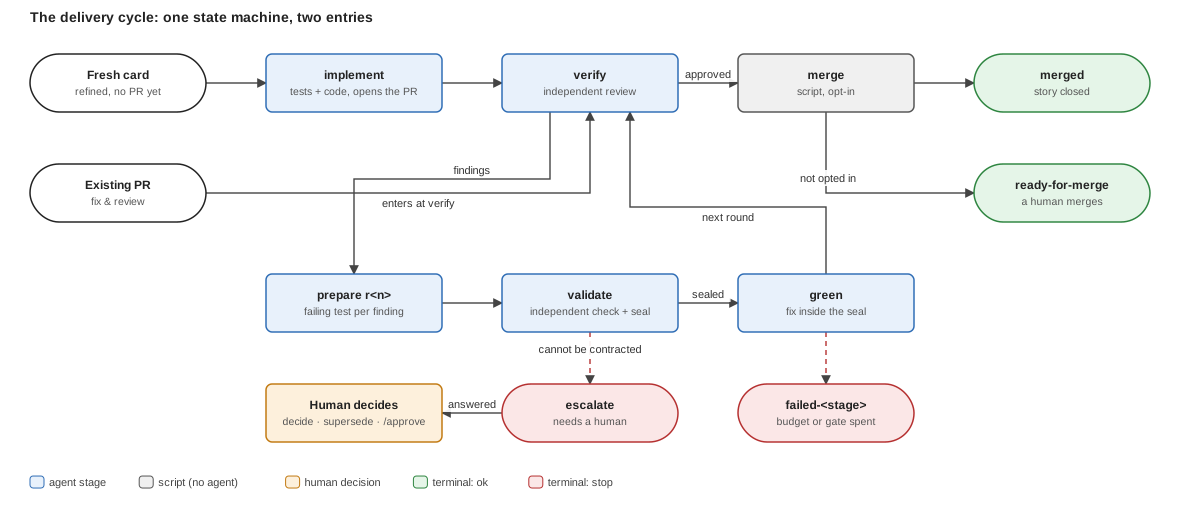
*Figure: two ways in (a fresh card at the top, a PR with findings on the left), one loop, and every exit is a human decision point.*
**One rule authority.** `cycle-state.mjs` alone decides what is due: stage order, retry budgets, round caps, resume after an interruption, and per-stage context freshness. Every realization asks it "what is next?", dispatches exactly that stage, forgets everything but the answer, and asks again. No coordinator, skill or driver holds a cycle rule of its own, which is why the three realizations in [section 3](#3-three-realizations-and-which-to-use) behave identically.
**State is files, not memory.** Each stage publishes a *handoff* under the run directory; the next question is answered from those files. A cycle interrupted at any point resumes from its first incomplete stage.
**Independence is structural.** The agent that implements never reviews; the agent that writes a finding's failing test is never its fixer; the validator never repairs. Only independent review activities are recorded as evidence.
Operational detail: the [`pair-workflow-cycle` skill](https://github.com/foomakers/pair/blob/main/packages/knowledge-hub/dataset/.skills/workflow/cycle/SKILL.md) (in-session coordinator, [#486](https://github.com/foomakers/pair/issues/486)), the [`cycle-state.mjs` script](https://github.com/foomakers/pair/blob/main/packages/knowledge-hub/dataset/.skills/workflow/cycle/scripts/cycle-state.mjs), and the `merge` stage ([#490](https://github.com/foomakers/pair/issues/490)) in [section 6](#6-the-merge-stage-and-the-merge-gate). The design is recorded in [ADR-024](https://github.com/foomakers/pair/blob/main/.pair/adoption/tech/adr/adr-024-delivery-phases-are-skills.md).
## 2. The stages, one by one
Every stage is a *skill* run by one *role*. `cycle-state.mjs` also decides whether the stage gets a **fresh** agent (the default) or **resumes** the previous agent of the same role (`reuse`); resuming is admitted only inside one role, never into `validate` or `verify`, whose whole value is independence.
| Stage | Role | Skill |
| --- | --- | --- |
| `implement` | implementer | [`pair-workflow-implement-phase`](https://github.com/foomakers/pair/blob/main/packages/knowledge-hub/dataset/.skills/workflow/implement-phase/SKILL.md) |
| `verify` | reviewer | [`pair-workflow-review-phase`](https://github.com/foomakers/pair/blob/main/packages/knowledge-hub/dataset/.skills/workflow/review-phase/SKILL.md) |
| `prepare` | test author | [`pair-workflow-red-spec`](https://github.com/foomakers/pair/blob/main/packages/knowledge-hub/dataset/.skills/workflow/red-spec/SKILL.md) |
| `validate` | contract validator | [`pair-workflow-red-verify`](https://github.com/foomakers/pair/blob/main/packages/knowledge-hub/dataset/.skills/workflow/red-verify/SKILL.md) |
| `green` | implementer (fixer) | [`pair-workflow-green-fix`](https://github.com/foomakers/pair/blob/main/packages/knowledge-hub/dataset/.skills/workflow/green-fix/SKILL.md) |
| `merge` | none: a script | [`cycle-merge.mjs`](https://github.com/foomakers/pair/blob/main/packages/knowledge-hub/dataset/.skills/workflow/cycle/scripts/cycle-merge.mjs) |
Each subsection below says what the stage is for, who runs it, what it reads and produces, when it is skipped, and how it ends. The *what and why* is here; the argument lists are in the skills.
### `implement`
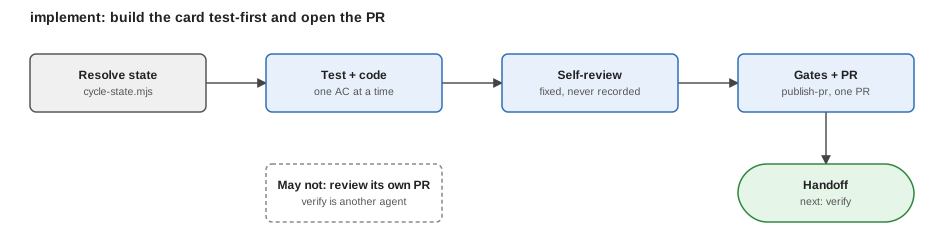
*Figure: implement asks the state script first and publishes last; everything between is test and code, one acceptance criterion at a time.*
- **For**: turning a refined card into verified commits and exactly one PR, written test-first, for each acceptance criterion a test that would fail without the behavior, then the code.
- **Who / context**: the implementer, `fresh`.
- **Reads → produces**: the card and the base branch → commits in the story worktree, a checkpoint, the PR (created or updated, never duplicated), and the stage handoff.
- **Self-review**: the implementer reviews its own diff against the acceptance criteria and fixes what it finds, and records nothing of it, so the verifier judges the result without the author's conclusions in front of it.
- **Skipped when**: a PR already exists for the card (the cycle enters at `verify`).
- **Ends**: success: handoff published, next is `verify`; a red gate still publishes the PR and routes one retry on the same base; a second red gate stops the cycle.
### `verify`
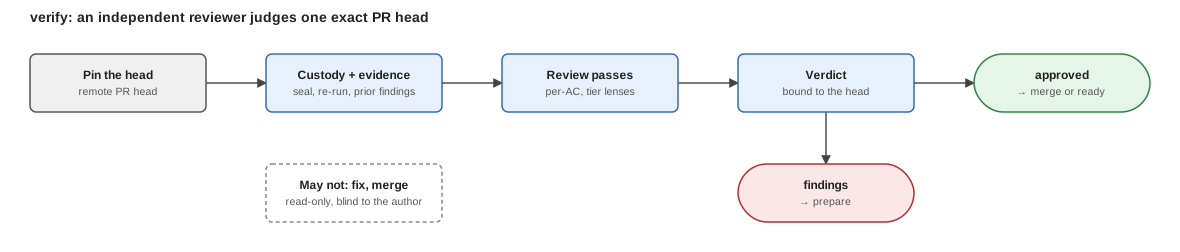
*Figure: verify pins the PR head before reading anything, so the verdict is about exactly one commit.*
- **For**: an independent judgment of one exact PR head: that the sealed evidence is intact, that every acceptance criterion has a test proving it, that prior findings are resolved, and that the adopted risk-tier passes find nothing blocking.
- **Who / context**: the reviewer, always `fresh`, read-only on code. It sees the card, the PR and the code, never the implementer's checkpoint.
- **Reads → produces**: PR head, card, handoffs → one review with stable finding ids, a verdict and the head it reviewed, published idempotently.
- **Skipped when**: never. Every path to a merge or a ready PR passes through it, and a moved head needs a new one.
- **Ends**: approved, the cycle advances to `merge` (or stops ready-for-merge); blocking findings at or above the project's floor, a remediation round starts at `prepare`; a finding only a human can settle, `escalate`.
### `prepare`
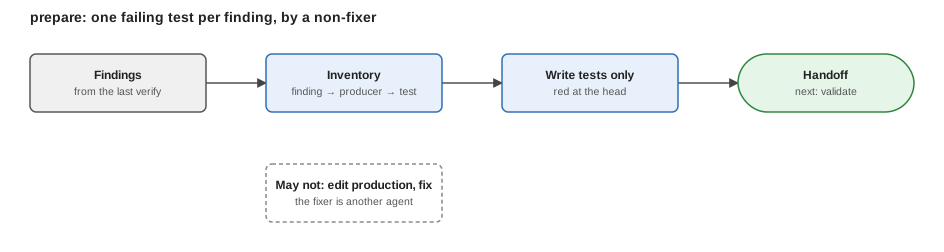
*Figure: prepare turns findings into failing tests before any production edit, and the author is never the one who will fix them.*
- **For**: turning each blocking finding into an executable acceptance contract (a failing test that proves the finding at the unfixed head, plus controls that must keep passing) before anyone touches production code.
- **Who / context**: the test author, `fresh` on the first round and eligible to `reuse` itself across rounds. It writes tests and fixtures only, and is never the fixer.
- **Reads → produces**: the findings of the last `verify` → test files and the contract handed to `validate`.
- **Skipped when**: a fresh card with no findings; the cycle never starts here without a review having found something.
- **Ends**: a contract ready for `validate`; or a typed refusal (the finding cannot be proven, must be split, is stale) that stops or escalates the group.
### `validate`
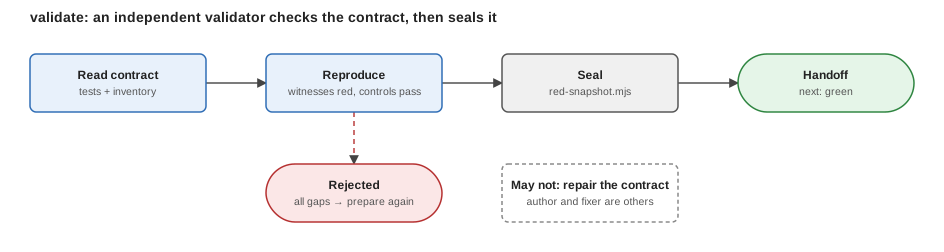
*Figure: validate reproduces every witness against the unfixed base; one typed rejection lists every gap, or the seal lands.*
- **For**: an independent check that the contract really discriminates (each witness fails at the unfixed head for the intended defect, each control may pass) and a deterministic **seal**: the tests become an immutable snapshot commit the fixer cannot alter.
- **Who / context**: the contract validator, always `fresh`. It never repairs a contract.
- **Reads → produces**: the contract and the base → either one typed rejection listing every gap found, or a sealed snapshot.
- **Skipped when**: never inside a round: it is the gate between `prepare` and `green`.
- **Ends**: sealed (next is `green`; rejected) back to `prepare` for a bounded number of repairs, then the cycle stops.
### `green`
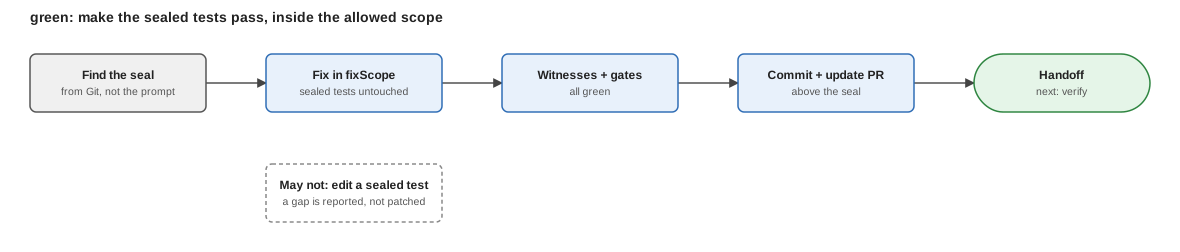
*Figure: green starts from the seal, may touch only the allowed scope, and ends with the same witnesses now passing.*
- **For**: making the sealed tests pass by changing production code only inside the contract's allowed scope, then updating the existing PR.
- **Who / context**: the implementer as fixer, `fresh` or resumed within its own role. A sealed test is untouchable: a gap in the contract is reported, never patched around.
- **Reads → produces**: the seal (discovered from Git, never trusted from a prompt) → commits above the seal, the updated PR, an evidence ledger.
- **Skipped when**: never inside a round.
- **Ends**: success (next is `verify`; an approved test that still fails) one retry on the SAME seal; a fixer that needs a human decision posts its escalation itself.
### `merge`
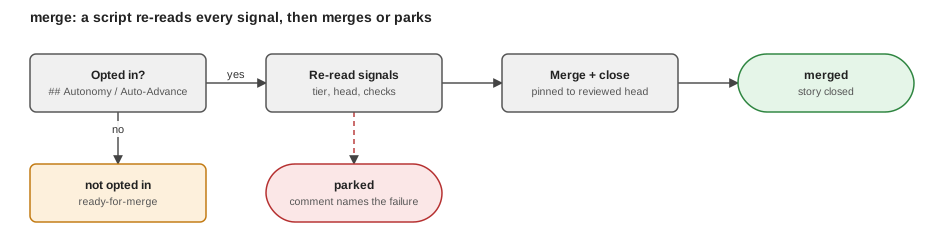
*Figure: merge re-reads every signal from the host before acting; any signal that is not success parks the card instead.*
- **For**: executing the merge of a review-approved PR, only when the project opted in. Detail in [section 6](#6-the-merge-stage-and-the-merge-gate).
- **Who / context**: nobody: it is a script, not an agent dispatch.
- **Reads → produces**: freshly re-read signals → a merge and a closed story, or a *park* with a comment on the card naming the failing signal.
- **Skipped when**: the project did not opt in (the default): the cycle stops `ready-for-merge` and a human merges.
- **Ends**: merged, merged with closure unfinished, or parked.
### Where a human decides
The cycle never decides these for itself: `decide` records a maintainer's answer to a finding that needs one (the cycle leaves `escalate` without re-running anything); `supersede` sets aside an unvalidated attempt so the stage can be redone; the explicit approval of a high-risk PR (`/approve`) is a recorded human act the `merge` stage requires. The recovery paths, including a stale card lock and custody after a base merge, are in the [`pair-workflow-cycle` skill](https://github.com/foomakers/pair/blob/main/packages/knowledge-hub/dataset/.skills/workflow/cycle/SKILL.md).
## 3. Three realizations, and which to use
One cycle, three ways to turn its crank. They differ in *who dispatches the stages*, never in what the rules are.
| Realization | Entry point | Dispatches stages with | Story |
| --- | --- | --- | --- |
| **In-session coordinator** | the [`pair-workflow-cycle` skill](https://github.com/foomakers/pair/blob/main/packages/knowledge-hub/dataset/.skills/workflow/cycle/SKILL.md) in Claude Code, Codex, or pi with `pi-subagents` | the session's own subagent primitive | [#486](https://github.com/foomakers/pair/issues/486) |
| **Console driver** | [`pair-cli run`](/docs/reference/cli/commands) | one fresh engine process per stage, `pi`, `opencode`, `claude`, `codex`, whatever is on PATH | [#487](https://github.com/foomakers/pair/issues/487) |
| **Claude parallel batch** | the `pair-implement-batch` workflow, driven by `pair-loop` ([batch engine](/docs/contributing/batch-engine-internals)) | the Claude Workflow tool, N cards at once | [#479](https://github.com/foomakers/pair/issues/479) |
**Choosing**: three questions, in order:
1. **Are you in a harness with a subagent primitive, working one card with a human nearby?** Use the in-session coordinator. It binds the primitive by probing the toolset, not by product name, and refuses cleanly when none is present: the console driver is then the fallback.
2. **Is there no interactive session (a shell, cron, CI, a daemon) or do you want an engine the session cannot be?** Use the console driver. It works on any engine and has no dependency on a vendor's orchestration tool. `--parallel N` is its fan-out ([#491](https://github.com/foomakers/pair/issues/491)): one `pair-cli run --card` process per allowed card, bounded by dependencies, the mutex analysis and `## Max Parallelism`, with one card failing never aborting the others.
3. **Are you on Claude Code and want a whole epic's cards in parallel with the orchestration inside the session?** Use the Claude parallel batch. Elsewhere the same work is the console driver's fan-out.
The in-session coordinator and the console driver run the cycle's hooks and profiles; the Claude batch runs no cycle hook ([section 5](#5-cycle-hooks)). The console driver and the loop also re-select cards over time, which a one-card in-session run does not.
Links out for the mechanics: the [`pair-cli run` reference](/docs/reference/cli/commands), the [`pair-loop` skill](https://github.com/foomakers/pair/blob/main/packages/knowledge-hub/dataset/.skills/loop/SKILL.md), and the [Max Parallelism section](https://github.com/foomakers/pair/blob/main/packages/knowledge-hub/dataset/.pair/knowledge/guidelines/collaboration/automation/automation-policy.md#max-parallelism--the-parallel-batch-ceiling) for the ceiling.
## 4. Profiles: engine, model, effort, context per stage
A **workflow profile** declares which engine, model, effort and context policy each stage uses (a cheap model with a resumed session for `prepare` and `green`, a frontier model with a fresh session for `validate` and `verify`) without touching any skill or script. The schema, the cascade, the model classes and the refusals are owned by [workflow-profiles.md](https://github.com/foomakers/pair/blob/main/packages/knowledge-hub/dataset/.pair/knowledge/guidelines/collaboration/automation/workflow-profiles.md) ([#488](https://github.com/foomakers/pair/issues/488)); both coordinators resolve it through one resolver.
**Shape** (abridged: the full field table is in the owner):
```json
{
"name": "cheap-green",
"defaults": { "engine": "claude", "model": "by-tier", "effort": "medium", "context": "fresh" },
"modelClasses": { "cheap": "", "balanced": "", "frontier": "" },
"stages": {
"prepare": { "model": "cheap", "context": "reuse" },
"validate": { "model": "frontier" },
"green": { "model": "cheap", "context": "reuse" },
"verify": { "model": "frontier", "effort": "high" }
}
}
```
**Cascade**: resolved once per run, highest first:
1. an external workflow-config file, used verbatim;
2. a named profile passed for this invocation;
3. the project's declared default profile in `pair.config.json`;
4. the KB default: the engine's own model, default effort, `fresh` on every stage.
Within a profile, a stage entry overrides only the fields it declares, then `defaults`, then the KB default. With nothing configured, the cycle runs exactly as it did before profiles existed.
**Worked mixed-model example.** The profile above runs the work that needs breadth at low cost and the work that needs independence at high capability:
| Stage | Model | Context | Why |
| --- | --- | --- | --- |
| `implement` | `by-tier` (from the card's `risk:*`) | fresh | cost follows risk |
| `prepare` | cheap | reuse | writing tests from findings is mechanical; resuming keeps what the author learned |
| `validate` | frontier | fresh | the independent check is the cycle's quality gate |
| `green` | cheap | reuse | the fix is bounded by the sealed tests |
| `verify` | frontier, high effort | fresh | the final judgment is what a human relies on |
Because `prepare` and `validate` apply to remediation rounds only, a profile must not assume every stage runs on every card: a fresh card runs `implement` and `verify` first.
**`context` is validated, not trusted.** A stage entry asking `reuse` into a stage where the cycle's transition table forbids it (`validate` and `verify` above all) is rejected at load, never accepted and silently overridden at dispatch. The table is `cycle-state.mjs`'s ([the rule is in workflow-profiles.md](https://github.com/foomakers/pair/blob/main/packages/knowledge-hub/dataset/.pair/knowledge/guidelines/collaboration/automation/workflow-profiles.md#context-is-validated-against-the-cycles-transition-table)).
**Audit, not input.** The resolved profile's name and content hash are recorded in every handoff but excluded from the inputs that invalidate evidence: swapping a profile between invocations re-validates nothing.
## 5. Cycle Hooks
`## Cycle Hooks` in `tech/automation.md` declares deterministic commands around the cycle, fail fast on a bad toolchain, realign generated mirrors before a stage, notify on an outcome, alert on a stop ([#489](https://github.com/foomakers/pair/issues/489)). The schema, the per-command timeout, hook-name rules and the fail-safe default are owned by [automation-policy.md](https://github.com/foomakers/pair/blob/main/packages/knowledge-hub/dataset/.pair/knowledge/guidelines/collaboration/automation/automation-policy.md#cycle-hooks--deterministic-commands-around-the-delivery-cycle).
The hooks are executed by the **coordinator** (the in-session skill or the console driver) never by the stage's own agent, through one shared executor, so the two cannot drift. The Claude parallel batch has no shell and runs none.
**Blocking vs logging: the distinction that matters:**
| Kind | Hook names | A non-zero exit |
| --- | --- | --- |
| **Blocking** | `pre-`, `pre-cycle` | **stops the cycle** before the stage runs; the command's own output is reported verbatim |
| **Logging** | `post-`, `post-cycle`, `on-halt` | **is logged, never a stop**: the stage already happened, remaining commands still run |
**Every hook point and its typical use:**
| Hook point | Typical use |
| --- | --- |
| `pre-cycle` | check the toolchain, fail fast on a dirty environment (runs in the main checkout, never in a story tree) |
| `pre-prepare`, `pre-validate` | fetch/refresh fixtures the contract stages read |
| `pre-implement` | install dependencies, realign the generated mirrors, start a local service the tests need: all in the story worktree |
| `pre-green` | same as `pre-implement`, for a remediation round |
| `pre-verify` | an external gate the verifier must find green (a build), blocks `verify` on failure |
| `pre-merge` | a last local check before an automatic merge, blocks the merge on failure |
| `post-` | notifications, metrics, audit lines, anything whose failure must not stop the cycle |
| `post-cycle` | notify the outcome, clean up what `pre-cycle` created |
| `on-halt` | alert a human: the deterministic notification point for every failure path |
Stage hooks run in the **story worktree**, the tree the stage works on; cycle-level hooks run in the **main checkout**. A hook name is a pattern over the stage ids `cycle-state.mjs` enumerates, so a stage added later gets its hooks with no schema change; a typo is a warning at load, not a stop.
## 6. The `merge` stage and the merge gate
The `merge` stage ([#490](https://github.com/foomakers/pair/issues/490)) is the cycle's last, and it is **opt-in per project**. A review-approved PR stops *ready-for-merge* and a human merges it: that is the default, and it is the fail-closed posture.
**The default is no automatic merge.** The `merge` gate of `## Autonomy` is `always` unless written otherwise, and `always` parks every review-approved card for a human. A maintainer opts in with `until: merged` plus `merge: never` (every selected card may merge) or `merge: when; has: …; lacks: …` (a card matching the condition escalates instead). The legacy `## Auto-Advance` section is translated to the same gate by `autonomy-policy.mjs` (`(none)` is `always`, a tier is `when; lacks: `) and keeps working ([Autonomy](https://github.com/foomakers/pair/blob/main/packages/knowledge-hub/dataset/.pair/knowledge/guidelines/collaboration/automation/automation-policy.md#autonomy--selection-target-and-gates-us-521-adr-027)).
**What the stage re-verifies, on freshly read signals, before any merge**: the conjunction that *is* the merge-allowed synthesis ([pr-states.md](https://github.com/foomakers/pair/blob/main/packages/knowledge-hub/dataset/.pair/knowledge/guidelines/collaboration/project-management-tool/pr-states.md)):
- the card's risk tier, re-read (a mid-run raise parks the card);
- the PR's current remote head is identical to the head that was reviewed (a moved head is never merged);
- the `pair-review` check is `success` on that head;
- the `pair-explicit-approval` check is `success` on that head (below the highest-risk tier it passes by itself; at that tier it requires a recorded human approval);
- every OTHER CI check on that head (check runs and commit statuses, read through the code-host adapter) is `success`: a failed one refuses the merge (`ci-not-green`, halted), a still-running one parks it awaiting the build;
- the tier's gate set is green.
Anything unreadable, moved or not `success` **parks** the card with the failing item named: it is never merged. On success the merge follows merge-and-cascade: the adopted strategy, story close, parent cascade with read-back, branch deletion.
**Relationship to the other declarations.** The `merge` gate answers *which cards may merge unattended*; it is a switch, never a gate list, and it does not restate what "green" means: that is the quality model's per-tier table. The `merge` stage *enacts* it. Every realization reaches the stage through the same script, so the rule has one owner and `pair-loop` itself holds no merge call. Detail: the [Autonomy](https://github.com/foomakers/pair/blob/main/packages/knowledge-hub/dataset/.pair/knowledge/guidelines/collaboration/automation/automation-policy.md#autonomy--selection-target-and-gates-us-521-adr-027) sections.
## 7. Host adapters: PM tool and code host
The cycle scripts never call a host CLI themselves: they call the **adapter** the project's `way-of-working.md` binds, so every host-specific spelling (binary, arguments, URL shape, label and check vocabulary) lives in one file ([#492](https://github.com/foomakers/pair/issues/492), [ADR-026](https://github.com/foomakers/pair/blob/main/.pair/adoption/tech/adr/adr-026-pm-code-host-adapter-interface.md)). The PM tool (cards) and the code host (pull requests) are resolved independently.
**The interface is eight methods:**
| Method | Side | For |
| --- | --- | --- |
| `readCard` | PM tool | read a card's text and fields |
| `cardHash` | PM tool | derived from `readCard` by the kit, never written by an adapter |
| `prHead` | code host | the PR head as a 40-hex sha |
| `upsertComment` | code host | create or update a marker-keyed comment, idempotently |
| `concludeCheck` | code host | publish a check conclusion on a given sha |
| `setPrState` | code host | leave exactly one PR-state label |
| `merge` | code host | merge pinned to the reviewed head |
| `closeAndCascade` | PM tool | close the card and every parent whose children are all done |
A further optional set of primitives serves scope decisions and state lookups; omitting one fails only the feature that needs it, typed, naming the method.
**Shipped adapters**: **GitHub** and **Azure DevOps**. A filesystem host is the extension guide's worked example.
**Adding a host** is one new file plus one declaration, never an edit to an existing adapter or to `cycle-state.mjs`. The validated step-by-step guide, including the file layout and the checks an adapter must pass, is the [Host Adapter Extension Guide](https://github.com/foomakers/pair/blob/main/packages/knowledge-hub/dataset/.pair/knowledge/guidelines/collaboration/project-management-tool/host-adapter-extension-guide.md). Credentials are never read, stored or printed by an adapter: the host CLI authenticates itself.
## 8. Automation as one whole
*Unattended* work is the cycle plus five things around it: a trigger, a dispatch, gates, safety rails, and a way out.
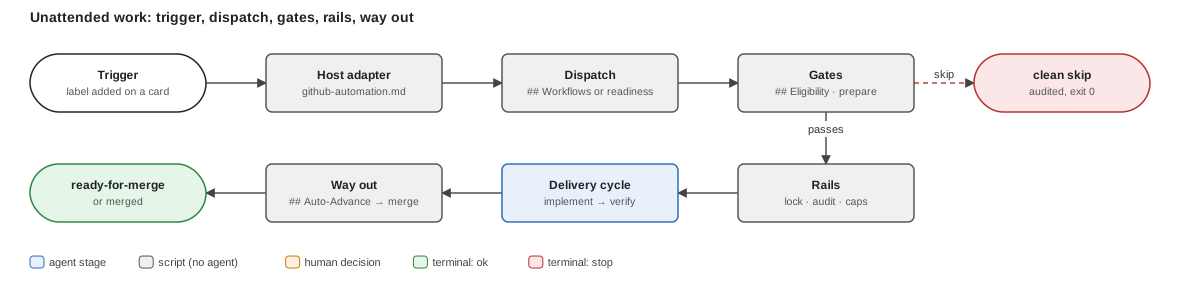
*Figure: the cycle sits in the middle; the trigger and the host adapter feed it, the gates and rails bound it, and the way out is always a parked card or a human.*
1. **The trigger.** A tracker event (a label added to a card) reaches the **host adapter**, the thin per-host piece that holds the credentials the trigger runs under. It calls the dispatcher; it carries no cycle rule. See [github-automation.md](https://github.com/foomakers/pair/blob/main/packages/knowledge-hub/dataset/.pair/knowledge/guidelines/collaboration/automation/github-automation.md) and [#492](https://github.com/foomakers/pair/issues/492).
2. **The dispatch.** The console driver (or `pair-loop`) reads `tech/automation.md` and maps the card's tags through `## Workflows` ([automation-policy.md](https://github.com/foomakers/pair/blob/main/packages/knowledge-hub/dataset/.pair/knowledge/guidelines/collaboration/automation/automation-policy.md#workflows--which-workflow-each-tag-routes-to)). A tag is an opaque routing key; **an untagged card is never routed by tag**. With no mapping, the card's own Definition of Ready decides: a Ready card with a task breakdown enters the cycle, a card with a PR enters at `verify`.
3. **The gates.** The `## Autonomy` `filter` bounds `--autonomous` runs: a card without a listed label is skipped as ineligible, and `--approve-ineligible` lets exactly one run through. Unattended runs never start a preparation skill unless the `prepare` gate says so (`always` by default: a human prepares). A card that cannot be read is a clean skip.
4. **The safety rails.** An exclusive **per-card lock** (no timeout; SIGTERM and SIGINT release it, so re-running the same command continues the run); an **audit trail**, `start`, `skip`, `end`, with the start also printed as a `DISPATCH-RECORD:` line the adapter can post on the card; the **dispatch cap**; and `## Max Parallelism` as the ceiling on fan-out. An escalation condition in `## Autonomy` stops the cycle with one marker-keyed comment on the card.
5. **The way out.** The `merge` gate of `## Autonomy` and the `merge` stage ([section 6](#6-the-merge-stage-and-the-merge-gate)). By default the run ends *ready-for-merge* and the merge stays a human decision.
**A reader can predict any card's outcome** by walking these in order: is it mapped or Ready? eligible? unlocked? does a prepare or escalation condition fire? has the project opted into merge for its tier?
### Worked example: a label to a PR ready for merge, no one present
Setup: `## Workflows` maps `auto-dev` to the cycle; `## Autonomy` declares `filter: risk:green` and leaves the `merge` gate at `always`. Card 123 is Ready, has a task breakdown, and carries `risk:green`.
| # | What happens | Printed / recorded |
| --- | --- | --- |
| 1 | A maintainer adds `auto-dev` to card 123. The host adapter fires. | the adapter's own job log |
| 2 | The dispatcher reads `automation.md`, matches `auto-dev`, checks eligibility and the card lock. | audit `start` + the `DISPATCH-RECORD:` line, posted on the card |
| 3 | `implement` writes tests and code, opens PR 456. | a handoff; the PR body |
| 4 | `verify` reviews the exact head. | one review on the PR; the `pair-review` check |
| 5 | Blocking findings? A remediation round runs `prepare → validate → green → verify` until clean or the budget is spent. | one handoff per stage |
| 6 | Approved, the `merge` gate is `always` ⇒ no `merge` stage. | audit `end`; status *ready-for-merge* |
| 7 | A human merges PR 456. | n/a |
Had the policy declared `until: merged` and `merge: never`, step 6 would have run the `merge` stage: re-read the signals, merge pinned to the reviewed head, close the story and cascade to its parent, or park with a comment naming the signal that failed.
The mechanics of every step are in the owner links of sections 1–7; the walk-through as a hands-on tutorial is on the docs site ([Automated development](/docs/tutorials/automated-development)).
## 9. Timeouts, stalls and retries by surface
What bounds a stage that hangs, and what is retried, differs by *who drives the cycle*. The rules of the cycle never change; the enforcement does. Single owner of this table, other pages link here.
| Surface | What bounds a hang | What happens next |
| --- | --- | --- |
| **`pair-cli run`** (console driver, tier 2) | One wall-clock watchdog per engine process: `--iteration-timeout ` (default `1800`). It covers every cycle stage, every `run --skill` iteration **and the loop's `pair-next` selection process** (same bound, passed to each). No terminal event in the stream within the bound ⇒ the engine gets `SIGTERM` and the run is reported `stalled` (a terminal event already read keeps its outcome). | A stalled **stage** is re-dispatched fresh, sharing the dead-dispatch budget `policy.deadDispatchRetries` (default `1`, read from `cycle-state`); the next unadvanced handoff ends the cycle `failed-`. A stalled or failed **selection** stops the loop `selection failed` (exit `1`) and is never retried. |
| **`pair-cli run --parallel` / `--watch`** (the loop) | The same watchdog per child `run --card`, plus the per-card lock (no timeout of its own). | **Transient** failures are retried: a child that crashed, was killed, or never reported a cycle status (engine/API error) is retried within the per-run **retry budget** (default `1`, printed in the loop header and audited). A **durable** terminal, a reported `failed-contract` or any `failed-*`, or `escalate` (the review/fix budget is spent, a human decision is owed), is reported with its reason and excluded, never retried. An `escalated` card (an autonomy gate fired) is not durable: it is skipped until its escalation is cleared, then re-picked. A lock whose holder pid is dead on this host (a SIGKILLed driver) is a **stale lock**: reclaimed and audited `lock-reclaimed`; a live holder is respected (`locked by pid P (alive)`). |
| **In-session `/pair-workflow-cycle`** (any harness) | The coordinator enforces it, not a process: **Step 4** of the skill: a stage that is still running but makes no progress for its time bound is a stall. | Resume it once on the same subagent (or re-dispatch the same prompt fresh where resume is unavailable), within the same `deadDispatchRetries` budget as a dead dispatch; then `failed-`. A stage may never leave a command in the background or end its turn on one ([headless stage execution](https://github.com/foomakers/pair/blob/main/packages/knowledge-hub/dataset/.pair/knowledge/guidelines/technical-standards/ai-development/skill-conventions/headless-stage-execution.md)). |
| **Claude Code Workflows** (`pair-loop`, `pair-implement-batch`) | The runtime's `agent()` has no timeout option, so each call races a timer: `args.agentTimeoutMinutes` (default 30 minutes, aligned with the 1800 s of `pair-cli`) when the sandbox exposes `setTimeout`; where it does not, the call is unbounded and the limit cannot be enforced. | A selection that times out is retried once, then the run ends `failed: true, reason: "selection failed: timeout after m"`; any other `pair-loop` stage that times out fails the run naming the stage; a `pair-implement-batch` stage agent that times out is NOT retried (the runtime cannot cancel it, so it may still be writing to the worktree and a retry would be a second writer: the stage ends `failed-` with `timed out after m) the agent may still be running; human check required`, and a human must check the worktree before re-running. The loop retries only transient failures and keeps no cross-run halt memory beyond the card's current durable state. |
| **`/pair-loop` in other coding agents** | No loop runs there: the skill drives exactly **one** eligible card per invocation and prints a continue-token; the caller re-invokes it. | Unattended multi-card delivery on those agents is the console driver (first row). |
## 10. Where to go next
| You want to… | Read |
| --- | --- |
| run one card in your session | the [`pair-workflow-cycle` skill](https://github.com/foomakers/pair/blob/main/packages/knowledge-hub/dataset/.skills/workflow/cycle/SKILL.md) |
| run from a shell or cron, or fan out | the `pair-cli run` section of the [CLI reference](/docs/reference/cli/commands) |
| choose models per stage | [workflow-profiles.md](https://github.com/foomakers/pair/blob/main/packages/knowledge-hub/dataset/.pair/knowledge/guidelines/collaboration/automation/workflow-profiles.md) |
| declare the filter, workflows, gates, hooks, caps | [automation-policy.md](https://github.com/foomakers/pair/blob/main/packages/knowledge-hub/dataset/.pair/knowledge/guidelines/collaboration/automation/automation-policy.md) |
| wire GitHub triggers | [github-automation.md](https://github.com/foomakers/pair/blob/main/packages/knowledge-hub/dataset/.pair/knowledge/guidelines/collaboration/automation/github-automation.md) |
| add a PM tool or code host | [Host Adapter Extension Guide](https://github.com/foomakers/pair/blob/main/packages/knowledge-hub/dataset/.pair/knowledge/guidelines/collaboration/project-management-tool/host-adapter-extension-guide.md) |
Known limitation: a link check catches a broken anchor, not a semantic change in a linked owner. If an owner's behavior changes shape, this page is updated in the same change.
**Next:** [Lifecycle modes](/docs/process-lifecycle/lifecycle-modes), who drives the cycle and on which assistant.
---
## Delivery workflow
Source: https://pair.foomakers.com/docs/process-lifecycle/delivery-workflow
The **delivery workflow** is the second [lifecycle](/docs/process-lifecycle) workflow, after [analysis and refinement](/docs/process-lifecycle/refinement-workflow). It takes one Ready [card](/docs/concepts/glossary#card) to a review-approved pull request, and optionally to a merge, without relying on one long conversation. It is a set of [workflow skills](/docs/concepts/skills#workflow-skills) driven by a single state machine.
## Why it exists
A single agent that writes the code, judges it and merges it grades its own work. The workflow splits that job so each judgment is made by someone who did not make the thing being judged, and it keeps its state in files so an interruption costs nothing.
## One state machine per card

*Figure: a fresh card takes the straight path across the top; only blocking review findings enter the loop on the left, and every exit on the right is a place where a human decides.*
- **Stages**: `implement`, `verify`, the remediation stages `prepare`, `validate` and `green`, then `merge`. A fresh card runs `implement → verify → merge`.
- **Remediation rounds**: blocking review findings loop `prepare → validate → green → verify`. The failing test comes first, is [sealed](/docs/concepts/glossary#seal), and the fix lands above the seal.
- **One rule authority**: a single script decides what is due next. Every driver asks it, dispatches exactly that stage, and asks again.
## Independent roles
Four roles, never the same agent for adjacent judgments: the **implementer** (writes tests and code), the **fix-test author** (writes a finding's failing test), the **contract verifier** (validates and seals it) and the **reviewer** (verifies the exact PR head). The implementer never reviews; the verifier never repairs.
## Durable handoffs and custody
Every stage publishes a [handoff](/docs/concepts/glossary#handoff) file under the run directory. State is files, not memory: a cycle resumes from its first incomplete stage. A sealed test is custody-checked byte for byte at verification; a fixer cannot weaken what it must satisfy.
## Autonomy gates and escalation
Three gates decide how far a card goes without you: `until` (`ready`, `pr`, `merged`), `prepare` (who refines a Draft card) and `merge` (whether a review-approved card merges). A `when` condition that fires **escalates** the card to a human. Defaults keep a human in the loop. Recipe: [Autonomy and per-stage engine and model](/docs/guides/autonomy-and-profiles); every key: [Adoption settings](/docs/reference/adoption-settings#techautomationmd).
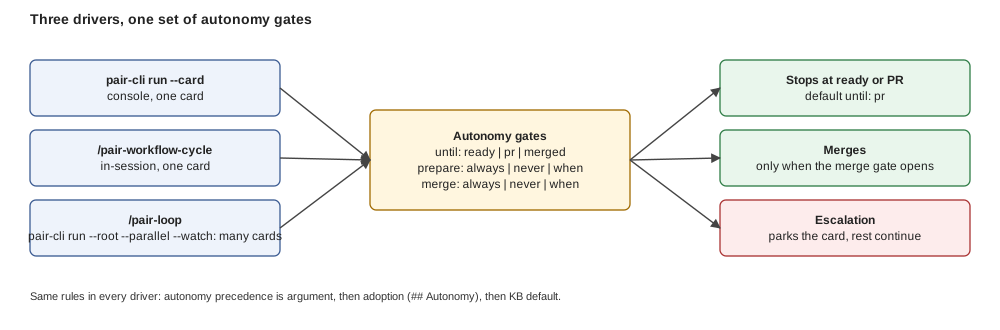
*Figure: whichever driver starts the run, the same gates sit between it and a merge; the only way around a gate is the escalation path to a human.*
## Per mode
Same three modes as the [refinement workflow](/docs/process-lifecycle/refinement-workflow#per-mode); which assistants support each is in [Lifecycle modes](/docs/process-lifecycle/lifecycle-modes#modes-by-assistant).
- **Assisted**: not the workflow. You run `/pair-process-implement` and `/pair-process-review` yourself, task by task.
- **Supervised**: you trigger it on one card (`/pair-workflow-cycle`, `pair-cli run --card`), or on a set of cards you name (`/pair-implement-batch`). It runs implement, independent verify and remediation, then stops for you at the review-approved PR or at an escalation.
- **Autonomous**: `/pair-loop` or `pair-cli run --root --parallel --watch` re-select cards and run the cycle under the gates. A card merges only when the `merge` gate allows it.
## Realizations
One cycle, several drivers: the in-session coordinator `/pair-workflow-cycle` (Claude Code, Codex, pi with subagents), the console driver `pair-cli run` on any installed [engine](/docs/concepts/glossary#engine), and the Claude Code parallel batch. They differ in who dispatches the stages, never in the rules. Choosing one: [The delivery cycle in depth, realizations](/docs/process-lifecycle/delivery-cycle#3-three-realizations-and-which-to-use).
**Next:** [The delivery cycle in depth](/docs/process-lifecycle/delivery-cycle), stage by stage.
---
## Lifecycle modes
Source: https://pair.foomakers.com/docs/process-lifecycle/lifecycle-modes
The phases and the two workflows ([analysis and refinement](/docs/process-lifecycle/refinement-workflow), [delivery](/docs/process-lifecycle/delivery-workflow)) are the same in every mode. What changes is **who drives**:
- **Assisted**: pair guides you through every phase of the process with AI, one skill at a time.
- **Supervised**: pair automates the work on a single card, from start to finish.
- **Autonomous**: pair watches the backlog and applies the whole process, on its own, to every card that matches a criterion you set (for example all `risk:green` cards, or all UI cards).
Pick per project, or per card.
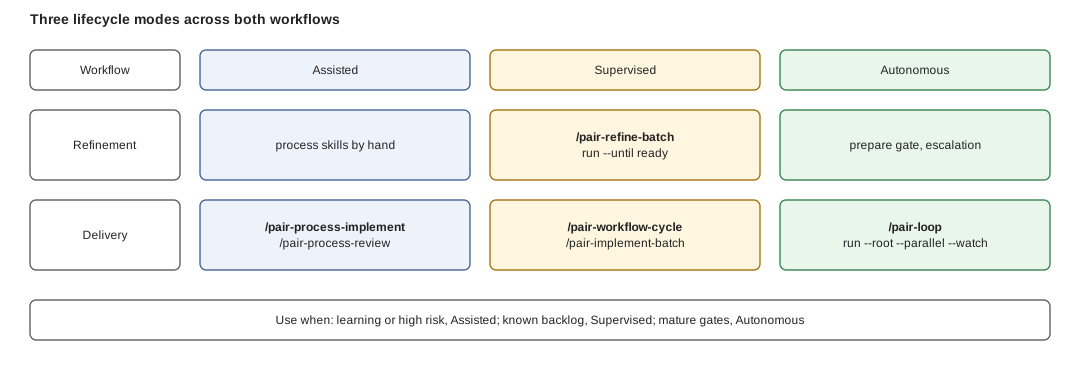
*Figure: move right along a row and the human disappears from the loop; move down and the same mode applies to delivery instead of refinement.*
## Assisted
**pair guides you through every phase with AI; you run each step.** PRD, bootstrap, planning, refinement, implementation and review are each one skill you invoke, in the order the [phases](/docs/process-lifecycle/phases) give. Use it while learning pair, on a new or high-risk project, or when you want to read and approve every decision.
## Supervised
**pair automates the work on a single card, from start to finish; you trigger it and review the result.** A hand-picked batch is the same thing on several cards you name.
- **Refinement**: `pair-cli run --card --until ready` stops the card right after refinement; `/pair-refine-batch` does it for a set of Draft cards you name. Grill questions still reach you.
- **Delivery**: `/pair-workflow-cycle ` in your assistant, or `pair-cli run --card ` from a shell; `/pair-implement-batch` for a set of cards you name. The workflow runs implement, independent verify and remediation, then stops at the review-approved PR or at an [escalation](/docs/concepts/glossary#escalation).
Use it when the project is set up, the backlog is known, and you want independent verification without running each stage by hand. Recipe: [Deliver a card](/docs/guides/deliver-a-card).
## Autonomous
**pair watches the backlog and applies the whole process to every card that matches your criterion, inside the gates you set.**
- **Selection**: the criterion is a label filter in `## Autonomy` of `tech/automation.md` (`filter: risk:green`, or a team label such as `ui`), applied to the cards under a root card.
- **Drivers**: `/pair-loop` in a Claude Code session, or `pair-cli run --root --parallel --watch` as a daemon on any [engine](/docs/concepts/glossary#engine).
- **Gates**: `until` (`ready`, `pr`, `merged`), `prepare` and `merge` decide how far a card goes; an escalation hands a card back to a human.
- **Safe defaults**: nothing merges and no Draft card is prepared unattended until you declare it.
Use it when classification and gates are trusted and the backlog is mostly low-risk. Read [what it does and does not protect you from](/docs/tutorials/automated-development#safety-what-this-does-and-does-not-protect-you-from) before the first unattended run. Walkthrough: [Automated development](/docs/tutorials/automated-development); every key: [Adoption settings](/docs/reference/adoption-settings#techautomationmd).
## Modes by assistant
Assisted needs only a tool that reads skills. Supervised in-session needs a [harness](/docs/concepts/glossary#harness) with subagents; from a shell, `pair-cli run` needs an engine. Autonomous needs an engine.
| Mode | Claude Code | Codex | pi | opencode | Cursor | GitHub Copilot | Windsurf |
| --- | --- | --- | --- | --- | --- | --- | --- |
| Assisted | yes | yes | yes | yes | yes | yes | yes |
| Supervised, in session (`/pair-workflow-cycle`) | yes | yes | yes, with pi-subagents | no | no | no | no |
| Supervised and Autonomous, from a shell (`pair-cli run`) | yes (`claude -p`) | yes | yes | yes | no | no | no |
| Autonomous, in session (`/pair-loop` with the batch workflows) | yes | degraded, one card per run | degraded, one card per run | no | no | no | no |
"Degraded" means the skill runs one card and prints a continue-token for the next invocation. The harness and engine layer is explained in [Harnesses and engines](/docs/integrations/adding-a-harness); per-tool setup in [AI coding tools](/docs/integrations).
## Modes by workflow
| Mode | Workflow | Who triggers | What runs | Where it stops | Config |
| --- | --- | --- | --- | --- | --- |
| Assisted | Refinement | you, per skill | `/pair-process-brainstorm`, `-plan-stories`, `-refine-story`, `-plan-tasks` | after each skill | none |
| Assisted | Delivery | you, per skill | `/pair-process-implement`, `/pair-process-review` | after each skill | none |
| Supervised | Refinement | you, per card or batch | `pair-cli run --card --until ready`, `/pair-refine-batch` | Ready, or a grill question | `prepare` |
| Supervised | Delivery | you, per card or batch | `/pair-workflow-cycle`, `/pair-implement-batch`, `pair-cli run --card` | review-approved PR, escalation | `until`, Blocking Severities |
| Autonomous | Refinement | the loop | `prepare` gate `never` or `when` | escalation (`needs-review`) | `prepare` |
| Autonomous | Delivery | the loop or daemon | `/pair-loop`, `pair-cli run --root --parallel --watch` | gates `until` and `merge`, escalation | `## Autonomy` |
## Which to use
| Situation | Mode |
| --- | --- |
| New to pair, new project, high-risk work | Assisted |
| Known backlog, you want one card done end to end and review the result | Supervised |
| Mature gates; a class of cards (green risk, UI, ...) can run without anyone watching | Autonomous |
Modes mix: plan Assisted, deliver Supervised, and hand the green cards to Autonomous. Configuring the gates is a guide: [Autonomy and per-stage engine and model](/docs/guides/autonomy-and-profiles).
**Next:** [Skill layers](/docs/process-lifecycle/skill-layers), which skill drives which.
---
## Phases
Source: https://pair.foomakers.com/docs/process-lifecycle/phases
Four phases, nine steps. Each step has a how-to guide in the Knowledge Base and a skill that runs it. You enter at whatever phase matches your project; `/pair-next` tells you which.
## Three ways to run the steps
The steps are the same in every mode; what changes is who drives them.
| Mode | Who drives | You step in | Read |
| --- | --- | --- | --- |
| **Assisted** | pair guides you through every phase with AI, you run each skill | at every step | the phase pages below |
| **Supervised** | pair automates one card from start to finish | at checkpoints and escalations | [Refinement workflow](/docs/process-lifecycle/refinement-workflow), [Delivery workflow](/docs/process-lifecycle/delivery-workflow) |
| **Autonomous** | pair watches the backlog and runs the whole process on every card matching your criterion (e.g. all `risk:green` or all UI cards) | only when classification escalates a card | [Tag-driven automation](/docs/process-lifecycle/tag-driven-automation), [Lifecycle modes](/docs/process-lifecycle/lifecycle-modes) |
Think of driving automation in cars: assistance, then a car that drives a stretch while you supervise, then one that drives itself inside a defined area. The analogy is spelled out in [Lifecycle modes](/docs/process-lifecycle/lifecycle-modes). You can mix them: plan Assisted, deliver Supervised, and let low-risk cards run Autonomous. Details and per-assistant support: [Lifecycle modes](/docs/process-lifecycle/lifecycle-modes).
## The steps
```text
Discovery (optional, before Phase 1) ─── /pair-process-brainstorm
Phase 1: Induction (one-time)
Step 1 Create PRD ─────────────── /pair-process-specify-prd
Step 2 Bootstrap project ──────── /pair-process-bootstrap
Step 3 Plan initiatives ───────── /pair-process-plan-initiatives
Phase 2: Strategic planning (per initiative)
Step 4 Break down epics ───────── /pair-process-plan-epics
Phase 3: Iteration (per epic)
Step 5 Break down stories ─────── /pair-process-plan-stories
Step 6 Refine stories ─────────── /pair-process-refine-story
Step 7 Create tasks ───────────── /pair-process-plan-tasks
Phase 4: Execution (per story)
Step 8 Implement ──────────────── /pair-process-implement
Step 9 Code review ────────────── /pair-process-review
```
| Phase | Runs | Card | Leaves behind |
| --- | --- | --- | --- |
| [Induction](/docs/process-lifecycle/phases/induction) | once | PRD | `.pair/adoption/` filled in, prioritized initiatives |
| [Strategic planning](/docs/process-lifecycle/phases/strategic-planning) | per initiative | [Initiative](/docs/concepts/glossary#initiative-epic-story-task) | epics sized for a few sprints each |
| [Iteration](/docs/process-lifecycle/phases/iteration) | per epic | Epic | Ready stories with tasks |
| [Execution](/docs/process-lifecycle/phases/execution) | per story | Story | a merged pull request |
Two ways to follow the steps: **process skills** (recommended: one slash command, the AI runs the structured process, composes capability skills and updates your PM tool) or the **how-to guides** in `.pair/knowledge/how-to/` for the same process by hand. Both are listed in the [Skills catalog](/docs/reference/skills-catalog) and the [Guidelines and how-to catalog](/docs/reference/guidelines-catalog).
**Next:** [Induction](/docs/process-lifecycle/phases/induction), the one-time setup. After the four phases, continue with the [refinement workflow](/docs/process-lifecycle/refinement-workflow) and the [delivery workflow](/docs/process-lifecycle/delivery-workflow) to automate them.
---
## "Execution: Implement & Review"
Source: https://pair.foomakers.com/docs/process-lifecycle/phases/execution
Execution is the daily development loop. You pick up a refined story, implement it task by task, create a PR, and get it reviewed and merged.
## Step 8: Implement
Develop a user story by working through its tasks sequentially.
| | |
| --- | --- |
| **Skill (recommended)** | `/pair-process-implement` |
| **How-to guide** | [10: How to Implement a Task](/docs/reference/guidelines-catalog) |
| **Input** | Story issue with tasks (status: Ready) |
| **Output** | Feature branch, commits, pull request |
### The Implementation Cycle
For each task, the skill follows a strict 5-step cycle:
```text
1. Context ──── Load adoption files and technical decisions
│
2. Branch ───── Create or switch to the feature branch
│
3. Implement ── Write code (TDD for dev tasks, direct for docs/config)
│
4. Quality ──── Run quality gates (lint, test, type check)
│
5. Commit ───── Commit and update task checkbox in the story
```
### TDD Discipline (Development Tasks)
The AI follows strict TDD, tests and implementation never change in the same session:
1. **RED**: write a failing test that defines the expected behavior
2. **GREEN**: write the minimal code to make the test pass
3. **REFACTOR**: improve structure without changing behavior
Every new module file must have a corresponding unit test file (1:1 mapping). Mocks are avoided in favor of in-memory test doubles.
### Commit Strategies
| Strategy | When | Flow |
| --- | --- | --- |
| **Commit per task** | Multi-task stories (recommended) | Implement → confirm with dev → commit → next task |
| **Commit per story** | Single-task stories or continuous flow | Implement all → confirm with dev → commit all |
With commit-per-task, the developer gets a checkpoint between every task: the AI presents a summary and waits for confirmation before committing.
### Progress Feedback: Ticks and One Comment
While the skill works through the breakdown, the story reports its own progress. As each task completes, its checklist item in the story's **Task Breakdown** is ticked (located by task ID, patched one line at a time, never rewriting another section) and the outcome is queued. At the end of the run, the queue is flushed as **one comment**: a headline, one line per task, everything longer collapsed in ``.
The cadence is one comment per run iteration, so an unattended run reports at task granularity without turning the story into a comment feed. A task that failed or was skipped is recorded in the comment and its checklist item stays unticked: a story that stopped halfway looks different from one that finished.
The feedback is annotation, never a gate: a locator mismatch, a body edited concurrently, or a tracker write that does not land is retried once, then reported in the comment, and the run carries on.
That holds through the writer too: the tick is composed with `$on-failure: report`, so a tracker error comes back as an outcome to record rather than as a halt that would stop the story it only annotates.
Three rules make that safe, and the shipped guideline `task-progress-feedback.md` (installed into your project at `.pair/knowledge/guidelines/collaboration/project-management-tool/`, listed in the [guidelines catalog](/docs/reference/guidelines-catalog)) states them in full: the item is located by **task ID**, never by position or title; the write is **diff-checked** to exactly one changed line, one checkbox per write, or it is abandoned rather than sent; a conflicting body is re-read and re-located, never re-patched from the stale snapshot.
### Closing Phase: Checkpoint + PR
After all tasks are complete, the skill's closing phase splits the handoff from the publish so the PR is always built on a clean context:
1. **Writes a checkpoint** (`/pair-capability-checkpoint` in write mode): the boundary artifact capturing story, branch, tasks done, decisions, and remaining todos. This is the handoff document the PR is built from, not this session's memory.
2. **Publishes the PR via a handoff-only subagent**: spawns a fresh, anonymous subagent whose entire prompt is the checkpoint, which resumes from it and runs `/pair-capability-publish-pr`. That skill runs the quality gate, pushes the branch, creates or updates one PR from the [PR template](/docs/reference/guidelines-catalog), links it to the story, copies the classification tags, and marks it ready for review.
If subagent spawning is unavailable, the skill degrades to running `/pair-capability-publish-pr` inline in the same session (checkpoint still written) and notes the degradation. Re-invoking `/pair-process-implement` on an interrupted story reads the checkpoint and resumes from the first pending task, completed tasks are never repeated, and `publish-pr` updates the existing PR rather than opening a second one.
### What Your PR's Tier Changes
The `risk:*` tag copied from your story onto the PR (see the closing phase above) is what scales the rest of the flow. Five things change with it; the model behind each is linked, not repeated here.
1. **Review re-classifies from the diff: it may raise, never lower (D17).** The tier from refinement is a floor. If the actual diff is riskier than the story implied, review raises it and says so; if it is safer, the tier stays. Raising only ever widens what runs.
2. **Gates scale with the tier.** The pre-merge gate reads the tag and runs the checks that tier needs: the matrix is in [Tag-Driven Quality Gates](/docs/concepts/tag-driven-gates#the-matrix-when-tiering-is-enabled). Locally, `/pair-capability-verify-quality` runs the same set before you push.
3. **Review effort scales with the tier.** Green: no human review wait, the AI review is informational. Yellow: blocked until one reviewer approves, within one working day. Red: blocked until an explicit approval, within two working days. These are KB defaults a project can override per tier; the full table is in the [Quality Model](/docs/reference/quality-model#classification--tiers).
4. **The PR moves through three states**: `to-be-reviewed`, `ready-to-merge`, `not-approved`: synthesized from gate, review and tier; you never set them by hand. See [PR State Flow](/docs/concepts/pr-state-flow).
5. **No tag means red.** A PR with no resolvable `risk:*` tag is gated as 🔴 and runs the full matrix with a warning: missing classification never means fewer checks.
## Step 9: Code Review
Review a pull request through a structured 6-phase process.
| | |
| --- | --- |
| **Skill (recommended)** | `/pair-process-review` |
| **How-to guide** | [11: How to Code Review](/docs/reference/guidelines-catalog) |
| **Input** | Pull request |
| **Output** | Review decision: approve, request changes, or reject |
### The Review Phases
```text
Phase 1 ── Validation ────── PR structure, linked story, classification (risk floor)
│
Phase 2 ── Technical ─────── Code quality, security, cost, architecture (coupling)
│
Phase 3 ── Adoption ──────── Libraries match tech-stack.md, patterns match architecture.md
│
Phase 4 ── Completeness ──── All AC covered, all tasks done, DoD met
│
Phase 5 ── Decision ──────── APPROVED, CHANGES REQUESTED, or REJECT
│
Phase 6 ── Merge ─────────── Merge PR, update story/epic/initiative status
```
### The Verdict-First Review Body
The review is submitted as the **native GitHub review** (the verdict *is* the Approve / Request Changes / Comment action): there is no separate review comment. Its body is **verdict-first** so a reader understands the outcome in about 30 seconds (D22):
- **Top:** classification tags (`risk:` · `cost:`), the decision, and a one-line reason. If the review-time classification differs from the story's refinement-time one, a **Classification changed** line states the change: it only ever fires *upward* (the review value is a floor: it may raise a tier, never lower it).
- **Assessments** (each a one-line verdict, details collapsed): security: input validation, output handling, authentication, authorization, introduced vulnerabilities (from `/pair-capability-assess-security`); **cost** class (from `/pair-capability-assess-cost`); **architecture / coupling** balance (from `/pair-capability-assess-coupling`); **bug fix, red test before fix**.
- When a capability is not installed, its section reads **not assessed**, explicit, never silently dropped.
### The Bug-Fix Red Test
Test-first bug fixing is policy (`AGENTS.md` § Bug Resolution Workflow), and the review is where it is verified instead of assumed. On a **bug-fix** PR the reviewer names the test that reproduces the bug and how the diff shows it failing-before / passing-after; a bug fix with no reproducing test and no recorded rationale is a **Major** finding: the fix has not proven it addresses the bug.
The condition is half the check: a **feature** PR carries no test-first obligation, so its verdict reads *not applicable, not a bug fix* (written out, never dropped), and a genuinely untestable fix (a doc typo, a pure-formatting change) is closed by an explicit one-line rationale rather than a blocked merge. It is reviewer judgment aided by the checklist prompt, pair runs no automated commit-order analysis.
### ADR Enforcement
If the review detects a new library not listed in `tech-stack.md` or an architecture pattern not recorded in `architecture.md`, it **blocks** and requests an Architecture Decision Record before approval. This ensures every technical choice is deliberate and documented.
### Parent Cascade
After merge, the skill updates the status hierarchy:
- Story → **Done**
- If all stories in the epic are Done → Epic → **Done**
- If all epics in the initiative are Done → Initiative → **Done**
## The Complete Loop
```text
/pair-next → suggests story to implement
│
/pair-process-implement #story-id
│
├── Task 1: RED → GREEN → REFACTOR → commit
├── Task 2: RED → GREEN → REFACTOR → commit
├── Task N: ... → commit
│
└── Closing: checkpoint (write) → fresh subagent resumes → publish-pr → PR ready
│
/pair-process-review #pr-number
│
├── Approved → merge → status cascade
└── Changes requested → fix → re-review
│
/pair-next → suggests next story
```
This loop repeats for every story. `/pair-next` always knows what comes next.
Every skill named here is in the [Skills catalog](/docs/reference/skills-catalog); every how-to in the [Guidelines and how-to catalog](/docs/reference/guidelines-catalog).
**Next:** [Analysis and refinement workflow](/docs/process-lifecycle/refinement-workflow), the first workflow that runs on top of the phases.
---
## "Induction: Project Setup"
Source: https://pair.foomakers.com/docs/process-lifecycle/phases/induction
Induction happens once when starting a new project. By the end of these three steps, your project has a product vision, technical decisions, and a prioritized roadmap.
## Step 1: Create the PRD
Define what you're building, who it's for, and what success looks like.
| | |
| --- | --- |
| **Skill (recommended)** | `/pair-process-specify-prd` |
| **How-to guide** | [01: How to Create a PRD](/docs/reference/guidelines-catalog) |
| **Input** | Product idea, target audience, problem statement |
| **Output** | `.pair/adoption/product/PRD.md` |
The AI follows a 4-phase process:
1. **Template analysis**: studies the 13-section PRD template
2. **Hypothesis-driven questions**: asks structured questions about users, pain points, features, and KPIs
3. **Document generation**: produces the PRD following the template
4. **Iterative review**: submits for your review and refines based on feedback
The PRD becomes the source of truth for every subsequent step. All planning and implementation traces back to it.
## Step 2: Bootstrap the Project
Generate technical standards, configure quality gates, and set up your PM tool.
| | |
| --- | --- |
| **Skill (recommended)** | `/pair-process-bootstrap` |
| **How-to guide** | [02: How to Complete Bootstrap Checklist](/docs/reference/guidelines-catalog) |
| **Input** | PRD (from Step 1) |
| **Output** | Adoption files in `.pair/adoption/tech/` |
The AI guides you through five decision areas:
- **Project categorization**: Pet/PoC, Startup, or Enterprise (determines rigor level)
- **Architecture pattern**: monolith, microservices, serverless, etc.
- **Tech stack**: language, framework, testing, database, with version pinning
- **Infrastructure**: deployment, CI/CD, hosting
- **Way of working**: methodology (Scrum/Kanban), branching strategy, quality gates
Each decision produces an adoption file. Bootstrap composes several capability skills internally (`/pair-capability-assess-architecture`, `/pair-capability-assess-stack`, etc.): you don't need to invoke them individually.
### Where Classification Is Switched On
Risk classification is configured at bootstrap, in `.pair/adoption/tech/risk-matrix.md` (the tag projection, an optional criticality table, optional per-tier overrides) and, for tier-aware gates, in `way-of-working.md`. Without the file, KB defaults apply and no tags are emitted: nothing fails. How to set it up: [Classify stories and use risk tags](/docs/guides/classify-risk); the process it feeds: [the risk-driven thread](/docs/process-lifecycle#the-risk-driven-thread).
**For existing projects**: start here instead of Step 1. Bootstrap reads your codebase and proposes adoption files from what it finds ([Adopt pair in an existing repository](/docs/guides/adopt-existing-repo)).
## Step 3: Plan Initiatives
Extract strategic objectives from the PRD and prioritize them.
| | |
| --- | --- |
| **Skill (recommended)** | `/pair-process-plan-initiatives` |
| **How-to guide** | [03: How to Create & Prioritize Initiatives](/docs/reference/guidelines-catalog) |
| **Input** | PRD (from Step 1) |
| **Output** | Issues in your PM tool (type: initiative) with P0/P1/P2 priority |
Initiatives are the highest-level work items: each represents a strategic objective spanning 6-8 sprints:
- **P0 (Must-Have)**: core value proposition, without these the product doesn't ship
- **P1 (Important)**: significant business value, planned for early delivery
- **P2 (Nice-to-Have)**: desirable but deferrable
The AI extracts objectives directly from your PRD sections (goals, features, success metrics) and proposes the prioritization. You validate and adjust.
## What You Have After Induction
```text
.pair/
├── adoption/
│ ├── product/
│ │ └── PRD.md ← Product vision and requirements
│ └── tech/
│ ├── architecture.md ← Architecture decisions
│ ├── tech-stack.md ← Technology choices with versions
│ ├── way-of-working.md ← Methodology and quality gates
│ └── infrastructure.md ← Deployment and CI/CD
PM Tool:
├── Initiative (P0): ...
├── Initiative (P0): ...
├── Initiative (P1): ...
└── Initiative (P2): ...
```
Every AI session from this point forward reads these files. Decisions never drift.
**Next:** [Strategic planning](/docs/process-lifecycle/phases/strategic-planning), break initiatives into epics.
---
## "Iteration: Stories & Tasks"
Source: https://pair.foomakers.com/docs/process-lifecycle/phases/iteration
Iteration happens per epic. You take a feature-level epic and break it into sprint-ready work items: user stories with acceptance criteria and implementation tasks.
## Step 5: Break Down User Stories
Slice an epic into vertical user stories that each deliver end-to-end value.
| | |
| --- | --- |
| **Skill (recommended)** | `/pair-process-plan-stories` |
| **How-to guide** | [07: How to Break Down User Stories](/docs/reference/guidelines-catalog) |
| **Input** | Epic issue from your PM tool |
| **Output** | Issues in your PM tool (type: story) validated against INVEST criteria |
The AI applies **vertical slicing**: each story delivers a thin slice of functionality from UI to database, rather than a horizontal layer. Stories are validated against the INVEST framework:
- **I**ndependent: can be developed without waiting for other stories
- **N**egotiable: details are open for discussion
- **V**aluable: delivers something useful to the user
- **E**stimable: small enough to estimate confidently
- **S**mall: fits in a single sprint
- **T**estable: has clear pass/fail criteria
Before candidates are even triaged, the AI reads the project's recorded decisions (ADRs, decision log) and its context map, scoped to what the epic touches: a candidate contradicting a live decision is reshaped or dropped, whatever a decision shaped is **cited** in the generated story (`(per ADR-013)`, `(per context-map: macrostate)`), and a candidate that genuinely reopens a decision is flagged `Revisits ` in the proposal rather than silently contradicting it. Fresh project with no decisions yet? Generation behaves exactly as before, see [Adoption files](/docs/concepts/adoption-files).
Before a story is created, it's triaged against stories already linked to the epic, proposed as **EXTEND #ID** or **CREATE**, same pattern as epic breakdown (see [Strategic Planning](/docs/process-lifecycle/phases/strategic-planning#triage-against-the-existing-backlog)). INVEST validation still applies to every CREATE candidate; an EXTEND re-validates INVEST for the merged scope.
## Step 6: Refine a User Story
Transform a rough story into a development-ready specification.
| | |
| --- | --- |
| **Skill (recommended)** | `/pair-process-refine-story` |
| **How-to guide** | [08: How to Refine a User Story](/docs/reference/guidelines-catalog) |
| **Input** | Story issue (status: Draft: the concrete board column is `Todo`) |
| **Output** | Story updated with acceptance criteria, technical analysis, and sizing (status: Ready) |
Refinement opens with a **phase 0 alignment gate**: the AI runs a `/pair-capability-grill` shared-understanding sync (goal, acceptance criteria, edge cases, dependencies, design, and risks) one question at a time, and no readiness section is authored until you and the AI explicitly agree. It's a blocking gate: an unaligned story never proceeds to Ready.
Refinement reads the same adoption context as story breakdown, acceptance criteria and the technical approach follow (and cite) decisions already recorded, and an approach that reopens one is flagged `Revisits ` for you to accept or reject.
Refinement then adds these to a story:
### Acceptance Criteria (Given-When-Then)
```text
Given the user is on the login page
When they enter valid credentials and click "Sign in"
Then they are redirected to the dashboard
And their session is active for 24 hours
```
Every AC is testable: either it passes or it doesn't.
### Technical Analysis
- Implementation approach (files to create/modify)
- Integration points (APIs, services, databases)
- Technical risks and mitigations
- Dependencies on other stories or external systems
### Story Sizing
Story points using the team's estimation methodology. The AI proposes a size based on complexity and the team validates.
### Classification Matrix
Refinement also shifts classification left: `/pair-capability-classify` scores the story against the quality model (risk and cost dimensions, coupling fed by the scoped subdomain/context mapping) and writes the matrix into the story's `## Classification` section, so the risk tier is known before a line of code is written, not first surfaced at review.
**What you see on the card.** A `## Classification` section: the resulting tier up front, then one line per dimension with its value, where it came from and a short note, collapsed under a `` so the card stays readable. When the project projects tags, the card also carries the `risk:*` tag. The dimensions and tiers themselves are defined in [Tag-Driven Quality Gates](/docs/concepts/tag-driven-gates) and the [Quality Model](/docs/reference/quality-model).
**What you are asked to confirm.** Classification is a proposal: the refinement reports the matrix and you accept it or correct a dimension you know better (a story that actually touches a critical service, say). The tier is derived from the story's declared scope (a story that names no deployable falls back to the project's defaults) so a vague scope is the usual reason to correct it here rather than at review.
Review later re-classifies from the real diff; that side is in [Execution](/docs/process-lifecycle/phases/execution#what-your-prs-tier-changes).
## Step 7: Create Tasks
Break a refined story into concrete implementation tasks.
| | |
| --- | --- |
| **Skill (recommended)** | `/pair-process-plan-tasks` |
| **How-to guide** | [09: How to Create Tasks](/docs/reference/guidelines-catalog) |
| **Input** | Story with acceptance criteria and analysis (status: Ready once tasks exist) |
| **Output** | Task Breakdown section appended to the story body |
Tasks are documented **inline in the story body**, not as separate issues. Each task includes:
- Implementation approach and files to touch
- Acceptance criteria mapped to the parent story's AC
- Dependency graph showing task ordering
- TDD approach (for development tasks)
### Task Types
| Type | Approach | Example |
| --- | --- | --- |
| Development | TDD: write test → implement → refactor | "Implement login API endpoint" |
| Documentation | Direct implementation | "Write API documentation" |
| Configuration | Follow infrastructure guidelines | "Configure CI pipeline" |
### AC Coverage Table
Every acceptance criterion maps to at least one task:
```text
| AC | Tasks |
| AC-1 | T-1 |
| AC-2 | T-2 |
| AC-3 | T-2, T-3|
```
No orphan ACs, no orphan tasks.
## What You Have After Iteration
```text
PM Tool:
├── Epic 1: Authentication & Registration
│ ├── Story: User can register with email (Ready, 3 pts)
│ │ ├── T-1: Registration API endpoint
│ │ ├── T-2: Registration form UI
│ │ ├── T-3: Email verification flow
│ │ └── T-4: E2E tests
│ ├── Story: User can log in (Ready, 2 pts)
│ │ ├── T-1: Login API endpoint
│ │ ├── T-2: Login form UI
│ │ └── T-3: Session management
│ └── Story: User can reset password (Ready, 3 pts)
│ └── ...
```
Every story is development-ready: clear AC, technical approach, sized, with tasks.
**Next:** [Execution](/docs/process-lifecycle/phases/execution), implement stories and review code.
---
## "Strategic Planning: Epics"
Source: https://pair.foomakers.com/docs/process-lifecycle/phases/strategic-planning
Strategic planning happens once per initiative. You take a high-level objective and decompose it into epics that can be delivered in 2-4 sprints each.
## Step 4: Break Down Epics
Decompose an initiative into manageable delivery chunks.
| | |
| --- | --- |
| **Skill (recommended)** | `/pair-process-plan-epics` |
| **How-to guide** | [06: How to Break Down Epics](/docs/reference/guidelines-catalog) |
| **Input** | Initiative issue from your PM tool |
| **Output** | Issues in your PM tool (type: epic) linked to the parent initiative |
The AI analyzes the initiative scope and proposes epics sized for 2-4 sprints. Each epic is:
- **Self-contained**: delivers a coherent set of features
- **Independently releasable**: can go to production without waiting for other epics
- **Sized for a team**: enough work for 2-4 sprints, not more
### Epic 0: Foundation Work
For new projects, the skill includes an **Epic 0 assessment**, infrastructure, tooling, and foundation work that must happen before feature development:
- Repository setup, CI/CD pipeline
- Core libraries and shared components
- Development environment and quality gates
- Authentication/authorization foundation (if needed)
Epic 0 is created only when the assessment identifies essential setup work.
### Triage Against the Existing Backlog
Before writing anything, each candidate epic is matched against epics already linked to the initiative, proposed as **EXTEND #ID** (substantial scope overlap) or **CREATE** (distinct), with the rationale shown before you confirm. A re-run with the same candidates never creates duplicates: an exact title/parent match is recognized as already-present, and a partial-overlap match is proposed as EXTEND again rather than a second CREATE.
## Optional: Domain Modeling (DDD)
If your project benefits from domain-driven design, two capabilities place work into subdomains and bounded contexts. They are **scoped capabilities**, not standalone steps, invoked by `/pair-process-plan-initiatives`, `/pair-process-plan-epics`, `/pair-process-refine-story`, or `/pair-process-plan-tasks` with `$scope` set to what was just touched (see [Migration Notes](/docs/reference/skill-management#migration-notes)).
### Define Subdomains
| | |
| --- | --- |
| **Skill** | `/pair-capability-map-subdomains` |
Classifies problem areas as:
- **Core**: your competitive advantage, build in-house
- **Supporting**: necessary but not differentiating, build or buy
- **Generic**: commodity, buy or use open source
Each subdomain also gets a **Volatility** rating (High/Medium/Low), defaulted from the classification with a human override.
### Define Bounded Contexts
| | |
| --- | --- |
| **Skill** | `/pair-capability-map-contexts` |
Establishes service boundaries and integration patterns between contexts (synchronous, asynchronous, shared kernel, contract). Each relationship is assessed on integration strength, socio-technical distance, and volatility: an unbalanced and volatile relationship must be mitigated or explicitly accepted before it passes approval.
Skip DDD if your project is a simple CRUD app or doesn't need service decomposition, both capabilities fall back to plain "system areas" (services/modules) when no DDD artifacts exist, without erroring.
## What You Have After Strategic Planning
```text
PM Tool:
├── Initiative (P0): User Management
│ ├── Epic 0: Foundation & Infrastructure
│ ├── Epic 1: Authentication & Registration
│ ├── Epic 2: Profile & Preferences
│ └── Epic 3: Admin Dashboard
└── Initiative (P1): ...
├── Epic 4: ...
└── Epic 5: ...
```
Each epic is ready for iteration: the next level breaks them into sprint-sized stories. Initiatives and epics are not classified: the risk tier enters at story refinement ([Iteration](/docs/process-lifecycle/phases/iteration#classification-matrix)), as laid out in [the risk-driven thread](/docs/process-lifecycle#the-risk-driven-thread).
**Next:** [Iteration](/docs/process-lifecycle/phases/iteration), break epics into stories, refine them, and create tasks.
---
## Analysis and refinement workflow
Source: https://pair.foomakers.com/docs/process-lifecycle/refinement-workflow
The **analysis and refinement workflow** is the first of the two [lifecycle](/docs/process-lifecycle) workflows. It ends where the [delivery workflow](/docs/process-lifecycle/delivery-workflow) begins: at a story in the `Ready` [macrostate](/docs/concepts/glossary#macrostate).
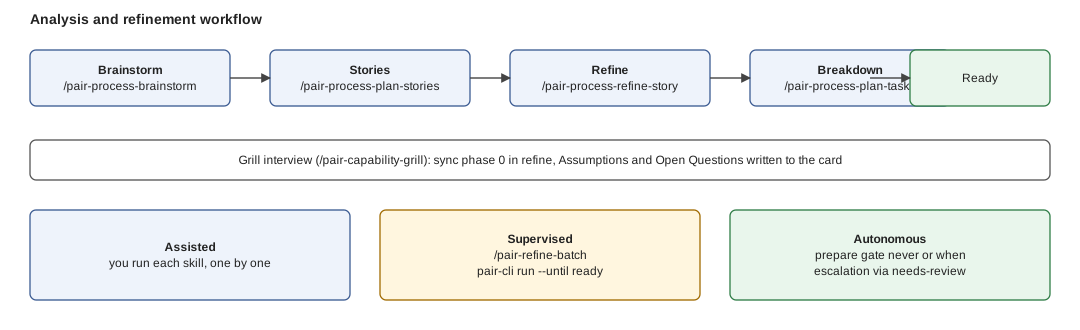
*Figure: the four steps are the same in every row; what changes down the rows is how many of them a human runs by hand.*
## The four steps
| Step | Skill | Result |
| --- | --- | --- |
| Brainstorm | `/pair-process-brainstorm`, with a `/pair-capability-grill` interview | a Draft epic and story tree from a theme |
| Stories | `/pair-process-plan-stories`, which triages each candidate (EXTEND or CREATE) | INVEST-valid Draft stories |
| Refine | `/pair-process-refine-story` | acceptance criteria, analysis, sizing, `## Assumptions` and `## Open Questions` |
| Breakdown | `/pair-process-plan-tasks` | tasks, dependency graph, AC coverage; the card becomes Ready |
Refinement opens with a **sync phase 0**: `/pair-capability-grill` asks one question at a time until you and the AI agree ([grill](/docs/concepts/glossary#grill)). Whatever the AI had to assume, or could not resolve, is written to the card as Assumptions and Open Questions. Detail: [Iteration](/docs/process-lifecycle/phases/iteration#step-6-refine-a-user-story).
## Per mode
### Assisted
You run each skill by hand and read each output. Use it while learning pair or for high-risk work. Tutorials: [Brainstorming](/docs/tutorials/brainstorming), [Refinement](/docs/tutorials/refinement).
### Supervised
pair refines one card end to end; you trigger it and read the result. **With pair-cli:** `pair-cli run --card 217 --prepare never --until ready` stops the card right after refinement, before implementation. **In your assistant:** `/pair-refine-batch` does the same for a set of Draft cards you name. Grill questions still reach you.
### Autonomous
The `prepare` [autonomy gate](/docs/concepts/glossary#autonomy-gates) lets pair refine a Draft card alone. `never` proceeds and records assumptions on the card; `when` proceeds unless a condition escalates. An escalation keeps the card Draft, labels it `needs-review` and exits non-zero, so a human takes over. Default is `always`: a human prepares. Setting the gate: [Autonomy and per-stage engine and model](/docs/guides/autonomy-and-profiles).
**Next:** [Delivery workflow](/docs/process-lifecycle/delivery-workflow), from Ready card to review-approved PR.
---
## Skill layers
Source: https://pair.foomakers.com/docs/process-lifecycle/skill-layers
pair's skills sit in three layers. A skill only calls down, never up, so every layer stays testable on its own.
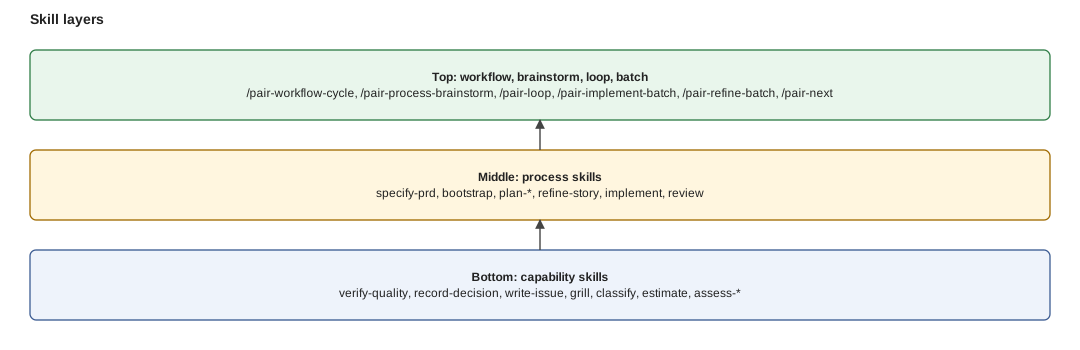
*Figure: arrows only point down. Start at the layer whose granularity matches the control you want; everything below it is called for you.*
1. **Capability skills** do one reusable operation: verify quality, record a decision, write an issue, grill, classify. See [capability skills](/docs/concepts/skills#capability-skills).
2. **Process skills** run one lifecycle step and compose capabilities. See [process skills](/docs/concepts/skills#process-skills).
3. **Workflow, brainstorm, loop and batch skills** orchestrate many steps. See [workflow skills](/docs/concepts/skills#workflow-skills) and [loop and batch entry points](/docs/concepts/skills#loop-and-batch-entry-points).
## What each upper-layer skill drives
| Skill | Drives |
| --- | --- |
| `/pair-workflow-cycle` | the stage skills, which run `/pair-process-implement`, `/pair-process-review`, `/pair-capability-verify-quality`, `/pair-capability-publish-pr` |
| `/pair-refine-batch` | `/pair-process-refine-story`, `/pair-process-plan-tasks` |
| `/pair-implement-batch` | `/pair-workflow-cycle` stages for many cards |
| `/pair-process-brainstorm` | `/pair-capability-grill`, `/pair-process-plan-epics`, `/pair-process-plan-stories` |
| `/pair-loop` | the batch workflows, which run the cycle |
| `/pair-next` | suggests a process skill; runs none |
You normally start at the top (`/pair-next`, `/pair-workflow-cycle`) and let it call down. Drop a layer when you want control: run a process skill by hand, or a capability on its own. Every skill, with its command and what it composes: [Skills catalog](/docs/reference/skills-catalog).
**Next:** [Tag-driven automation](/docs/process-lifecycle/tag-driven-automation), what tags let automation do.
---
## Tag-driven automation
Source: https://pair.foomakers.com/docs/process-lifecycle/tag-driven-automation
Tags are how the delivery process hands decisions to automation without a second source of truth: classification writes them once, and everything downstream (gates, review, the unattended loop) only **reads** them. This page is the operational view; the model is in [Tag-driven quality gates](/docs/concepts/tag-driven-gates) and the mechanics in [The delivery cycle in depth](/docs/process-lifecycle/delivery-cycle).
## What gets tagged, and when
| When | What is written | By |
| --- | --- | --- |
| Story refinement | the classification matrix on the card, plus the `risk:*` tag when tag projection is on | `/pair-capability-classify` |
| PR publish | the story's tags copied onto the one PR | `/pair-capability-publish-pr` |
| Review | the PR's tier **raised** if the diff warrants it, never lowered; the PR state label | `/pair-process-review` |
Only the tag families your project's tag projection lists are emitted (`risk` by default; `cost` opt-in). With projection off, the matrix is still written to the card, but nothing downstream can filter on it. Turning it on: [Classify stories and use risk tags](/docs/guides/classify-risk).
## Selection is a filter over tags
Which cards an unattended run may pick up is not a new tag. It is the `filter` key of `## Autonomy` in `.pair/adoption/tech/automation.md`: an any-of list of labels, each matched by plain string equality against the labels classification already put on the card.
```markdown
## Autonomy
filter: risk:green
until: pr
```
- `filter: risk:green` selects only green cards; yellow and red never match, by construction. There is no AND, OR or NOT grammar.
- No file, or no filter: every open card is a candidate for the drivers that take an explicit root; nothing runs unattended until a project declares `## Autonomy`.
- The tier-to-gate and tier-to-review policy is not restated here; it stays in the [quality model](/docs/reference/quality-model).
**Legacy sections.** Projects written for v0.4 may still carry `## Eligibility` (one label) and `## Auto-Advance` (`(none)` or a tier). `autonomy-policy.mjs` translates them: `## Eligibility` becomes `filter`, `## Auto-Advance` becomes the `merge` gate (`(none)` is `always`, a tier is `when; lacks: `). They keep working; a `## Autonomy` section that contradicts them is refused. New projects write `## Autonomy` only. Every key: [Adoption settings](/docs/reference/adoption-settings#techautomationmd).
## Tags route cards to workflows
`## Workflows` maps a label to the workflow that runs on a card carrying it (`auto-dev ⇒ pair-loop`). A card with no mapped tag runs nothing: the absence of a route is the opt-in boundary. The filter is applied before routing. Recipe: [Automate work via tags](/docs/guides/tag-automation).
## The unattended loop
`/pair-loop` and `pair-cli run` select cards through the filter, drive each through the delivery cycle (`implement → verify`, remediation rounds as needed), and stop on the project's `## Stop Predicate` or iteration cap. A card that clears review stops at ready-for-merge unless the `merge` gate allows the merge stage under `until: merged`. Walkthrough: [Automated development](/docs/tutorials/automated-development).
**Next:** [Deliver a card](/docs/guides/deliver-a-card), the recipe that puts all of this to work.
---
## Reference
Source: https://pair.foomakers.com/docs/reference
Look-up material: complete, factual, no narrative. Come here when you know what you need and want the details.
## CLI
- [CLI commands](/docs/reference/cli/commands): full syntax and options for every pair-cli command
- [CLI examples](/docs/reference/cli/examples): copy-paste examples and common workflows
- [Install sources](/docs/reference/cli/install-sources): every `--source` form and the offline mode
- [update-link](/docs/reference/cli/update-link): link validation and repair inside `.pair/`
## Catalogs
- [Skills catalog](/docs/reference/skills-catalog): every pair skill with its command and composition
- [Guidelines and how-to catalog](/docs/reference/guidelines-catalog): guideline categories and how-to guides
- [Templates catalog](/docs/reference/templates-catalog): the 19 shipped templates and which skill reads each
- [pair-next](/docs/reference/pair-next) and [Claude Code plugin and /pair-assistant](/docs/reference/pair-assistant)
## Structure and configuration
- [KB structure](/docs/reference/kb-structure): directory layout and file purposes of `.pair/`
- [Configuration](/docs/reference/configuration): `pair.config.json` registries and options
- [Adoption settings](/docs/reference/adoption-settings): every section and key you can set in `.pair/adoption/`
- [Quality model](/docs/reference/quality-model): default quality rules, tiers and tags
- [Coupling model](/docs/reference/coupling-model): the three dimensions and the balance rule behind the coupling dimension
- [Quality gates configuration](/docs/reference/quality-gates-configuration): every opt-in quality knob, and what is always on
- [Skill management](/docs/reference/skill-management): how skills are resolved, transformed and installed
## Specs
- [CLI contracts](/docs/reference/specs/cli-contracts): machine-readable CLI behaviour contracts
- [KB source resolution](/docs/reference/specs/kb-source-resolution): how KB sources are resolved
Explanations that used to live here moved next to the flow they describe: [The delivery cycle in depth](/docs/process-lifecycle/delivery-cycle) and, for contributors, [Batch engine internals](/docs/contributing/batch-engine-internals).
---
## Adoption settings
Source: https://pair.foomakers.com/docs/reference/adoption-settings
import { Callout } from 'fumadocs-ui/components/callout'
One page listing **every setting you can put in your adoption files**. `reference/configuration` covers the registry part of `pair.config.json` ([Configuration](/docs/reference/configuration)); this page covers everything else. Every section is **optional**: absent means the default in the table, never an error. A malformed section is a **HALT** naming the file and line, not a silent fallback.
## `tech/automation.md`
Read by the delivery cycle ([`/pair-workflow-cycle`, `pair-cli run`](/docs/process-lifecycle/delivery-cycle)), `/pair-loop`, `/pair-implement-batch`, `/pair-next` and `publish-pr`. Explained in [Automated development](/docs/tutorials/automated-development#autonomy-until-gates-escalation).
| Section / key | Allowed values | Default when absent | Read by | Effect | Assistant |
| --- | --- | --- | --- | --- | --- |
| `## Autonomy` `filter` | labels, any-of | all cards | `autonomy-policy.mjs` | which cards unattended runs pick | yes |
| `## Autonomy` `assignee`, `status`, `root` | `@me` or login; canonical macrostates; issue id | all open | `autonomy-policy.mjs` | narrows the selection | yes |
| `## Autonomy` `until` | `ready`, `pr`, `merged` | `pr` | `autonomy-policy.mjs` | how far a card goes; only `merged` evaluates the merge gate | yes |
| `## Autonomy` `prepare` | `always`, `never`, `when; has: …; lacks: …` | `always` | `cycle-prepare.mjs` | who refines and breaks down a Draft card (`always` keeps a human) | yes |
| `## Autonomy` `merge` | `always`, `never`, `when; has: …; lacks: …` | `always` | `autonomy-policy.mjs`, `cycle-merge.mjs` | whether a review-approved card merges; a `when` condition escalates | yes |
| `## Eligibility` (legacy) | one label | none | `autonomy-policy.mjs` | translated to `filter:`; still honoured | yes |
| `## Auto-Advance` (legacy) | `(none)` or the eligibility tier | `(none)` | `autonomy-policy.mjs` | translated to `merge:`; still honoured | yes |
| `## Stop Predicate` | ` ⇒ `, `max-iterations: N` | `max-iterations: 1` | `pair-cli run`, `/pair-loop` | when an unattended run stops | no |
| `## Max Parallelism` | positive integer, optional `: N` | `1` | `pair-cli run --parallel`, `/pair-loop` | parallel batch ceiling | no |
| `## Audit Location` | project-relative path | `automation/loop-audit.md` under `working_path` | `/pair-loop`, `pair-cli run` | where the unattended trail is appended | no |
| `## Workflows` | ` ⇒ `, `Precedence:` | none (no tag routing) | dispatcher | opt-in per card: tag to workflow | no |
| `## Blocking Severities` | floor `Critical`, `Major` or `Minor` | `Minor` | `blocking-severities.mjs` | findings at or above the floor block | yes |
| `## Blocking Severities` `max-dispatches` | ` [warn\|block]` | no ceiling | `blocking-severities.mjs` | ceiling on a run's published handoffs | yes |
| `## Cycle Hooks` | `pre-`, `post-`, `pre-cycle`, `post-cycle`, `on-halt`; `timeout` (default 600, `0` off) | no hooks | `cycle-hooks.mjs` | shell commands at stage boundaries | yes |
| `## Publish-PR Hooks` | `pre-publish`, `post-publish` | no hooks | `/pair-capability-publish-pr` | commands around PR publication | yes |
| `## Harness` | harness names, `Requires: mcp` | all harnesses supported | `/pair-capability-setup-harness` | which harnesses the project supports | yes (delegated) |
| `## Model Policy` | `: cheap\|balanced\|frontier` | no class | `/pair-capability-setup-harness`, `workflow-profile.mjs` | model class per tier; what a profile's `model: by-tier` reads | yes (delegated) |
Validate before committing: `node .claude/skills/pair-workflow-cycle/scripts/autonomy-policy.mjs resolve`, `cycle-hooks.mjs load `, `blocking-severities.mjs read `. Section grammars: [Automation Policy](https://github.com/foomakers/pair/blob/main/packages/knowledge-hub/dataset/.pair/knowledge/guidelines/collaboration/automation/automation-policy.md).
## `tech/way-of-working.md`
| Section / key | Allowed values | Default when absent | Read by | Effect | Assistant |
| --- | --- | --- | --- | --- | --- |
| PM tool | `github-projects`, `linear`, `azure-devops`, `filesystem`, … | none (setup HALTs) | every PM skill | which tracker is the backlog | yes (`/pair-capability-setup-pm`) |
| `code-host`, `base-branch` | tool name; branch | the PM tool; `main` | `publish-pr`, host adapters | where PRs live and target | yes (`/pair-capability-setup-pm`) |
| `## State Mapping` | `Board State → Macrostate` table; an unmapped state (e.g. `Removed`) is ignored; closure without completion (Not planned) is never `Done` | canonical names | `/pair-capability-write-issue`, `/pair-next` | maps your board to the five [macrostates](/docs/concepts/canonical-states#customizing-for-your-board) | yes (`/pair-capability-setup-pm`) |
| `## Assignment` `default-assignee`, `code-host-assignee` | login | none (items unassigned, with a warning) | `write-issue`, `publish-pr` | who items and PRs are assigned to | no |
| Review enforcement | `disabled`, `enabled` | `disabled` | `/pair-capability-setup-gates` | whether `pair-review` blocks merge ([PR states](/docs/concepts/pr-state-flow)) | yes |
| Review identity | `none`, `app`, `bot-user` | `none` | publish and review skills | who executes review writes ([Review identity](/docs/concepts/review-identity)) | yes |
| Coverage guardrail | `disabled`, `enabled` | `disabled` | `/pair-capability-setup-gates` | blocks coverage regressions ([Tag-driven gates](/docs/concepts/tag-driven-gates#coverage-guardrail-opt-in-off-by-default)) | yes |
| Pre-merge tiering, hook manager | `disabled`/`enabled`; `husky` or other | `disabled`; `husky` | `/pair-capability-setup-gates` | tier-scoped pre-merge checks; hook tooling | yes (delegated) |
| `format-check-command` | shell command | none | `publish-pr`, implement phase | formatting gate run before publishing | yes |
| `worktree-setup-command` | shell command | none | implement and review phases | run once in a fresh worktree before any gate | yes |
| Review Tier Matrix | `tier..reviewers`, `tier..sla_days`, … | KB defaults ([Quality model](/docs/reference/quality-model)) | review skills | per-tier reviewers, SLA, checklist depth (Definition of Ready/Done tier requirements) | yes |
| Custom Gate Registry | table: order, gate, command, scope key, required | standard gates | `/pair-capability-verify-quality` | extra gates after lint, types, tests | no |
| Merge Strategy | `squash`; commit format; branch cleanup; `prompt`/`silent` confirmation | `squash`, `prompt` | `/pair-process-review` | how a PR ends | no |
| `## Process Profile` `profile`, `whitelist` | `default`, `poc`, `custom` + step ids | `default` | `/pair-next` and every skill (process-profile gate) | which process steps the project runs | yes |
| `## Manual Testing` | free text (paths, templates) | none | review skills | where manual test suites live | no |
More: [Quality gates configuration](/docs/reference/quality-gates-configuration), [Definition of Ready and Done](/docs/concepts/definition-of-ready-and-done).
## `tech/risk-matrix.md`
| Section | Allowed values | Default when absent | Read by | Effect | Assistant |
| --- | --- | --- | --- | --- | --- |
| `## Tag Projection` | `Active:` families (`risk`, `cost`, renamed family) | `risk` | `/pair-capability-classify` | which classification tags are written to cards and PRs | yes |
| `## Criticality Table` | service or domain to `Low`, `Medium`, `High` | derived from the KB model | `/pair-capability-classify` | service-criticality dimension of the tier | yes |
| `## Overrides` | `.: ` | KB rules | `/pair-capability-classify` | project deltas to the matrix | yes |
Model: [Quality model](/docs/reference/quality-model#project-overrides-techrisk-matrixmd).
## Package-local adoption and templates
| Setting | File | Default | Effect | Assistant |
| --- | --- | --- | --- | --- |
| `## Package-Local Adoption` router | central `tech/*.md` | off | lists packages whose rules live in `/.pair/-template.md` | KB template | override-first resolution, file used whole ([Customize templates](/docs/guides/customize-templates)) | yes |
## `pair.config.json`
Outside the registries ([Configuration](/docs/reference/configuration)):
| Key | Allowed values | Default | Read by | Effect | Assistant |
| --- | --- | --- | --- | --- | --- |
| `skipRegistries` | registry names | none | `install`, `update` | registries left untouched, e.g. `agents` keeps your `AGENTS.md`/`CLAUDE.md` ([Quickstart](/docs/getting-started/quickstart)) | yes (`update --skip-registries`) |
| `workflowProfiles` | `default`, `files`, `inline`: named JSON profiles with `engine`, `model`, `effort`, `context` per stage | KB default: the run's engine, its default model, default effort, fresh context | `workflow-profile.mjs` | engine, model, effort and context per stage; `--profile` / `--workflow-config` override per run ([Workflow profiles](/docs/reference/configuration#workflow-profiles-workflowprofiles)) | yes |
| `engine` | `id`, `bin`, `model` maps | `claude` | `pair-cli run` | which agent engine runs ([Execution engine](/docs/reference/configuration#execution-engine-engine)) | no |
## Related
- [Claude Code plugin & /pair-assistant](/docs/reference/pair-assistant)
- [Customize the Knowledge Base for your team](/docs/guides/customize-for-your-team)
- [Delivery cycle](/docs/process-lifecycle/delivery-cycle)
---
## CLI Commands
Source: https://pair.foomakers.com/docs/reference/cli/commands
import { Callout } from 'fumadocs-ui/components/callout'
Complete reference for all `pair-cli` commands with syntax, options, and examples.
**Quick Navigation:**
- [install](#install): Install documentation and assets
- [update](#update): Update existing documentation
- [update-link](#update-link): Validate and update links
- [package](#package): Package KB content into ZIP
- [scaffold-kb](#scaffold-kb): Scaffold an external KB repository
- [kb-info](#kb-info): Display package metadata, or check installed vs current KB version
- [kb-cache](#kb-cache): Inspect and reclaim the shared KB cache
- [kb-verify](#kb-verify): Verify KB package integrity
- [kb-validate](#kb-validate): Validate KB structure
- [validate-config](#validate-config): Validate configuration
- [tokens](#tokens): Count words and estimated tokens per area of a project's pair files
- [run](#run): Run a pair skill headlessly on a chosen engine, in a re-invocation loop
## Rules that apply to every command
- **Extra positional arguments are an error.** Every command rejects positionals beyond the ones
documented for it: `pair-cli install ./a ./b` fails with `error: too many arguments for 'install'` (exit 1) instead of silently ignoring `./b`. This is what catches an unquoted option value, `--name Acme KB` (which used to mean `--name Acme`) now fails instead of half-working; quote it: `--name "Acme KB"`.
This is a behavior change, earlier releases ignored the stray argument, so a wrapper script or CI job that passed one must drop it. [GitHub Releases](https://github.com/foomakers/pair/releases) names the release that introduced it.
- **Registry writes are atomic; the last writer wins.** `install` and `update` build each
registry's result in a sibling directory (`.tmp--`) seeded from the live target, then swap it in with renames, so an interrupted or concurrent run never leaves a tree that is neither the old state nor the new one. File targets (`AGENTS.md`, `CLAUDE.md`) are replaced by a rename.
There is no lock: a second run is never blocked, and when two runs overlap the later swap wins wholesale (two runs on different dataset versions leave the project consistently on one of them). Leftovers of a dead run are swept, and a target left absent by an interrupted swap is restored, on the next run: no manual cleanup.
`behavior: add` registries (`.pair/adoption`) are never staged. The target is transiently duplicated on disk while a run is in flight. On Windows, `rename` over an existing directory is not atomic, so these guarantees hold on POSIX platforms only.
- **Package-local `.pair` dirs are never touched.** `/.pair/` directories (the opt-in [package-local adoption override](/docs/concepts/package-local-adoption)) are project content: `install`/`update` leave them alone, and `validate-config` rejects a registry `target` at or inside one.
---
## install
**Via `/pair-assistant` (optional, Claude Code):** ask for "pair in this project, first time".
Install documentation and assets from KB source to target folder.
### Usage
```bash
pair-cli install [target]
pair-cli install [registry:target ...]
```
### Arguments
- `[target]`: Optional target directory path (default: current working directory)
- `[registry:target ...]`: Install specific registries to custom targets
### Options
| Option | Description |
| --------------------------- | ----------------------------------------------------------------- |
| `--list-targets` | List all available asset registries with descriptions |
| `--config ` | Use custom configuration file (default: `config.json`) |
| `--source ` | KB source: URL, local path, or git repo (overrides auto-download) |
| `--offline` | Skip KB download, use local source only |
| `--skip-verify` | Skip package integrity verification (for ZIP sources) |
| `--skip-registries ` | Comma-separated registry names to leave out (e.g. `agents` keeps your own `AGENTS.md`/`CLAUDE.md`); remembered in `pair.config.json` |
**KB Source Options:**
- `--source `: Download KB from custom HTTP/HTTPS URL or use local path
- `--source `: Clone KB from a git repository (`*.git`, `git@…`, `ssh://git@…`, append `#ref` to pin version)
- `--offline`: Skip automatic KB download (requires `--source` with local path)
**Existing files:** install is all-or-nothing per registry target. If any target already exists (`AGENTS.md`, `CLAUDE.md`, `.claude/skills`, `.pair/knowledge`, …) it exits 1 with `Target '' already exists` and writes nothing. Use `--skip-registries ` to leave a registry untouched; an unknown name exits 1 and lists the valid ones.
**Note:** Cannot combine `--source ` or `--source ` with `--offline`. The `--offline` flag requires `--source` with a local filesystem path.
**Target Resolution:** Registry output is written relative to the current working directory. When running via `pnpm --filter`, the CLI reads `INIT_CWD` (set by pnpm to the original invoking directory) so output lands at the monorepo root, not inside the filtered package directory.
### Examples
```bash
# List available registries
pair-cli install --list-targets
# Install with defaults
pair-cli install
# Existing repo with its own AGENTS.md/CLAUDE.md: keep them
pair-cli install --skip-registries agents
# Install to custom directory
pair-cli install ./my-custom-path
# Install specific registries
pair-cli install github:.github knowledge:.pair
# Use custom KB source (remote URL)
pair-cli install --source https://internal-mirror.company.com/kb.zip
# Use custom KB source (git repository)
pair-cli install --source https://github.com/acme/kb-artifacts.git
pair-cli install --source git@github.com:acme/kb-artifacts.git#v1.0.0
# Use custom KB source (local path)
pair-cli install --source /absolute/path/to/kb-content
pair-cli install --source ./relative/path/to/kb-content
# Offline mode (no KB download)
pair-cli install --offline --source ./local-kb-content
```
---
## update
**Via `/pair-assistant` (optional, Claude Code):** ask for "the KB and skills refreshed".
Update existing documentation and assets from KB source.
### Usage
```bash
pair-cli update [target]
pair-cli update [registry:target ...]
```
### Arguments
- `[target]`: Optional target directory path (default: current working directory)
- `[registry:target ...]`: Update specific registries in custom targets
### Options
| Option | Description |
| --------------------------- | ----------------------------------------------------------------- |
| `--config ` | Use custom configuration file (default: `config.json`) |
| `--source ` | KB source: URL, local path, or git repo (overrides auto-download) |
| `--offline` | Skip KB download, use local source only |
| `--skip-registries ` | Comma-separated registry names to leave out; remembered in `pair.config.json` `skipRegistries` (remove the name to opt back in) |
| `--persist-backup` | Keep backup files after a successful update |
### Examples
```bash
# Update with defaults
pair-cli update
# Update specific registries
pair-cli update github:.github knowledge:.pair
# Update from custom KB source
pair-cli update --source https://internal-mirror.company.com/kb.zip
# Update from git repository
pair-cli update --source https://github.com/acme/kb-artifacts.git#v2.0.0
# Offline update
pair-cli update --offline --source ./local-kb-content
```
---
## update-link
**Via `/pair-assistant` (optional, Claude Code):** ask for "broken links in installed KB content fixed".
Validate and update internal links in installed KB content.
### Usage
```bash
pair-cli update-link [target]
```
### Options
| Option | Description |
| --------------------- | --------------------------------------------------- |
| `--url ` | KB source URL or local filesystem path |
| `--dry-run` | Preview changes without writing to files |
| `--log-level ` | Set logging level (trace, debug, info, warn, error) |
### Examples
```bash
# Update links in current directory
pair-cli update-link
# Preview link updates (dry-run)
pair-cli update-link --dry-run
# Update links with verbose output
pair-cli update-link --verbose
# Update links from custom KB source
pair-cli update-link --url https://github.com/org/repo/releases/download/v1.0/kb.zip
pair-cli update-link --url ./relative/path/to/kb
```
For detailed usage, see the [Link Update Guide](/docs/guides/update-kb).
---
## package
**Via `/pair-assistant` (optional, Claude Code):** ask for "to publish or share a KB".
Package KB content into validated ZIP file for distribution.
### Usage
```bash
pair-cli package [options]
```
### Options
| Option | Short | Description |
| ----------------------------- | ----- | ------------------------------------------------------------ |
| `--layout ` | | Layout mode: `source` or `target` (default: `target`) |
| `--output ` | `-o` | Output ZIP file path (default: `kb-package.zip`) |
| `--source-dir ` | `-s` | Source directory to package (default: current directory) |
| `--config ` | `-c` | Path to config.json file |
| `--name ` | | Package name for manifest |
| `--pkg-version ` | | Package version for manifest |
| `--description ` | | Package description for manifest |
| `--author ` | | Package author for manifest |
| `--skip-registries ` | | Comma-separated registry names to exclude |
| `--root ` | | Custom root path for link relativization (default: `.pair/`) |
| `--log-level ` | `-l` | Set logging level (trace, debug, info, warn, error) |
| `--interactive` | `-i` | Enter interactive mode with guided prompts |
| `--tags ` | | Comma-separated tags (e.g., `"ai,devops,testing"`) |
| `--license ` | | Package license (default: `MIT`) |
| `--org` | | Enable organizational packaging mode |
| `--org-name ` | | Organization name (required when `--org`) |
| `--team ` | | Team name within the organization |
| `--department ` | | Department within the organization |
| `--approver ` | | Package approver (free-text) |
| `--compliance ` | | Comma-separated compliance tags (e.g., `"SOC2,ISO27001"`) |
| `--distribution ` | | Distribution policy: `open`, `private`, or `restricted` |
### Examples
```bash
# Package current directory (target layout - default)
pair-cli package
# Package from source layout
pair-cli package --layout source
# Package with custom output path
pair-cli package -o dist/kb-v1.0.0.zip
# Package with metadata
pair-cli package --name "My KB" --pkg-version 1.0.0
# Interactive package creation
pair-cli package --interactive
# Organizational package
pair-cli package --org --org-name "Acme Corp" --team "Platform" --compliance "SOC2,ISO27001"
```
### Interactive Mode
Quick mode is the default: omitting `--interactive` resolves smart defaults from `package.json`, `git config`, and saved preferences (`~/.pair/preferences.json`) and applies them in one shot, so `pair-cli package` in a repo whose `package.json` name is `foo` produces a `foo` package, not `kb-package`. Passing `--interactive` (the guided selector, requires a TTY) enters a guided flow that pre-fills prompts from the _same_ resolved defaults and lets you confirm or override each. This guided/quick duality follows the [Guided / Quick Setup Convention](/docs/contributing/writing-skills#setup-skills-guided-vs-quick).
### Org Template
When `--org` is active, the CLI looks for `.pair/org-template.json` to pre-fill defaults. CLI flags override template values.
---
## kb-info
**Via `/pair-assistant` (optional, Claude Code):** ask for "the installed KB version, or whether it is behind".
Display metadata from a KB package ZIP file, or (when no package path is given) check the
project's installed KB version against the current one.
### Usage
```bash
pair-cli kb-info [package-path] [options]
```
### Options
| Option | Description |
| ---------------------- | -------------------------------------------------------------------- |
| `--json` | Output package metadata or version-check result as JSON format |
| `--source ` | KB source the current version is read from (version-check mode only) |
| `--log-level ` | Set minimum log level (debug, info, warn, error) |
### Version Check Mode
Running `pair-cli kb-info` without a package path compares the KB version recorded as installed in
the project (written by `install`/`update` on success) against the current one:
- **Up to date**: installed matches current, exit code 0.
- **Version drift**: installed differs from current; the output includes a migration-page URL
for the version jump (one page per jump, per the docs Migrations index).
- **Unknown installed version**: legacy install with no recorded metadata; run `pair-cli install` or
`pair-cli update` to record it.
- **Current version unavailable**: the source could not be resolved (offline, unreachable
mirror, etc.); the installed version is still reported. Exit code is 0 in all cases: this is a
metadata check only, it never performs migration.
`install` and `update` also print a non-blocking heads-up with the same migration-page pointer
when the version about to be applied differs from what's currently recorded.
#### Sources
`--source` accepts every kind `install`/`update` accept, and each resolves the current version
the same way it would be installed:
| Source kind | How the current version is resolved |
| ----------- | ---------------------------------------------------------------------------------------------------------------------------------------------------- |
| _(none)_ | The KB the CLI resolves by default (bundled dataset, or the cached official release) |
| Local path | `manifest.json` in the directory, the `manifest.json` inside a `.zip`, or the owning package's `package.json` one level up (monorepo dataset layout) |
| Remote URL | The URL is probed for reachability and the version is parsed out of the URL string itself (the artifact is not downloaded) |
| Git URL | The repository is shallow-cloned read-only and its root `manifest.json` is read |
A git source (`*.git`, `git://…`, `git@…`, `ssh://git@…`, optionally pinned with `#ref`: a branch or tag, **not** a commit SHA: the clone is issued as `git clone --depth 1 --branch [`, and git answers a SHA with `Remote branch ] not found in upstream origin`) is cloned into a throwaway temporary directory that is deleted straight after the read: the shared KB cache (`~/.pair/kb`) is never written to, so a version check can never disturb an installed KB.
Private repositories authenticate exactly as they do for `install`: `PAIR_GIT_TOKEN` or your SSH keys. Credentials never reach the output, any token in a git error message is redacted before it is printed or serialized to JSON.
Only the root `manifest.json` is read from a git repository, never a root `package.json`, even
when one is present. `install` records the installed version of a git source from its cache slot,
where only a `manifest.json` is reachable; reporting a `package.json` version as "current" would
therefore describe a version `install` can never record, leaving the check stuck on "unknown
installed version" for good. A git KB that wants drift visibility ships a root `manifest.json`.
If the clone cannot run at all (offline, `git` not installed, wrong credentials, a `#ref` that
does not exist, or a repository with no root `manifest.json`) the check reports **Current
version unavailable** with the reason and still exits **0**, like every other source kind.
### Examples
```bash
# Display package metadata
pair-cli kb-info my-kb.zip
# Display as JSON
pair-cli kb-info my-kb.zip --json
# Check installed vs current KB version
pair-cli kb-info
# Version check, JSON output (for CI)
pair-cli kb-info --json
# Version check against a custom source
pair-cli kb-info --source /path/to/kb
# Version check against a git-hosted KB, pinned to a tag
pair-cli kb-info --source https://github.com/acme/kb.git#v2.0.0
```
---
## kb-cache
**Via `/pair-assistant` (optional, Claude Code):** ask for "the shared KB cache inspected or reclaimed".
Inspect and reclaim the shared KB cache: the machine-wide directory where `install` and
`update` keep downloaded knowledge bases so repeated runs do not re-fetch them.
### Usage
```bash
pair-cli kb-cache [list|prune] [options]
```
### Arguments
| Argument | Description |
| -------- | -------------------------------------------------------------------- |
| `list` | Show every cache slot with its kind, size and label (default action) |
| `prune` | Remove the slots that are safe to remove |
### Options
| Option | Description |
| --------------------- | ------------------------------------------------------------- |
| `--dry-run` | `prune` only: report what would be removed and delete nothing |
| `--json` | Output the inventory or the prune result as JSON |
| `--log-level ` | Set minimum log level (debug, info, warn, error) |
### What prune removes: and what it never removes
`prune` removes only slots that a later `install`/`update` can recreate:
- **backup**: a `.bak` slot left behind by an interrupted install
- **stage**: an abandoned `.tmp-*` staging directory
- **legacy-git**: a pre-`external/` git clone at the cache root
- **official**: KB slots for CLI versions other than the one running
It never removes:
- **external KBs** (`external/`): fetched from a URL the CLI does not retain, so deleting one
is not undoable by re-running an install
- **every official slot when the running version cannot be resolved**: rather than compare
against an empty version and delete the KB currently in use
A cache root that exists but cannot be read is reported as an error, not as an empty cache, and
a prune that fails to remove part of what it identified exits non-zero instead of reporting a
clean sweep.
This command reads the cache only: it never downloads a KB.
### Examples
```bash
# Show what the cache holds
pair-cli kb-cache
# See what prune would reclaim, without deleting
pair-cli kb-cache prune --dry-run
# Reclaim the stale slots
pair-cli kb-cache prune
# Machine-readable inventory
pair-cli kb-cache list --json
```
## kb-verify
**Via `/pair-assistant` (optional, Claude Code):** ask for "a KB package checked for integrity".
Verify KB package integrity before installation or distribution. Validates checksum (SHA-256), structure, and manifest.
### Usage
```bash
pair-cli kb-verify [options]
```
### Options
| Option | Description |
| --------------------- | ------------------------------------------------ |
| `--json` | Output verification report as JSON format |
| `--log-level ` | Set minimum log level (debug, info, warn, error) |
### Verification Checks
1. **Checksum (SHA-256):** Validates content integrity
2. **Structure:** Confirms registry directories exist per config.json
3. **Manifest:** Validates required fields and metadata
### Examples
```bash
# Verify package
pair-cli kb-verify kb-package.zip
# Verify with JSON output (for CI/CD)
pair-cli kb-verify dist/kb-v1.0.0.zip --json
# Verify with debug logging
pair-cli kb-verify kb-package.zip --log-level debug
```
---
## kb-validate
**Via `/pair-assistant` (optional, Claude Code):** ask for "the KB checked for structural soundness".
Validate KB structure, links, and metadata using layout-aware validation.
### Usage
```bash
pair-cli kb-validate [options]
```
This command takes **no positional argument**: the KB directory is passed as
`--path ` (a stray positional is rejected, see
[Rules that apply to every command](#rules-that-apply-to-every-command)).
### Options
| Option | Description |
| --------------------------------- | -------------------------------------------------------------------------------------- |
| `--path ` | KB directory to validate (default: current directory) |
| `--layout ` | Layout mode: `source` or `target` (default: `target`) |
| `--strict` | Zero tolerance: optional link patterns are discarded, every missing target is an error |
| `--ignore-config` | Consult no config: no registries resolve, so nothing is collected or checked |
| `--skip-registries ` | Comma-separated registry names to exclude from validation |
| `--optional-link-patterns ` | Comma-separated globs whose **missing** link targets are warnings, not errors |
| `--log-level ` | Set logging level (trace, debug, info, warn, error) |
### Examples
```bash
# Validate current directory
pair-cli kb-validate
# Validate another directory
pair-cli kb-validate --path ./my-kb
# Validate source layout
pair-cli kb-validate --layout source
# Validate with zero tolerance (optional link patterns discarded)
pair-cli kb-validate --strict
# Validate excluding specific registries
pair-cli kb-validate --skip-registries adoption,github
# Tolerate links into a codebase that is not checked out beside the KB
pair-cli kb-validate --optional-link-patterns "apps/**,packages/**"
```
### Optional link patterns
A KB validated on its own still contains relative links into the codebase it
normally sits next to. Declaring those targets **optional** keeps every other link
checked, instead of switching whole registries off:
```json
{
"link_validation": {
"optional_link_patterns": ["apps/**", "packages/**"]
}
}
```
Patterns are written in the **resolved** form (the target's path relative to the KB
root) because that form does not change with the depth of the file the link is written
in. Above: links landing on `/apps/…`, however deep the source file is. A target
that is a true **sibling** of the KB root resolves one level up, so its rule starts with
`../` (`../apps/**`), and `**/apps/**` covers both anchorings at once.
Rules:
- A pattern only affects a **missing** target. A target that exists is simply valid.
- A missing target matching a pattern is a **warning** (`optional link (pattern-matched)`)
and does not fail the run; a missing target matching nothing stays an **error**.
- Config patterns and `--optional-link-patterns` are **merged** (union), never replaced. Entries
are trimmed on both sides before the union, so declaring the same pattern twice (even with
different surrounding whitespace) yields one matcher.
- Each pattern is matched against the target **resolved relative to the KB root**
(`apps/x.ts`) and: only when the link **as written** is a genuine spelling of that same target, i.e. its leading `../` climb lands exactly on the KB root (`../../apps/x.ts` from `.pair/knowledge/`), or the resolved target leaves the KB tree, against the written form too. A match in either form makes the link optional, and overlapping patterns still produce a single warning.
Every other link is matched on its **resolved form only**: one that stays inside the KB (`apps/x.md`, `./apps/x.md`), and one whose `../` climb lands back inside the KB (`../../apps/y.md` from `.pair/knowledge/a/b/`, resolving to `.pair/knowledge/apps/y.md`).
So a rule like `apps/**` or `../../apps/**` cannot silence a broken link that merely **looks** like it, typically a file moved deeper, whose `../` depth is now wrong and whose target will never exist.
- **Prefer the resolved form; the written form is depth-bound.** `../../apps/**` matches only
links whose `../` climb lands exactly on the KB root, so the same rule stops matching as soon as the same target is linked from a deeper file.
Measured with two files linking to the SAME out-of-KB target: `[x](../../../apps/x.ts)` from `.pair/knowledge/a.md` and `[x](../../../../apps/x.ts)` from `.pair/knowledge/deep/b.md` are **both errors** under `../../apps/**`, and **both warnings** under `../apps/**` (their common resolved form) or `**/apps/**`.
Nothing is silenced by the mismatch (the error stays) but the rule does not do what it looks like it does.
- Glob syntax: `**` (a whole segment: **zero or more** path segments, so `a/**/b` matches
`a/b` and `**/apps/**` matches `apps/x.ts`), `*` (any characters except `/`, which is also what a `**` that is not a whole segment means), `?` (one character, never `/`), `[abc]` / `[a-z]` / `[!abc]`. Patterns are anchored: `apps/**` does not match `vendor/apps/x.ts`.
Anchoring is on the KB root, so the decorations that would only restate it are stripped from the pattern and from the path alike: a leading `/` or `./`, a trailing `/`, repeated `/`.
`/apps/**` (how an absolute internal link is written) and `./apps/**` are the same rule as `apps/**`, and `apps/` the same as `apps`, note that is the directory itself, NOT everything under it: write `apps/**` for that.
A malformed pattern (unterminated class, out-of-order range like `[z-a]`) is reported and skipped, never fatal, including under `--strict`, where the matchers are discarded but the typo is still warned about.
A **blank** entry is not a malformed pattern: on the flag it is dropped silently (`"apps/**,,"` is one pattern), in config it is dropped with its own "not a non-empty string" warning.
- **Everything outside that list is literal, not an error.** Brace expansion (`{apps,packages}/**`),
extglob (`+(a|b)`) and leading-`!` negation (`!apps/**`) are compiled character by character, so
they simply never match, and they are **not** reported as malformed patterns, so nothing warns.
Write one pattern per alternative instead (`["apps/**", "packages/**"]`).
- A pattern containing a **comma** cannot be passed on `--optional-link-patterns` (the flag value is
split on `,`, so `"[a,b]/*"` becomes two patterns, one of them malformed). Declare such a pattern
in `link_validation.optional_link_patterns` instead.
- Three places this matcher is **more permissive than `minimatch`**, so do not assume parity:
a trailing `/**` also matches the **directory itself** (`apps/**` matches `apps`, `**/b/**` matches `a/b`), `**` **traverses `..` segments** (`**` matches `../../apps/x.ts`), and the normalization above collapses spellings minimatch keeps distinct (`/apps/**` matches `apps/x.ts`).
All three make a pattern broader than a minimatch habit suggests, and a too-broad pattern is not malformed, so nothing warns about it. Prefer the narrowest pattern that covers the links you mean to tolerate.
- A `link_validation` section of the wrong **shape**, not an object, `optional_link_patterns`
not an array (`"apps/**"` instead of `["apps/**"]`), a camelCase key, or non-string entries,
is reported as a warning and ignored, never fatal. Without that warning the run would look
like "all these links are broken" rather than "the config key is misspelled". An empty section
(`"link_validation": {}`) declares nothing and is silent.
- Config-shape and malformed-pattern diagnostics are printed under **`Configuration:`** in the
report and counted in its `Warnings:` total, alongside the per-file ones. They are **also
logged on stderr**, so each one deliberately appears twice: on stderr, where it is visible
without scrolling back through a long report (and survives piping the report to a file), and
in the report itself for the counted summary.
- `--strict` **overrides** optional patterns: in strict mode every missing target is an error.
That is all it does today: the CLI makes **no network requests**, so external (`http`/`https`)
links are never fetched, with or without `--strict`. A green `--strict` run in CI means "every
internal target exists", never "external links are reachable".
- Links carrying a **non-http URI scheme** (`mailto:`, `tel:`, `ftp:`, `vscode:`, any
`scheme:` of two characters or more) address something that is not a file: they are skipped
entirely, never resolved as a path and never reported broken, with or without `--strict`
(they are not fetched either, as nothing is). A Windows drive letter (`C:/x`) is a single
character and therefore not a scheme: it stays an internal path.
- `--ignore-config` consults no config at all, so no registries resolve, **no files are
collected and nothing is validated**, structure, links and metadata are all skipped, and optional patterns (config or CLI) have no effect, since there is nothing to match against. The run says so rather than passing silently: a `Configuration:` notice (`--ignore-config: … nothing validated …`) is printed on stderr and in the report, counted in the `Warnings:` total.
Use it to skip validation entirely, not as a way to run with CLI-only patterns.
- Config patterns are read from the config of the **KB being validated**
(`<--path>/pair.config.json`, falling back to `<--path>/config.json` when the former is
absent), not from the invoking project: the same config `--path` already
resolves registries from. Validating `--path ./my-kb` therefore ignores a `link_validation`
section left in the repo-root config.
---
## scaffold-kb
**Via `/pair-assistant` (optional, Claude Code):** ask for "their own knowledge base repository".
Scaffold an external knowledge base repository: a pure KB repo (knowledge + skills)
plus the script that releases it. Publishing itself lives in the generated script, not
in the CLI, so any code host works.
### Usage
```bash
pair-cli scaffold-kb [path] [options]
```
### Arguments
- `[path]`: Target directory for the KB repo (default: current working directory)
### Options
| Option | Short | Description |
| --------------- | ----- | ------------------------------------------------------------------ |
| `--name ` | | KB name (default: derived from the target directory name) |
| `--host ` | | Release automation host: `github` or `generic` (default: `github`) |
| `--force` | `-f` | Regenerate scaffold-owned files without confirmation |
`--name` is embedded in generated YAML, bash, and Markdown: newlines, control characters
and `${{` (which GitHub Actions would evaluate as a live expression in the generated
workflow) are rejected, and the value is limited to 100 characters. Quote names that
contain spaces (`--name "Acme KB"`): an unquoted value is rejected as an extra
positional argument rather than silently truncated.
`--host` is never inferred from the target repository's `origin` remote: pass
`--host generic` for GitLab, Bitbucket, or self-hosted, otherwise a GitHub Actions
workflow is generated. The command has no `--json` output: it reports a human-facing
summary only.
### Refused Targets
`scaffold-kb` fails, before writing anything, when the target exists and is not a
directory, or when it is a configured pair project (`.pair/adoption/` present).
`--force` does not bypass the second check: it is a wrong-target mistake, not an
overwrite decision.
### What Gets Created
| Path | Ownership |
| ------------------------------- | --------------------------------------------------- |
| `.pair/knowledge/`, `.skills/` | your content (seed files are never overwritten) |
| `pair.config.json` | scaffold-owned: knowledge + skills registries |
| `README.md`, `.gitignore` | scaffold-owned |
| `scripts/release.sh` | scaffold-owned: wraps `pair-cli package` (mode `0755`) |
| `.github/workflows/release.yml` | scaffold-owned: `--host github` only |
No `.pair/adoption/` is created: a KB is knowledge, not a configured project.
### Idempotency
Re-running is safe. Unchanged files are left alone, content under
`.pair/knowledge/`/`.skills/` is never touched, and a modified scaffold-owned file is
only regenerated after confirmation (or with `--force`). Without a terminal the file is
kept and reported as skipped.
### Examples
```bash
# Scaffold in the current directory
pair-cli scaffold-kb
# Scaffold into a new directory with an explicit name
pair-cli scaffold-kb ../acme-kb --name "Acme KB"
# Non-GitHub code host: release script only, no workflow
pair-cli scaffold-kb ../acme-kb --host generic
# Release it (wraps pair-cli package, then tags and publishes)
cd ../acme-kb && bash scripts/release.sh 1.0.0
# Install it into a project
pair-cli install --source https://github.com/acme/acme-kb.git
```
See [Own and publish a Knowledge Base](/docs/guides/external-kb) for the full workflow.
---
## validate-config
**Via `/pair-assistant` (optional, Claude Code):** ask for "their registry config validated".
Validate asset registry configuration file.
### Usage
```bash
pair-cli validate-config [options]
```
### Options
| Option | Short | Description |
| ----------------- | ----- | ------------------------------------------------------------- |
| `--config ` | `-c` | Path to config.json file to validate (default: `config.json`) |
### What Gets Validated
- Asset registry structure (required fields: `behavior`, `target_path`, `description`)
- Behavior values (must be: `mirror`, `add`, `overwrite`, `skip`)
- Target path validity
- Transform configuration
- Source path existence (if specified)
### Examples
```bash
# Validate default config.json
pair-cli validate-config
# Validate custom config file
pair-cli validate-config --config ./my-config.json
```
---
## tokens
**Via `/pair-assistant` (optional, Claude Code):** ask for "words or estimated tokens of their pair files counted".
Count words and estimated tokens (`ceil(characters / 4)`, no tokenizer) per area of the project's
markdown: templates, adoption, adr, decision-log, skills, guidelines, agent-context.
### Usage
```bash
pair-cli tokens [options]
```
### Options
| Option | Description |
| ----------------- | -------------------------------------------------------------------- |
| `--root ` | Project root to count (default: the current directory) |
| `--area ` | Report one area only; an unknown name exits 1 and lists the valid ones |
| `--json` | Output areas, per-file items and the total as JSON |
| `--baseline ` | A previous `--json` report; resolved against the current directory (not `--root`); adds the per-area and total delta (`Δ`) against it. A missing or non-report file exits 1 |
### Example
```bash
pair-cli tokens --json > base.json # record a baseline
pair-cli tokens --baseline base.json # later: delta per area
```
## run
**Via (optional, Claude Code):** `--card` is `/pair-workflow-cycle`; `--root`, `--parallel` and `--watch` are `/pair-loop`.
Run a pair skill **headlessly** on a chosen engine, re-invoking it until it stops: the portable
unattended loop (`ADR-021` tier 2: the external driver).
`pair-cli run` is an **execution adapter**, not a process engine. It decides *how* to invoke (engine,
skill, perimeter, autonomy) and never *what* to work on: eligibility, the stop predicate, the
parallelism ceiling and the audit location are read from
[`.pair/adoption/tech/automation.md`](/docs/reference/quality-model) with the names `pair-loop`
already defines, and that file is never written. **It never merges, in any mode.**
### Usage
```bash
pair-cli run [options]
```
### Options
| Option | Description |
| ------------------------------- | ---------------------------------------------------------------------------------------------------- |
| `--engine ` | Engine to drive: `pi`, `opencode`, `claude` or `codex`. Precedence: flag > `pair.config.json` > schema default |
| `--skill ` | Skill to invoke. Explicit, and **never** falls back: a missing skill is an error |
| `--prompt ` | Run this text instead of a skill invocation (mutually exclusive with `--skill`) |
| `--root ` | Scope root, passed on under the resolved skill's own name for it (`--root` for `pair-next`/`pair-loop`, `--story` for the `pair-process-*` workflows). Not combinable with `--card`: a dispatched card **is** the scope |
| `--filter ` | Label filter, one label or a comma-separated any-of list (`risk:green,risk:yellow`), for a skill that declares one (`pair-next`). **Refused** for `pair-loop`, see below |
| `--assignee ` | Keep issues assigned to this user (`@me` = the authenticated code-host user), for a skill that declares it (`pair-next`). **Refused** for `pair-loop` (the driver declares only root/predicate/iteration for it) |
| `--status ` | Comma-separated canonical macrostates (e.g. `Draft,Ready`), for a skill that declares it (`pair-next`). **Refused** for `pair-loop` (the driver declares only root/predicate/iteration for it) |
| `--until ` | With `--card` or `--parallel` (forwarded to every child card): how far the delivery cycle goes, `ready` (stop before implement), `pr` (default), `merged` (enter the merge stage; the only value that evaluates the merge gate). Argument > `## Autonomy` > default, every effective value printed with its source |
| `--prepare ` | With `--card` or `--parallel` (forwarded to every child card): the prepare gate `[; has: …][; lacks: …]`: who prepares a Draft card. `always` (default) needs a human (R3.11); `never` proceeds alone recording assumptions; `when` proceeds alone unless a stage boundary escalates (`needs-review`, the card stays Draft, exit 1). `--until ready` stops right after the phase |
| `--merge ` | With `--card` or `--parallel` (forwarded to every child card): the merge gate, same grammar. `always` (default) parks `awaiting-human`; `never`/`when` merge under `--until merged` unless a `has`/`lacks` condition escalates (`escalated`, exit 1, `on-halt`, one comment on the card). #490's signal checks stay mandatory |
| `--card ` | Work this card. With a mapped tag it dispatches that workflow; with no mapping it drives the **whole delivery cycle**, see below. Not combinable with `--skill`/`--prompt`/`--root` |
| `--card-tags ` | Comma-separated labels the trigger observed on `--card` (explicit override). Absent with `--autonomous` ⇒ the card's live labels are read from the tracker (unreadable ⇒ fails closed, nothing runs). Empty or unmapped ⇒ the card's own readiness decides |
| `--pr ` | Enter the cycle straight at fix-and-review on an existing PR: the first stage is `verify`, no `prepare` before it. Requires `--card` |
| `--rounds ` | Bound the remediation rounds of a cycle run. Omitted ⇒ the policy's `maxFixRounds`; it can never widen it |
| `--run-id ` | Run directory to continue. Defaults to `story-`: the same convention the batch engine uses |
| `--parallel ` | Fan-out: up to `min(dependency-allowed, ## Max Parallelism, n)` cards at once, each its own `pair-cli run --card` process, see below. Needs `--root` or `--filter` (or the policy's); not combinable with `--card`/`--skill`/`--prompt` |
| `--watch` | With `--parallel`: the watch loop, every iteration re-selects (skipping escalated cards until the escalation clears, locked cards, and terminal ones, merged, parked, target reached, or a durable failure (`failed-*`, `escalate` awaiting a human); a TRANSIENT failure (a crash or an engine/API error before the cycle reported) is retried once per run, then excluded as `retry budget exhausted`) and an idle one waits `--interval`. Stops at the Stop Predicate, the iteration cap (idle polls count) or Ctrl-C. `--parallel 1` for a sequential agent |
| `--no-watch` | Explicitly no watch loop (the default; refused together with `--watch`) |
| `--interval s\|m\|h` | The idle wait under `--watch`: default `10m`, at least `60s`. Requires `--watch` |
| `--cwd